If your day runs inside Cursor, Claude Code, or VS Code, switching to a browser tab to read an API spec breaks your flow and costs you context. The Apidog MCP Server closes that gap by feeding your real API specifications straight into the agent, so it reads, references, and codes against your contract without leaving the editor. This piece explains what that buys you, what it honestly does and doesn’t do, and how it fits with the rest of the Apidog toolchain.
Why “manage APIs from your AI agent” matters now
AI agents write a lot of API client code. The problem is they guess. Ask Cursor to build a function that calls POST /orders and, without your spec in context, it invents field names, mistypes enums, and forgets that status is an integer code, not a string. You then spend the afternoon reconciling the agent’s imagination with your actual contract.
The fix is to give the agent the source of truth. When the agent can read your API design directly, it stops hallucinating shapes and starts matching them. That’s the whole point of connecting an MCP server to your API specs: less guessing, fewer round-trips, and code that lines up with the contract on the first try.
One thing to set straight up front. “Manage APIs” here means design-time work: reading, referencing, generating against, and reasoning about your API contract. It does not mean runtime traffic management. Apidog is not an API gateway. It won’t route production requests, throttle callers, or sit in your traffic path like Kong or Apigee. If you need a gateway, you need a gateway. Apidog handles the design, mock, test, and documentation side of the lifecycle, and the MCP server brings that side into your agent.
What the Apidog MCP Server actually does
The Apidog MCP Server gives your AI coding tool read access to API specifications. Once it’s connected, the agent can pull spec content on demand instead of working from whatever it scraped off your code. Per Apidog’s documentation, an assistant connected through the server can:
- Generate code based on your API specifications.
- Search and query API specification content.
- Update data transfer objects (DTOs) with new fields from the spec.
- Add documentation comments to code based on the spec.
- Create complete MVC code for specific endpoints.
It runs as a local MCP server that your IDE talks to. It works with AI-powered editors that support MCP, including Cursor and VS Code, and command-line agents like Claude Code. You point it at a spec source, the agent queries it, and you keep working.
Three ways to connect a spec source
You don’t have to put everything in one place. The server reads from three kinds of sources, and you pick based on what you’re working with.
| Source | Token needed | Best for |
|---|---|---|
| Apidog project | Personal access token | Private, team-internal APIs you design in Apidog |
| Published Apidog docs | None | Public API docs you’ve already shipped |
| Swagger / OpenAPI file (local or URL) | None | A spec file you have on disk or hosted somewhere |
That last row matters. You don’t need to be an Apidog customer to feed an OpenAPI file to the server. If you keep a openapi.yaml in your repo, the agent can read it through the MCP server and code against it.
Be honest about the limits
A clear product story includes the edges. Here’s what the MCP server doesn’t do.
It’s read-only. The server retrieves and caches spec data for the agent to read. It does not let the agent rewrite your API design through the server. You design the contract in Apidog (or in your OpenAPI file); the agent consumes it.
It caches locally. The server keeps a local copy of spec data for speed. If you change the spec in Apidog, the agent may still be looking at the old version until you ask it to refresh. Apidog’s docs are explicit about this: tell the AI to refresh so it reads the latest updates. Worth remembering after a design change.
It’s not the gateway, again. Reading specs and generating code is design-time. None of this puts Apidog in your request path.
Where the rest of the toolchain fits
The MCP server is one piece. The reason it’s useful is that it sits on top of a contract you can also mock, test, and ship, all without re-keying anything.
Mock before the backend exists
Frontend and agent code shouldn’t wait for a live backend. Apidog generates a mock server from your spec, so the agent can build against realistic responses today. The mock runs headless in CI too, which means your pipeline can spin up endpoints on demand. If mocking is new to you, start with the mock API explainer and the deeper API mocking guide. When you’re comparing options, the best API mock tools roundup lays out the field.
Test from the command line, in CI
Design is only half the job. You need to know the implementation still matches the contract. The Apidog CLI runs your test scenarios headlessly with apidog run, which is what you wire into a pipeline. It supports data-driven runs from CSV or JSON, and it emits reports in CLI, HTML, JSON, and JUnit formats so your CI can parse the results. For a step-by-step walkthrough, the command-line REST API testing tutorial shows the full loop.
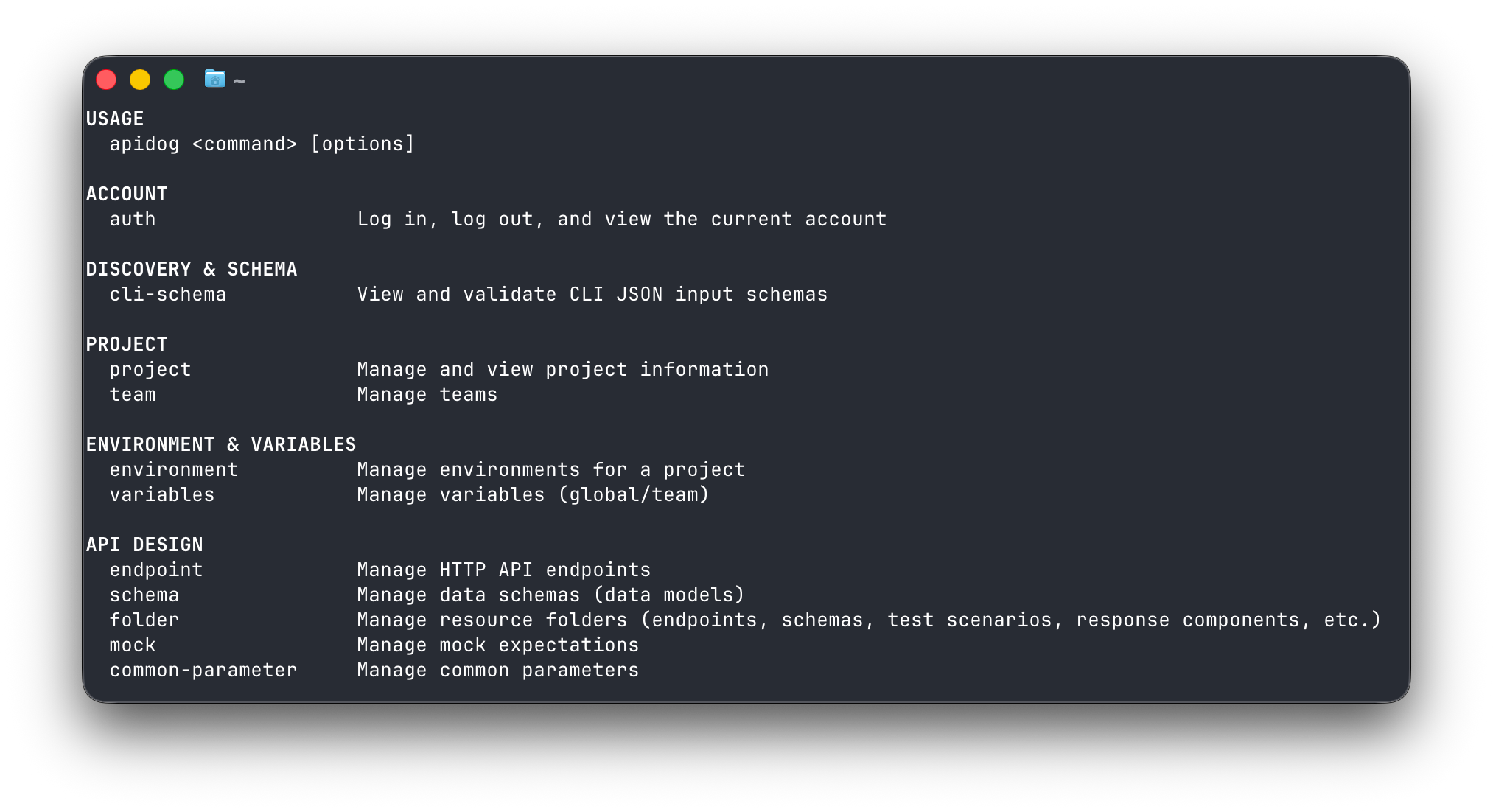
Here’s the part that ties back to agents. Your AI tool can drive that CLI for you. You ask Claude Code to run the suite, it shells out to apidog run, reads the report, and tells you what failed, all in the same session where it wrote the code.
| Stage | Apidog piece | Runs in your agent? |
|---|---|---|
| Read the contract | MCP server (read-only) | Yes, natively via MCP |
| Mock the endpoints | Mock server (also headless in CI) | Indirectly, agent codes against the mock URL |
| Test the implementation | Apidog CLI (apidog run) |
Yes, agent shells out and reads reports |
| Manage the lifecycle | Apidog project (design, version, document) | Design-time, surfaced to the agent via MCP |
A realistic loop inside Cursor
Picture a normal afternoon. You’re adding a new endpoint to an existing service.
- You design
POST /subscriptionsin your Apidog project, with the request schema and response codes spelled out. - In Cursor, you ask the agent to scaffold the handler. Because the MCP server is connected, the agent reads the exact schema and generates a handler whose DTO matches your fields, types, and required flags.
- You ask it to write tests against the mock so the frontend can move in parallel.
- You ask it to run the suite. The agent calls the CLI, gets a JUnit report, and surfaces the one assertion that failed.
- You tweak the design, tell the agent to refresh from the spec, and regenerate.
You never opened a browser. The contract stayed the source of truth, and the agent stayed pointed at it. For a visual take on this workflow, see visual debugging with the Apidog MCP client, and for testing MCP servers themselves, the MCP server testing playbook.
How this compares to other CLI and spec tooling
Plenty of tools touch part of this. They’re good at what they do, and the honest framing is about scope, not insults.
- Newman runs Postman collections from the command line. It’s a solid, widely-used runner. Its world is the collection, not a shared design-time contract your agent reads through MCP.
- inso (the Insomnia CLI) runs collections and lints specs from the terminal. Again, strong at its job; it isn’t an MCP bridge that feeds specs into your editor.
- Prism mocks and validates against an OpenAPI file, and it’s excellent for spec-driven mocking. It’s a focused tool, not a full design-mock-test-document platform.
- WireMock and Mockoon CLI are capable, popular mock servers. They mock; they don’t manage the broader contract lifecycle or expose specs to an agent over MCP.
Apidog’s angle isn’t “better runner.” It’s that one contract drives design, mock, test, docs, and the MCP feed into your agent. If you’re weighing runners specifically, the Apidog CLI vs Postman CLI comparison gets into the CI details, and the broader CI/CD testing practices guide covers how the pieces fit a pipeline.
Frequently asked questions
Can the AI agent edit my API spec through the MCP server?
No. The Apidog MCP Server is read-only. The agent reads, searches, and generates code from your spec, but it doesn’t rewrite the design through the server. You change the contract in Apidog or in your OpenAPI file, then ask the agent to refresh so it picks up the latest version.
Do I need an Apidog account to use the MCP server?
Not for every source. Connecting to a private Apidog project needs a personal access token. But the server also reads published Apidog docs and plain Swagger/OpenAPI files with no token at all, so you can feed it a local openapi.yaml and start there.
Is this an API gateway?
No, and that’s deliberate. The MCP server and the wider Apidog platform handle design-time work: designing, mocking, testing, and documenting your API. They treat your API as a product you can manage end to end. They don’t route or throttle production traffic. For that you still want a gateway like Kong or Apigee.
Which AI tools work with it?
Any MCP-capable AI coding tool. That covers editors like Cursor and VS Code and command-line agents like Claude Code. You connect the server once per tool, point it at a spec source, and the agent can query it from then on.
Bringing it together
The pitch is simple. Keep your API contract as the source of truth, and let your AI agent read it where you already work. The Apidog MCP Server hands your specs to Cursor, Claude Code, or VS Code so the agent stops guessing and starts matching your design. Pair that with headless mocking and a CLI the agent can run, and the design-mock-test loop lives inside your editor instead of across five tabs. Just remember the boundary: this is design-time lifecycle management, not a runtime gateway.
Ready to try it? Download Apidog, connect the MCP server to your editor, and point your agent at a real spec. The platform docs at Apidog walk through each spec source. Once your agent is reading the contract instead of inventing it, you won’t want to go back.