
VOOZH about

URL: https://apify.com/apify/facebook-likes-scraper

โ‡ฑ โค๏ธŽ Facebook Likes and Reactions Scraper ยท Apify


๐Ÿ‘ Facebook Likes and Reactions Scraper avatar

Facebook Likes and Reactions Scraper

Pricing

from $2.60 / 1,000 results

Go to Apify Store

Facebook Likes and Reactions Scraper

Extract Facebook likes data from one or multiple Facebook posts. Get post URL, reaction type (like, love, care, sad, angry, laugh), and basic liker info such as Facebook name and profile URL. Download the data in JSON, CSV Excel and use it in apps, spreadsheets, and reports.

Pricing

from $2.60 / 1,000 results

Rating

3.2

(15)

Developer

๐Ÿ‘ Apify

Apify

Maintained by Apify

Actor stats

44

Bookmarked

6.8K

Total users

114

Monthly active users

2.4 days

Issues response

3 hours ago

Last modified

Categories

Share

What is Facebook Likes Scraper?

It's a simple and powerful tool that allows you to extract data about reactions to Facebook posts. To get that data, just insert the post URL and click "Save & Start" button.

What Facebook likes data can I extract?

With this Facebook API, you will be able to extract the following likes data from Facebook:

๐Ÿ”— Post URL๐Ÿ˜ข Reaction type (like, love, care, angry, sad, laugh)
๐Ÿ–ผ Liker Profile URL๐Ÿ’‚โ€โ™€๏ธ Basic liker info
๐Ÿ‘ Facebook ID โœ๏ธ Post ID

Why scrape Facebook likes?

๐Ÿคฌ Analyze social media and identify hot spots of misinformation or hate speech

๐Ÿ”Ž Conduct market research or product analysis

๐Ÿคบ Monitor competition

๐Ÿค” Track brand sentiment and shifts in customer engagement

How do I use Facebook Likes Scraper?

Facebook Likes Scraper was designed to be easy to start with even if you've never extracted data from the web before. Here's how you can scrape Facebook data with this tool:

  1. Create a free Apify account using your email.
  2. Open Facebook Likes Scraper.
  3. Add one or more Facebook post URLs to scrape its likes and other reactions.
  4. Click "Start" and wait for the data to be extracted.
  5. Download your data in JSON, XML, CSV, Excel, or HTML.

Input

The input for Facebook Likes Scraper should be URLs of Facebook posts you want to scrape reactions from. Click on the input tab for a full explanation of input in JSON.

{
"startUrls":[
{
"url":"https://www.facebook.com/humansofnewyork/posts/pfbid0BbKbkisExKGSKuhee9a7i86RwRuMKFC8NSkKStB7CsM3uXJuAAfZLrkcJMXxhH4Yl"
}
]
}
...

Output sample

The results will be wrapped into a dataset which you can find in the Storage tab. Here's an excerpt from the dataset you'd get if you apply the input parameters above:
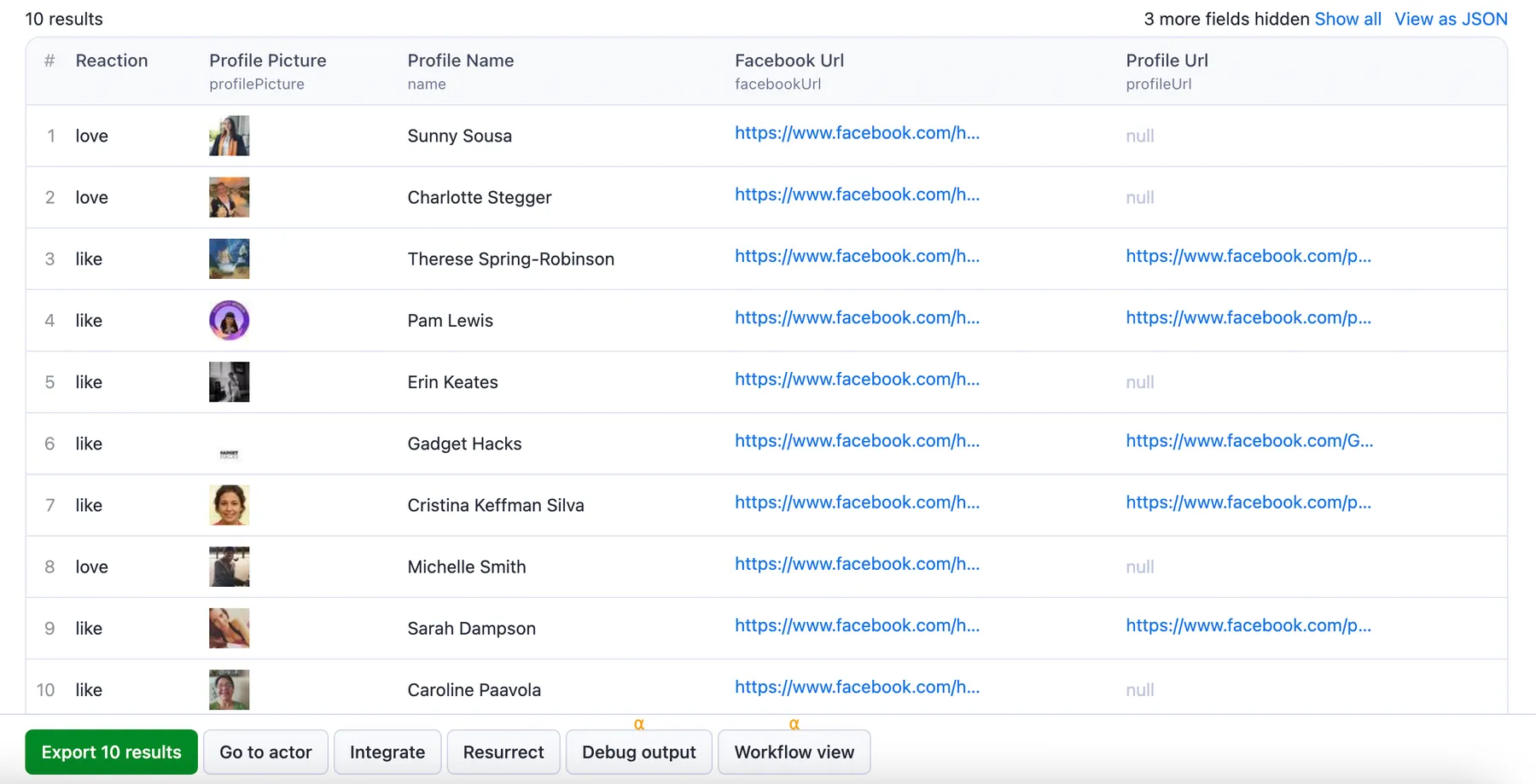
๐Ÿ‘ Facebook Likes scraping

And here is the same data but in JSON. You can choose in which format to download your Facebook data: JSON/JSONL, Excel, HTML table, CSV, or XML.

[{
"facebookUrl":"https://www.facebook.com/humansofnewyork/posts/pfbid0BbKbkisExKGSKuhee9a7i86RwRuMKFC8NSkKStB7CsM3uXJuAAfZLrkcJMXxhH4Yl",
"reaction":"love",
"name":"Michelle Smith",
"profileUrl":null,
"profilePicture":"https://scontent-man2-1.xx.fbcdn.net/v/t1.18169-1/22800_10207336193869748_1821910971530943054_n.jpg?stp=cp0_dst-jpg_p40x40&_nc_cat=105&ccb=1-7&_nc_sid=7206a8&_nc_ohc=_6ChvYNvDBMAX-J2bUl&_nc_oc=AQmF-nSdG94uKGQzDb_IHiQyu97QPNKqfndGF7uG_O950jt8L36m0o6DOhDmQPFtVqvwvqGsqGfcoFVXUvpgRrLx&_nc_ht=scontent-man2-1.xx&oh=00_AfB2hFdjSrD6F7ZsGHJoOSPgaGeMbIGeKW0PgGnO6hhguA&oe=64649844",
"facebookId":"6375219342552112",
"postId":"6375219342552112"
},
{
"facebookUrl":"https://www.facebook.com/humansofnewyork/posts/pfbid0BbKbkisExKGSKuhee9a7i86RwRuMKFC8NSkKStB7CsM3uXJuAAfZLrkcJMXxhH4Yl",
"reaction":"like",
"name":"Sarah Dampson",
"profileUrl":"https://www.facebook.com/people/Sarah-Dampson/pfbid0VQgN3GwLtyQLXMjxKc1TM9ion7B7r9oHAcVbM4EkCZwRNbh12FbpNs6neZhHm7dFl/",
"profilePicture":"https://scontent-man2-1.xx.fbcdn.net/v/t39.30808-1/324069204_843562506947134_5065400659853604584_n.jpg?stp=cp0_dst-jpg_p40x40&_nc_cat=111&ccb=1-7&_nc_sid=7206a8&_nc_ohc=etfsyQ9lpW8AX8fIjHb&_nc_ht=scontent-man2-1.xx&oh=00_AfA5iEcJ7IU_yGK-cZyvJWEOSqGUv2Z31Eq4xDBQEC8OhA&oe=644230AF",
"facebookId":"6375219342552112",
"postId":"6375219342552112"
},
{
"facebookUrl":"https://www.facebook.com/humansofnewyork/posts/pfbid0BbKbkisExKGSKuhee9a7i86RwRuMKFC8NSkKStB7CsM3uXJuAAfZLrkcJMXxhH4Yl",
"reaction":"like",
"name":"Caroline Paavola",
"profileUrl":null,
"profilePicture":"https://scontent-man2-1.xx.fbcdn.net/v/t39.30808-1/340095828_2223834257819881_2999023177662489964_n.jpg?stp=cp0_dst-jpg_p40x40&_nc_cat=110&ccb=1-7&_nc_sid=7206a8&_nc_ohc=a95c1A4ZAKIAX8Jy8sL&_nc_ht=scontent-man2-1.xx&oh=00_AfBXtH73Wi1cC6pDuprFD_RF-aAK1KKnL4-V1yEOyoNTnA&oe=64427771",
"facebookId":"6375219342552112",
"postId":"6375219342552112"
},
{
"facebookUrl":"https://www.facebook.com/humansofnewyork/posts/pfbid0BbKbkisExKGSKuhee9a7i86RwRuMKFC8NSkKStB7CsM3uXJuAAfZLrkcJMXxhH4Yl",
"reaction":"love",
"name":"Penny Brill",
"profileUrl":null,
"profilePicture":"https://scontent-man2-1.xx.fbcdn.net/v/t31.18172-1/209387_1863556022561_7170678_o.jpg?stp=c0.0.40.40a_cp0_dst-jpg_p40x40&_nc_cat=100&ccb=1-7&_nc_sid=7206a8&_nc_ohc=yZ9FmYzoqBsAX_mDZVJ&_nc_ht=scontent-man2-1.xx&oh=00_AfBsMxH5CKqlEslCQLbzT1YPN9RjWbKksqu9pCyv561o-A&oe=64647994",
"facebookId":"6375219342552112",
"postId":"6375219342552112"
}]
...

How many results can you scrape with Facebook Likes scraper?

Facebook Likes scraper can currently return 20 results on average - the preview of likes (reactions) you see per every post. However, you have to keep in mind that scraping facebook.com has many variables to it and may cause the results to fluctuate case by case. Thereโ€™s no one-size-fits-all-use-cases number. The maximum number of results may vary depending on the complexity of the input, location, and other factors. Some of the most frequent cases are:

  • website gives a different number of results depending on the type/value of the input
  • website has an internal limit that no scraper can cross
  • scraper has a limit that we are working on improving

Therefore, while we regularly run Actor tests to keep the benchmarks in check, the results may also fluctuate without our knowing. The best way to know for sure for your particular use case is to do a test run yourself.

How much will scraping Facebook Likes cost you?

When it comes to scraping, it can be challenging to estimate the resources needed to extract data as use cases may vary significantly. That's why the best course of action is to run a test scrape with a small sample of input data and limited output. Youโ€™ll get your price per scrape, which youโ€™ll then multiply by the number of scrapes you intend to do.

Watch this video for a few helpful tips. And don't forget that choosing a higher plan will save you money in the long run.

Want to scrape Facebook Pages or comments?

You can use the dedicated scrapers below if you want to scrape specific Facebook data. Each of them is built particularly for the relevant Facebook scraping case be it group posts, reviews, events, or images. Feel free to browse them:

๐Ÿž Facebook Photos Scraper๐ŸŒŸ Facebook Reviews Scraper
๐Ÿ—“ Facebook Events Scraper๐Ÿ“ฑ Facebook Pages Info Scraper
๐Ÿ‘ฅ Facebook Groups Scraper๐Ÿ•ต๏ธโ€โ™€๏ธ Facebook Search Scraper
๐Ÿ•น Facebook Games Scraper๐Ÿ‘€ Facebook Marketplace Scraper
๐Ÿ’ฌ Facebook Comments Scraper๐Ÿ“ Facebook Posts Scraper
๐Ÿ”ฎ Brand Collaboration Scraper๐Ÿšฉ Facebook Pages Scraper
๐Ÿ›๏ธ Facebook Ads Library Scraper

Integrations and Facebook Likes Scraper

Last but not least, Facebook Likes Scraper can be connected with almost any cloud service or web app thanks to integrations on the Apify platform. You can integrate with LangChain, Make, Trello, Zapier, Slack, Airbyte, GitHub, Google Sheets, Google Drive, Asana, and more.

You can also use webhooks to carry out an action whenever an event occurs, e.g., get a notification whenever Facebook Likes Scraper successfully finishes a run.

Using Facebook Likes Scraper with the Apify API

The Apify API gives you programmatic access to the Apify platform. The API is organized around RESTful HTTP endpoints that enable you to manage, schedule, and run Apify actors. The API also lets you access any datasets, monitor actor performance, fetch results, create and update versions, and more. To access the API using Node.js, use the apify-client NPM package. To access the API using Python, use the apify-client PyPI package.

Check out the Apify API reference docs for full details or click on the API tab for code examples.

Is it legal to scrape Facebook Likes data?

Our Facebook scrapers are ethical and do not extract any private user data, such as email addresses, gender, or location. They only extract what the user has chosen to share publicly. However, you should be aware that your results could contain personal data. You should not scrape personal data unless you have a legitimate reason to do so.

If you're unsure whether your reason is legitimate, consult your lawyers. You can also read our blog post on the legality of web scraping and ethical scraping.

Your feedback

Weโ€™re always working on improving the performance of our Actors. So if youโ€™ve got any technical feedback for Facebook Likes Scraper or simply found a bug, please create an issue on the Actorโ€™s Issues tab in Apify Console.

You might also like

Facebook Reactions Scraper

scraper_one/facebook-reactions-scraper

Extract reaction data from Facebook posts, such as who reacted, their profile information, and the type of reaction (like, sad, haha, angry etc.). Ideal for audience analysis, influencer insights, engagement tracking and social media monitoring.

495

5.0

Facebook Likes Scraper (Fast & Cheap) ๐Ÿ‘ ๐ŸŒŸ

scrapestorm/facebook-likes-scraper-fast-cheap

Collect Facebook likes data ๐Ÿ“Š from posts. Retrieve the URL, name ๐Ÿ“, ID ๐Ÿ†”, and profile photo ๐Ÿ“ธ of users who liked ๐Ÿ‘, with the option to set a maximum number of results to scrape ๐Ÿ”ข. Download data in JSON, CSV, or Excel formats ๐Ÿ“ฅ for use in apps, reports, spreadsheets, or analytics ๐Ÿ“ˆ.

199

1.9

Facebook Likes Reactions Scraper

scrapapi/facebook-likes-reactions-scraper

Facebook Likes Reactions Scraper ๐Ÿ‘๐Ÿ“˜ extracts likes, reactions, and engagement data from public Facebook posts and pages. Ideal for content analysis, brand monitoring, competitor research, and social media tracking. Fast, scalable, and built for reliable automated data collection. ๐Ÿš€๐Ÿ“Š

Facebook Likes and Reactions Scraper

scraper-engine/facebook-likes-reactions-scraper

Extract engagement data from Facebook posts using the Facebook Likes and Reactions Scraper. Collect likes, reaction types, usernames, and engagement counts automatically. Ideal for social media analytics, audience research, and influencer marketing.

๐Ÿ‘ User avatar

Scraper Engine

12

Facebook Comments Scraper

apify/facebook-comments-scraper

Extract data from hundreds of Facebook comments from one or multiple Facebook posts. Get comment text, timestamp, likes count and basic commenter info. Download the data in JSON, CSV, Excel and use it in apps, spreadsheets, and reports.

Facebook Reels Scraper

apify/facebook-reels-scraper

Extract data from hundreds of Facebook reels from one or multiple Facebook pages and profiles. Get reel URL, text, page or profile URL, timestamp, number of plays and more. Download the data in JSON, CSV, and Excel and use it in apps, spreadsheets, and reports.

Facebook Groups Scraper

simpleapi/Facebook-Groups-Scraper

Gather high-quality data from public Facebook groupsโ€”posts, comments, reactions, images, and contextual metadata. Designed for researchers, brands, and developers needing accurate, scalable group insights for analytics or automation.

Facebook Comments Scraper

leadsbrary/facebook-comments-scraper

Extract comments from any public Facebook post, reel, or video. Get comment text, date, author name, profile link, reaction count, and reply count. Configure output fields, filter by date, sort results. Export as JSON, CSV, or Excel.

๐Ÿ‘ User avatar

Alexandre Manguis

26

5.0

Facebook Posts Scraper

scraper_one/facebook-posts-scraper

Scrape Facebook posts from Facebook pages, groups etc. Retrieve post URLs, content, publication dates, author details, and engagement metrics. Ideal for Facebook monitoring solutions.

800

5.0

Related articles

How to download Facebook data from Facebook posts
Read more