Pricing
Pay per usage
Enrich Google Maps Dataset with Contacts
Enrich Google Maps Dataset with Contacts. Scrape websites of Google Maps places for contact details and get email addresses, website, location, address, zipcode, phone number, social media links. Export scraped data, run the scraper via API, schedule and monitor runs or integrate with other tools.
Pricing
Pay per usage
Rating
3.1
(9)
Developer

Actor stats
92
Bookmarked
1.7K
Total users
55
Monthly active users
10 hours
Issues response
a month ago
Last modified
Categories
Share
This Actor should only be used if you already have a dataset from Google Maps Scraper. If you don't have one, it is better to use a dedicated Google Maps Email Extractor Actor that does everything in one run with more predictable pricing.
What does Enrich Google Maps Dataset With Contacts do?
It's a tool that allows you to use your current Google Maps dataset and enhance the results with available contact details such as email addresses and socials. It does so by merging contact data available on Google Maps with other contact details from place's website. To get that data, just insert the task, run or dataset ID of Google Maps Scraper and click "Save & Start" button.
With this scraping tool, you can:
📈 Extract business contacts data from Google Maps places at scale
📩 Extract place names, addresses, phone numbers, and other details from companies registered on the platform
👨🍳 Get restaurant data, business address information, reviews, opening hours and more
☄️ Get more than 200 results per search
💿 Work with already acquired datasets from Google Maps
⬇️ Download contact details data in Excel, CSV, JSON, and other formats
What business data can I extract from Google Maps?
With this Google Maps API, you will be able to extract the following Google Maps data:
| 🌆 Place name and place ID | ✍️ Place description and URL |
| 📱 Social media links | 🏛 Place category and opening hours |
| 📮 Address, location and postal code | 📞 Phone number |
| 📥 Website and email | 🌐 Geolocation (latitude and longitude) |
How do I get contact details from Google Maps?
- Pick Google Maps places or queries to extract data from.
- Use Google Maps Scraper 🔗 to crawl google.com/maps and extract information. You must not enable the "only data from search page" option because you need to populate the
websitefield. Using Google Maps Extractor dataset is also supported. - Copy the dataset ID with extracted info. (You can also copy run ID and task ID if you want to run the Google Maps Scraper again as part of the whole flow)
- Paste the ID to Enrich Google Maps Dataset Actor and click Start.
- Download your dataset containing contact details.
If you need guidance on how to run the scraper, you can follow our step-by-step tutorial 🔗.
Aborting Contact Details run
If the Contact Details Scraper takes too long to finish, you can abort it and collect all the contacts you already collected. In this case, you will need to resurrect this actor's run to merge the results which only takes a minute.
To prevent the need for aborting in the future, you can change the default input parameters of how many pages the Contact Details Scraper should visit per website.
Input example
You can provide ID or full name of the Google Maps Scraper source (can be ID/name of a task, run or dataset)
Dataset ID example
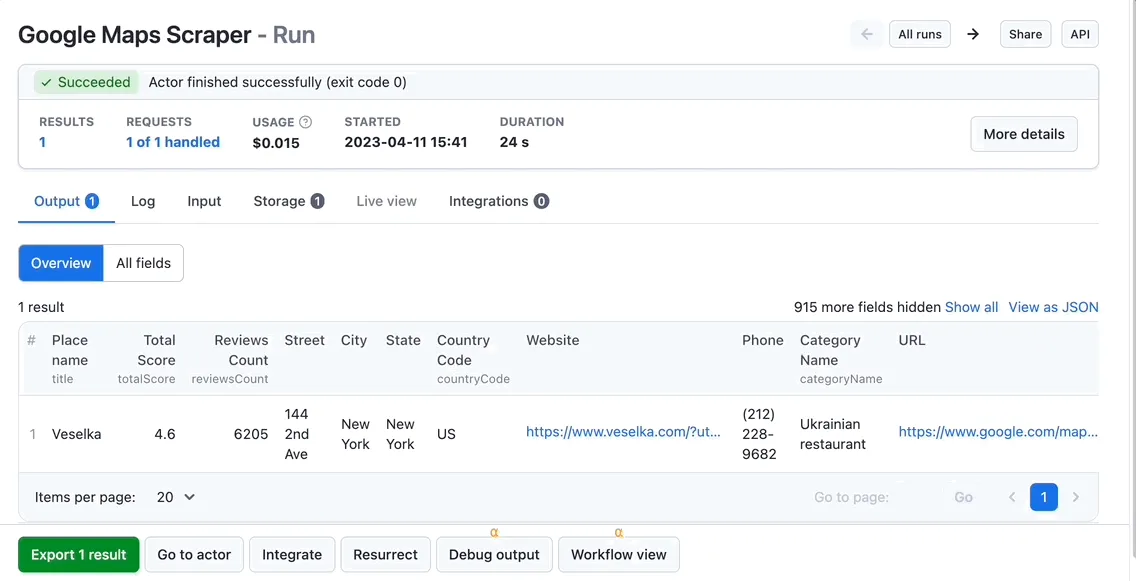
Provide an ID of a finished Google Maps Scraper run or its dataset. In this case, the Google Maps Scraper was already finished and this Enrich Actor will only enhance it with contact details.
👁 Image
Task ID example
Provide an ID or full name of preconfigured Google Maps Scraper task. In this case, the task will be run first to scrape Google Maps and only after this Enrich Google Maps Dataset will enhance it with contact details. This allows you to skip running Google Maps Scraper first. (Don't mind that the JSON input key mentions datasetId, it will work with task and name as well)
Optionally, you can also change the default Contact Details Scraper input.
Output example
The results will be wrapped into a dataset which you can find in the Storage tab. You can choose in which format to download your contact details data: JSON, JSONL, Excel spreadsheet, HTML table, CSV, or XML.
☎️ Google Maps place data plus contact details
Need more map scraping tools?
You can use the dedicated scrapers below if you want to scrape specific Google Maps data. Each of them is built particularly for the relevant map scraping case be it reviews, gas prices, OCR from pins, or itineraries. Feel free to browse them:
| 🧭 Google Maps Itinerary | ⛽ Gas Prices Scraper |
| ⭐️ Google Maps Reviews Scraper | 🍰 Easy Google Maps Scraper |
| 🍎 Apple Maps Scraper | 📍 OCR for Google Map pins |
FAQ
Can I integrate Enrich Google Maps Dataset with other apps?
Last but not least, Enrich Google Maps Dataset can be connected with almost any cloud service or web app thanks to integrations on the Apify platform. You can integrate with Make, Asana, Zapier, Slack, Airbyte, GitHub, Google Sheets, Google Drive, .
You can also use to carry out an action whenever an event occurs, e.g., get a notification whenever Enrich Google Maps Dataset successfully finishes a run.
Can I use Enrich Google Maps Dataset with the API?
The Apify API gives you programmatic access to the Apify platform. The API is organized around RESTful HTTP endpoints that enable you to manage, schedule, and run Apify actors. The API also lets you access any datasets, monitor actor performance, fetch results, create and update versions, and more. To access the API using Node.js, use the apify-client NPM package. To access the API using Python, use the apify-client PyPI package.
Check out the Apify API reference docs for full details or click on the API tab for code examples.
Is it legal to scrape contact details from Google Maps?
Our Google Maps scrapers are ethical and do not extract any private user data. They only extract what businesses have chosen to share publicly. However, you should be aware that some results such as reviews could contain personal data. You should not scrape personal data unless you have a legitimate reason to do so.
If you're unsure whether your reason is legitimate, consult your lawyers. You can also read our blog post on the legality of web scraping and ethical scraping.
How can I use contact details data scraped from Google Maps?
📬 Extract business contacts and emails on scale
💿 Build a database with up-to-date contact information
💼 Generate leads and business prospects
📈 Conduct business analysis and market research
🤺 Search, monitor and analyze competition
Your feedback
We’re always working on improving the performance of our Actors. So if you’ve got any technical feedback for Google Maps with Contact Details Scraper or simply found a bug, please create an issue on the actor’s Issues tab in Apify Console.