|
VOOZH | about |
|
VOOZH | about |
GraphQL’s descriptive query language and parallel resolvers architecture has helped many companies like Shopify and Github deliver powerful data APIs to their users.
👁 The GraphQL logo.A lesser-known feature of GraphQL called annotations is now used everywhere by libraries like Apollo or Relay to provide a better developer experience.
This article will introduce you to annotations and guide you through the most common usage for 3 helpful annotations.
The Replay is a weekly newsletter for dev and engineering leaders.
Delivered once a week, it's your curated guide to the most important conversations around frontend dev, emerging AI tools, and the state of modern software.
Annotations, or directives, that help you follow the official GraphQL specification are an official feature of the GraphQL language.
A directive is easily recognizable by the @ character, as shown below:
<code>
query Hero($episode: Episode, $withFriends: Boolean!) {
 hero(episode: $episode) {
 name
 friends @include(if: $withFriends) {
 name
 }
 }
}
</code>
In this example, taken from the official GraphQL documentation, the directive’s name is “include.”
As written in the GraphQL documentation, directives can receive arguments and can be applied to many places in GraphQL documents.
Directive applied to a query field (Apollo client)
<code>
query GetCartItems {
 cartItems @client
}
</code>
Directive applied to a type definition (Apollo Federation)
<code>
type User @key(fields: "id") {
 id: ID!
 username: String!
}
</code>
For simplicity, this article only covers a subset of the directives’ possible locations (mostly operation’s fields).
A complete list of possible locations is available on this excellent Stack Overflow answer.
Directives can be seen as GraphQL syntax shorthands to carry additional information to the GraphQL server or client for the execution of the query or mutation.
GraphQL Server @include directive
<code>
query Hero($episode: Episode, $withFriends: Boolean!) {
 hero(episode: $episode) {
 name
 friends @include(if: $withFriends) {
 name
 }
 }
}
</code>
The @include directive indicates to the GraphQL server whenever the fields should be included or not in the response data JSON body.
Apollo Client @client directive
<code>
query GetCartItems {
 cartItems @client
}
</code>
Apollo Client is “providing” the @client directive as a shorthand to indicate if a field value should be fetched locally or remotely on a GraphQL API.
We will take a close look at the @client directive in the next section.
Let’s analyze how the @include directive works when applied on the following query:
<code>
query Hero($episode: Episode, $withFriends: Boolean!) {
 hero(episode: $episode) {
 name
 friends @include(if: $withFriends) {
 name
 }
 }
}
</code>
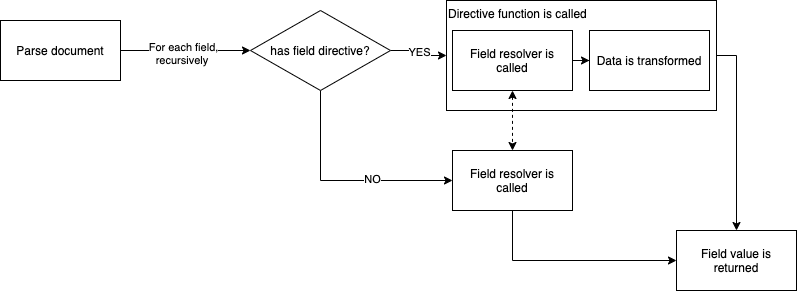
When parsing the incoming operation (Hero query), the server navigates through each field, calling the resolver to get the appropriate data.
When reaching the friends field, the GraphQL server encounters the include directive and calls it, along with the field definition and the associated resolver.
The include directive will call the friends resolver only if the if param value is truthful.
To sum up, on the server side, directives “wrap” the field resolvers to:
@skip or @include directives — see next section)Annotations also allow you to add new behaviors for operations (query, mutations) or adding extra information to types definition.
Let’s now get more practical by reviewing many types of directives, including the standard ones, Apollo custom directives, and community-driven directives.
We are now familiar with directives syntax and their inner workings. Let’s take a look at some that you’ve probably already used without even noticing.
The following directives, defined by the GraphQL specifications, are meant to be supported by any GraphQL server (any server library, not only Apollo, that follows the GraphQL spec).
The specification defines three directives, including the @include directive seen in the previous section.
@skipThis directive act as the opposite of the @include directive, including the targeted field, only if the if parameter value is false.
<code>
query Hero($episode: Episode, $onlyHero: Boolean!) {
 hero(episode: $episode) {
 name
 friends @skip(if: $onlyHero) {
 name
 }
 }
}
</code>
@deprecatedUnlike the directive we saw before, this directive is meant to be used on a type definition — not an operation (query/mutation), to provide extra information on the type itself.
<code>
type Hero {
 name: String!
 friends: [Hero!]!
 appearsIn: [Movie!]!
 appearsOn: [Movie!]! @deprecated(reason: "Use `appearsIn`.")
}
</code>
Using this directive to indicate deprecated fields have many advantages:
Apollo Client is making some interesting usage of directives on the client side. Directives on the client side behave a bit differently than server side ones.
How does it work?
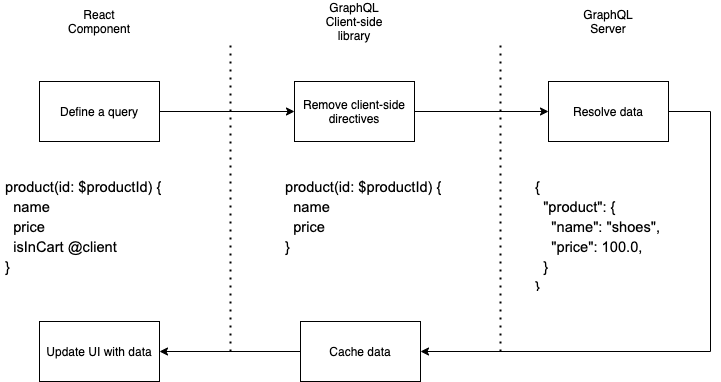
Client side directives are only defined on the client side, which means that the targeted GraphQL server is not supposed to receive them.
👁 Directives on the client side.
An extra step not shown in the above graph is that the client side directive execution can happen:
To sum up, client side directives can interact with cached data and provides features around cache management.
Let’s now see some examples of features brought by Apollo Client’s client side directives.
@client directiveAs seen above, the following GraphQL query is using a client side directive, called @client.
<code>
product(id: $productId) {
 name
 price
 isInCart @client
}
</code>
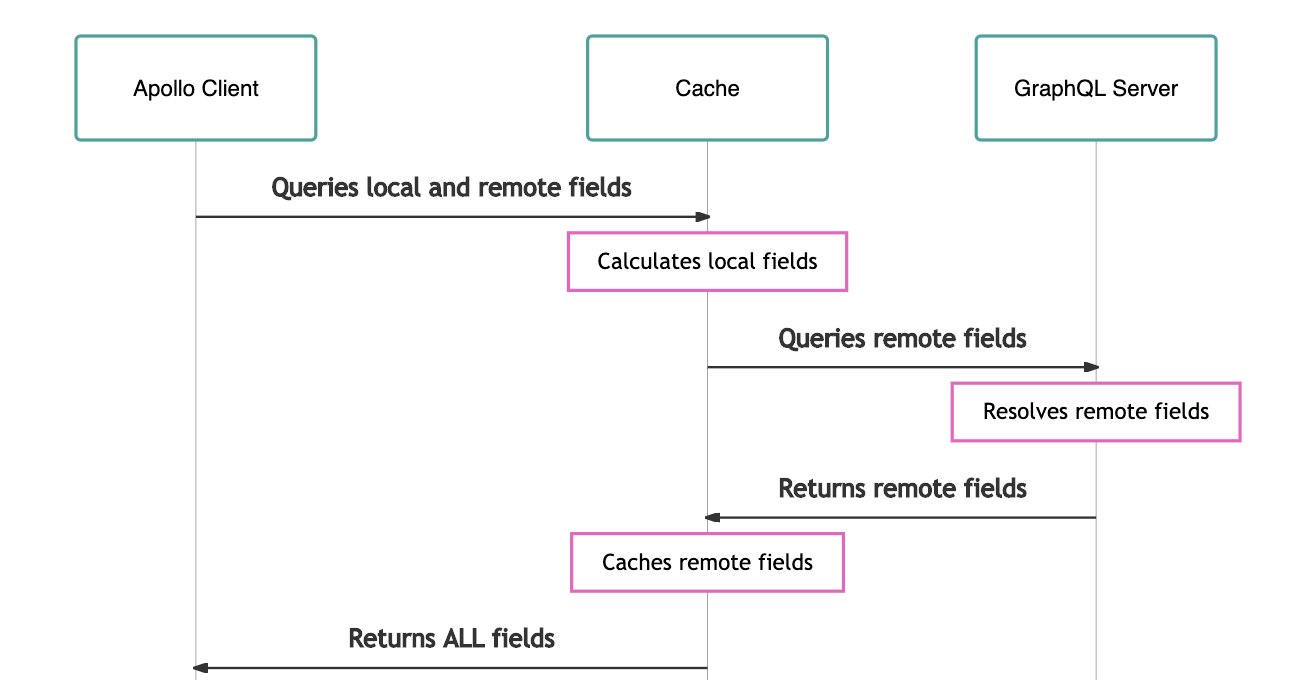
The @client directive, provided by Apollo Client, indicates that the isInCart field is local, meaning that no request to the GraphQL Server is required to get its value.
As shown in the graph below, our query will be executed in many steps:
@client fields)@client fields)useQuery() Hook)Graph from the official Apollo React Client documentation
Apollo Client has some improvements regarding @client usage. The following query use only local fields and will not trigger a request to the GraphQL server (since there are no remote fields):
<code>
query GetCartItems {
 cartItems @client
}
</code>
The GetCartItems query a perfect example of a “local state” usage of Apollo GraphQL, brought through a delightful experience thanks to directives syntax.
@export directiveAnother smart usage that provides a great developer experience is the client side @export directive:
<code>
query CurrentUserPostCount($userId: Int!) {
 currentUserId @client @export(as: "userId")
 postCount(user: $userId)
}
</code>
This directive, provided by Apollo Client, allows you to reuse any local field value (via @client) as a variable for a field, or a subquery of the current operation.
The CurrentUserPostCount query is another example of a smooth experience around state management with GraphQL that Apollo is providing.
Without the @export use, a separated query and added logic would be necessary to achieve the same GraphQL query.
We saw good examples of directives provided on both the client and the server side by the official specification and major libraries.
Let’s now focus on 3 powerful server side directives that you can start using to supercharge your GraphQL schema.
@computed directiveProvided by the GraphQL Community organization, the @computed directive is particularly handy at solving a ubiquitous problem: repetition and scaffolding.
Many times, in real world applications, some properties are simply computed or derived from existing ones.
Writing resolvers for those computed properties is cumbersome and unnecessary.
Let’s see @computed in action:
<code>
type User {
 firstName: String
 lastName: String
 fullName: String @computed(value: "$firstName $lastName")
}

type Query {
 me: User
}

</code>
Here, the User.fullName property does not require a resolver method. @computed will automatically compute the proper value when requested.
Full installation details are available on the official repository:
GitHub – graphql-community/graphql-directive-computed-property: GraphQL directive for create computed property
GraphQL directive for create computed property. Contribute to graphql-community/graphql-directive-computed-property development by creating an account on GitHub.
Using this directive on your schema will help you keep your resolvers scaling.
Now let’s tackle a more significant challenge, again with the help of a GraphQL Community organization package: graphql-directive-auth.
The @auth directive provides an elegant solution to the authentication and authorization GraphQL APIs design challenge.
The graphql-directive-auth package is providing two powerful directives:
@isAuthenticated@hasRole(role: String)Both directives apply to the fields definition, as shown on the following schema:
<code>
type Query {
 currentUser: User @isAuthenticated
 users: [User] @isAuthenticated
}

type User {
 id
 first_name
 last_name
 purchases: [Product!]! @hasRole('self', 'admin')
}
</code>
By reading this schema, we understand that:
Running the following query is only achievable by an admin, being the only user that has access to all users’ purchases lists:
<code>
query {
 users {
 id
 first_name
 purchases {
 title
 price
 }
 }
}
</code>
graphql-directive-auth is relying on JWT, operating in two modes:
Authorization header with a JWT Token carrying some role property@isAuthenticated) and also a custom method to define the role checking behavior (hasRole(role)).This library, thanks to GraphQL directives, provides an easy way to add an extendable authentication layer to your GraphQL API.
Full installation and custom configuration details are available in the official repository:
GitHub – graphql-community/graphql-directive-auth: GraphQL directive for handling auth
GraphQL directive for handling auth. Contribute to graphql-community/graphql-directive-auth development by creating an account on GitHub.
Most frontend applications make the choice to do all the data formatting on the client side, resulting in kb of third-party formatting libraries.
The @saeris/graphql-directives package provides a set of 30 directives that will allow your frontend to let the API do all the heavy lifting for formatting.
Let’s highlight the most interesting directive:
<code>
type Example {
 # Int | Float => String
 hourlyRate: Int @formatCurrency(
 defaultFormat = "$0,0.00" # String!
 defaultRoundingMode = HALF_AWAY_FROM_ZERO # RoundingMode!
 )
}

query ExampleQuery {
 getPerson {
 # Raw => Default Format => Requested Format
 # 1150 => $11.50 => EUR 11.5
 hourlyRate(format: "USD0,0.0", currency: "EUR") # => EUR 11.5
 }
}
</code>
The @formatCurrency is especially interesting given the complex subject of formatting currencies.
The interesting thing is that, as a type definition directive, @formatCurrency augments the applied field resolver to allow clients to pass optional formatting arguments such as format or currency at query time.
The same goes for dates, numbers, phone numbers formatting, and over 20+ directives for Strings and Measurements!
This package is definitely a must-have for a modern GraphQL API. Take some time to look at the official repository: https://github.com/Saeris/graphql-directives#formatdate
Directives are a visual and flexible way to extend type definition capabilities and the execution of GraphQL operations (query and mutations).
On the server-side, directives allow you to add metadata to types (@deprecated, Apollo Federation directives), optimizing queries (@include, @skip), and also transforming data (@computed).
On the client side, directives are mainly used to customized cache behavior and add some local state management capabilities (@client).
However, creating useful general purpose directives is complicated.
For this reason, the main power of directives is the ability to write your own in order to:
Building directives is achieved by using the SchemaDirectiveVisitor API from graphql-tools.
A good starting point to learn this API is the great Apollo documentation page dedicated to this subject.
I hope that the three annotations recommended in this article will inspire you in writing your own. Please know that directives are just getting started in the GraphQL ecosystem, since many more features are coming in the future @defer, @live, @specifiedBy.
While GraphQL has some features for debugging requests and responses, making sure GraphQL reliably serves resources to your production app is where things get tougher. If you’re interested in ensuring network requests to the backend or third party services are successful, try LogRocket.
👁 LogRocket Dashboard Free Trial BannerLogRocket lets you replay user sessions, eliminating guesswork around why bugs happen by showing exactly what users experienced. It captures console logs, errors, network requests, and pixel-perfect DOM recordings — compatible with all frameworks.
LogRocket's Galileo AI watches sessions for you, instantly aggregating and reporting on problematic GraphQL requests to quickly understand the root cause. In addition, you can track Apollo client state and inspect GraphQL queries' key-value pairs.
Learn how to use Gemini CLI subagents to delegate frontend, backend, testing, and docs tasks to specialized agents with guardrails and clear ownership.
Learn how next-browser gives AI agents runtime context for debugging Next.js apps, including React props, hydration, PPR, forms, and performance.
Build dynamic LLM routing in Next.js with OpenRouter, TanStack AI, task classification, model fallbacks, and cost-aware routing.
TSRX adds first-class control flow, conditional hooks, and scoped styles to React via a TypeScript compiler extension — no new framework required.
Hey there, want to help make our blog better?
Join LogRocket’s Content Advisory Board. You’ll help inform the type of content we create and get access to exclusive meetups, social accreditation, and swag.
Sign up now