|
VOOZH | about |
|
VOOZH | about |
3D web development is taking the internet by storm, with both developers and non-developers creating 3D web experiences using AI coding tools.
👁 how AI is shaping the future of 3D web developmentThis is fascinating, considering 3D development used to be an area only a select few developers could work in. But now, even non-developers are “vibe coding” entire 3D web games, AR/VR applications, and virtual e-commerce experiences with just a few prompts.
In this article, we’ll cover what’s happening, where 3D web development started, how it has changed over the years, and how AI is revolutionizing the space even further. We’ll also explore some of the AI tools you can use to build 3D web experiences, the current and future challenges AI presents in 3D web development, and how things might change in the future.
The Replay is a weekly newsletter for dev and engineering leaders.
Delivered once a week, it's your curated guide to the most important conversations around frontend dev, emerging AI tools, and the state of modern software.
The web was originally designed for text and static images. It was built to focus on sharing documents rather than creating interactive experiences. Any interactivity beyond images in the early web required plugins like Flash or Java applets. Even then, those tools didn’t handle 3D particularly well.
3D development on the web began to gain more ground around the late 1990s to early 2000s, especially with the introduction of tools like VRML (Virtual Reality Modeling Language), Shockwave 3D, and Java OpenGL.
Most of these tools had a gentle learning curve, code-wise. However, they had performance issues, as they relied entirely on the CPU. Plus, you would need to set up additional plugins to get them to run on the web.
For context, here’s what a sample code for rendering a blue 3D box looks like in Shockwave 3D:
on create3DBox()
 -- Create a new 3D world
 w = member("3Dworld").newWorld()

 -- Create a cube model
 m = w.newModel("cube", #box)

 -- Set the size of the cube
 m.transform.scale = vector(100, 100, 100)

 -- Set the color to blue
 m.shaderList[1].diffuse = rgb(0, 0, 255)

 -- Add a light source
 light = w.newLight("light", #directional)
 light.color = rgb(255, 255, 255)
 light.transform.rotation = vector(45, 45, 0)

 -- Position the camera
 cam = w.newCamera("camera")
 cam.transform.position = vector(0, 0, -300)

 -- Render the scene
 w.render()
end
But before you could get the code to run on the web, you’d have to build the scene inside Adobe Director, export it as a .dcr file, embed it into your webpage, and make sure the user had the Shockwave Player plugin installed. And even when all that was in place, performance was disappointing.
In 2011, the Khronos Group introduced WebGL (Web Graphics Library), and it revolutionized 3D on the web. WebGL was different in that it allowed browsers to access the computer’s GPU directly and leverage hardware acceleration; this made it possible to render performant 3D in real time without any additional plugins.
This shift also introduced libraries like Three.js and Babylon.js, both of which further simplified WebGL with easy-to-use APIs and SDKs. Their major advantage is that they are plug-and-play. All you need to do is add their JavaScript library to your HTML file, and things just work.
Over time, 3D on the web became more developer-friendly, and adoption grew. But what continued to limit developers from creating immersive 3D experiences was limited knowledge of 3D asset creation, shaders, scene setup, and more.
Generative AI and LLMs are now starting to change that.
AI is lowering the technical barriers in 3D web development. Instead of spending hours creating models, textures, and animations, you can now leverage AI tools to handle the heavy lifting. For example, with Windsurf/Cursor, you only need to describe the experience you want to build, and it builds it for you.
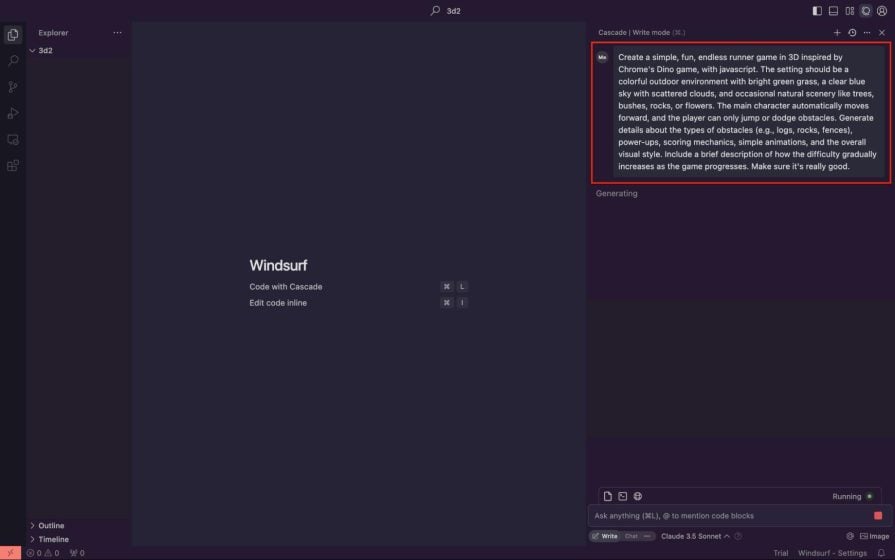
To try it out, I wanted to recreate the famous Chrome Dino game in 3D. All I had to do was describe it in detail and feed the prompt into Windsurf, as shown in the image below:👁 windsurf prompt for dino game
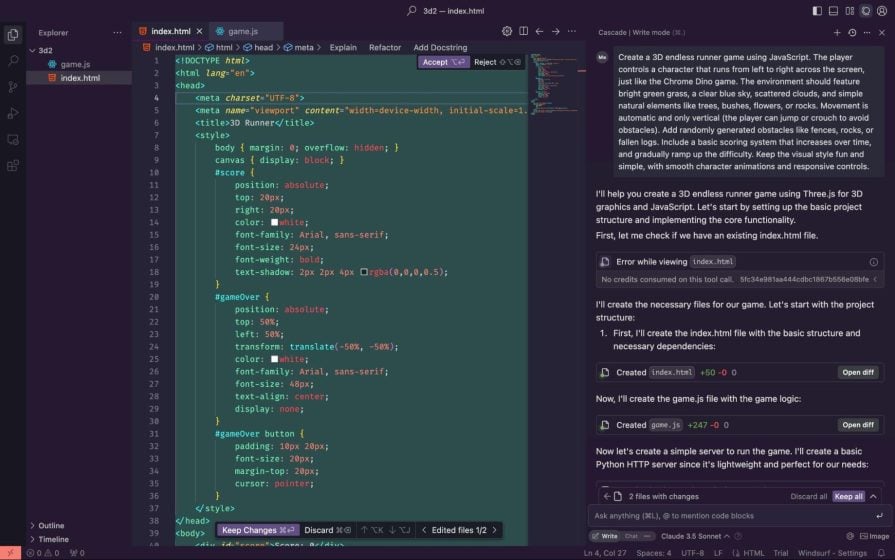
Next, it created the needed files and pasted all the necessary code into their respective locations:👁 windsurf creating file structure

After following all the instructions and running the app, it just worked!:👁 basic game output from windsurf
But that’s not all. We now have tools that can generate 3D assets from static images or text prompts, similar to how generative image models like DALL-E, Google’s Imagen, and Midjourney work.
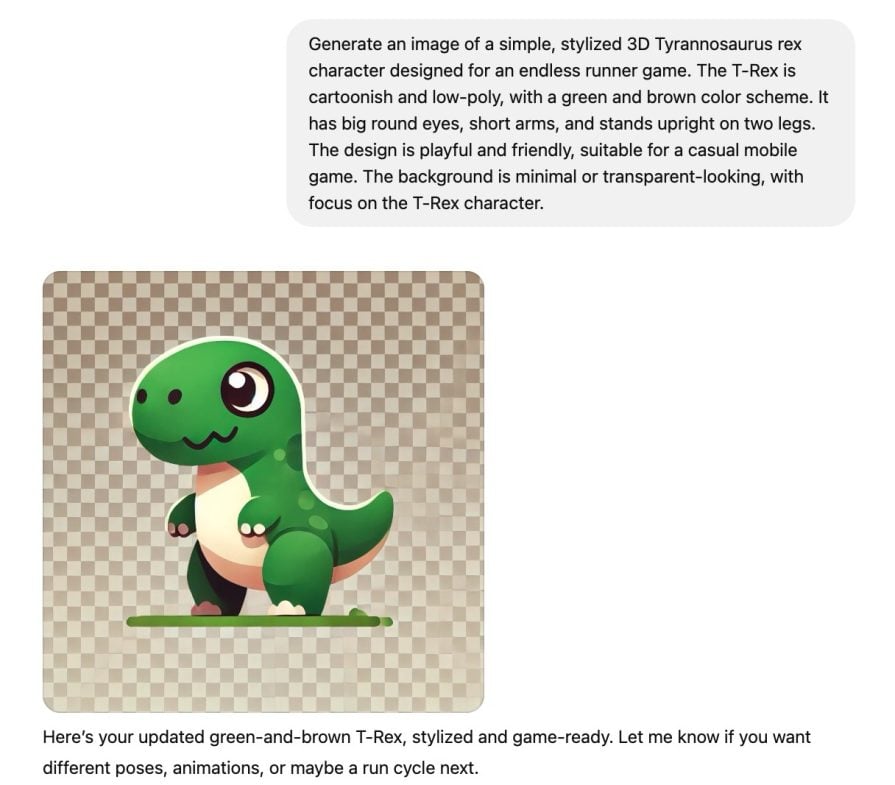
To improve the 3D dino game, I first asked ChatGPT to generate a low-poly T-Rex image for me:👁 chat gpt generated 3D dino image

Next, I removed the image background and sent it to Hyper3D Ronin to convert it into a 3D model:👁 hyper3d logo creation
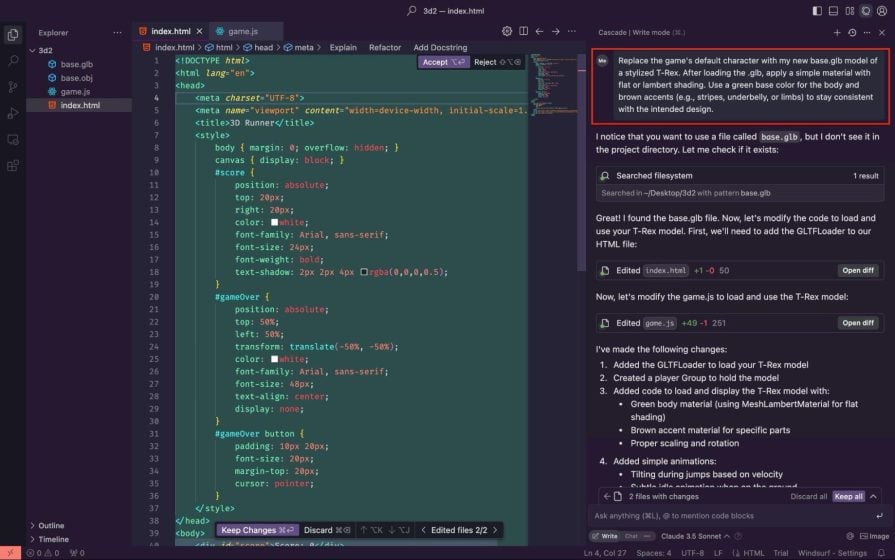
After the conversion, I downloaded the model’s .glb file, copied it into my project directory, and prompted Windsurf to replace the default box character with the new 3D model, as shown below:👁 adding character to windsurf

And again, it just works. It’s like magic:👁 updated dino game with logo
You can also play the game here or explore the code via this GitHub repo.
While the recent trend has mostly focused on creating 3D web games, it’s important to remember that 3D web development goes beyond that. There are plenty of other use cases, such as:
These are all important application areas solving real problems, and it’ll be exciting to see more people exploring them instead of just sticking to gaming.
All these exciting shifts in development experience come with their challenges. Let’s explore some of them below.
Yes, non-developers can open Cursor or Windsurf and start vibe coding what they want to build. The reality, though, is that the AI and LLMs powering these tools often hallucinate or generate code that doesn’t work. And for someone who doesn’t understand programming basics, figuring out what went wrong and how to fix it can be a dead-end experience.
LLMs are good at writing clean code, but they’re just as good at writing bad code, too. In their eagerness to help you get things working, they might trade off performance or security for quick fixes. Over time, this can lead to bloated or low-quality codebases.
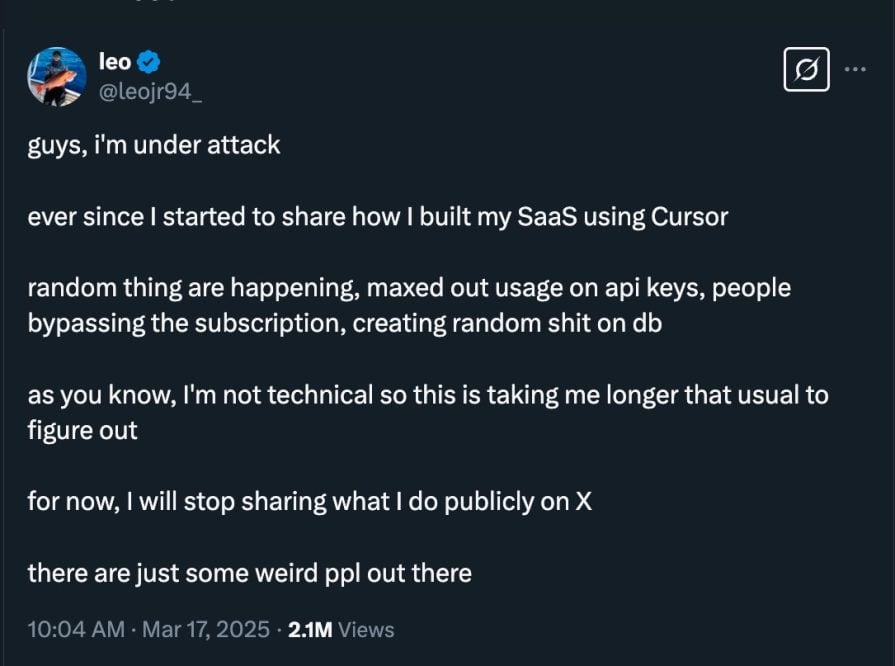
For example, a user shared their experience on X (Twitter) about how their platform, built with AI coding tools, was compromised. Fixing the issue wasn’t straightforward, as shown in the image below:👁 tweet user compromised platform
This event buttresses the earlier points about the knowledge gap and quality control. AI tools can speed things up, but they don’t replace the need for a solid understanding of how things work under the hood, at least not yet.
There’s also the ethical concern around ownership. The code and 3D assets these AI tools generate in seconds are trained on the hard work of other developers and artists, many of whom never gave explicit permission for their work to be used. This raises questions about who really owns the output, whether it’s truly original, and what rights the original creators should have.
The AI tools for 3D web development fall into two categories:
LLMs and coding assistants for building the experience, and generative models for converting text or images into 3D assets.
For development, we have tools like Claude, Windsurf, and Cursor:
Claude is better fine-tuned for coding tasks compared to other general-purpose LLMs like OpenAI’s ChatGPT and Google’s Gemini, and it’s especially good at writing JavaScript—Three.js and Babylon.js included.
Windsurf, as demonstrated in our example, is an AI coding tool that lets you build in a VS Code-like environment with support for models like Claude, GPT-4, and others.
Cursor provides a similar AI-first coding experience, with strong autocomplete, inline explanations, and multi-model support.
For generating 3D assets, we have tools like Hyper3D Rodin, Tripo3D, Meshy.ai, and Hunyuan3D-2. Hyper3D Rodin lets you transform text or 2D images into 3D models, as shown in our example. Tripo3D and Meshy.ai work similarly. Hunyuan3D-2, on the other hand, is an open-source model developed by Tencent that focuses on generating high-fidelity 3D assets from text with detailed geometry and textures.
3D on the web will only continue to get better. To back this up, there has been progress on introducing WebGPU – a newer, more performant, and lower-level web graphics API that aims to replace WebGL. In addition, there’s a new WebXR API that brings native 3D and AR/VR support to the browser without requiring any additional libraries. Chromium-based browsers like Chrome and Edge already support it, and over time, other browsers will likely follow.
Similarly, this is the worst these AI tools and models will ever be. While they may not be perfectly accurate right now, they’re being improved constantly and will only get better. In the future, AI will make 3D web development more automated and accessible with realistic and interactive experiences.
In this tutorial, we covered the evolution of 3D web development and how AI is making it easier to create 3D experiences with a practical example. We also explored some of the AI tools you can use to build 3D applications, as well as the current and future challenges surrounding AI 3D web development.
It’s genuinely exciting to think about how much easier AI makes creating immersive 3D experiences in the future!
TSRX adds first-class control flow, conditional hooks, and scoped styles to React via a TypeScript compiler extension — no new framework required.
Learn how to build a full React Native auth system using Better Auth and Expo — with email/password login, Google OAuth, session persistence, and protected routes.
Compare the top AI development tools and models of June 2026. View updated rankings, feature breakdowns, and find the best fit for you.
Learn how Bloom filters reduce database lookups for username availability checks while preserving correctness at scale.
Would you be interested in joining LogRocket's developer community?
Join LogRocket’s Content Advisory Board. You’ll help inform the type of content we create and get access to exclusive meetups, social accreditation, and swag.
Sign up now