|
VOOZH | about |
|
VOOZH | about |
When building web applications, we often have to implement authentication to protect the app against unauthorized access to user data and improve its integrity. Your specific auth needs depend on the type of app you’re building, but authentication in general is crucial for any app that collects or stores users’ data.
👁 ImageIf you’re deliberating what level of authentication your app requires, it helps to know details like what actions will be performed and who will perform them. You may want your users to validate their identity using authentication methods like their username, email, and password.
Building authentication into applications comes with challenges such as password vulnerabilities, improper session management, handling and storing user credentials, and more. Auth.js was created as a comprehensive tool to make adding authentication to web apps easier and more secure.
In this guide, we’ll learn what Auth.js is, cover its history, and discuss why you should use it in your projects. To demonstrate the many excellent features of Auth.js, we’ll build a simple Next.js application that implements user authentication such as login, signup, and session management.
The Replay is a weekly newsletter for dev and engineering leaders.
Delivered once a week, it's your curated guide to the most important conversations around frontend dev, emerging AI tools, and the state of modern software.
Auth.js is the most comprehensive JavaScript library for authentication in any web application. It simplifies implementing user authentication mechanisms into web applications. With Auth.js, you have the flexibility to leverage various authentication strategies, from simple username-password combinations to complex services like OAuth or SSO systems.
The Auth.js library has inbuilt support for a lot of databases, including MongoDB, PostgreSQL, MDQL, MariaDB, and more. It will also work with no database at all when you integrate it with OAuth services or JSON Web Tokens.
Auth.js was formally called NextAuth when Iain Collins first developed it in 2016. At that time, it looked quite different from the tool we know today.
In 2020, the project was rewritten and relaunched by Balázs Orbán with a focus on simplifying authentication for Next.js applications. This is considered the true beginning of NextAuth.
When the library started getting adopted by more developers and implementing support for more frameworks and use cases, its name was changed from NextAuth to Auth.js. This move, which happened in late 2022, expanded the scope of the framework beyond Next.js apps to support other React frameworks.
Auth.js as we know it today is a comprehensive solution that simplifies all the complexities and security concerns associated with traditional authentication methods. Due to its active community of developers and contributors, Auth.js has continually advanced to keep up with newer security standards and best practices.
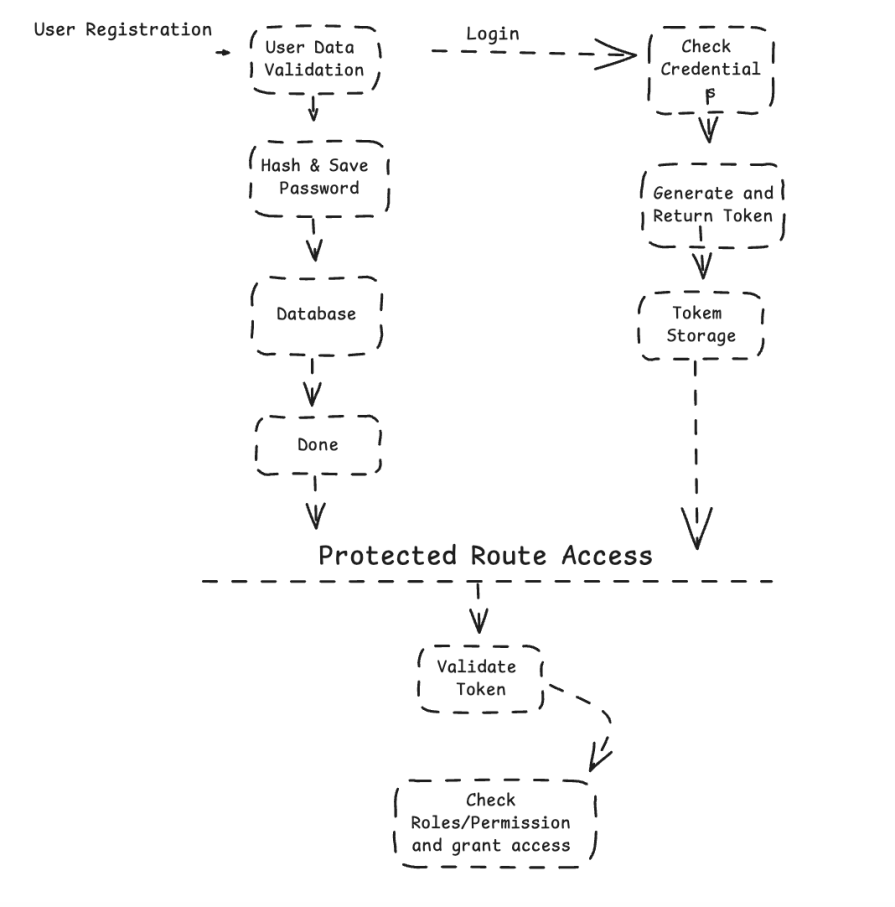
Auth.js handles user authentication and authorization in a web application. It handles major functionalities such as user registration, login, password and session management, and control of accessibility to users. The diagram below shows how it works in a web application:
👁 Diagram Showing Auth Js Workflow In Web App
For an important feature like authentication and authorization that affects your app’s security, you should consider why you should use Auth.js over other authentication frameworks. Let’s discuss some of the pros and cons of using Auth.js as your go-to authentication framework:
Even though Auth.js was developed to provide an extensive authentication framework that simplifies how we handle user authentications in web applications, it’s not a perfect tool. Some developers have faced challenges while using it, which has led to criticisms like the below:
Despite these challenges, Auth.js still stands out as a reliable, complete authentication solution. It’s way better than building a custom authentication or using other smaller authentication solutions, which often take more development time and lack the rich features that Auth.js provides.
The learning curve might be a little steeper than others, but in the long run, it will save lots of time and effort. Also, the developers seem committed to enhancing the framework while addressing different concerns by the developers.
Remember every project is different and each developer has different needs, so providing a one-size-fits-all solution will be difficult.
In this section, we’ll talk about how to set up Auth.js in your project and see some of its standout features in action.
To get started with Auth.js, you need to install it along with the required dependencies in your project. You can use a SvelteKit, Express.js, or Next.js application to get started.
For the demonstration in this tutorial, we’ll use it with a Next.js application. You can visit the official documentation for instructions on how to install it in your chosen environment.
First, create a new Next.js project by running the command below:
npx create-next-app@latest
Then install the next-auth package using npm:
npm install next-auth
Next, create an authentication provider. For this demonstration, we’ll use GitHub as our OAuth provider. Create a .env.local file in the root directory of your project and add your client ID and secret:
GITHUB_ID=your-github-client-id
GITHUB_SECRET=your-github-client-secret
Then configure the provider in your pages/api/auth/[...nextauth].js and add the provider’s configurations:
import NextAuth from 'next-auth';
import Providers from 'next-auth/providers';

export default NextAuth({
 providers: [
 Providers.GitHub({
 clientId: process.env.GITHUB_ID,
 clientSecret: process.env.GITHUB_SECRET,
 }),
 ],
 pages: {
 signIn: '/auth/signin',
 },
});
By default, Auth.js has provided you with a sign-in page. You can, however, make use of any custom sign-in page so that you can easily customize it. We did that by adding a pages object to the NextAuth configuration.
Now, create a pages/auth/signin.js file for the custom sign-in page and add the code snippets below:
import { signIn } from 'next-auth/client';

const SignIn = () => {
 return (
 <div>
 <h1>Sign In</h1>
 <button onClick={() => signIn('github')}>Sign in with GitHub</button>
 </div>
 );
};

export default SignIn;
To protect a page in your application from unauthorized users — for example, the profile page — use the useSession hook provided by NextAuth. Create a pages/profile.js file and add the code snippets below:
import { useSession } from 'next-auth/client';
import { useEffect } from 'react';
import { useRouter } from 'next/router';

const ProfilePage = () => {
 const [session, loading] = useSession();
 const router = useRouter();

 useEffect(() => {
 if (!loading && !session) {
 router.push('/auth/signin');
 }
 }, [loading, session, router]);

 if (loading) {
 return <p>Loading...</p>;
 }

 if (!session) {
 return null;
 }

 return <div>This a protected page</div>;
};

export default ProfilePage;
If a user tries to access the profile page without signing in, they will be redirected to the sign-in page. Once they’re signed in, they’ll be able to view the contents on the profile page.
Auth.js offers various customizable configuration options for your authentication needs. These include:
Now, let’s look at an example of how you can customize your NextAuth configuration to use multiple auth providers, callbacks, and custom pages.
Update your pages/api/auth/[...nextauth].js file with this code:
import NextAuth from 'next-auth';
import Providers from 'next-auth/providers';

export default NextAuth({
 providers: [
 Providers.GitHub({
 clientId: process.env.GITHUB_ID,
 clientSecret: process.env.GITHUB_SECRET,
 }),
 Providers.Google({
 clientId: process.env.GOOGLE_ID,
 clientSecret: process.env.GOOGLE_SECRET,
 }),
 ],
 callbacks: {
 async signIn(user, account, profile) {
 return true;
 },
 async redirect(url, baseUrl) {
 return baseUrl;
 },
 async session(session, token) {
 session.user.id = token.id;
 return session;
 },
 async jwt(token, user, account, profile, isNewUser) {
 if (user) {
 token.id = user.id;
 }
 return token;
 },
 },
 pages: {
 signIn: '/auth/signin',
 signOut: '/auth/signout',
 error: '/auth/error',
 },
});
Then update your .env.local file to add your Google ID and Google Secret key:
GOOGLE_ID=your-google-client-id
GOOGLE_SECRET=your-ggoogle-client-secret
Also, create the pages/auth/signout.js and pages/auth/error.js pages. Add this code to the pages/auth/signout.js file:
import { useEffect } from 'react';
import { signOut } from 'next-auth/client';
import { useRouter } from 'next/router';

const SignOut = () => {
 const router = useRouter();

 useEffect(() => {
 // Sign out the user and redirect to the homepage
 signOut({ redirect: false }).then(() => router.push('/'));
 }, [router]);

 return (
 <div>
 <h1>Signing you out...</h1>
 <p>Please wait.</p>
 </div>
 );
};

export default SignOut;
Then add this code to the pages/auth/error.js file:
import { useRouter } from 'next/router';

const Error = () => {
 const router = useRouter();
 const { error } = router.query;

 return (
 <div>
 <h1>Error</h1>
 <p>Sorry, an error occurred: {error}</p>
 <button onClick={() => router.push('/')}>Go back to Home</button>
 </div>
 );
};

export default Error;
While Auth.js provides all these customization options, remember that it’s not perfect — no tool is. If you’re willing to work through challenges adding advanced customizations, multi-factor authentication, or integration with custom backends, it can be a powerful authentication tool for your project.
Auth.js provides an easy way to handle authentication in any web application, but it’s important to understand whether Auth.js is the right tool for your specific project. It’s particularly useful if:
However, Auth.js might not be a suitable solution for you if:
Passport, OAuth, and Firebase Authentication are a few of the earliest-established authentication libraries and frameworks that are still popularly used to implement authentication in web apps.
Auth.js provides more compatibility with Next.js, while Passport.js is one of the most used and universal authentication libraries in the Node.js ecosystem. Firebase Authentication, meanwhile, is being used everywhere — not only in Node.js applications, but also on every other platform.
Now let’s compare these libraries:
| Feature | Passport.js | Auth.js | Auth0 | Firebase Authentication |
|---|---|---|---|---|
| Integration | Easy to integrate with Next.js | Works with the majority of Node.js frameworks | Platform-independent with SDKs for many frameworks and languages | Integrates with various platforms, including Node.js applications |
| Performance | High performance, but implementation dependent | Optimized for Next.js applications | High performance, cloud-based solution | High performance, serverless solution |
| Community | Large community, wide adoption in Node.js ecosystem | Fast-growing community, particularly in Next.js ecosystem, but smaller than Passport.js | Large and active community, extensive enterprise support | Large community, backed by Google |
| Documentation/resources | Some areas in documentation are lacking for the version transition | Extensive documentation with numerous examples and third-party tutorials | Fully-featured and fully documented with API references. | Comprehensive documentation with lots of community tutorials and examples |
| Customization | Highly customizable with various strategies | Limited customization options | Customizable, but within the constraints of the Auth0 platform | Customizable, with pre-built UI components available |
| Session management | Has a built-in session management functionality | Requires additional middleware for session management | Has advanced JWT-based management and customization. | Supports JWT-based extended token management and customization |
| Authentication methods | Supports authentication strategies like email/password, and OAuth providers (Google, GitHub, Facebook, etc.) | Extensive support for various strategies (OAuth, OpenID, etc.) | Supports authentication strategies like social, enterprise, passwordless, etc. and also supports custom databases | Extensive support for various strategies including social logins, phone auth, anonymous auth, and multi-factor authentication |
With this comparison table, you can see a quick snapshot of the different features and benefits these libraries offer to help inform your decision about which tool to use to implement authentication in your project.
Of course, there are a variety of other options to consider as well, but this is a good place to start!
Auth.js handles user authentication in any JavaScript application more securely and flexibly. It supports a lot of authentication providers, manages user sessions, and even lets you use custom callbacks, making it an ideal solution for a new or existing project.
Also, I strongly believe that with its actively growing community, some of the challenges and concerns raised by some developers about the poor documentation and migration guide will be sorted out and things will improve.
Debugging Next applications can be difficult, especially when users experience issues that are difficult to reproduce. If you’re interested in monitoring and tracking state, automatically surfacing JavaScript errors, and tracking slow network requests and component load time, try LogRocket.
LogRocket captures console logs, errors, network requests, and pixel-perfect DOM recordings from user sessions and lets you replay them as users saw it, eliminating guesswork around why bugs happen — compatible with all frameworks.
LogRocket's Galileo AI watches sessions for you, instantly identifying and explaining user struggles with automated monitoring of your entire product experience.
The LogRocket Redux middleware package adds an extra layer of visibility into your user sessions. LogRocket logs all actions and state from your Redux stores.
👁 ImageModernize how you debug your Next.js apps — start monitoring for free.
Learn how next-browser gives AI agents runtime context for debugging Next.js apps, including React props, hydration, PPR, forms, and performance.
Build dynamic LLM routing in Next.js with OpenRouter, TanStack AI, task classification, model fallbacks, and cost-aware routing.
TSRX adds first-class control flow, conditional hooks, and scoped styles to React via a TypeScript compiler extension — no new framework required.
Learn how to build a full React Native auth system using Better Auth and Expo — with email/password login, Google OAuth, session persistence, and protected routes.
Would you be interested in joining LogRocket's developer community?
Join LogRocket’s Content Advisory Board. You’ll help inform the type of content we create and get access to exclusive meetups, social accreditation, and swag.
Sign up now