|
VOOZH | about |
|
VOOZH | about |
Fastify is a popular web server framework for Node.js, and Vite is a build tool — created by the Vue team — that, as of recently, offers experimental support for server-side rendering. Wiring these two tools together to get server-side rendering with client-side hydration is tricky.
👁 Fastify and Vite LogosThankfully, there’s fastify-vite, a Fastify plugin that makes it easier to use all the benefits of Vite in your Fastify apps.
In this blog post, I’ll show how to get started with fastify-vite, and explain how it handles server-side rendering and asset bundling. Please keep in mind that, at the time of this writing, fastify-vite’s README says the project is “highly experimental, not yet ready for production,” so don’t use this code for an important production app!
This blog post assumes you have a basic understanding of Fastify syntax and Vue Single File Components.
The Replay is a weekly newsletter for dev and engineering leaders.
Delivered once a week, it's your curated guide to the most important conversations around frontend dev, emerging AI tools, and the state of modern software.
First, you need to install some dependencies. Below is a minimal package.json to get started with fastify-vite. You need to install both fastify-vite and fastify-vite-vue because fastify-vite is designed to work with several different frontend frameworks.
{
 "dependencies": {
 "fastify": "3.17.0",
 "fastify-vite": "2.2.0-beta.5",
 "fastify-vite-vue": "2.2.0-beta.5"
 }
}
You’ll need to create six files in order to set up a minimal app with fastify-vite:
server.jsmain.jsbase.vueroutes.jsviews/index.vueentry/server.jsYou can find the full “Hello, World” app on GitHub here. The main entry point for the application is server.js, which is responsible for setting up a Fastify server and configuring it to use fastify-vite.
For the purposes of a “Hello, World” app, below is all you need to do with Fastify. Fastify-vite handles importing and executing the rest of the code.
const fastify = require('fastify')()
const fastifyVite = require('fastify-vite')
const fastifyViteVue = require('fastify-vite-vue')

async function main () {
 await fastify.register(fastifyVite, {
 api: true,
 root: __dirname, // <-- fastify-vite looks for `main.js` in this directory
 renderer: fastifyViteVue,
 })

 return fastify
}

if (require.main === module) {
 fastifyVite.app(main, (fastify) => {
 fastify.listen(3000, (err, address) => {
 if (err) {
 console.error(err)
 process.exit(1)
 }
 console.log(`Server listening on ${address}`)
 })
 })
}

module.exports = main
Fastify-vite looks for a main.js file in the root directory that’s responsible for creating and configuring a Vue app. In particular, main.js needs to set up Vue Router. Here are the contents of main.js:
import { createSSRApp } from 'vue'
import { createMemoryHistory, createRouter, createWebHistory } from 'vue-router'
import { createHead } from '@vueuse/head'
import routes from './routes'

import base from './base.vue'

export function createApp (ctx) {
 const app = createSSRApp(base)
 const head = createHead()
 const history = import.meta.env.SSR
 ? createMemoryHistory()
 : createWebHistory()
 const router = createRouter({ history, routes })
 app.use(router)
 app.use(head)
 return { ctx, app, head, router }
}
First, note that server.js uses CommonJS require(), but main.js uses ESM import.
This is by design! Vite bundles and compiles main.js using esbuild, so main.js can run in both the browser and in Node.
The main.js file imports two new files: routes.js and base.vue. The base.vue file is responsible for setting up the basic layout of your Vue app, including setting up the router-view component, as shown below.
<template>
 <router-view v-slot="{ Component }">
 <h1>My App</h1>
 <component :key="route.path" :is="Component" />
 </router-view>
</template>

<script>
import { useRoute } from 'vue-router'
export default {
 setup () {
 return { route: useRoute() }
 }
}
</script>
Next is the routes.js file. This file is responsible for exporting all the routes for your app.
The main.js file adds these routes to Vue Router, and entry/server.js will add these routes to Fastify. The fastify-vite-vue package has a loadRoutes() function that converts the routes into the correct format for Vue Router and Fastify.
In order to import multiple routes, you can use Vite’s globEager() function, but the below example uses vanilla import to avoid introducing unnecessary new concepts.
import { loadRoutes } from 'fastify-vite-vue/app'
import * as index from './views/index.vue'

export default loadRoutes({ './views/index.vue': index })
And, finally, entry/server.js is the server-side entry point for fastify-vite. It is responsible for creating a server-side rendering function and exporting routes. You can think of this function as standard boilerplate.
import { createApp } from '../main'
import { createRenderFunction } from 'fastify-vite-vue/server'
import routes from '../routes'

export default {
 routes,
 render: createRenderFunction(createApp),
}
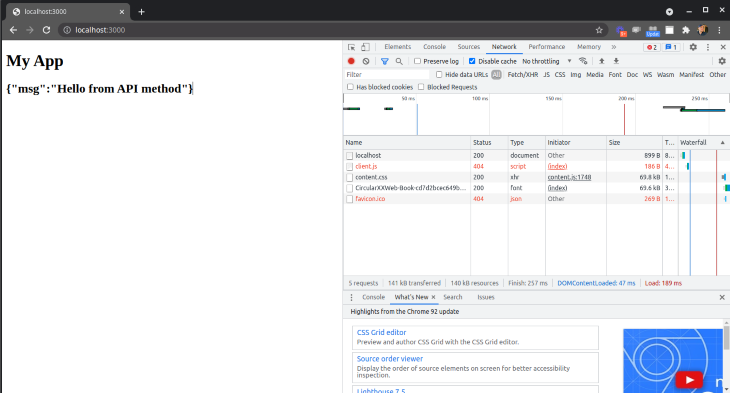
Once you run node ./server.js and visit http://localhost:3000/, you should see the below HTML output:
<div id="app">
 <h1>My App</h1>

 <h2>index.vue</h2>
</div>
The biggest benefit of fastify-vite is that it sets up server-side rendering with full client-side hydration for you. Pure server side rendering with Vue is easy, but getting the client to pick up where the server left off is tricky.
Fastify-vite ensures a seamless handoff from client to server without much extra work. Here’s how server-side rendering with fastify-vite works.
First, you need to add the fastify-api plugin. Fastify-vite works nicely with fastify-api to allow your Vue components to make API requests during server-side rendering, so your routes don’t have to make an API request to the server in the mounted() hook to fetch data.
{
 "dependencies": {
 "fastify": "3.17.0",
 "fastify-api": "0.2.0",
 "fastify-vite": "2.2.0-beta.5",
 "fastify-vite-vue": "2.2.0-beta.5"
 }
}
Next, you need to add an API endpoint to the server.js file. This endpoint will echo back whatever msg it receives. Simple, but enough to show that fastify-vite will be able to render index.vue without making an HTTP request to /echo.
const fastify = require('fastify')()
const fastifyVite = require('fastify-vite')
const fastifyViteVue = require('fastify-vite-vue')
const fastifyApi = require('fastify-api')

async function main () {
 await fastify.register(fastifyApi)
 await fastify.register(fastifyVite, {
 api: true,
 root: __dirname,
 renderer: fastifyViteVue,
 })

 fastify.api(({ post }) => ({
 echo: post('/echo/:msg', ({ msg }, req, reply) => { // <-- new API endpoint `echo`
 reply.send({ msg })
 })
 }))

 return fastify
}
Next, add data fetching to index.vue. The fastify-vite-vue package has a neat useHydration() hook. It takes a getData() function that’s responsible for loading the initial data and injects an $api object that lets you access the echo API endpoint.
Note: Do not use an HTTP client, like Axios or fetch(), directly. Use $api because fastify-vite-vue is smart enough to skip the HTTP request on the server side.
<template>
 <h2>{{ctx.$loading ? 'Loading...' : ctx.$data.result.body}}</h2>
</template>

<script>
import { useHydration } from 'fastify-vite-vue/client'

export const path = '/'

export async function getData ({ req, $api }) {
 return {
 result: await $api.echo({
 msg: 'Hello from API method',
 }),
 }
}
export default {
 async setup () {
 const ctx = await useHydration({ getData })
 return { ctx }
 }
}
</script>
In order to fully hydrate the client-side app, you need to create a client-side entry point in entry/client.js that hydrates the app. Below is entry/client.js:
import { createApp } from '../main'
import { hydrate } from 'fastify-vite-vue/client'
const { app, router } = createApp()

hydrate(app)

// Wait until router is ready before mounting to ensure hydration match
router.isReady().then(() => app.mount('#app'))
When you open up http://localhost:3000, notice that index.vue contains the response from echo without any HTTP requests to /echo.
However, suppose you add a new view — views/hello.vue — that has a Vue router-link back to the index.
<template>
 <router-link to="/">Back to Home</router-link>
</template>

<script>
export const path = '/hello'
</script>
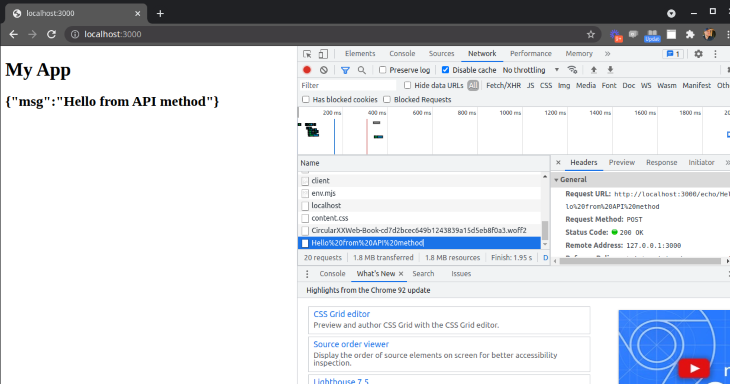
Navigate to http://localhost:3000/hello, click on the link, and look closely at the Network tab when http://localhost:3000 loads. You’ll see that getData() now makes a separate HTTP request to the /echo API endpoint.
Fastify-vite is a powerful Fastify plugin that helps you integrate Vite’s powerful features into your Fastify app, including full server-side rendering support.
Although fastify-vite is not production-ready yet, you should try it out for yourself on any Fastify apps you’re working on. It makes server-side rendering with client side hydration much easier!
There’s no doubt that frontends are getting more complex. As you add new JavaScript libraries and other dependencies to your app, you’ll need more visibility to ensure your users don’t run into unknown issues.
LogRocket is a frontend application monitoring solution that lets you replay JavaScript errors as if they happened in your own browser so you can react to bugs more effectively.
👁 LogRocket Dashboard Free Trial BannerLogRocket works perfectly with any app, regardless of framework, and has plugins to log additional context from Redux, Vuex, and @ngrx/store. Instead of guessing why problems happen, you can aggregate and report on what state your application was in when an issue occurred. LogRocket also monitors your app’s performance, reporting metrics like client CPU load, client memory usage, and more.
Build confidently — start monitoring for free.
Learn how to use Gemini CLI subagents to delegate frontend, backend, testing, and docs tasks to specialized agents with guardrails and clear ownership.
Learn how next-browser gives AI agents runtime context for debugging Next.js apps, including React props, hydration, PPR, forms, and performance.
Build dynamic LLM routing in Next.js with OpenRouter, TanStack AI, task classification, model fallbacks, and cost-aware routing.
TSRX adds first-class control flow, conditional hooks, and scoped styles to React via a TypeScript compiler extension — no new framework required.
Would you be interested in joining LogRocket's developer community?
Join LogRocket’s Content Advisory Board. You’ll help inform the type of content we create and get access to exclusive meetups, social accreditation, and swag.
Sign up now