|
VOOZH | about |
|
VOOZH | about |
In this post, you’ll learn about functional components and find out how to use stateless components in your workflow in Vue.
👁 A Guide For Creating and Using Stateless Components in VueThe Replay is a weekly newsletter for dev and engineering leaders.
Delivered once a week, it's your curated guide to the most important conversations around frontend dev, emerging AI tools, and the state of modern software.
You will need the following in your PC:
node -v
To do this, uninstall the old CLI version first:
npm uninstall -g vue-cli
Next, install the new one:
npm install -g @vue/cli
npm install
A Vue application state is an object that determines the behaviors of a component. Vue application states dictate how the component renders or how dynamic it is.
Meanwhile, a Vue instance is a ViewModel that contains options including templates for presentation elements, elements to be mounted, methods, and lifecycle hooks when initialized.
Components in Vue.js are usually reactive: in Vue.js, data objects can have a lot of options for concepts you can use, computed properties, methods, and watchers. Additionally, data objects re-render any time data values change.
By contrast, functional components do not hold state.
Essentially, functional components are functions that have components of their own. Functional components do not have states or instances because they don’t keep or track state. Furthermore, you can’t access the construct within functional components.
Functional components were created for presentation. Functional components in Vue.js are similar to those in React.js. In Vue, developers can use functional components to build straight-forward, neat components easily by passing context.
From the official documentation, a functional component looks like this:
Vue.component('my-component', {
 functional: true,
 // Props are optional
 props: {
 // ...
 },
 // To compensate for the lack of an instance,
 // we are now provided a 2nd context argument.
 render: function (createElement, context) {
 // ...
 }
})
One key guideline to keep in mind when creating functional components is functional property. The functional property is specified either in the template section of your component or in the script section. The template section syntax looks something like this:
<template functional>
 <div> <h1> hello world</h1>
 </div>
</template>
You can specify scripts as a property like this:
export default {
 functional: true,
 render(createElement) {
 return createElement(
 "button", 'Click me'
 );
 }
};
Functional components can be executed quickly because they have no state and do not go through the same initialization and re-rendering process as components or parts of the template on data value change.
Mostly, functional components are useful for presentation or for displaying a loop of items.
In this introductory demo, you’ll see both the single page component type demo with the Vue template and the render function type of functional components.
Open your Test.vue file and copy the code block below into the file:
<template functional>
 <div>
 <p v-for="brand in props.brands" :key="brand">{{brand}} </p>
 </div>
</template>
<script>
export default {
 functional: true,
 name: 'Test',
 props: {
 brands: Array
 }
}
</script>
The functional indicator in both the script and the template shows that this is a functional component. Note that props can still be passed — they are the only data value that can be passed in functional components.
The temporal data props hold can also be looped through.
Open your app.vue file and copy the code block below into it:
<template>
 <div id="app">
 <img alt="Vue logo" src="./assets/logo.png">
 <Test
 :brands ="['Tesla', 'Bentley', 'Ferrari', 'Ford']">
 </Test>
 </div>
</template>
<script>
import Test from './components/Test.vue'
export default {
 name: 'app',
 components: {
 Test
 }
}
</script>
<style>
#app {
 font-family: 'Avenir', Helvetica, Arial, sans-serif;
 -webkit-font-smoothing: antialiased;
 -moz-osx-font-smoothing: grayscale;
 text-align: center;
 color: #2c3e50;
 margin-top: 60px;
}
</style>
Here, you’ll see that the props reference is being used with a colon.
Run the application in the dev server with the following command:
npm run serve
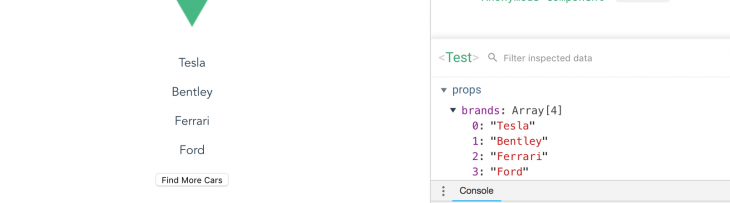
The result in your browser should look like this:
Functional components can also contain render functions.
Developers use render functions to create their own virtual DOM without using the Vue template.
Use a render function to create a new button under the cars list. Create a new file inside your project folder named example.js and copy the code block below into the file:
export default {
 functional: true,
 render(createElement, { children }) {
 return createElement("button", children);
 }
 };
This creates a render function in a functional component to show a button and uses the child node on the element as the button text.
Open your app.vue file and copy the code block below into the file:
<template>
 <div id="app">
 <img alt="Vue logo" src="./assets/logo.png">
 <Test
 :brands ="['Tesla', 'Bentley', 'Ferrari', 'Ford']">
 </Test>
 <Example>
 Find More Cars
 </Example>
 </div>
</template>
<script>
import Test from './components/Test.vue'
import Example from './Example'
export default {
 name: 'app',
 components: {
 Test, Example
 }
}
</script>
<style>
#app {
 font-family: 'Avenir', Helvetica, Arial, sans-serif;
 -webkit-font-smoothing: antialiased;
 -moz-osx-font-smoothing: grayscale;
 text-align: center;
 color: #2c3e50;
 margin-top: 60px;
}
</style>
If you run the application again, you’ll see that Find More Cars — the child node — is now the text for the button. The example component appears as a functional component upon inspection.
You can add click events on the components and include the method in your root component. However, you need the data object argument in your render function to access it.
Copy this in your example.js file:
export default {
 functional: true,
 render(createElement, { data, children }) {
 return createElement("button", data, children);
 }
 };
Copy the following into your app.vue file:
<template>
 <div id="app">
 <img alt="Vue logo" src="./assets/logo.png">
 <Test
 :brands ="['Tesla', 'Bentley', 'Ferrari', 'Ford']">
 </Test>
 <Example @click="callingFunction">
 Find More Cars
 </Example>
 </div>
</template>
<script>
import Test from './components/Test.vue'
import Example from './Example'
export default {
 name: 'app',
 components: {
 Test, Example
 },
 methods: {
 callingFunction() {
 console.log("clicked");
 }
 }
}
</script>
In addition to the above example, there are other arguments you can use in your functional components listed in the official documentation.
This beginner’s guide to functional components can help you achieve quick presentation, display a loop of items, or display simple parts of your workflow that do not require a state.
Debugging Vue.js applications can be difficult, especially when users experience issues that are difficult to reproduce. If you’re interested in monitoring and tracking Vue mutations and actions for all of your users in production, try LogRocket.
👁 LogRocket Dashboard Free Trial BannerLogRocket lets you replay user sessions, eliminating guesswork by showing exactly what users experienced. It captures console logs, errors, network requests, and pixel-perfect DOM recordings — compatible with all frameworks.
With Galileo AI, you can instantly identify and explain user struggles with automated monitoring of your entire product experience.
Modernize how you debug your Vue apps — start monitoring for free.
Learn how next-browser gives AI agents runtime context for debugging Next.js apps, including React props, hydration, PPR, forms, and performance.
Build dynamic LLM routing in Next.js with OpenRouter, TanStack AI, task classification, model fallbacks, and cost-aware routing.
TSRX adds first-class control flow, conditional hooks, and scoped styles to React via a TypeScript compiler extension — no new framework required.
Learn how to build a full React Native auth system using Better Auth and Expo — with email/password login, Google OAuth, session persistence, and protected routes.
Would you be interested in joining LogRocket's developer community?
Join LogRocket’s Content Advisory Board. You’ll help inform the type of content we create and get access to exclusive meetups, social accreditation, and swag.
Sign up now