|
VOOZH | about |
|
VOOZH | about |
Disclaimer (updated as of 17 July 2024): There have been recent reports that Polyfill.io has been compromised and is being used to spread malware. This article, which was last reviewed on 28 June 2021, mentions the use of Polyfill.io to load a polyfill asynchronously inside a script tag. We advise reviewing your usage of this service and considering alternatives or updates to ensure your application’s security.
At the 2021 Next.js Conf on June 15, developers from around the world joined to witness the launch of Next.js 11, the latest release from the Vercel team. The updates and new features included in Next.js 11 have offered significant improvements to an already popular library.
In this article, we’ll take an in-depth look at some of these updates, which have impacted both the user and developer experiences. Let’s get started!
The Replay is a weekly newsletter for dev and engineering leaders.
Delivered once a week, it's your curated guide to the most important conversations around frontend dev, emerging AI tools, and the state of modern software.
At its core, conformance is a set of principles or coding guidelines that takes some of the decision-making responsibility away from the developer. By setting defaults and providing guidelines, it is easier to achieve a desired result and prevent common mistakes.
According to the Next.js team, “conformance is a system that provides carefully crafted solutions and rules to support optimal loading and Core Web Vitals”.
The new conformance principles in Next.js 11 can be broken down into three areas:
The framework must have certain design patterns established in its core that make it difficult for the developer to do things incorrectly.
Despite having strong defaults in place, there will be occasions where the onus falls on the developer to select between two potential paths. A set of actionable rules will make it easier for the application to adhere to strong performance standards while still allowing a sufficient level of customization.
Authoring time gives importance to performance during a feature’s development cycle instead of after production. Performance must be considered before code commit instead of being treated as an analytics-based metric after the product release.
One of the easiest ways to enforce the authoring time principle is through linting rules. Therefore, Next.js 11 supports ESLint out of the box.
To get the benefits of these features, you have to upgrade to the latest version of Next.js by running the following code:
npm i next@latest react@latest react-dom@latest
Enable linting by running the code below:
npx next lint
Once we upgrade our version and enable ESLint, we’ll begin to receive warnings that nudge us in the direction of industry best practice, helping our apps adhere to conformance guidelines.
Many websites include third-party scripts to enable analytics and advertisements.
The order in which scripts are loaded has a huge impact on page performance, particularly when dealing with several external scripts on a webpage. If not managed appropriately, scripts can severely degrade the user experience.
Next.js has introduced a Script Component with a strategy property that handles a lot of these issues.
Let’s test it out! One noticeable change is that we no longer have to wrap the native HTML script tag in the next/head tag:
import Head from 'next/head'
function Home() {
 return (
 <>
 <Head>
 <script async src="https://polyfill.io/v3/polyfill.min.js?features=WebAnimations" />
 </Head>
 </>
 )
}
Instead, we can use the native HTML script tag directly, as seen below:
import Script from 'next/script'
function Home() {
 return (
 <>
 <Script src="https://polyfill.io/v3/polyfill.min.js?features=WebAnimations" />
 </>
 )
}
In this example, we are advised to load our polyfill using the beforeInteractive strategy. Let’s change strategies to see how it impacts loading the scripts!
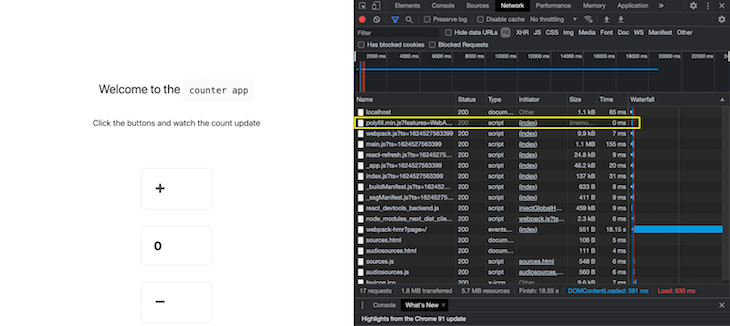
beforeInteractiveScripts are injected into the HTML at server side and run on the browser before the bundled JavaScript can run. Using the code block below, we see that the network call to fetch the polyfill is made before everything else in the network tab:
<Script src="https://polyfill.io/v3/polyfill.min.js?features=WebAnimations"
`strategy="beforeInteractive" />
👁 Beforeinteractive Script Polyfill First
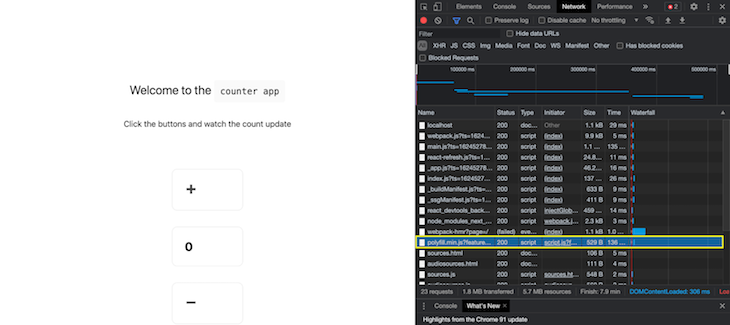
afterInteractiveIf we change our strategy to afterInteractive, the script would execute after the page becomes interactive. The network request is towards the bottom of the page in the network tab, which prioritizes more important tasks.
👁 After Interactive Script Execute Last
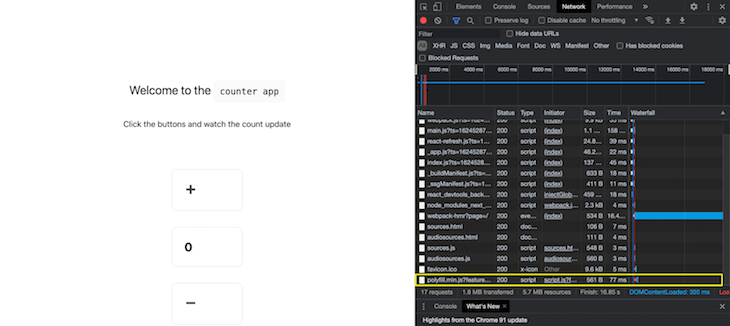
lazyOnloadChanging the strategy to lazyOnload tells Next.js to load the script during idle time. The network request to fetch the polyfill moves further down to the bottom of the page; there are no other lazy loaded scripts, as seen in the next screenshot.
onLoad propIn addition to the customizations above, if we want to execute some code after a script is loaded, we can use the onLoad prop for the script tag. The onLoad prop ensures that the script above has loaded, allowing the function to use the script’s features and variables without crashing:
<Script
 id="my-script"
src="https://polyfill.io/v3/polyfill.min.js?features=WebAnimations"
 onLoad={() => {
 // this executes after the script is loaded
 }}
/>
Next.js 11 includes enhancements to the next/image component like reducing layout shifts, which provides a smoother experience for the end user.
Previously, to render images using the Image component, the height and width props were mandatory. These props allowed Next.js to identify the size of the image and render a placeholder, preventing layout shifts and disorganized user interfaces:
<Image
 alt="Fixing"
 src="/fixing.png"
 layout="intrinsic"
 width={700}
 height={475}
/>
Next.js 11 provides support for the src prop, which can be applied using the import keyword. You don’t need to specify the height and width props separately if you import the source in this manner:
import source from '../public/fixing.png'
<Image
 alt="Fixing"
 src={source}
 layout="intrinsic"
/>
In Next.js 11, the next/image component supports a new placeholder prop that sets value to blur on slower connections. The next/image component will display a blurred, low resolution image while the original image is loading:
<Image
 alt="Fixing"
 src={source}
 layout="intrinsic"
 placeholder="blur"
/>
The blurred image will be shown for two to three seconds before the original image finally loads.
Additionally, Next.js 11 provides an option to supply a custom placeholder through the Image tag, which can be shown using the blurDataURL prop. The value supplied to this prop can be generated using an application like blurha.sh.
Webpack 5 support was announced in version 10.2 for all Next.js projects without a custom webpack configuration in their next.config.js file. A custom webpack configuration looks like the code below:
module.exports = {
 webpack: (config, { buildId, dev, isServer, defaultLoaders, webpack }) => {
 return config; // return the modified config
 },
}
From version 11 onwards, webpack 5 is the default build tool for all Next.js applications, irrespective of the custom config. All of the following optimizations that come with webpack 5 will be available to newly built projects.
We know that we can trigger a build using the command next build. But what if little has changed between the two successive builds that we trigger for the project?
Webpack 5 allows for conditional recompilation of only the files that have been changed. Performance is improved because we don’t redundantly process chunks that have not been altered.
With webpack 5 in place, Next.js 11 identifies fast refresh as a special task and executes it at a higher priority, leading to a faster refresh every time any code change is saved.
With webpack 5 in place, the build process for the build command is deterministic. Hashes generated upon subsequent builds do not change if the code segments have not changed, meaning files hashed in the browser can be reused over a longer time.
Webpack 5 provides the capability to tree shake commonJS modules, removing unused code from the bundle.
Due to requests from the community, the Vercel team has launched the @next/codemod tool, which supports compatibility between React and Next.js projects.
We can run the tool, supply it a project generated using the Create React App script, and convert it to a Next.js project. Let’s try it out!
First, create a React app using the command:
npx create-react-app cra-demo
Now, that we’ve initialized a new React project, we can run our project using the command:
npm run start
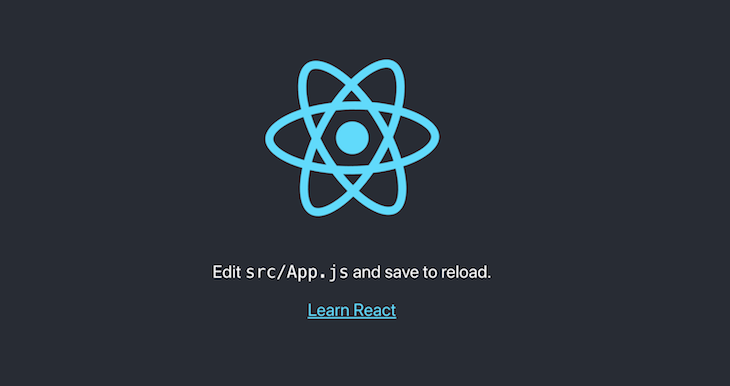
You’ll see the familiar React screen:
Next, run the script to migrate from Create React App to a Next.js project:
npx @next/codemod cra-to-next cra-demo
We can see that the script makes several changes to the repository to port it to Next.js. These changes include:
package.jsonpages folder, which is a main feature of a Next.js repo_app.js filenext.config.js file and population of itNext.js 11 features a brand new implementation of the Babel loader for webpack, which includes an in-memory config caching layer that further reduces the startup time from improvements made in versions 10.1 and 10.2.
The team at Vercel has used several next-gen frontend technologies like serviceWorker, WebAssembly, and ES modules to provide a collaborative environment right inside the browser. Using the Next.js Live feature, developers and designers can collaborate simply by sharing a URL. The Live feature is currently running under early access.
It is clear that these upgrades make up one of the most prominent Next.js releases ever!
There are changes made to the core that reduce startup times, like the Babel optimization, and conformance suggestions that nudge the developer towards a proven solution. Other improvements are to loading images and scripts, making the user experience seamless. Additionally, we now have the ability for improved collaboration using the Live feature.
For these reasons and more, the Next.js 11 version looks promising and worthy of an upgrade. Give it a try and let us know what you think in the comments!
Debugging Next applications can be difficult, especially when users experience issues that are difficult to reproduce. If you’re interested in monitoring and tracking state, automatically surfacing JavaScript errors, and tracking slow network requests and component load time, try LogRocket.
LogRocket captures console logs, errors, network requests, and pixel-perfect DOM recordings from user sessions and lets you replay them as users saw it, eliminating guesswork around why bugs happen — compatible with all frameworks.
LogRocket's Galileo AI watches sessions for you, instantly identifying and explaining user struggles with automated monitoring of your entire product experience.
The LogRocket Redux middleware package adds an extra layer of visibility into your user sessions. LogRocket logs all actions and state from your Redux stores.
👁 ImageModernize how you debug your Next.js apps — start monitoring for free.
Learn how to use Gemini CLI subagents to delegate frontend, backend, testing, and docs tasks to specialized agents with guardrails and clear ownership.
Learn how next-browser gives AI agents runtime context for debugging Next.js apps, including React props, hydration, PPR, forms, and performance.
Build dynamic LLM routing in Next.js with OpenRouter, TanStack AI, task classification, model fallbacks, and cost-aware routing.
TSRX adds first-class control flow, conditional hooks, and scoped styles to React via a TypeScript compiler extension — no new framework required.
Would you be interested in joining LogRocket's developer community?
Join LogRocket’s Content Advisory Board. You’ll help inform the type of content we create and get access to exclusive meetups, social accreditation, and swag.
Sign up now