|
VOOZH | about |
|
VOOZH | about |
As part of the TypeScript 4.7 release comes a major upgrade to ECMAScript Module Support for Node.js. This post takes a look at what that means.
👁 Typescript 4.7 ECMAScript Module SupportThe Replay is a weekly newsletter for dev and engineering leaders.
Delivered once a week, it's your curated guide to the most important conversations around frontend dev, emerging AI tools, and the state of modern software.
When ES6 shipped back in 2015, with it came the concept of modules for JavaScript. Back then it was known as “ES6 modules”. These days they are called ECMAScript modules.
Whilst writing code using ECMAScript module semantics came quickly for front end, for the back end (which is generally Node.js) that has not the case. There’s a number of reasons for this:
However, with the release Node.js 14 support for ECMAScript modules (also known as “ESM”) landed. If you’re interested in the details of that module support then it’s worth reading this post on ECMAScript modules.
The TypeScript team have been experimenting with ways to offer support for ECMAScript modules from a Node.js perspective, and with TypeScript 4.7 support is being released.
In this post we’ll test drive that support by attempting to build a simple module in TypeScript using the new ECMAScript modules support. As we do this, we’ll discuss what it looks like to author ECMAScript modules for Node.js in TypeScript.
Let’s go!
We’re going to make a module named greeter — let’s initialize it:
mkdir greeter
cd greeter
npm init --yes
We now have a package.json that looks something like this:
{
 "name": "greeter",
 "version": "1.0.0",
 "description": "",
 "main": "index.js",
 "scripts": {
 "test": "echo \"Error: no test specified\" && exit 1"
 },
 "keywords": [],
 "author": "",
 "license": "ISC"
}
Node.js supports a new setting in package.json called type. This can be set to either “module” or “commonjs”. To quote the docs:
Files ending with
.jsare loaded as ES modules when the nearest parent package.json file contains a top-level field"type"with a value of"module".
With that in mind, we’ll add a "type": "module" to our package.json.
We’re now ECMAScript module support compliant, let’s start adding some TypeScript.
In order that we can make use of TypeScript ECMAScript modules support we’re going to install TypeScript 4.7 (currently in beta):
npm install [email protected] --save
With this in place, we’ll initialize a TypeScript project:
npx tsc --init
This will create a tsconfig.json file which contains many options. We will tweak the module option to be nodenext to opt into ECMAScript module support:
{
 "compilerOptions": {
 // ...
 "module": "nodenext" /* Specify what module code is generated. */,
 "outDir": "./lib" /* Specify an output folder for all emitted files. */,
 "declaration": true /* Generate .d.ts files from TypeScript and JavaScript files in your project. */

 // ...
 }
}
We’ve also set the outDir option, such that compiled JavaScript will go into that directory, and the declaration option such that .d.ts files will be generated. We’ll also update the "scripts" section of our package.json to include build and start scripts:
 "scripts": {
 "build": "tsc",
 "start": "node lib/index.js"
 },
With all that set up, we’re ready to write some TypeScript ECMAScript modules. First we’ll write a greetings.ts module:
export function helloWorld(): string {
 return 'hello world!';
}
There is nothing new or surprising about this; it’s just a module exporting a single function named helloWorld. It becomes more interesting as we write our index.ts module:
import { helloWorld } from './greetings.js';

const greeting = helloWorld();

console.log(greeting);
The code above imports our helloWorld function and then executes it; writing the output to the console.
Not particularly noteworthy; however, the way we import is.
We are importing from './greetings.js'. In the past we would have written:
import { helloWorld } from './greetings';
Now we write:
import { helloWorld } from './greetings.js';
This can feel slightly odd and unnatural because we have no greetings.js in our codebase; only greetings.ts. The imports we’re writing reflect the code that will end up being executed; once our TypeScript has been compiled to JavaScript. In ES modules, relative import paths need to use extensions.
The easiest way to demonstrate that this is legitimate is to run the following code:
npm run build && npm start
Which results in:
> [email protected] build
> tsc


> [email protected] start
> node lib/index.js

hello world!
So, it works!
Part of ECMAScript module support is the ability to specify the module type of a file based on the file suffix. If you use .mjs, you’re explicitly saying a file is an ECMAScript module. If you use .cjs, you’re explicitly saying a file is an CommonJS module. If you’re authoring with TypeScript, you’d use mts and cts respectively and they’d be transpiled to mjs and cjs.
Happily, Node.js allows ES modules to import CommonJS modules as if they were ES modules with a default export; which is good news for interop. Let’s test that out by writing a oldGreetings.cts module:
export function helloOldWorld(): string {
 return 'hello old world!';
}
Exactly the same syntax as before. We’ll adjust our index.ts to consume this:
import { helloWorld } from './greetings.js';
import { helloOldWorld } from './oldGreetings.cjs';

console.log(helloWorld());
console.log(helloOldWorld());
Note that we’re importing from './oldGreetings.cjs'.
We’ll see if it works:
npm run build && npm start
Which results in:
> [email protected] build
> tsc


> [email protected] start
> node lib/index.js

hello world!
hello old world!
It does work!
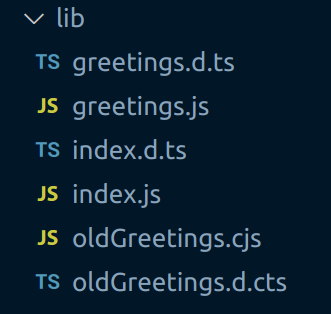
Before we close out, it might be interesting to look at what TypeScript is doing when we run our npm run build. It transpiles our TypeScript into JavaScript in our lib directory:
Note the greetings.ts file has resulted in greetings.js and a greetings.d.ts files, whereas oldGreetings.cts has resulted in oldGreetings.cjs and a oldGreetings.d.cts files; reflecting the different module types represented.
It’s also interesting to look at the difference in the emitted JavaScript. When you consider how similar the source files were. If you look at greetings.js:
export function helloWorld() {
 return 'hello world!';
}
This is the same code as greetings.ts but with types stripped. However, if we look at oldGreetings.cjs, we see this:
'use strict';
Object.defineProperty(exports, '__esModule', { value: true });
exports.helloOldWorld = void 0;
function helloOldWorld() {
 return 'hello old world!';
}
exports.helloOldWorld = helloOldWorld;
In the middle is the same code as oldGreetings.cts, but with types stripped, but around that boilerplate code that TypeScript is emitting for us to aid in interop.
We’ve seen what TypeScript support for ECMAScript modules looks like, and how to set up a module to embrace it.
If you’d like to read up further on the topic, the TypeScript 4.7 beta release notes are an excellent resource.
LogRocket lets you replay user sessions, eliminating guesswork by showing exactly what users experienced. It captures console logs, errors, network requests, and pixel-perfect DOM recordings — compatible with all frameworks, and with plugins to log additional context from Redux, Vuex, and @ngrx/store.
With Galileo AI, you can instantly identify and explain user struggles with automated monitoring of your entire product experience.
Modernize how you understand your web and mobile apps — start monitoring for free.
Deploying a Node-based web app or website is the easy part. Making sure your Node instance continues to serve resources to your app is where things get tougher. If you’re interested in ensuring requests to the backend or third-party services are successful, try LogRocket.
👁 LogRocket Network Request MonitoringLogRocket lets you replay user sessions, eliminating guesswork around why bugs happen by showing exactly what users experienced. It captures console logs, errors, network requests, and pixel-perfect DOM recordings — compatible with all frameworks.
LogRocket's Galileo AI watches sessions for you, instantly identifying and explaining user struggles with automated monitoring of your entire product experience.
LogRocket instruments your app to record baseline performance timings such as page load time, time to first byte, slow network requests, and also logs Redux, NgRx, and Vuex actions/state. Start monitoring for free.
Learn how to use Gemini CLI subagents to delegate frontend, backend, testing, and docs tasks to specialized agents with guardrails and clear ownership.
Learn how next-browser gives AI agents runtime context for debugging Next.js apps, including React props, hydration, PPR, forms, and performance.
Build dynamic LLM routing in Next.js with OpenRouter, TanStack AI, task classification, model fallbacks, and cost-aware routing.
TSRX adds first-class control flow, conditional hooks, and scoped styles to React via a TypeScript compiler extension — no new framework required.
Would you be interested in joining LogRocket's developer community?
Join LogRocket’s Content Advisory Board. You’ll help inform the type of content we create and get access to exclusive meetups, social accreditation, and swag.
Sign up now