|
VOOZH | about |
|
VOOZH | about |
The common way to build Vue apps is by using templates. It is not as common to build Vue apps using render functions and JSX. In this tutorial, we will learn what render functions are and how they work. We will also take a look at what JSX is and why you might want to use it in your Vue project.
👁 ImageThe Replay is a weekly newsletter for dev and engineering leaders.
Delivered once a week, it's your curated guide to the most important conversations around frontend dev, emerging AI tools, and the state of modern software.
The following is required to follow along with this tutorial:
yarn global add @vue/cli
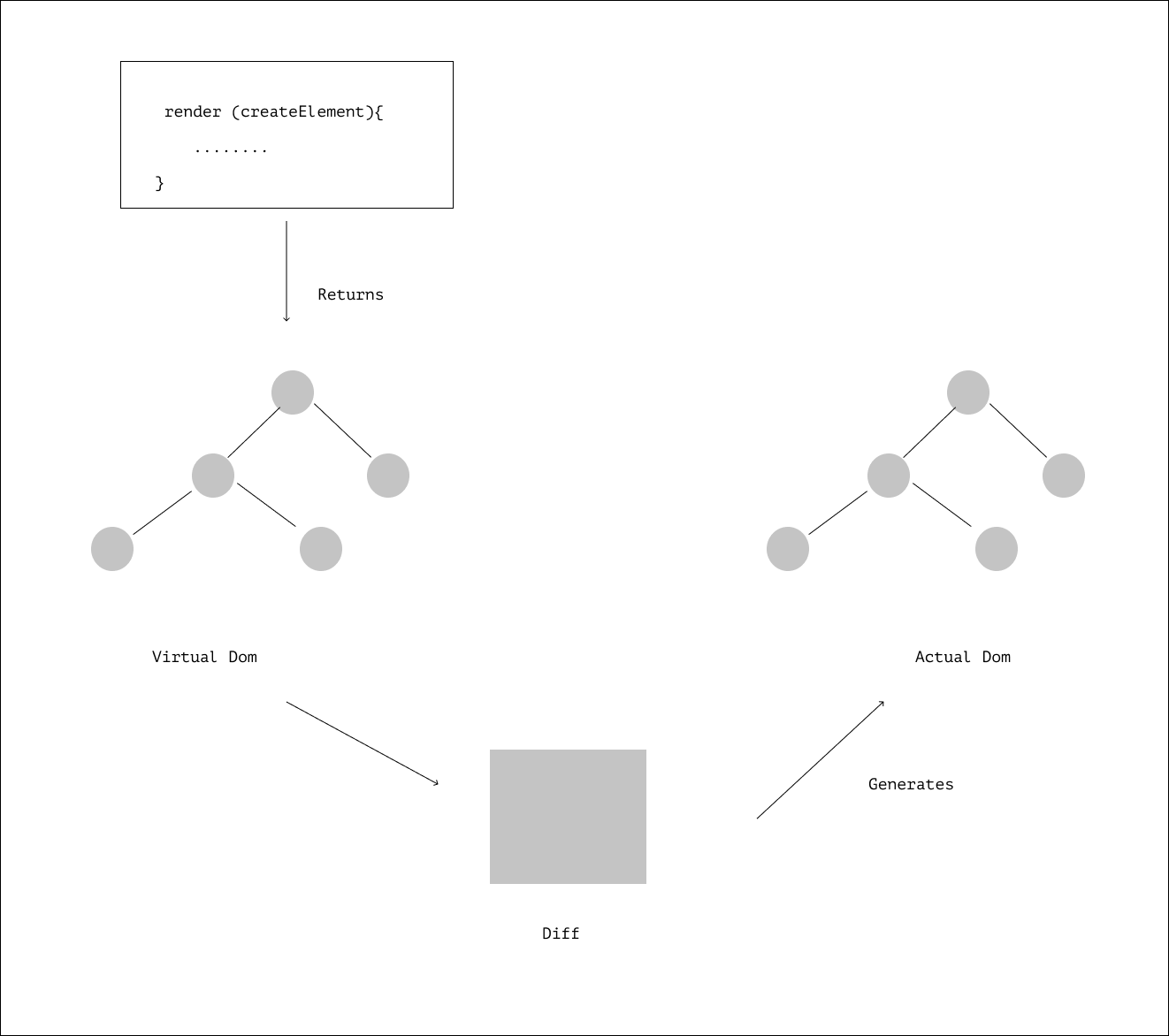
A render function is any function that returns a virtual DOM, they are what template code gets compiled to during the build process. The compiled code returns a virtual DOM which Vue processes to generate the actual browser DOM accordingly.
Render functions are closer to compiler alternatives than templates or JSX, they leverage on the document.createElement() Web API method to create HTML documents.
A typical render function looks like this:
render (createElement){
 return createElement( 'div', {}, [....]
)}
The createElement method takes in three arguments:
The createElement parameter in render functions is often written as h to denote Hyperscript as explained by Evan You — the creator of Vue.
Hyperscript stands for the script that generates HTML structures and helps create markups with JavaScript. The render function above can be rewritten like this:
render (h){
 return h( 'div', {}, [....]
)}
According to Evan You:
The Virtual DOM is a lightweight representation of what the actual DOM should look like at a given point in time
Vue creates a Virtual DOM that keeps track of all the changes made to the real DOM and on every data change Vue returns a new Virtual DOM, it then compares the old virtual DOM to the new one and checks for specific changes and makes adjustments in the real DOM.
The process of comparing and checking changes between the old and the new Virtual DOM is referred to as diffing.
This mini-app helps explore the Vue templates and render functions, you can learn more about render functions in Vue and the Virtual DOM here.
JSX is an XML-like syntax extension for writing JavaScript. It’s a syntactic abstraction of render functions. It was built by Facebook’s engineering team and originally intended to be used in building React apps in a more concise and elegant way.
JSX, similar to Vue templates, get compiled to render functions under the hood at build time.
<template>
 <div v-if="user.age > 18">
 Welcome, {{user.name}}
 </div>
</template>
The block of code above displays a user’s name if the user’s age is greater than 18.
export default {
....
 methods: {
 checkStatement(){
 if (this.user.age > 18) {
 return <div> Welcome, { this.user.name }</div>;
 }
 }
 },
 render(){
 return(
 {this.checkStatement()}
 )
 }
}
In JSX, the condition to check for a user’s age is wrapped in a function housed inside the Vue method instance and then the function is invoked in the render method.
 <template>
 <div v-for="item in items" :key="item.id">
 {{ item }}
 </div
</template>
The v-for directive executes a block of code a number of times. In the code above we use the v-for directive to render a list of items in an array.
render(){
 return(
 {this.items.map(item => {
 return (
 <div> {item} </div>
 )
 }
 )}
In JSX, the items in an array can be mapped over, using the ES2015 .map() method.
<template>
 <div>
 <button v-on:click="handleButtonClick()"> click me</button>
 </div>
</template>
<script>
export default {
 methods: {
 handleButtonClick(e){
 e.preventDefault();
 alert('button clicked')
 }
 }
</script>
The v-on directive listens to DOM events and triggers a function that performs a defined operation. In the code shown above, a click of the button triggers the handleButtonClick() function which displays an alert() dialog box.
export default {
 methods: {
 handleButtonClick(e){
 e.preventDefault();
 alert('button clicked')
 }
 },
 render(){
 return(
 <div>
 <button onClick={this.handleButtonClick}> click me</button>
 </div>
 )
 }
}
<template>
 <div>
 <div v-html="rawHtml"> </div>
 </div>
</template>
<script>
export default {
 data () {
 return {
 rawHtml: "<h1> This is some HTML </h1>",
 }
 }
}
</script>
v-html is used to set elements innerHTML, the code above sets the innerHTML of the div to the content of rawHtml.
export default {
 data () {
 return {
 rawHtml: "<h1> This is some HTML </h1>",
 }
 },
 render(){
 return(
 <div>
 <div domPropsInnerHTML={this.rawHtml}> </div>
 </div>
 )
 }
}
domPropsInnerHTML attribute performs the same task as v-html , it sets the content of the div to rawHtml.
<template>
 <div>
 <NewComponent/>
 </div>
</template>
<script>
import NewComponent from "NewComponent.vue";
export default {
 data () {
 return {
 components:{
 NewComponent,
 },
</script>
When using JSX there’s no need to register a component after importing it, you can just use it directly.
import NewComponent from 'NewComponent.vue'
....
 render(){
 return(
 <div> <NewComponent/></div>
 )
 }
For this section, we will be building a trivial app that displays a little bit of information about selected countries.
Create a new project
vue create vue-jsx
Install the dependencies needed to make use of JSX in your project using yarn:
yarn add @vue/babel-preset-jsx @vue/babel-helper-vue-jsx-merge-props
Configure your babel file to use the presets for JSX by including the following in your .babelrc or babel.config.js file, located in your project root directory:
{
 "presets": ["@vue/babel-preset-jsx"],
}
The @vue/babel-preset-jsx preset enables you to use the JSX presets made available by the Vue team.
Vue automatically injects h which is short for createElement in every method, so you don’t have to always declare h as a parameter in your render() function.
To test it out, replace the content of your HelloWorld.vue file in src/components folder with the following:
<script>
export default {
 data () {
 return {
 countries: [
 {
 name: 'Nigeria',
 description: "Nigeria is a large country that has a varied topography. It is about twice the size of the U.S. state of California and is located between Benin and Cameroon. It is the most populated country in africa"
 },
 {
 name: 'USA',
 description: "The United States of America (USA), commonly known as the United States (U.S. or US) or America, is a country comprising 50 states, a federal district, five major self-governing territories, and various possessions."
 },
 {
 name: 'China',
 description: "The People's Republic of China, simply known as China (Chinese:中国, pinyin: zhōng guó)is located in East Asia. It is the world's most populous country, with a population of around 1.404 billion. It is a unified multi-ethnic country with the Han nationality as the main nation."
 },
 {
 name: 'Argentina',
 description: "Argentina is a vast country located in the southern part of South America. The eighth largest country in the world, it is the second largest country in South America after Brazil, and it's about one-third the size of the United States. Argentina is bordered by the Andes Mountains and Chile to the west."
 },
 {
 name: 'Cameroon',
 description: "Cameroon is sometimes described as 'Africa in miniature' because it exhibits all the major climates and vegetation of the continent: mountains, desert, rain forest, savanna grassland, and ocean coastland. Cameroon can be divided into five geographic zones."
 },
 {
 name: 'Somalia',
 description: "With a land area of 637,657 square kilometers, Somalia's terrain consists mainly of plateaus, plains and highlands. Its coastline is more than 3,333 kilometers in length, the longest of mainland Africa and the Middle East. It has been described as being roughly shaped like a tilted number seven."
 }
 ]
 }
 },
 props: {
 msg: String
 },
 methods: {
 //where you write methods or functions used in your component
 },
 render () {
 return (
 <div>
 <div class="content">
 <h1>Hello, { this.msg } </h1>
 <main class="country-wrapper">
 {
 this.countries.map(country => {
 return (
 <div class="country-container">
 <h3 class="country-name ">{country.name}</h3>
 <article class="country-description">{country.description}</article>
 </div>
 )
 })
 }
 </main>
 </div>
 </div>
 )
 }
}
</script>
<!-- Add "scoped" attribute to limit CSS to this component only -->
<style scoped lang="scss">
.content{
 width: 100%;
 .country-wrapper{
 width: 100%;
 display: flex;
 flex-direction: row;
 flex-wrap: wrap;
 .country-container{
 display: flex;
 flex-direction: column;
 text-align:start;
 margin: 1em;
 padding: .5em;
 width: 28%;
 height: 12em;
 border: .08em solid #c4c4c4;
 .country-name{
 margin: 0;
 margin-bottom: 1em;
 }
 }
 }
}
</style>
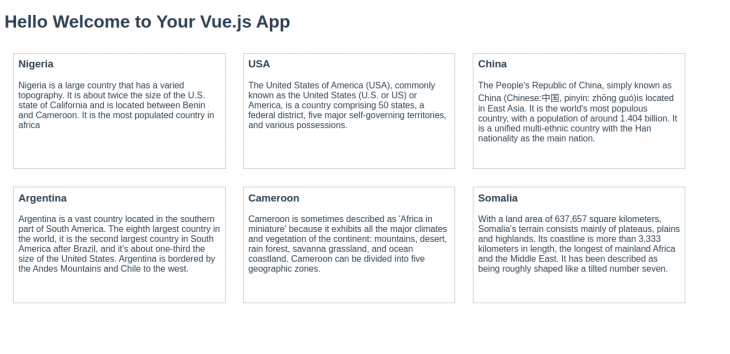
You should get a result similar to this:
We’ve seen how render functions work and how to set up a Vue project to use JSX, check out the repository to this article on GitHub. To learn about more awesome things you can do with Vue.js, check out the documentation.
Debugging Vue.js applications can be difficult, especially when users experience issues that are difficult to reproduce. If you’re interested in monitoring and tracking Vue mutations and actions for all of your users in production, try LogRocket.
👁 LogRocket Dashboard Free Trial BannerLogRocket lets you replay user sessions, eliminating guesswork by showing exactly what users experienced. It captures console logs, errors, network requests, and pixel-perfect DOM recordings — compatible with all frameworks.
With Galileo AI, you can instantly identify and explain user struggles with automated monitoring of your entire product experience.
Modernize how you debug your Vue apps — start monitoring for free.
Learn how next-browser gives AI agents runtime context for debugging Next.js apps, including React props, hydration, PPR, forms, and performance.
Build dynamic LLM routing in Next.js with OpenRouter, TanStack AI, task classification, model fallbacks, and cost-aware routing.
TSRX adds first-class control flow, conditional hooks, and scoped styles to React via a TypeScript compiler extension — no new framework required.
Learn how to build a full React Native auth system using Better Auth and Expo — with email/password login, Google OAuth, session persistence, and protected routes.
Hey there, want to help make our blog better?
Join LogRocket’s Content Advisory Board. You’ll help inform the type of content we create and get access to exclusive meetups, social accreditation, and swag.
Sign up now