|
VOOZH | about |
|
VOOZH | about |
Before the Electron project, cross-platform desktop application development was not particularly easy, because developers often had to maintain separate codebases for each operating system. Even though there were some generic APIs to build cross-platform applications, creating custom GUI elements was difficult.
👁 ImageElectron introduced a new way to develop cross-platform desktop applications with one codebase and web technologies (HTML, JavaScript, and CSS). Developers could build highly flexible and user friendly GUIs with their favorite frontend frameworks. Also, they could make custom GUI controls easily with HTML and CSS. Moreover, Electron has a full-featured API for native system operations.
However, Electron applications consume above average resources on user’s computers, which means many developers are looking for lightweight Electron alternatives. In this article, I will be discussing two alternatives to Electron: Tauri and Neutralino.js. I will also show you how to install and use these frameworks.
The Replay is a weekly newsletter for dev and engineering leaders.
Delivered once a week, it's your curated guide to the most important conversations around frontend dev, emerging AI tools, and the state of modern software.
Electron (formerly known as Atom Shell) is a cross-platform application development framework created by GitHub. Electron integrated the Chromium project and Node.js into one bundle and exposed a generic JavaScript API for native features such as displaying dialog boxes, sending notifications, and creating notification and tray icons.
Developers can create the GUI of the application with their preferred frontend framework and web UI toolkit. For example, we can use React and Material UI to build the frontend of the application. Native features like file handling can be done with the help of Node.js. As mentioned, we can use Electron’s JavaScript API for handling required operating system features.
If we need to show a message box, we can use the dialog.showMessageBox method from the Electron API. We don’t need to worry about the platform-specific code because Electron has dialog box implementations for Linux, macOS, and Windows.
Nowadays, most developers make their cross-platform applications with Electron because of the following impressive advantages:
Electron provides a flexible abstraction for native operating system features. Therefore, developers can maintain a single codebase for their cross-platform application that will run on most popular platforms.
Creating user interfaces with HTML and CSS in Electron is a piece of cake; these web technologies give you the freedom to create any custom GUI element. Additionally, Node.js has a massive ecosystem of libraries so you can add native-like features very quickly.
Electron was initially released about eight years ago, so it has a strong user base and community. There are beneficial built-in features such as auto updates, too. Reputable companies such as Microsoft choose Electron for building their cross-platform applications. For example, Visual Studio Code, Teams, and Skype were built on top of Electron.
While overall impressive, the Electron framework has several critical performance issues.
Electron bundles Chromium and Node.js into the final application package, so even if you are writing a simple and lightweight application by carefully choosing frontend libraries and frameworks, your application will become bloated.
Chromium and Node.js are complex projects, and these modules will consume above-average resources on your computer. In other words, applications built with Electron will take tons of physical memory and disk space.
Furthermore, Electron applications drain your laptop’s battery quickly due to high resource consumption. The cross-platform applications made with Electron often become bloatware due to Electron’s critical performance issues mentioned above.
Powerful hardware can hide this drawback from the average user. However, once users start running multiple Electron applications, it’s easy to feel this hidden performance issue.
Some time back, several alternatives such as Electrino and DeskGap arrived as solutions for Electron’s performance issues. Both projects tried to reduce the final bundle size by using the operating system’s webview instead of Chromium. Unfortunately, these two projects couldn’t complete with the matured Electron framework.
However, there are two trending lightweight alternatives for Electron: Tauri and Neutralino.js. Both projects try to solve Electron’s performance issue by replacing both Chromium and Node with better, lightweight alternatives.
Both projects use the well known webview library for rendering HTML and CSS instead of Chromium. The webview library uses the existing web browser component for rendering. For example, it will use gtk-webkit2 on Linux-based platforms, Cocoa Webkit on macOS, and Edge/MSHTML on Windows.
Tauri is a lightweight, cross-platform desktop application development framework written in Rust. Developers can make the frontend of a Tauri application by using their preferred frontend framework.
We can use Tauri’s JavaScript API for native platform features such as file handling and showing dialog boxes. Another great thing about Tauri is that we can implement our own native API in Rust and expose it to webview as a JavaScript API.
Let’s write a simple cross-platform application with Tauri.
Tauri applications can be built on any popular platform. In this demonstration, I built on Linux.
First, we need to install the required libraries by entering the following command in the Terminal:
$ sudo apt update && sudo apt install libwebkit2gtk-4.0-dev \
 build-essential \
 curl \
 wget \
 libssl-dev \
 appmenu-gtk3-module \
 libgtk-3-dev \
 squashfs-tools
After that, we need to install the Rust compiler and the Cargo package manager:
$ curl --proto '=https' --tlsv1.2 -sSf https://sh.rustup.rs | sh
Finally, we need to install Tauri CLI (make sure you already have Node.js and a package manager):
$ npm install -g tauri
A fresh Tauri application can be created by entering the following commands:
$ mkdir tauri-app && cd tauri-app
$ tauri create
Once you enter the tauri create command, the CLI will ask a set of questions for configuring the application. In this example, default values were used. The application name is tauri-app.
The tauri-app/src-tauri directory consists of the backend code of your application. You can place your frontend code into the tauri-app/dist directory. For now, I created tauri-app/dist/index.html and entered the following HTML:
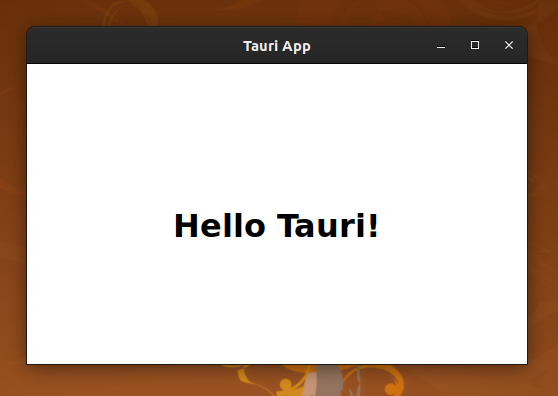
<h1 style="padding-top: 45vh; text-align: center;" >Hello Tauri!</h1>
We can launch our application by simply entering tauri dev. Since I am not using a development server, I had to set devPath to the ../dist directory in the tauri.conf.json file.
👁 A sample application created with Tauri
Tauri lets you create a single binary of your application for each platform. It can be done by simply entering tauri build command. But, if you need to make binaries for Linux, you have to run this command from a Linux computer.
Neutralino.js is a lightweight cross-platform desktop application development framework written in C/C++. Similar to Tauri, Neutralino motivates developers to use any frontend framework to build the GUI of the application. It also offers a JavaScript API for native operations similar to Electron.
Let’s write a simple cross-platform application with Neutralino.
Neutralino doesn’t require any additional libraries for application development. All you need to do is install its CLI on any operating system:
$ npm install -g @neutralinojs/neu
A fresh Neutralino application can be created using the following command:
$ neu create neutralino-app
The above command will create a new project by downloading the prebuilt JavaScript template. It will also download the latest prebuilt Neutralinojs binaries for each operating system. The main view (app/index.html) of this example application has the following content:
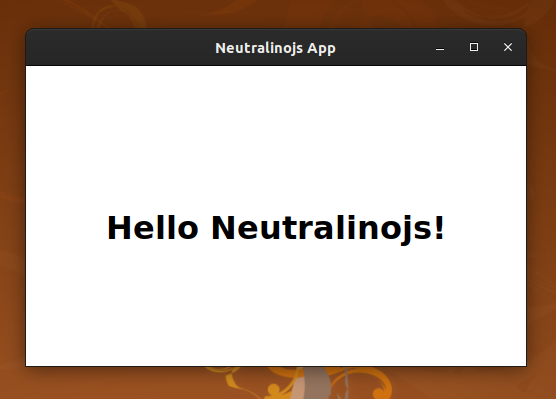
<h1 style="padding-top: 45vh; text-align: center;" >Hello Neutralinojs!</h1>
The application can be launched by simply entering the neu run command.
👁 A sample application created with Neutralinojs
We can release our application for others by entering neu build command. The command will make binaries inside the dist directory.
Neutralino doesn’t offer single binary creation support as Tauri does. It will always create a single resource file along with the platform-specific binary.
The same application took the following resources on Electron, Tauri, and Neutralino.js. The measurements are done on the Linux platform:
| Comparison factor | Electron | Tauri | Neutralino.js |
|---|---|---|---|
| Bundle size (uncompressed) | 200mb | 8mb | 2mb |
| Physical memory usage | ~100mb | ~50mb | ~50mb |
Electron, Tauri, and Neutralino.js will render an entire application inside a web browser. However, the rendering process of a web browser is complex. There are several steps before the drawing process of web-based GUI elements.
First, HTML, CSS content will be parsed. After that, the browser will make the DOM tree with parsed results. Finally, the web browser will draw the render tree that is made by combining style rules and the DOM tree.
Therefore, these frameworks are not suitable for very large applications. In such situations, going native or using a truly native framework such as Flutter could be a wise choice.
According to the above comparison, Tauri and Neutralino.js perform better than Electron. Electron applications consume a lot of disk space because each application is bundled with Chromium and Node. On the other hand, Tauri and Neutralino.js have surprisingly lightweight bundle sizes because those frameworks are reusing the user’s operating system’s system web browser library.
Electron allows you to ship a desktop application comfortably, but it will create critical performance issues that will cause frustration of users. Therefore, it’s time to look for an alternative.
Install LogRocket via npm or script tag. LogRocket.init() must be called client-side, not
server-side
$ npm i --save logrocket

// Code:

import LogRocket from 'logrocket';
LogRocket.init('app/id');
// Add to your HTML:

<script src="https://cdn.lr-ingest.com/LogRocket.min.js"></script>
<script>window.LogRocket && window.LogRocket.init('app/id');</script>
Learn how to use Gemini CLI subagents to delegate frontend, backend, testing, and docs tasks to specialized agents with guardrails and clear ownership.
Learn how next-browser gives AI agents runtime context for debugging Next.js apps, including React props, hydration, PPR, forms, and performance.
Build dynamic LLM routing in Next.js with OpenRouter, TanStack AI, task classification, model fallbacks, and cost-aware routing.
TSRX adds first-class control flow, conditional hooks, and scoped styles to React via a TypeScript compiler extension — no new framework required.
Hey there, want to help make our blog better?
Join LogRocket’s Content Advisory Board. You’ll help inform the type of content we create and get access to exclusive meetups, social accreditation, and swag.
Sign up now