Every time you run integration tests against AWS, you’re paying for it - DynamoDB reads, S3 operations, SQS messages. During active development, those costs add up fast. Worse, you need internet connectivity, and your tests depend on external service availability.
LocalStack solves this by emulating AWS services on your machine. You get S3, DynamoDB, SQS, SNS, Lambda, and 80+ other services running in a Docker container - completely free for the core services. Your .NET application connects to localhost:4566 instead of AWS, and you can develop offline, run tests without cloud costs, and iterate faster.
In this article, we’ll build a .NET 10 Minimal API that writes orders to DynamoDB, uploads receipts to S3, and publishes events to SQS. The same code will work against LocalStack (for development and CI) or real AWS (for staging and production) - controlled entirely by configuration. No code changes required.
The full sample code for this article lives at github.com/iammukeshm/localstack-for-dotnet-teams - clone it to follow along.
Why LocalStack for .NET Teams?
If you’ve built AWS-integrated .NET applications, you know the friction:
- Cost: Every
PutItem,SendMessage, orPutObjectduring development costs money. Run your test suite 50 times a day across a team, and you’re burning credits. - Speed: Network latency to AWS adds up. Local operations are instant.
- Offline development: No internet? No problem with LocalStack.
- CI costs: GitHub Actions or Azure DevOps running integration tests against real AWS? That’s expensive and slow.
- Environment isolation: Create and destroy resources freely without affecting shared AWS accounts.
LocalStack gives you fast feedback loops: create buckets, tables, and queues locally, run integration tests without touching AWS, and work offline when needed. It shines in dev/test and CI. For final validation (VPC, TLS, IAM edge cases), you should still hit a real AWS sandbox before production.
Essential AWS Services for .NET Developers
New to AWS? Start with this guide covering the core services every .NET developer should know.
What We’re Building
We’ll create a simple order processing API with three AWS integrations:
- DynamoDB – Store order records
- S3 – Upload order receipt files
- SQS – Publish order events for downstream processing
The architecture looks like this:
POST /orders→ Save to DynamoDB (Orders table)→ Upload receipt to S3 (orders-receipts bucket)→ Send message to SQS (orders-events queue)→ Return order confirmationThe key insight: your .NET code doesn’t care if it’s talking to LocalStack or AWS. The AWS SDK uses the same interfaces (IAmazonS3, IAmazonDynamoDB, IAmazonSQS). We just configure different endpoints.
Prerequisites
Here’s what you need:
- Docker Desktop – LocalStack runs as a container
- .NET 10 SDK – We’re using the latest .NET
- Visual Studio 2026 or VS Code – Your IDE of choice
- AWS CLI v2 – For creating and verifying LocalStack resources. Install AWS CLI v2 here
No AWS account required for this tutorial - that’s the point!
Step 1: Set Up LocalStack with Docker Compose
Create a new directory for your project and add a docker-compose.yml file:
services:localstack:image: localstack/localstack:latestcontainer_name: localstackports:- "4566:4566"environment:- SERVICES=s3,dynamodb,sqs- DEBUG=0- PERSISTENCE=1volumes:- "./localstack-data:/var/lib/localstack"- "/var/run/docker.sock:/var/run/docker.sock"Let’s break down what each setting does:
- Port 4566: This is LocalStack’s “edge” port - all services are accessible through this single endpoint
- SERVICES: We’re only running S3, DynamoDB, and SQS (faster startup, lower memory)
- DEBUG=0: Keeps logs clean; set to
1when troubleshooting - PERSISTENCE=1: Data survives container restarts (stored in
./localstack-data)
Start LocalStack:
dockercomposeup-dVerify it’s running:
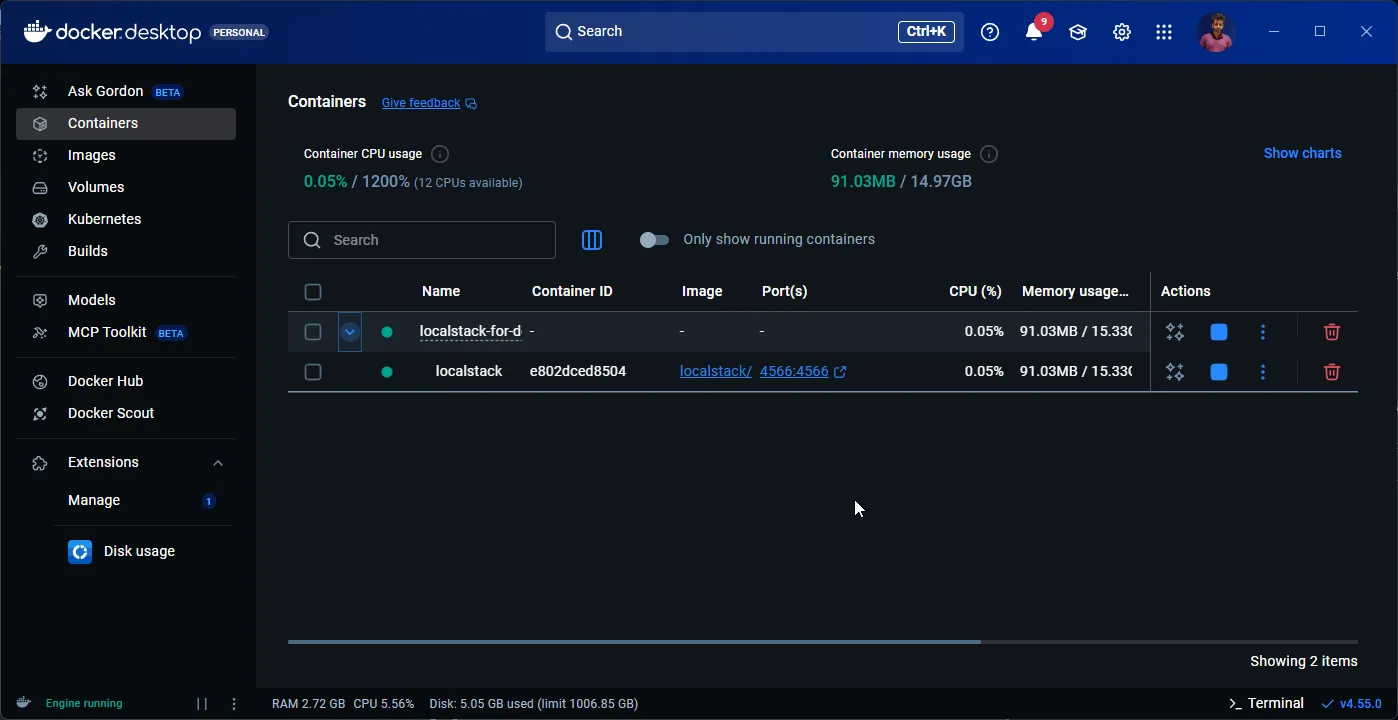
dockercomposelogslocalstackYou should see:
localstack | Ready.👁 LocalStack container running in Docker Desktop
Configure AWS CLI for LocalStack
LocalStack doesn’t validate credentials, so you can use any dummy values. Set these environment variables:
Linux/macOS:
exportAWS_ACCESS_KEY_ID=testexportAWS_SECRET_ACCESS_KEY=testexportAWS_DEFAULT_REGION=us-east-1Windows (PowerShell):
$env:AWS_ACCESS_KEY_ID="test"$env:AWS_SECRET_ACCESS_KEY="test"$env:AWS_DEFAULT_REGION="us-east-1"To interact with LocalStack, use the standard AWS CLI with the --endpoint-url flag:
aws--endpoint-url=http://localhost:4566s3lsThroughout this article, we’ll use
--endpoint-url=http://localhost:4566with all AWS CLI commands to target LocalStack instead of real AWS.
Step 2: Create AWS Resources in LocalStack
Before our .NET app can use these services, we need to create the resources. Run these commands:
Create the S3 Bucket
aws--endpoint-url=http://localhost:4566s3mbs3://orders-receiptsVerify:
aws--endpoint-url=http://localhost:4566s3lsOutput:
2025-12-26 10:00:00 orders-receiptsCreate the DynamoDB Table
aws--endpoint-url=http://localhost:4566dynamodbcreate-table--table-nameOrders--attribute-definitionsAttributeName=OrderId,AttributeType=S--key-schemaAttributeName=OrderId,KeyType=HASH--billing-modePAY_PER_REQUESTVerify:
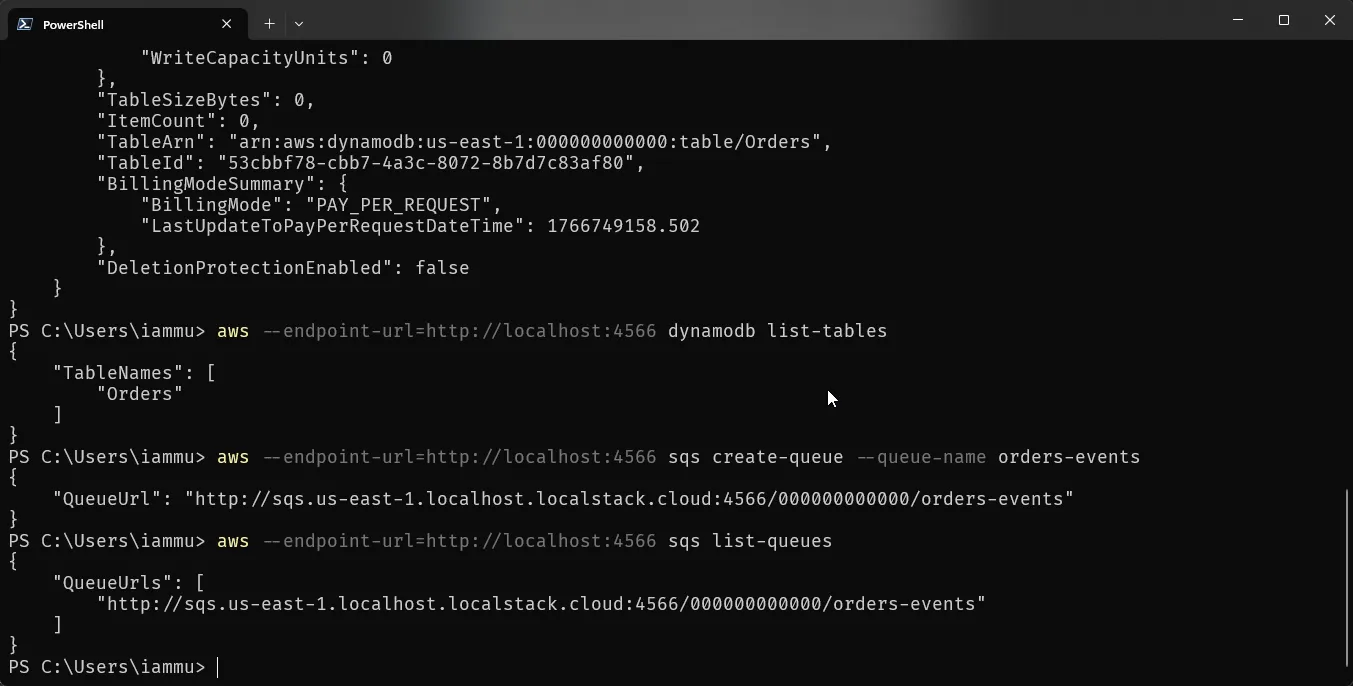
aws--endpoint-url=http://localhost:4566dynamodblist-tablesOutput:
{"TableNames": ["Orders"]}Create the SQS Queue
aws--endpoint-url=http://localhost:4566sqscreate-queue--queue-nameorders-eventsVerify:
aws--endpoint-url=http://localhost:4566sqslist-queuesOutput:
{"QueueUrls": ["http://sqs.us-east-1.localhost.localstack.cloud:4566/000000000000/orders-events"]}👁 LocalStack resources created via awslocal CLI
Step 3: Create the .NET 10 Project
Create a new Minimal API project:
dotnetnewwebapi-nLocalStackDemocdLocalStackDemoAdd the required NuGet packages:
dotnetaddpackageAWSSDK.S3dotnetaddpackageAWSSDK.DynamoDBv2dotnetaddpackageAWSSDK.SQSdotnetaddpackageScalar.AspNetCoreStep 4: Configure Endpoint Switching
The magic of LocalStack integration is in the configuration. We’ll set up our app to switch between LocalStack and AWS based on settings - no code changes required.
appsettings.json (Production defaults)
{"Logging": {"LogLevel": {"Default": "Information","Microsoft.AspNetCore": "Warning"}},"AWS": {"Region": "us-east-1","UseLocalStack": false},"Resources": {"BucketName": "orders-receipts","TableName": "Orders","QueueName": "orders-events"}}appsettings.Development.json (LocalStack)
{"AWS": {"Region": "us-east-1","UseLocalStack": true,"ServiceUrl": "http://localhost:4566"}}When UseLocalStack is true, our SDK clients will point to LocalStack. When false, they use real AWS with your configured credentials.
Step 5: Create the Order Model
Add Order.cs:
namespaceLocalStackDemo;publicrecordOrder(stringOrderId,stringCustomerEmail,decimalAmount,DateTimeCreatedAt);publicrecordCreateOrderRequest(stringCustomerEmail,decimalAmount);Step 6: Wire Up AWS Clients in Program.cs
Here’s the complete Program.cs with proper endpoint switching:
usingSystem.Text.Json;usingAmazon;usingAmazon.DynamoDBv2;usingAmazon.DynamoDBv2.Model;usingAmazon.S3;usingAmazon.S3.Model;usingAmazon.SQS;usingAmazon.SQS.Model;usingLocalStackDemo;usingScalar.AspNetCore;varbuilder=WebApplication.CreateBuilder(args);// Load configurationvarawsSection=builder.Configuration.GetSection("AWS");varregion=awsSection["Region"] ??"us-east-1";varuseLocalStack=awsSection.GetValue<bool>("UseLocalStack");varserviceUrl=awsSection["ServiceUrl"];varresourcesSection=builder.Configuration.GetSection("Resources");varbucketName=resourcesSection["BucketName"] ??"orders-receipts";vartableName=resourcesSection["TableName"] ??"Orders";varqueueName=resourcesSection["QueueName"] ??"orders-events";// Register S3 clientbuilder.Services.AddSingleton<IAmazonS3>(_=>{varconfig=newAmazonS3Config{RegionEndpoint=RegionEndpoint.GetBySystemName(region)};if (useLocalStack&&!string.IsNullOrEmpty(serviceUrl)){config.ServiceURL=serviceUrl;config.ForcePathStyle=true; // Required for LocalStack S3config.UseHttp=true;}returnnewAmazonS3Client(config);});// Register DynamoDB clientbuilder.Services.AddSingleton<IAmazonDynamoDB>(_=>{varconfig=newAmazonDynamoDBConfig{RegionEndpoint=RegionEndpoint.GetBySystemName(region)};if (useLocalStack&&!string.IsNullOrEmpty(serviceUrl)){config.ServiceURL=serviceUrl;config.UseHttp=true;}returnnewAmazonDynamoDBClient(config);});// Register SQS clientbuilder.Services.AddSingleton<IAmazonSQS>(_=>{varconfig=newAmazonSQSConfig{RegionEndpoint=RegionEndpoint.GetBySystemName(region)};if (useLocalStack&&!string.IsNullOrEmpty(serviceUrl)){config.ServiceURL=serviceUrl;config.UseHttp=true;}returnnewAmazonSQSClient(config);});builder.Services.AddOpenApi();varapp=builder.Build();app.MapOpenApi();app.MapScalarApiReference();// Health checkapp.MapGet("/", () =>Results.Ok(new{Status="Running",Mode=useLocalStack?"LocalStack":"AWS",Timestamp=DateTime.UtcNow}));// Create order endpointapp.MapPost("/orders", async (CreateOrderRequestrequest,IAmazonDynamoDBdynamoDb,IAmazonS3s3,IAmazonSQSsqs) =>{varorder=newOrder(OrderId: Guid.NewGuid().ToString(),CustomerEmail: request.CustomerEmail,Amount: request.Amount,CreatedAt: DateTime.UtcNow);// 1. Save to DynamoDBvarputRequest=newPutItemRequest{TableName=tableName,Item=newDictionary<string, AttributeValue>{["OrderId"] =new(order.OrderId),["CustomerEmail"] =new(order.CustomerEmail),["Amount"] =new() { N=order.Amount.ToString() },["CreatedAt"] =new(order.CreatedAt.ToString("O"))}};awaitdynamoDb.PutItemAsync(putRequest);// 2. Upload receipt to S3varorderId=order.OrderId;varreceipt=$"Order Receipt\n\nOrder ID: {orderId}\nCustomer: {order.CustomerEmail}\nAmount: ${order.Amount:F2}\nDate: {order.CreatedAt:F}";varputObjectRequest=newPutObjectRequest{BucketName=bucketName,Key=$"receipts/{orderId}.txt",ContentBody=receipt};awaits3.PutObjectAsync(putObjectRequest);// 3. Send message to SQSvarqueueUrlResponse=awaitsqs.GetQueueUrlAsync(queueName);varsendMessageRequest=newSendMessageRequest{QueueUrl=queueUrlResponse.QueueUrl,MessageBody=JsonSerializer.Serialize(order)};awaitsqs.SendMessageAsync(sendMessageRequest);returnResults.Created($"/orders/{order.OrderId}", order);});// Get order by IDapp.MapGet("/orders/{orderId}", async (stringorderId, IAmazonDynamoDBdynamoDb) =>{varresponse=awaitdynamoDb.GetItemAsync(newGetItemRequest{TableName=tableName,Key=newDictionary<string, AttributeValue>{["OrderId"] =new(orderId)}});if (response.Item.Count==0)returnResults.NotFound(new { Message="Order not found" });returnResults.Ok(newOrder(OrderId: response.Item["OrderId"].S,CustomerEmail: response.Item["CustomerEmail"].S,Amount: decimal.Parse(response.Item["Amount"].N),CreatedAt: DateTime.Parse(response.Item["CreatedAt"].S)));});// List all ordersapp.MapGet("/orders", async (IAmazonDynamoDBdynamoDb) =>{varresponse=awaitdynamoDb.ScanAsync(newScanRequest { TableName=tableName });varorders=response.Items.Select(item=>newOrder(OrderId: item["OrderId"].S,CustomerEmail: item["CustomerEmail"].S,Amount: decimal.Parse(item["Amount"].N),CreatedAt: DateTime.Parse(item["CreatedAt"].S)));returnResults.Ok(orders);});// Check SQS messages (for debugging)app.MapGet("/messages", async (IAmazonSQSsqs) =>{varqueueUrlResponse=awaitsqs.GetQueueUrlAsync(queueName);varreceiveResponse=awaitsqs.ReceiveMessageAsync(newReceiveMessageRequest{QueueUrl=queueUrlResponse.QueueUrl,MaxNumberOfMessages=10,WaitTimeSeconds=1});returnResults.Ok(receiveResponse.Messages.Select(m=>new{m.MessageId,m.Body,m.ReceiptHandle}));});// List S3 receiptsapp.MapGet("/receipts", async (IAmazonS3s3) =>{varresponse=awaits3.ListObjectsV2Async(newListObjectsV2Request{BucketName=bucketName,Prefix="receipts/"});returnResults.Ok(response.S3Objects.Select(o=>new{o.Key,o.Size,o.LastModified}));});app.Run();Code Walkthrough
AWS Client Registration
Each AWS client (IAmazonS3, IAmazonDynamoDB, IAmazonSQS) is registered with conditional configuration. When UseLocalStack is true:
ServiceURLpoints tohttp://localhost:4566UseHttp = trueavoids TLS issuesForcePathStyle = true(S3 only) ensures bucket names work correctly with LocalStack
POST /orders
This endpoint demonstrates the complete workflow:
- Creates an order record in DynamoDB
- Uploads a receipt file to S3
- Publishes an event to SQS for downstream processing
GET /orders/{orderId} and GET /orders
Read operations against DynamoDB to verify data persistence.
GET /messages and GET /receipts
Debug endpoints to verify SQS messages and S3 objects were created correctly.
Step 7: Run and Test
Start LocalStack (if not already running):
dockercomposeup-dRun the .NET application:
dotnetrunNavigate to http://localhost:5000/scalar/v1 to access the Scalar API documentation.
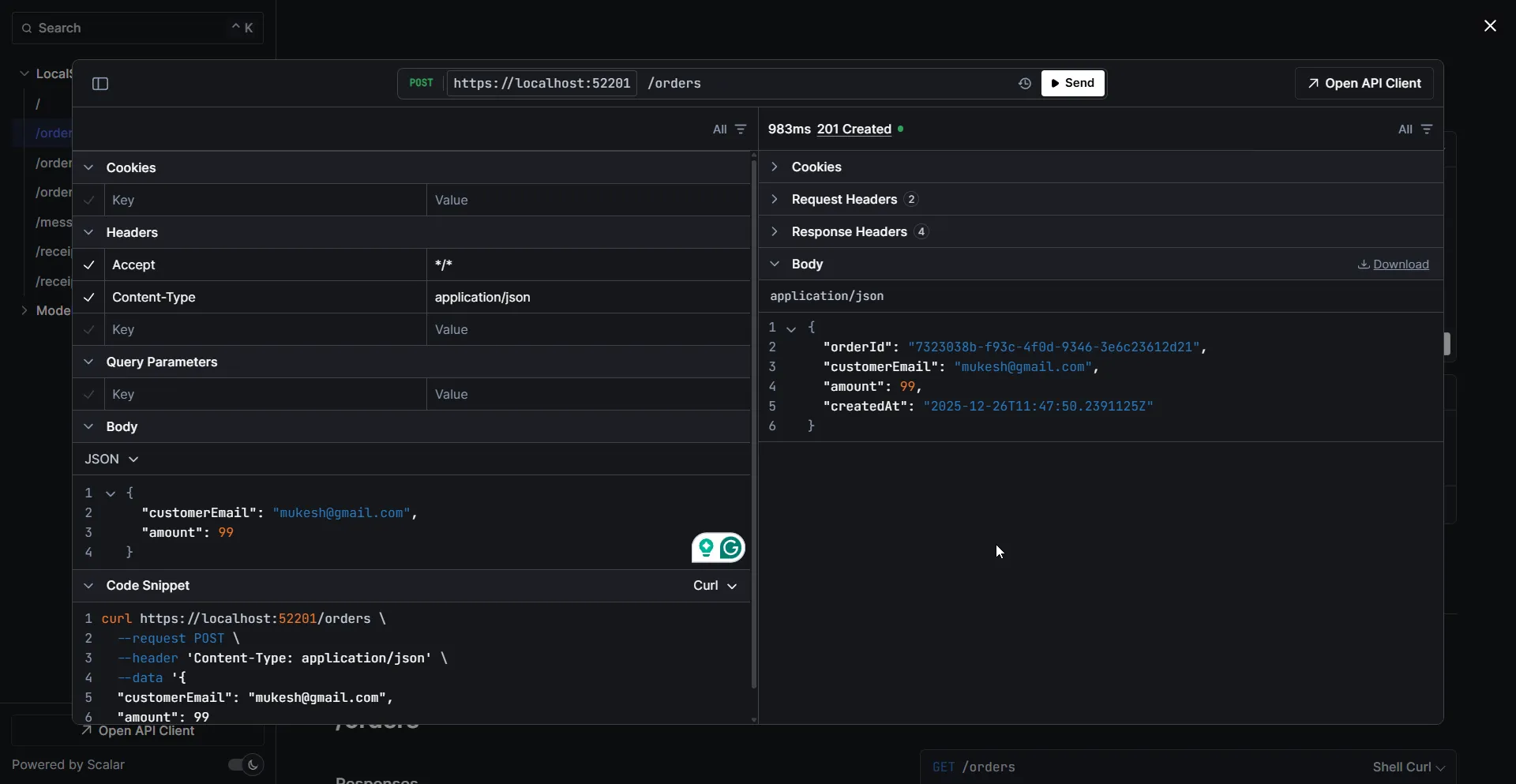
Test the Order Creation
Create an order using Scalar or curl:
curl-XPOSThttp://localhost:5000/orders-H"Content-Type: application/json"-d'{"customerEmail": "test@example.com", "amount": 99.99}'Expected response:
{"orderId": "a1b2c3d4-e5f6-7890-abcd-ef1234567890","customerEmail": "test@example.com","amount": 99.99,"createdAt": "2025-12-26T10:30:00Z"}👁 Creating an order via Scalar API documentation
Verify Data in LocalStack
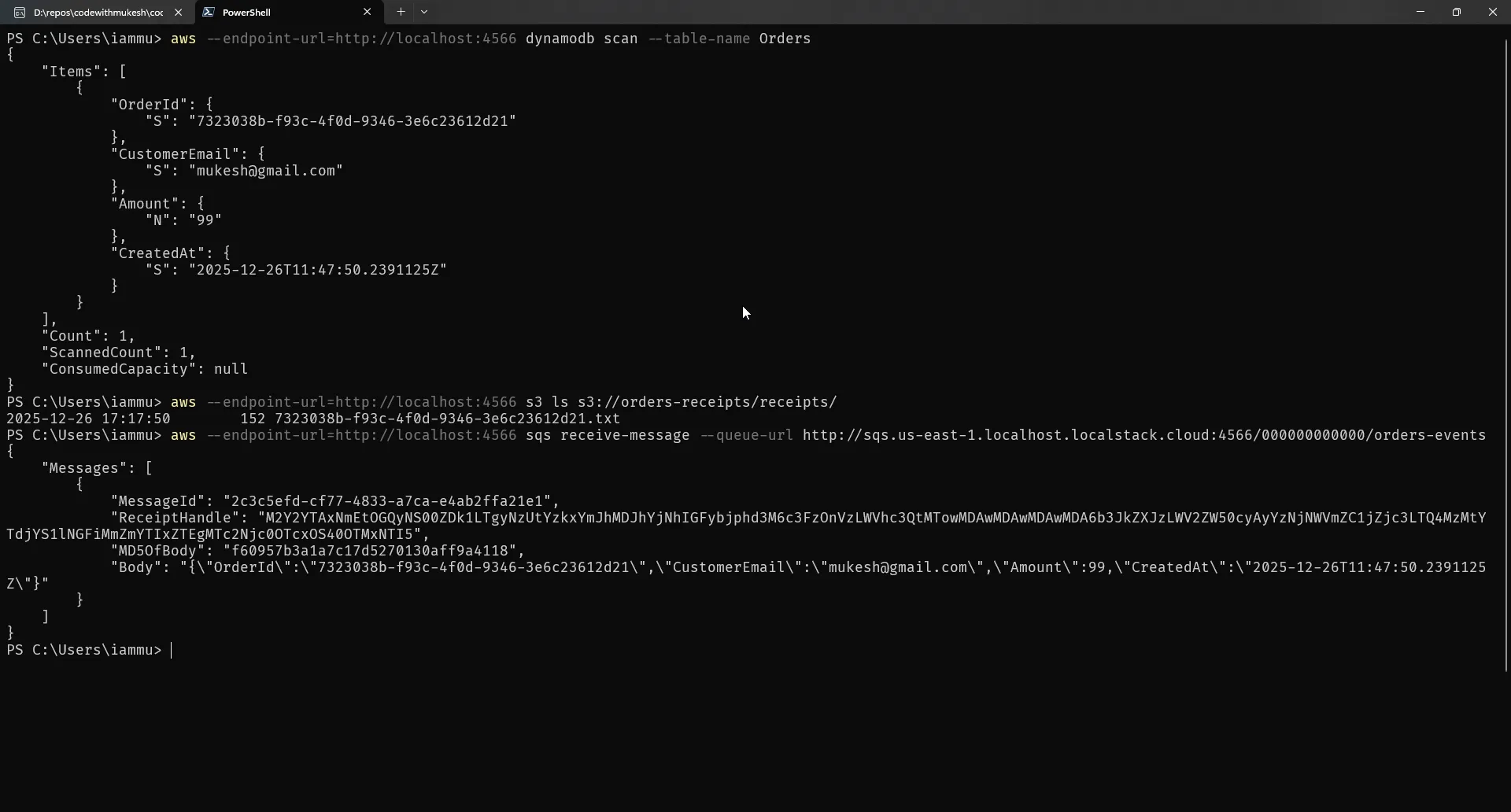
Check DynamoDB:
aws--endpoint-url=http://localhost:4566dynamodbscan--table-nameOrdersCheck S3:
aws--endpoint-url=http://localhost:4566s3lss3://orders-receipts/receipts/Check SQS:
aws--endpoint-url=http://localhost:4566sqsreceive-message--queue-urlhttp://sqs.us-east-1.localhost.localstack.cloud:4566/000000000000/orders-events👁 Verifying DynamoDB, S3, and SQS data in LocalStack
Step 8: CI Integration with GitHub Actions
One of the biggest wins with LocalStack is cost-free CI. Here’s a complete GitHub Actions workflow:
name: Integration Testson:push:branches: [main]pull_request:branches: [main]jobs:test:runs-on: ubuntu-latestservices:localstack:image: localstack/localstack:latestports:- 4566:4566env:SERVICES: s3,dynamodb,sqsDEBUG: 0steps:- uses: actions/checkout@v4- name: Setup .NETuses: actions/setup-dotnet@v4with:dotnet-version: "10.0.x"- name: Wait for LocalStackrun: |echo "Waiting for LocalStack to be ready..."for i in {1..30}; doif curl -s http://localhost:4566/_localstack/health | grep -q '"s3": "available"'; thenecho "LocalStack is ready!"exit 0fiecho "Attempt $i: LocalStack not ready yet, waiting..."sleep 2doneecho "LocalStack failed to start"exit 1- name: Create AWS Resourcesenv:AWS_ACCESS_KEY_ID: testAWS_SECRET_ACCESS_KEY: testAWS_DEFAULT_REGION: us-east-1run: |aws --endpoint-url=http://localhost:4566 s3 mb s3://orders-receiptsaws --endpoint-url=http://localhost:4566 dynamodb create-table --table-name Orders --attribute-definitions AttributeName=OrderId,AttributeType=S --key-schema AttributeName=OrderId,KeyType=HASH --billing-mode PAY_PER_REQUESTaws --endpoint-url=http://localhost:4566 sqs create-queue --queue-name orders-events- name: Restore dependenciesrun: dotnet restore- name: Buildrun: dotnet build --no-restore- name: Run testsenv:AWS__Region: us-east-1AWS__UseLocalStack: "true"AWS__ServiceUrl: http://localhost:4566Resources__BucketName: orders-receiptsResources__TableName: OrdersResources__QueueName: orders-eventsrun: dotnet test --no-build --verbosity normalWorkflow Breakdown
Let me walk through what each step does:
Services Block
services:localstack:image: localstack/localstack:latestports:- 4566:4566env:SERVICES: s3,dynamodb,sqsGitHub Actions spins up LocalStack as a Docker service container before your job runs. It’s available at localhost:4566 throughout the workflow. The SERVICES environment variable tells LocalStack which services to initialize - keeping it minimal speeds up startup.
Health Check
The Wait for LocalStack step polls the health endpoint until S3 reports as "available". This is critical - without it, your AWS CLI commands might fail because LocalStack hasn’t fully initialized. The loop tries 30 times with 2-second intervals, giving LocalStack up to 60 seconds to start.
Resource Seeding
Before tests run, we create the same resources we use locally: S3 bucket, DynamoDB table, and SQS queue. This mirrors your local development setup exactly.
Configuration Override
env:AWS__Region: us-east-1AWS__UseLocalStack: "true"AWS__ServiceUrl: http://localhost:4566Environment variables override your appsettings.json values. The double underscore (__) syntax is how ASP.NET Core maps environment variables to nested configuration keys. AWS__UseLocalStack becomes AWS:UseLocalStack in your IConfiguration.
What the Workflow Output Looks Like
When this workflow runs, you’ll see output like this:
Run echo "Waiting for LocalStack to be ready..."Waiting for LocalStack to be ready...Attempt 1: LocalStack not ready yet, waiting...Attempt 2: LocalStack not ready yet, waiting...LocalStack is ready!Run aws --endpoint-url=http://localhost:4566 s3 mb s3://orders-receiptsmake_bucket: orders-receiptsRun aws --endpoint-url=http://localhost:4566 dynamodb create-table...{"TableDescription": {"TableName": "Orders","TableStatus": "ACTIVE",...}}Run dotnet test --no-build --verbosity normalDetermining projects to restore...All projects are up-to-date for restore.LocalStackDemo.Api -> /home/runner/work/.../bin/Debug/net10.0/LocalStackDemo.Api.dllTest run for ...Passed! - Failed: 0, Passed: 5, Skipped: 0, Total: 5The entire workflow typically completes in under 2 minutes - most of that time is restoring NuGet packages and building. The LocalStack operations themselves are nearly instant.
Cost Comparison
Let’s put some numbers to this. Say your team runs integration tests 50 times per day:
| Scenario | Monthly Cost |
|---|---|
| Real AWS (DynamoDB, S3, SQS) | ~$50-100+ depending on usage |
| LocalStack in CI | $0 |
And that’s just direct costs. You also save on:
- Cleanup scripts to remove test data from AWS
- Dealing with rate limits and throttling
- Debugging failures caused by network issues
- Managing IAM permissions for CI runners
What the Tests Verify
The sample repository includes integration tests that run against LocalStack:
- DynamoDB_CanWriteAndReadOrder – Writes an order to DynamoDB with all fields (OrderId, CustomerEmail, Amount, CreatedAt), reads it back, and verifies the data matches. This confirms your DynamoDB table schema and SDK configuration are correct.
- S3_CanUploadAndDownloadReceipt – Uploads a receipt file to S3, downloads it, and verifies the content is identical. This validates your S3 bucket setup and path-style URL configuration.
These tests use xUnit with a shared LocalStackFixture that creates AWS SDK clients configured for LocalStack. The same tests work in CI without modification - LocalStack provides identical behavior locally and in GitHub Actions.
Adding This to Your Repository
The workflow file lives at .github/workflows/integration-tests.yml in your repository. Once you push it, GitHub Actions automatically picks it up and runs on every push to main and every pull request.
You can see the complete workflow in the sample repository.
Limitations: When You Still Need Real AWS
LocalStack is excellent for development and CI, but it doesn’t cover everything:
| What Works Well | What Doesn’t |
|---|---|
| S3 basic operations | IAM policy evaluation |
| DynamoDB CRUD | VPC/networking |
| SQS/SNS messaging | TLS certificate validation |
| Lambda (Community) | Some service-specific edge cases |
| Step Functions | Eventual consistency behavior |
My recommendation: Use LocalStack for 90% of development and CI. Run a short test suite against a real AWS sandbox before release to catch IAM, TLS, and edge case issues.
Choosing the Right AWS Compute Service for .NET
Once you're ready for production, learn which AWS compute option fits your .NET workload best.
CRUD with DynamoDB in ASP.NET Core
Go deeper on the DynamoDB side of this app - modelling, queries, and full CRUD from ASP.NET Core.
Common Gotchas and Fixes
S3 “bucket not found” errors
Cause: LocalStack S3 requires path-style URLs, not virtual-hosted style.
Fix: Always set ForcePathStyle = true in your AmazonS3Config.
”Connection refused” errors
Cause: LocalStack isn’t running or is on a different port.
Fix: Check docker compose ps and verify port 4566 is mapped.
HTTPS/TLS errors
Cause: LocalStack uses HTTP by default.
Fix: Set UseHttp = true on all client configs, and use http:// in ServiceUrl.
Region mismatches
Cause: Different regions between clients can cause signature errors.
Fix: Use the same region (us-east-1) consistently across all clients.
Data disappears after restart
Cause: LocalStack doesn’t persist by default.
Fix: Set PERSISTENCE=1 in your docker-compose.yml and mount a volume.
Slow first request
Cause: LocalStack lazy-loads services.
Fix: Normal behavior. First request initializes the service; subsequent requests are fast.
Switching to Real AWS
When you’re ready to deploy to staging or production, the switch is simple:
- Set
UseLocalStacktofalsein your configuration - Remove
ServiceUrl(or leave it empty) - Configure real AWS credentials (IAM roles, environment variables, or AWS profiles)
Your code stays exactly the same. The only difference is which endpoint the SDK clients connect to.
{"AWS": {"Region": "us-east-1","UseLocalStack": false}}With proper IAM credentials configured, your application now talks to real AWS.
Wrap-Up
LocalStack transforms how .NET teams develop AWS-integrated applications:
- Zero cloud costs during development and CI
- Instant feedback without network latency
- Offline development capability
- Reproducible environments via Docker Compose
- Simple switching between local and cloud via configuration
The pattern we built - endpoint switching via configuration - means your production code is identical to your development code. No conditional logic, no environment-specific branches. Just clean, testable code that works everywhere.
Grab the complete source code from github.com/iammukeshm/localstack-for-dotnet-teams, spin up LocalStack, and start saving on your AWS bill today.
Have questions or run into issues? Drop a comment below - I’d love to hear how LocalStack is working for your team.
Happy Coding :)