
🚀 HTTP-4-MCP ミドルウェアサーバー


🌟 はじめに
HTTP-4-MCPは、通常のHTTPインターフェースをMCP(モデル制御プロトコル)インターフェースに魔法のように変換する強力なミドルウェアサーバーです。簡単な設定で、HTTP APIを瞬時にMCPツールにすることができます。
✨ 主な特徴
🔄 HTTP to MCP : HTTP API を MCP インターフェースにワンクリックで変換
📝 JSON設定:シンプルで直感的な設定
🌊 SSEサポート:リアルタイムデータストリーミング
🎨ビジュアル構成: API 構成用のドラッグアンドドロップ インターフェース
🔥ホットリロード: 再起動なしで即座に構成を更新
📊完全な監視:詳細なログ記録とエラー追跡
🛡️安全で信頼性が高い: エラー処理とパラメータ検証が組み込まれています
Related MCP server: MCP Swagger Server
👨💻著者情報
📸 システムデモ
🖥️ 直感的なビジュアル設定インターフェース
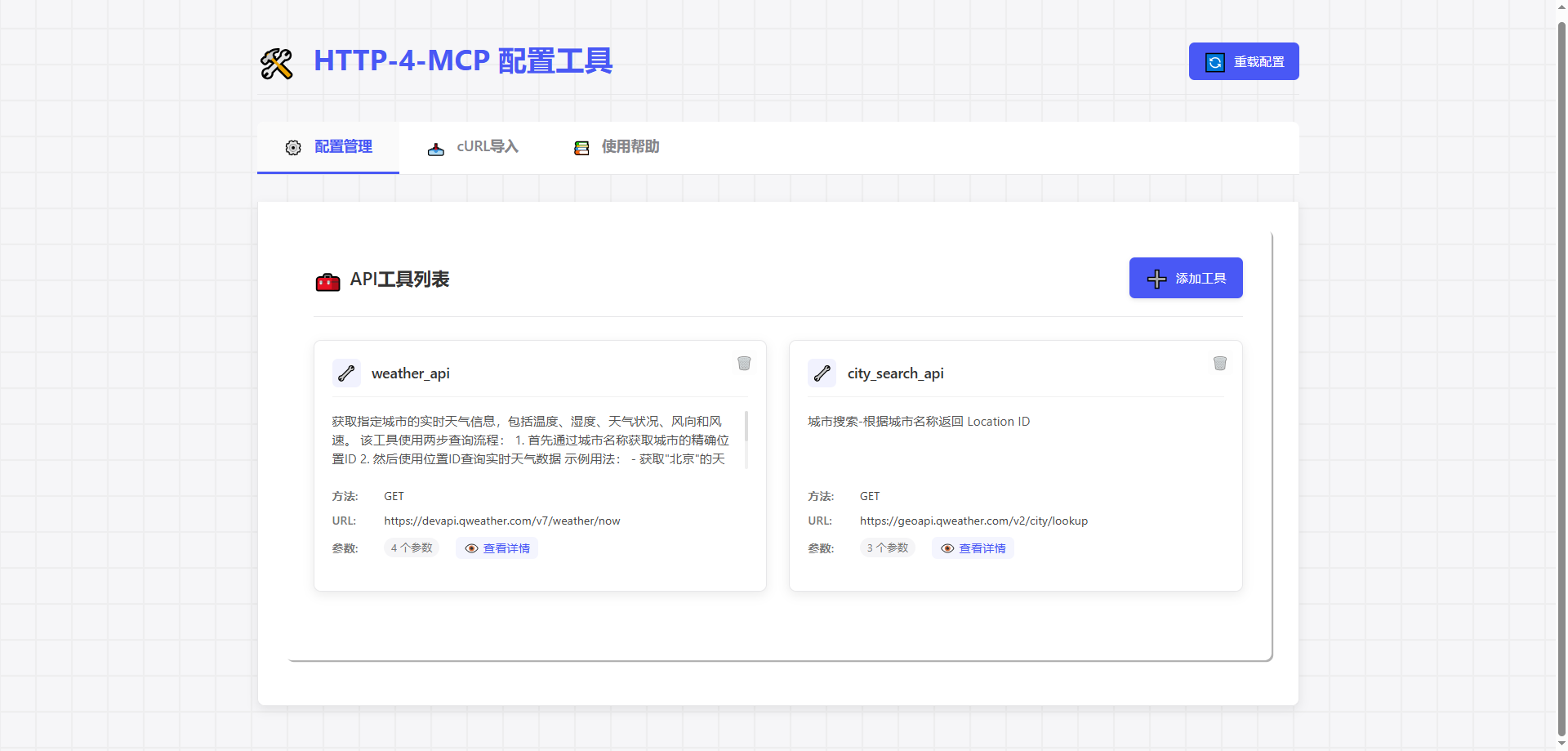
🔄強力なAPI変換
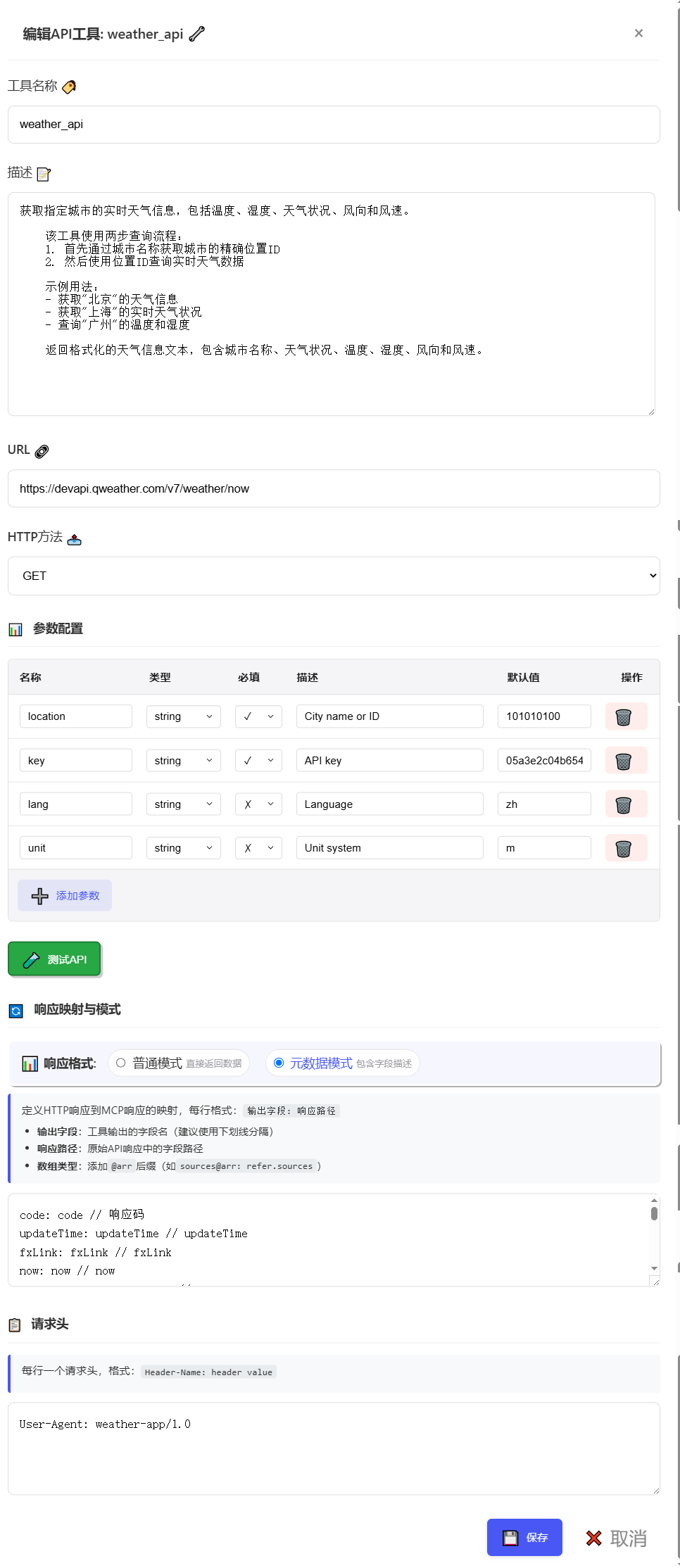
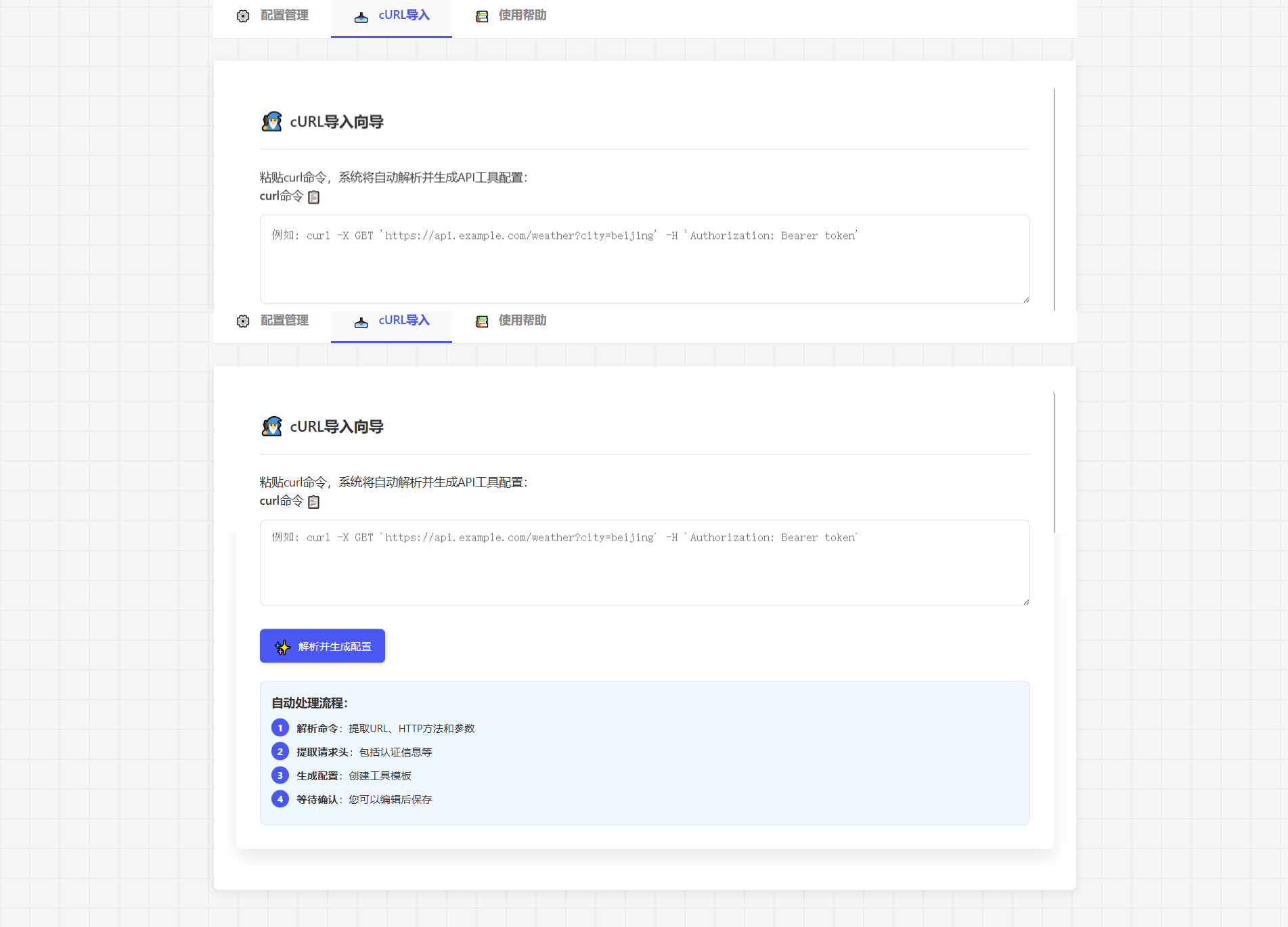
📊 cURL インポートのサポート
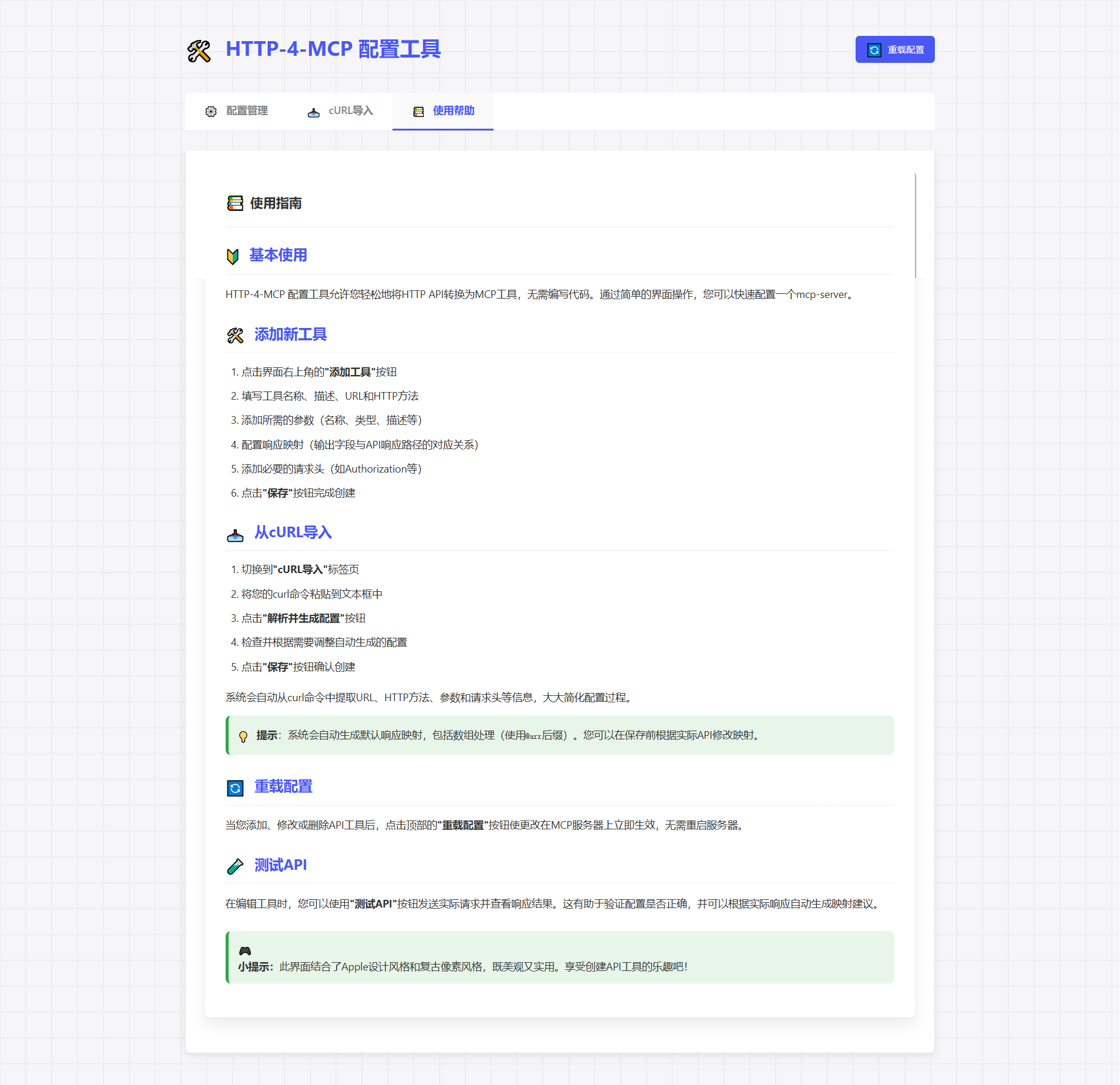
🚀 ツールの説明
🚀 クイックスタート
📦 インストール
# Clone repository
git clone https://gitee.com/tght1211/http-for-mcp-server.git
# or git clone https://github.com/tght1211/http-for-mcp-server.git

cd http-for-mcp-server

# Install dependencies (recommended using uv package manager)
uv venv
uv pip install -r requirements.txt
🎮 サービスを開始
# Activate virtual environment
.venv/Scripts/activate # Windows
source .venv/bin/activate # Linux/Mac

# Start main server
uv run run.py

# Start configuration UI (optional)
uv run run_config_ui.py
🎯 使用ガイド
1️⃣ APIを設定する
方法 1: 🎨 ビジュアル構成(推奨)
http://localhost:8002にアクセスしてください「新しいインターフェースを追加」をクリックします
設定パラメータを入力する
保存してすぐに適用しましょう!
方法2: 📝 JSON構成
{
 "tools": [
 {
 "name": "weather_api",
 "description": "Get real-time weather information for a specified city, including temperature, humidity, weather conditions, wind direction, and wind speed.\n \n This tool uses a two-step query process:\n 1. First, get the precise location ID through city name\n 2. Then, query real-time weather data using the location ID\n \n Example usage:\n - Get weather information for \"Beijing\"\n - Get real-time weather conditions for \"Shanghai\"\n - Query temperature and humidity for \"Guangzhou\"\n \n Returns formatted weather information text, including city name, weather conditions, temperature, humidity, wind direction, and wind speed.",
 "url": "https://devapi.qweather.com/v7/weather/now",
 "method": "GET",
 "params": {
 "location": {
 "type": "string",
 "desc": "City name or ID",
 "required": true,
 "default": "101010100"
 },
 "key": {
 "type": "string",
 "desc": "API key",
 "required": true,
 "default": "05a3e2c04b65416e912088b76a7a487e"
 },
 "lang": {
 "type": "string",
 "desc": "Language",
 "required": false,
 "default": "zh"
 },
 "unit": {
 "type": "string",
 "desc": "Unit system",
 "required": false,
 "default": "m"
 }
 },
 "headers": {
 "User-Agent": "weather-app/1.0"
 },
 "response": {
 "code": {
 "path": "code",
 "desc": "Response status code"
 },
 "updateTime": {
 "path": "updateTime",
 "desc": "Data update time"
 },
 "fxLink": {
 "path": "fxLink",
 "desc": "Detailed weather information link"
 },
 "now": {
 "path": "now",
 "desc": "Real-time weather data object"
 },
 "now_obsTime": {
 "path": "now.obsTime",
 "desc": "Actual observation time"
 },
 "now_temp": {
 "path": "now.temp",
 "desc": "Current temperature (Celsius)"
 },
 "now_feelsLike": {
 "path": "now.feelsLike",
 "desc": "Feels like temperature (Celsius)"
 },
 "now_icon": {
 "path": "now.icon",
 "desc": "Weather icon code"
 },
 "now_text": {
 "path": "now.text",
 "desc": "Weather phenomenon text description"
 },
 "now_wind360": {
 "path": "now.wind360",
 "desc": "Wind direction 360-degree angle"
 },
 "now_windDir": {
 "path": "now.windDir",
 "desc": "Wind direction description"
 },
 "now_windScale": {
 "path": "now.windScale",
 "desc": "Wind scale"
 },
 "now_windSpeed": {
 "path": "now.windSpeed",
 "desc": "Wind speed (km/h)"
 },
 "now_humidity": {
 "path": "now.humidity",
 "desc": "Relative humidity percentage"
 },
 "now_precip": {
 "path": "now.precip",
 "desc": "Precipitation (mm)"
 },
 "now_pressure": {
 "path": "now.pressure",
 "desc": "Atmospheric pressure (hPa)"
 },
 "now_vis": {
 "path": "now.vis",
 "desc": "Visibility (km)"
 },
 "now_cloud": {
 "path": "now.cloud",
 "desc": "Cloud coverage percentage"
 },
 "now_dew": {
 "path": "now.dew",
 "desc": "Dew point temperature (Celsius)"
 }
 },
 "response_mode": "metadata"
 }
 ]
}
2️⃣ MCPに接続する
# SSE connection URL
ws_url = "http://localhost:8000/mcp/sse"
🛠️ プロジェクト構造
📦 http-for-mcp-server
 ┣ 📂 config/ # Configuration files
 ┣ 📂 demo/ # Example code
 ┣ 📂 static/ # Static resources
 ┣ 📜 mcp_server.py # Main server
 ┣ 📜 config_ui.py # Configuration UI
 ┣ 📜 run.py # Startup script
 ┗ 📜 requirements.txt # Dependencies
📚 設定リファレンス
🔧 グローバル設定
構成 | 説明 | デフォルト |
🌐 ホスト | サーバーアドレス | 「0.0.0.0」 |
🔌 ポート | サーバーポート | 8000 |
🐛 デバッグ | デバッグモード | 間違い |
📝 ログレベル | ログレベル | "情報" |
🎉 特別な機能
🔄 cURL インポート
cURL コマンドを直接貼り付けると、構成が自動的に生成されます。
curl -X GET 'https://api.example.com/weather?city=beijing'🎨 ピクセルアートインターフェース
🎮 ゲームのような設定体験
🎯 ドラッグアンドドロップによるパラメータ設定
📊 リアルタイムリクエストテスト
🔄 構成を自動生成
🤝 貢献ガイド
🍴 このリポジトリをフォークする
🔧 機能ブランチを作成する
📝 変更を送信する
🚀 ブランチをプッシュする
📬 プルリクエストを送信する
📞 ヘルプを受ける
📧 問題を提出する
💬 ディスカッショングループに参加する
📚 ウィキを見る
📄オープンソースライセンス
このプロジェクトはMITライセンスを使用しています - LICENSEファイルを参照してください
This server cannot be installed
Maintenance
Latest Blog Posts
MCP directory API
We provide all the information about MCP servers via our MCP API.
curl -X GET 'https://glama.ai/api/mcp/v1/servers/Tght1211/http-4-mcp'
If you have feedback or need assistance with the MCP directory API, please join our Discord server