
Supports webhook integration for Discord, enabling notifications for events like issue creation, approval, status changes, updates, deletions, and comment creation.
Provides Docker container deployment with official image available on GitHub Container Registry, enabling easy containerized deployment of the MonkeyPlanner server.
Hosted on GitHub with CI/CD workflows, release management, and container registry integration for automated builds and deployments.
Integrated for internationalization support, enabling Korean, English, Japanese, and Chinese language interfaces through react-i18next.
Integrated as the icon library for the frontend interface using lucide-react components.
Supports markdown formatting in issue bodies with react-markdown and rehype-sanitize for safe rendering.
Required for frontend development with Node.js 18 or later as a runtime dependency.
Package manager used for frontend dependencies and development tooling.
Supported as a configurable database backend alongside SQLite for production deployments.
Built with React 18 framework for the frontend user interface with TypeScript.
Used for state management in the frontend through TanStack Query for efficient data fetching and caching.
Follows semantic versioning for releases and package management.
Supports webhook integration for Slack, enabling notifications for various issue-related events.
Default database backend with SQLite support for local-first data storage.
Provides OpenAPI 3.0 specification documentation for the backend API through Swagger.
Uses Tailwind CSS for styling the frontend interface with utility-first CSS framework.
Supports webhook integration for Telegram, enabling notifications for issue events and updates.
Used for frontend development with TypeScript for type-safe code and better developer experience.
Uses Vite 6 as the frontend bundler and development server for fast builds and hot module replacement.
Used for configuration files and OpenAPI specification documentation in YAML format.
Supported as an alternative package manager to npm for frontend dependency management.
MonkeyPlanner
Local-first task memory for your AI coding agents. Approve with a click; your agents do the rest. No cloud. No telemetry. Forever free, forever MIT.
Works with Claude Code · Claude Desktop · Cursor · Continue · any MCP-compatible client.
Quickstart
# Docker (recommended)
docker run -p 8080:8080 -v $(pwd)/data:/data ghcr.io/kjm99d/monkeyplanner:latest

# then wire up your agent
monkey-planner mcp install --for claude-code # or --for cursor / --for claude-desktop
Open http://localhost:8080 — the built-in Welcome board walks you through the rest.
Related MCP server: task-orchestrator
Features
Issue & Board Management
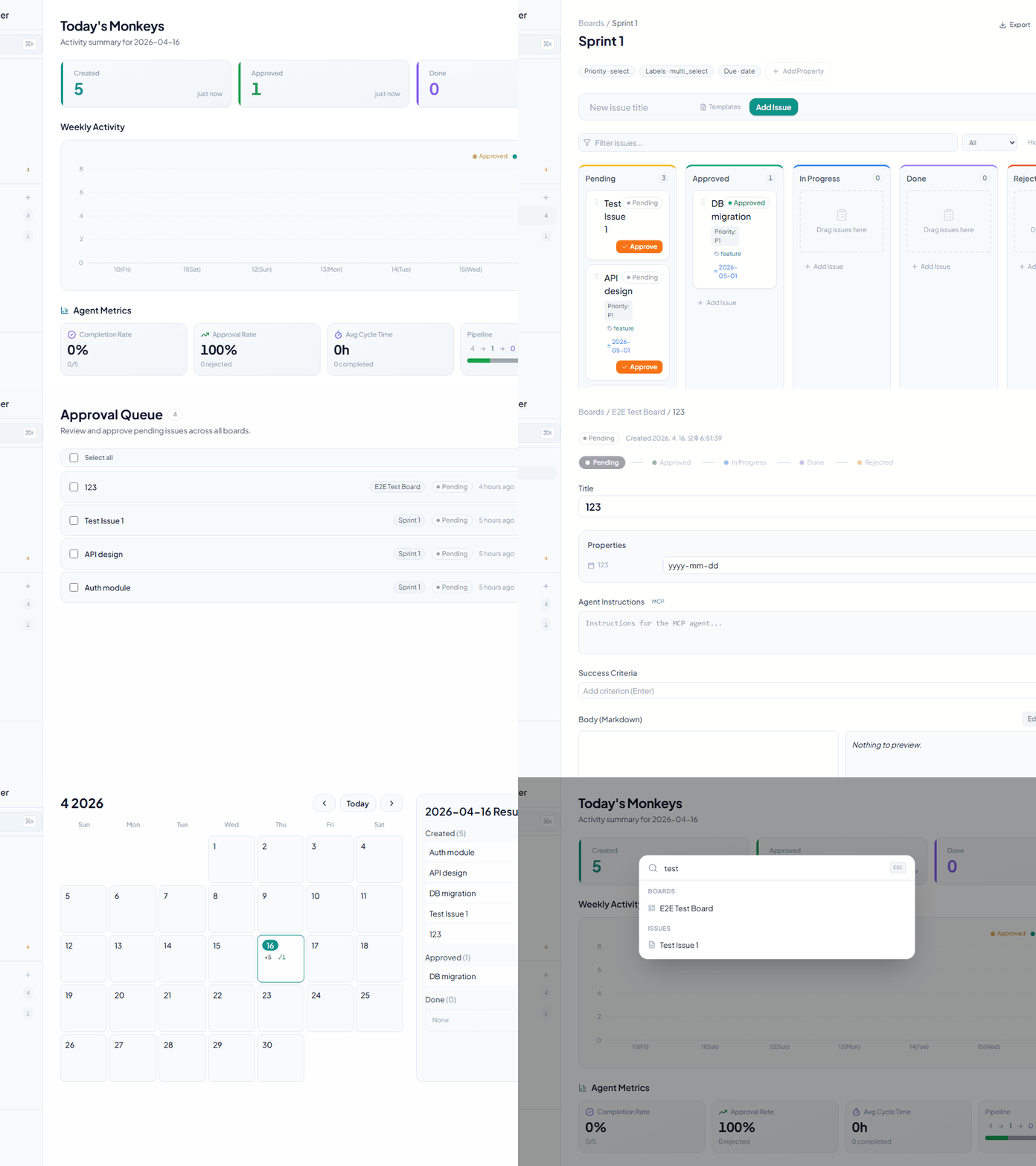
Kanban Board — Drag and drop, horizontal scroll, filtering, sorting, and table view toggle
Issue Creation — Title, markdown body, and custom properties
Custom Properties — Six supported types:
Text
Number
Select
Multi-select
Date
Checkbox
Approval Gate
Pending → Approved via a dedicated approval endpoint (cannot be done via generic PATCH)
Approval Queue — Bulk-approve all Pending issues across boards
Approved → InProgress → Done — Flexible status transitions
Rejected status — Record a rejection reason
Agent Features
Agent Instructions field — Provide detailed instructions for MCP agents to follow
Success Criteria — Manage completion conditions as a checklist
Comments — Log progress and communicate per issue
Dependencies — Express blocking relationships between issues
Data Visualization
Calendar — Monthly grid + daily activity (created, approved, completed counts)
Dashboard — Stats cards + weekly activity chart
Sidebar — Board list, issue counts, and recent items
User Experience
Global Search — Quick search with Cmd+K
Keyboard Shortcuts
h— Go to dashboarda— Go to approval queue?— Show shortcut helpCmd+S— SaveEscape— Close modal/dialog
Collapsible Sidebar — Maximize screen space
Dark Mode — Theme toggle
Internationalization — Korean, English, Japanese, and Chinese
Automation & Integrations
Webhooks — Discord, Slack, and Telegram support
Events:
issue.created,issue.approved,issue.status_changed,issue.updated,issue.deleted,comment.created
Real-time UI sync (SSE) — Changes via MCP/CLI automatically reflect in open browser tabs, no refresh needed
JSON Export — Export all issue data
Right-click Context Menu — Quick actions
Issue Templates — Per-board localStorage persistence
MCP Server (AI Agent Integration)
Thirteen tools for AI agent automation:
list_boards— List all boardslist_issues— Query issues (filter by boardId, status)get_issue— Issue detail including instructions, criteria, and commentscreate_issue— Create a new issueapprove_issue— Approve: Pending → Approvedclaim_issue— Claim: Approved → InProgresssubmit_qa— Submit for QA: InProgress → QAcomplete_issue— Complete: QA → Done (optional comment)reject_issue— Reject: QA → InProgress with required reasonadd_comment— Add a comment to an issueupdate_criteria— Check or uncheck a success criterionsearch_issues— Search issues by titleget_version— Get the MCP server version (for diagnostics)
Tech Stack
Backend
Language: Go 1.26
Router: chi/v5
Database: SQLite / PostgreSQL (configurable)
Migrations: goose/v3
Embedded files: embed.FS (single-binary deployment)
Frontend
Framework: React 18
Language: TypeScript
Bundler: Vite 6
CSS: Tailwind CSS
State management: React Query (TanStack)
Drag and drop: @dnd-kit/core, @dnd-kit/sortable
Icons: lucide-react
Charts: recharts
i18n: react-i18next
Markdown: react-markdown + rehype-sanitize
MCP
Protocol: JSON-RPC 2.0 over stdio
Targets: Claude Code, Claude Desktop
Getting Started
Requirements
Go 1.26 or later
Node.js 18 or later
npm or yarn
Installation & Running
1. Clone and initialize
git clone https://github.com/kjm99d/MonkeyPlanner.git
cd monkey-planner
make init
2. Production build (single binary)
make build
./bin/monkey-planner
The server runs at http://localhost:8080 with the frontend embedded.
3. Development mode (separate processes)
Terminal 1 — backend:
make run-backendTerminal 2 — frontend (Vite dev server, :5173):
make run-frontendThe frontend automatically proxies /api requests to :8080.
Environment Variables
# Server address (default: :8080)
export MP_ADDR=":8080"

# Database connection string
# SQLite (default: sqlite://./data/monkey.db)
export MP_DSN="sqlite://./data/monkey.db"

# PostgreSQL example
export MP_DSN="postgres://user:password@localhost:5432/monkey_planner"
MCP Server Setup
Recommended: auto-configure via CLI
# Claude Code (writes .mcp.json in the current directory)
monkey-planner mcp install --for claude-code

# Claude Desktop (writes the OS-native config file)
monkey-planner mcp install --for claude-desktop

# Cursor (writes .cursor/mcp.json)
monkey-planner mcp install --for cursor
Flags: --dry-run to preview, --scope user for a global entry (~/.mcp.json), --force to overwrite, --base-url <url> to point at a non-default server.
Restart the client afterwards so it re-reads the config.
Manual configuration
Works identically for Claude Code (.mcp.json), Claude Desktop (OS-native config), and Cursor (.cursor/mcp.json):
{
 "mcpServers": {
 "monkey-planner": {
 "command": "/path/to/monkey-planner",
 "args": ["mcp"],
 "env": {
 "MP_BASE_URL": "http://localhost:8080"
 }
 }
 }
}
The binary must be able to reach the HTTP server (set with MP_BASE_URL). Leave it at the default when running both on the same machine.
MCP Tool Usage Examples
AI: List all boards
→ list_boards()

AI: Find issues related to "authentication"
→ search_issues(query="authentication")

AI: Approve the first pending issue, claim it, work on it, and submit for QA
→ approve_issue() → claim_issue() → submit_qa()
Workflow — Real Usage Scenario
Below is a real workflow from fixing a language switcher bug, showing how a human and AI agent collaborate through MonkeyPlanner.
Status Flow
Pending → Approved → InProgress → QA → Done
 ↑ │ (reject with reason)
 └──────────────┘
Step-by-Step
1. Create Issue — Human finds a bug, asks AI to register it
Human: "The language selector dropdown doesn't appear when clicking the button. Create an issue."
AI: create_issue(boardId, title, body, instructions) → status: Pending
2. Approve — Human reviews and approves
Human: (clicks Approve on the board or tells AI)
AI: approve_issue(issueId) → status: Approved
3. Start Work — AI claims the issue and begins coding
AI: claim_issue(issueId) → status: InProgress
 - Reads code, identifies root cause
 - Implements fix, runs tests
 - Commits changes
4. Submit for QA — AI finishes and submits for review
AI: submit_qa(issueId, comment: "commit abc1234 — fixed click handler")
 → status: QA
 add_comment(issueId, "Commit info: ...")
5. Review — Human tests the fix
Human: Tests in browser, finds the dropdown is clipped by sidebar
 → reject_issue(issueId, reason: "Dropdown is hidden behind sidebar")
 → status: InProgress (back to step 3)

Human: Tests again after fix, everything works
 → complete_issue(issueId) → status: Done
6. Feedback Loop — Communication via comments throughout
Human: add_comment("Dropdown is clipped on the left side, fix it")
AI: get_issue() → reads comment → fixes → commit → submit_qa()
Human: Tests → complete_issue() → Done ✓
Key Takeaways
Human controls the gates: Approve, QA pass/reject, Complete
AI does the work: Code analysis, implementation, testing, commits
Comments are the communication channel: Both sides use
add_commentto exchange feedbackQA loop prevents premature completion: Issues must pass human review before Done
API Reference
OpenAPI 3.0 spec: backend/docs/swagger.yaml
Key Endpoints
Boards
GET /api/boards # List boards
POST /api/boards # Create board
PATCH /api/boards/{id} # Update board
DELETE /api/boards/{id} # Delete board
Issues
GET /api/issues # List issues (filter: boardId, status, parentId)
POST /api/issues # Create issue
GET /api/issues/{id} # Issue detail + child issues
PATCH /api/issues/{id} # Update issue (status, properties, title, etc.)
DELETE /api/issues/{id} # Delete issue
POST /api/issues/{id}/approve # Approve issue (Pending → Approved)
Comments
GET /api/issues/{issueId}/comments # List comments
POST /api/issues/{issueId}/comments # Add comment
DELETE /api/comments/{commentId} # Delete comment
Properties (Custom Attributes)
GET /api/boards/{boardId}/properties # List property definitions
POST /api/boards/{boardId}/properties # Create property
PATCH /api/boards/{boardId}/properties/{propId} # Update property
DELETE /api/boards/{boardId}/properties/{propId} # Delete property
Webhooks
GET /api/boards/{boardId}/webhooks # List webhooks
POST /api/boards/{boardId}/webhooks # Create webhook
PATCH /api/boards/{boardId}/webhooks/{whId} # Update webhook
DELETE /api/boards/{boardId}/webhooks/{whId} # Delete webhook
Calendar
GET /api/calendar # Monthly stats (year, month required)
GET /api/calendar/day # Daily issue list (date required)
For full schema details, see backend/docs/swagger.yaml.
Project Structure
monkey-planner/
├── backend/
│ ├── cmd/monkey-planner/
│ │ ├── main.go # Entry point (HTTP server)
│ │ └── mcp.go # MCP server (JSON-RPC stdio)
│ ├── internal/
│ │ ├── domain/ # Domain models (Issue, Board, etc.)
│ │ ├── service/ # Business logic
│ │ ├── storage/ # Database layer (SQLite/PostgreSQL)
│ │ ├── http/ # HTTP handlers & router
│ │ └── migrations/ # goose migration files
│ ├── web/ # Embedded frontend (embed.FS)
│ ├── docs/
│ │ └── swagger.yaml # OpenAPI 3.0 spec
│ ├── go.mod
│ └── go.sum
│
├── frontend/
│ ├── src/
│ │ ├── components/ # Reusable components
│ │ ├── features/ # Page & feature components
│ │ │ ├── home/ # Dashboard
│ │ │ ├── board/ # Board & Kanban
│ │ │ ├── issue/ # Issue detail
│ │ │ ├── calendar/ # Calendar
│ │ │ └── approval/ # Approval queue
│ │ ├── api/ # API hooks & client
│ │ ├── design/ # Tailwind tokens
│ │ ├── i18n/ # Translations (en.json, ko.json, ja.json, zh.json)
│ │ ├── App.tsx # Router
│ │ ├── index.css # Global styles
│ │ └── main.tsx
│ ├── package.json
│ ├── vite.config.ts
│ ├── tsconfig.json
│ └── tailwind.config.js
│
├── .mcp.json # Claude Code MCP config
├── Makefile # Build & dev commands
├── .githooks/ # Git hooks
└── data/ # SQLite database (default)
Testing
Backend tests
make test-backendFrontend tests
make test-frontendAccessibility tests
make test-a11yAll tests
make testCommon Commands
# Initial setup after cloning
make init

# Production build
make build

# Run production server
./bin/monkey-planner

# Development mode
make run-backend # Terminal 1
make run-frontend # Terminal 2

# Clean build artifacts
make clean
Status Transition Rules
Pending
 ↓ (approve endpoint)
Approved
 ↓ (PATCH status)
InProgress
 ↓ (PATCH status)
Done

Pending → Approved: POST /api/issues/{id}/approve (dedicated endpoint only)
Approved ↔ InProgress ↔ Done: Free transitions via PATCH
Pending: Cannot be re-entered from other statuses
Rejected: Separate rejection state with reason tracking
License
MIT
Contributing
Issues and pull requests are welcome.
Contact
For questions or feedback about the project, please open a GitHub Issue.
This server cannot be installed
Maintenance
Latest Blog Posts
MCP directory API
We provide all the information about MCP servers via our MCP API.
curl -X GET 'https://glama.ai/api/mcp/v1/servers/kjm99d/MonkeyPlanner'
If you have feedback or need assistance with the MCP directory API, please join our Discord server