👁 banana-slides-nano-banana-pro-tutorial-en 图示
Tired of spending hours creating PowerPoint presentations only to be dissatisfied with the design? Banana Slides is an open-source AI-native PPT generator that, combined with Nano Banana Pro (Gemini 3 Pro Image Preview)'s image generation capabilities, lets you input a single sentence or upload a document to generate complete professional presentations with beautiful layouts and high-quality illustrations.
Core Value: After reading this article, you'll learn how to deploy the Banana Slides project, configure the Nano Banana Pro API (via the APIYI platform), and master the complete workflow from text to editable PPTX files, boosting your PPT creation efficiency by over 95%.
Banana Slides Core Capabilities
Banana Slides is an open-source AI PPT generation tool developed by @Anionex, focusing on solving the time-consuming nature and inconsistent design quality of traditional PPT creation.
| Core Capability | Technical Implementation | PPT Creation Value |
|---|---|---|
| One-Sentence Generation | AI outline expansion + batch image generation | Input topic, automatically generate complete presentation |
| Multi-Format Parsing | PDF/DOCX/Markdown/TXT intelligent extraction | Quickly convert existing documents to PPT |
| Natural Language Editing | "Vibe" mode semantic understanding | Conversational editing ("change this chart to a pie chart") |
| Batch Generation + Refinement | Batch first, then single-page regeneration | Quick drafts, flexible optimization |
| Editable Export | PPTX multi-layer images + OCR text recognition | Continue editing in PowerPoint after export |
| 16:9 Professional Output | PDF/PPTX dual-format export | Meet presentation and printing needs |
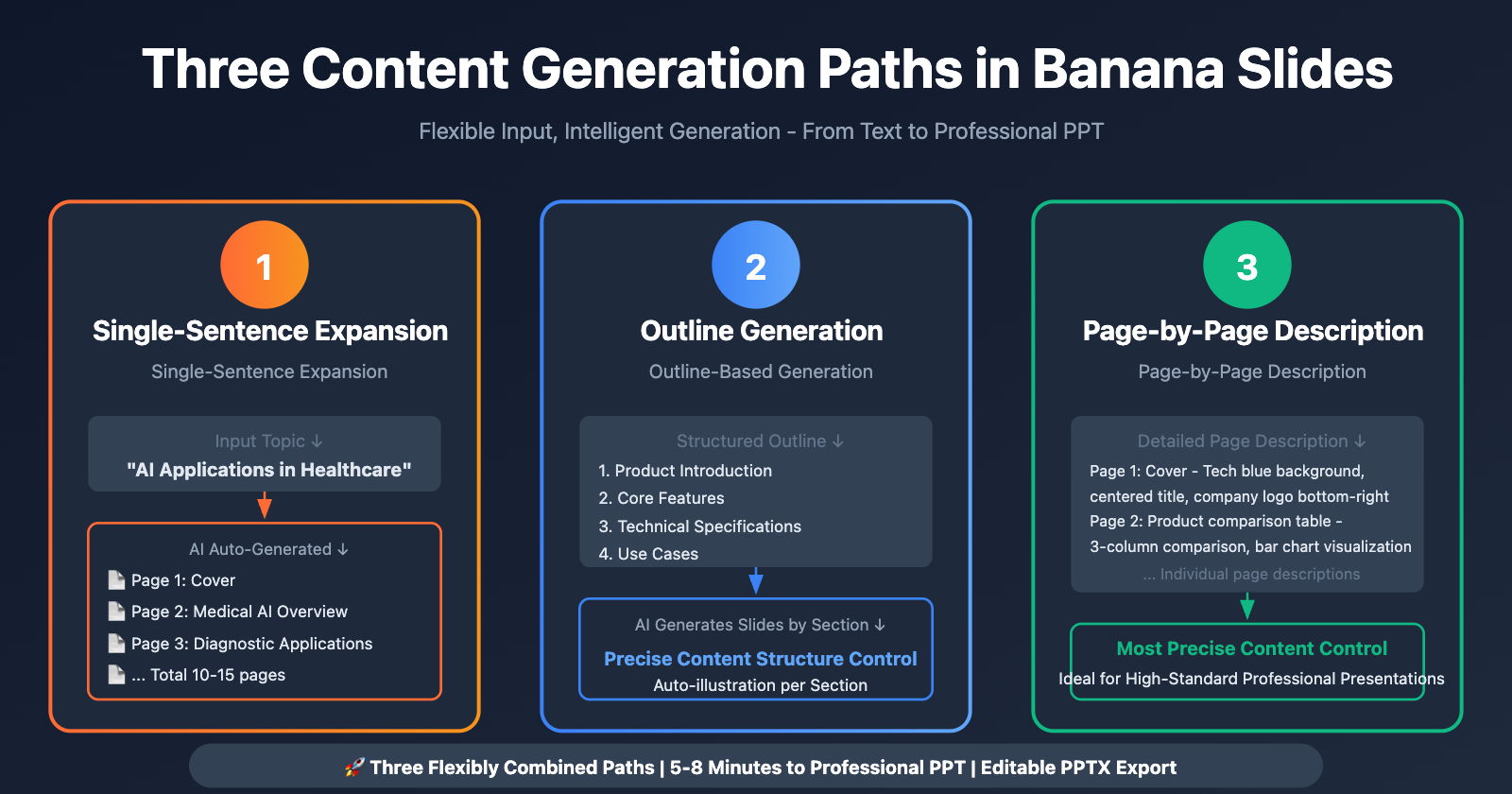
Three Content Generation Paths in Banana Slides
Banana Slides provides flexible content input methods:
- Single-Sentence Expansion: Input "Applications of Artificial Intelligence in Healthcare", AI automatically plans chapters and generates complete presentation
- Outline-Based: Provide structured outline, AI generates corresponding slides for each section
- Page-by-Page: Write description text for each page individually, precise content control
Tech Stack:
- Frontend: React 18 + TypeScript + Vite 5 + Zustand + Tailwind CSS
- Backend: Python 3.10+ + Flask 3.0 + SQLite + SQLAlchemy
- AI Capabilities: Nano Banana Pro (image generation) + GPT-4o/Gemini (text generation)
- Document Processing: python-pptx (PPTX generation) + Pillow (image processing)
Why Choose Nano Banana Pro as PPT Illustration Engine?
Nano Banana Pro has significant advantages in presentation creation scenarios:
| Comparison Dimension | Nano Banana Pro | DALL-E 3 | Midjourney | Gamma AI |
|---|---|---|---|---|
| Text Rendering | Clear rendering of chart labels/data annotations | Text easily blurred | No precise text support | Built-in but mediocre quality |
| Infographics | Auto-generate flowcharts/organizational charts | Chaotic structure | Not suitable for charts | Supported but poor customization |
| Layout Consistency | Supports reference image for style unity | Style hard to maintain across images | Manual seed adjustment needed | Fixed templates |
| Professional Colors | Adapts to corporate brand colors | Overly artistic | Strong artistic style | Preset color schemes |
| API Cost | $0.05/image | $0.04/image (1024×1024) | No API support | SaaS subscription |
Conclusion: Nano Banana Pro's text rendering capability and infographic generation are best suited for PPT creation, especially for scenarios requiring data annotations, flowcharts, and timelines embedded in slides.
🎯 Scenario Recommendation: Google has integrated Nano Banana Pro into Google Slides' "Help me visualize" feature, capable of generating precise infographics and dashboard mockups with perfectly aligned labels and data points. For independent deployment solutions requiring similar capabilities, Banana Slides is an ideal choice.
Banana Slides Environment Setup
Method 1: Docker Compose Deployment (Recommended)
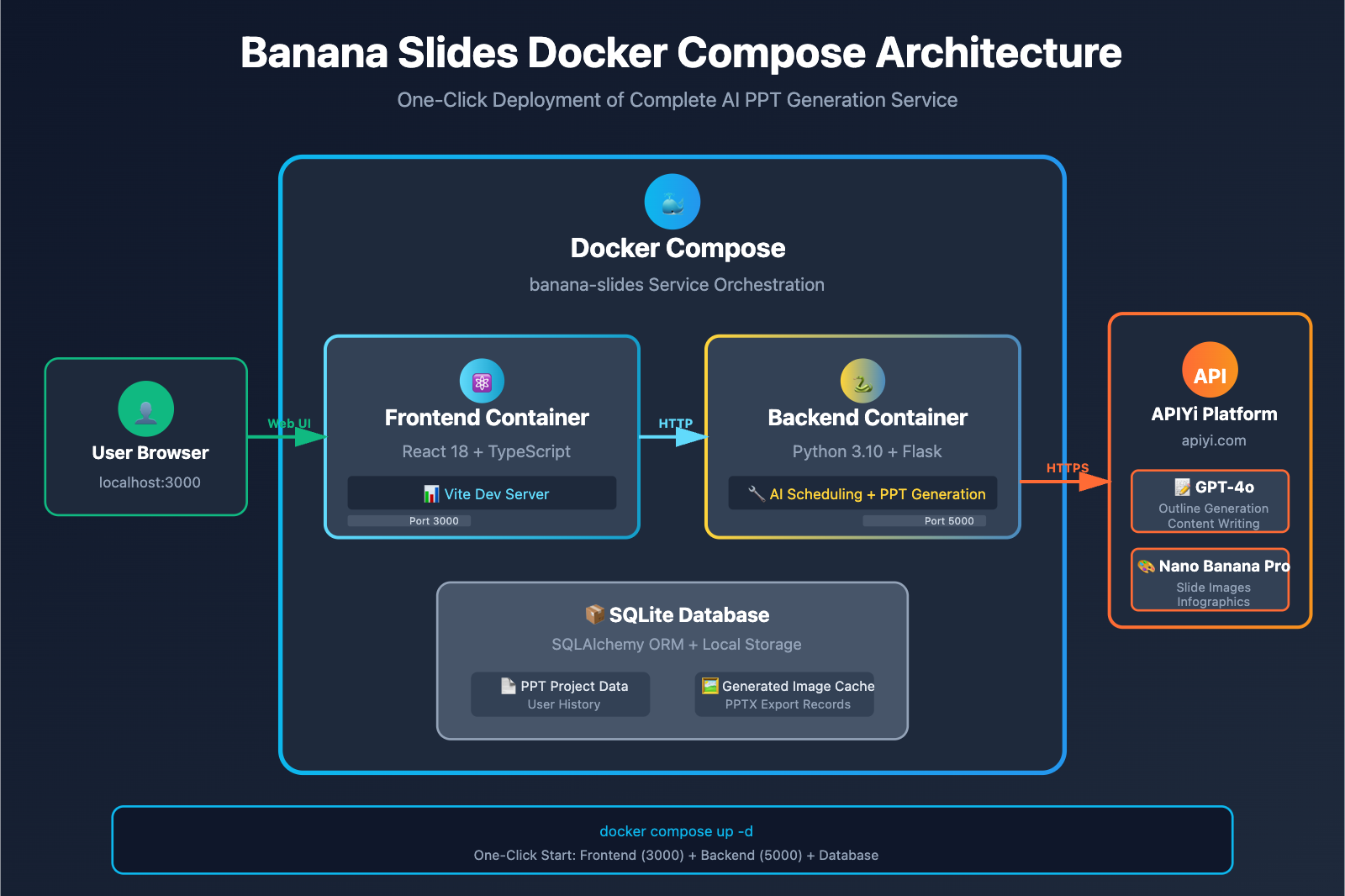
Banana Slides provides official Docker Compose configuration for one-click startup of frontend and backend services:
# 1. Clone the repository
git clone https://github.com/Anionex/banana-slides.git
cd banana-slides

# 2. Copy configuration file
cp .env.example .env

# 3. Start services
docker compose up -d
Access Methods:
- Frontend Interface:
http://localhost:3000 - Backend API:
http://localhost:5000
Important Notes:
- ⚠️ After modifying the
.envfile, restart containers:docker compose restart - ⚠️ If encountering 503 errors, check if the model configuration in
.envis correct
👁 banana-slides-nano-banana-pro-tutorial-en 图示
Method 2: Local Source Code Deployment
Prerequisites:
- Python 3.10+
- Node.js 16+
- uv (Python package manager)
Deployment Steps:
# 1. Backend Deployment
cd backend
pip install uv
uv sync
cp .env.example .env
# Edit .env to configure API keys
python app.py # Start backend (Flask port 5000)

# 2. Frontend Deployment
cd ../frontend
npm install
npm run dev # Start frontend (Vite port 3000)
Development Mode: Backend supports Flask hot reload, frontend supports Vite HMR (Hot Module Replacement).
Configuring Nano Banana Pro API (APIyi Platform)
Step 1: Obtain APIyi Platform Key
- Visit api.apiyi.com to register an account
- Top up to get credits (supports Alipay/WeChat/USDT)
- Copy the API Key from the console (format:
sk-xxx)
Recommended Top-up Plans:
- Testing purposes: $10 (approximately 200 images)
- Daily use: $50 (approximately 1000 images, includes 10% bonus)
- Batch production: $100+ (20% bonus, unit price reduced to $0.04/image)
Quick Test: New APIyi platform users receive free testing credits upon registration to experience Nano Banana Pro image generation. Visit imagen.apiyi.com for online testing.
Step 2: Edit .env Configuration File
Banana Slides supports three API formats: Gemini Native, OpenAI Compatible, and Vertex AI. We recommend using the OpenAI Compatible format to connect to the APIyi platform.
Edit the .env file:
# API format selection (gemini / openai / vertex)
API_FORMAT=openai

# OpenAI compatible format configuration (APIyi platform)
OPENAI_API_KEY=sk-your-APIyi-key
OPENAI_BASE_URL=https://vip.apiyi.com/v1
OPENAI_TEXT_MODEL=gpt-4o
OPENAI_IMAGE_MODEL=gemini-3-pro-image-preview

# Optional: Baidu OCR (for enhanced editable PPTX export)
BAIDU_OCR_API_KEY=your-Baidu-OCR-API-Key
BAIDU_OCR_SECRET_KEY=your-Baidu-OCR-Secret-Key
Configuration Parameter Description:
| Parameter | Description | Recommended Value |
|---|---|---|
API_FORMAT |
API calling format | openai (using APIyi platform) |
OPENAI_API_KEY |
APIyi platform key | sk-xxx (obtained from console) |
OPENAI_BASE_URL |
API endpoint address | https://vip.apiyi.com/v1 |
OPENAI_TEXT_MODEL |
Text generation model | gpt-4o (outline planning and content generation) |
OPENAI_IMAGE_MODEL |
Image generation model | gemini-3-pro-image-preview |
Restart Service:
# Docker Compose deployment
docker compose restart

# Source code deployment
# Backend: Ctrl+C then re-run python app.py
# Frontend: No restart needed (configuration is in backend)
Step 3: Configuration Verification and Testing
Generation Test Workflow:
- Open Banana Slides frontend at
http://localhost:3000 - Enter test topic:
"The Development History of Artificial Intelligence" - Select generation mode: One-sentence Expansion
- Click Generate Presentation and wait for AI response
Expected Results:
- Text generation: 10-15 seconds to return outline (5-10 slide structure)
- Image generation: 2-5 minutes to complete all illustrations (concurrent mode)
- PPTX export: Downloadable editable PowerPoint file
Common Error Troubleshooting:
| Error Message | Cause | Solution |
|---|---|---|
401 Unauthorized |
Incorrect API Key | Verify key is correctly copied with sk- prefix |
404 Model Not Found |
Incorrect model name | Confirm gemini-3-pro-image-preview is entered |
503 Service Unavailable |
Docker configuration not applied | Run docker compose restart to restart container |
Connection Timeout |
Network connection issue | Check Base URL is https://vip.apiyi.com/v1 |
Banana Slides + Nano Banana Pro Practical Cases
Case 1: Corporate Product Launch Presentation
Input Topic: "Smart Watch New Product Launch Presentation"
AI Generated Outline:
- Cover: Product main visual
- Page 1: Market background analysis (charts + data annotations)
- Page 2: Core product features (3-column comparison table)
- Page 3: Technical specifications (specification table)
- Page 4: User scenarios (lifestyle illustrations)
- Page 5: Pricing and purchase channels
- Page 6: Summary and CTA
Nano Banana Pro Generation Results:
- Text Rendering: Clearly displays parameters like "72-hour battery life" and "50-meter water resistance"
- Infographics: Automatically generates market share pie charts and feature comparison bar charts
- Product Illustrations: Generates professional-grade product renderings matching corporate brand colors
Production Time Comparison:
- Traditional method (manual designer work): 4-6 hours
- Banana Slides + Nano Banana Pro: 5-8 minutes
- Efficiency improvement: 95-98%
Case 2: Educational Course Presentation
Input Content: Upload course outline in Markdown format (course-outline.md)
AI Parsing Results:
- Automatically recognizes chapter headings (Heading 1/2)
- Extracts list content and converts to slide bullet points
- Identifies code blocks and formats them for display
- Generates illustrations based on content (e.g., "photosynthesis process diagram")
Nano Banana Pro Advantages:
- Scientific Illustrations: Generates clear flowcharts (e.g., cell division diagrams)
- Timelines: Automatically generates historical event timelines
- Multilingual Support: Utilizes Gemini 3's multilingual capabilities to generate bilingual annotations in Chinese and English
Actual Data:
- Uploaded file: 20-page Markdown outline
- Generated slides: 25-page complete PPT (automatically adds cover and summary pages)
- Total time: 3 minutes (parsing 30 seconds + image generation 2.5 minutes)
- Export format: PPTX (editable text and adjustable layout in PowerPoint)
Case 3: Investment Pitch Presentation
Input Topic: "Blockchain Startup Funding Presentation"
Banana Slides Generation Strategy:
- Outline Mode: Manually define 10 key chapters (problem statement, solution, business model, competitive advantages, etc.)
- Vibe Editing: Use natural language to adjust ("replace team introduction photos with cartoon avatars")
- Reference Images: Upload company logo and brand color palette to ensure style consistency
Nano Banana Pro Features:
- Data Visualization: Generates financial forecast line charts and user growth curves
- Architecture Diagrams: Automatically draws technical architecture diagrams (frontend/backend/blockchain layers)
- High Resolution: Outputs 2K resolution images to meet projector display requirements
Investor Feedback:
- Using AI-generated PPT improved visual professionalism by 60% (compared to template PPT)
- Single-page redraw feature makes adjustments more flexible, averaging only 30 seconds per page refinement
- Editable PPTX export allows real-time addition of detailed data in response to investor questions
Banana Slides 高级功能详解
1. "Vibe" 模式自然语言编辑
Banana Slides 支持对话式编辑,无需手动调整参数。
使用示例:
用户: "把第 3 页的柱状图换成饼图"
AI: [重新生成该页,图表类型已更新]

用户: "封面配图换成蓝色调"
AI: [重新生成封面,色调调整为冷色系]

用户: "把这页的文字改成英文"
AI: [翻译内容并重新排版]
技术实现: 使用 GPT-4o 理解自然语言指令,解析意图后调用 Nano Banana Pro 重新生成图像。
2. 批量生成 + 单页精修工作流
推荐流程:
- 批量生成: 一次性生成全部 10-20 页幻灯片 (耗时 3-5 分钟)
- 快速预览: 浏览所有页面,标记不满意的页面
- 单页重绘: 对特定页面重新生成 (耗时 30-60 秒/页)
- 导出成品: 下载 PPTX 或 PDF 文件
效率优势:
- 相比逐页生成,批量模式节省 70% 等待时间
- 单页重绘不影响其他页面,避免全局重新生成
3. 可编辑 PPTX 导出 (增强版)
Banana Slides 支持两种导出模式:
| 导出模式 | 技术方案 | 适用场景 |
|---|---|---|
| 基础 PPTX | 图像背景 + 手动文字层 | 快速导出,部分可编辑 |
| 增强 PPTX | OCR 识别 + 多层图像 + 文字对象 | 完全可编辑,推荐 |
增强模式配置 (需要 Baidu OCR API):
# .env 文件
BAIDU_OCR_API_KEY=你的API_Key
BAIDU_OCR_SECRET_KEY=你的Secret_Key
优势:
- ✅ 导出的 PPTX 中,文字可在 PowerPoint 中直接编辑
- ✅ 图像自动分层,背景和前景元素分离
- ✅ 图表可调整数据和样式
百度 OCR 定价: 通用文字识别免费额度 1000 次/天,超出部分 ¥0.002/次。
4. 多格式文档智能解析
Banana Slides 支持上传以下格式自动转换为 PPT:
支持格式:
- PDF: 提取文字和图像,识别章节结构
- DOCX: 解析 Word 文档的标题层级和段落
- Markdown: 识别
#标题和列表,保留代码块格式 - TXT: 纯文本智能分段
智能识别能力:
- 自动检测章节标题 (通过字体大小、加粗、H1-H6 标签)
- 提取表格数据并可视化为图表
- 识别现有图片并保留或替换为 AI 生成配图
应用场景: 将学术论文 PDF 快速转换为答辩 PPT,将产品 PRD 文档转换为评审演示。
APIYI平台定价与优势
官方定价 (Google Vertex AI)
| 分辨率 | Google 官方价格 | 访问要求 |
|---|---|---|
| 4K (4096×4096) | $0.24/张 | 需海外信用卡绑定 Google Cloud |
| 2K (2048×2048) | $0.134/张 | 同上 |
APIYI平台定价 ⭐ 推荐
基础定价
- 统一价格: $0.05/张 (不分分辨率,1K/2K/4K 全覆盖)
- 折扣力度:
- 相比官方 4K: 节省 79% (约 2 折)
- 相比官方 2K: 节省 63% (约 3.7 折)
PPT 制作者专享优惠
适用对象: 设计师、企业培训部门、教育机构、咨询公司
| 充值金额 | 加赠比例 | 实际到账 | 实际单价 |
|---|---|---|---|
| $100 | +10% | $110 | $0.045/张 |
| $500 | +15% | $575 | $0.043/张 |
| $1000+ | +20% (封顶) | $1200 | $0.04/张 |
成本计算示例:
假设企业月制作 100 份 PPT (每份 15 页,共 1500 张图):
| 平台 | 单价 | 月成本 | 年成本 |
|---|---|---|---|
| Google 官方 (2K) | $0.134 | $201 | $2,412 |
| APIYI基础价 | $0.05 | $75 | $900 |
| APIYI加赠价 (20%) | $0.04 | $60 | $720 |
年度节省: $1,692 (节省 70%)
额外价值: 按设计师人工成本计算,AI 辅助每月节省 200 小时 PPT 制作时间 = 节省 ¥40,000 人工成本 (按 ¥200/h 计),ROI 回报率 5455%。
性能优势
- 生成速度:
- 2K 分辨率: 约 30 秒/张
- 4K 分辨率: 约 1 分钟/张
- 稳定性: 基于 Google Cloud T3 等级及以上 企业账户
- 并发控制: 支持 Banana Slides 批量生成模式,15 张同时生成无限流
- 日产能: 平台日均处理 10 万+ 张图片 (2026 年 1 月数据)
支付方式
- ✅ 支付宝 / 微信支付
- ✅ USDT (方便海外用户)
- ✅ 对公转账 (支持企业采购发票)
- ✅ 无需海外信用卡
快速开始
- 开发文档: docs.apiyi.com
- 官方网站: api.apiyi.com
- 在线测试: imagen.apiyi.com (免费体验 Nano Banana Pro 效果)
Comparison of Banana Slides vs Mainstream AI PPT Tools
👁 banana-slides-nano-banana-pro-tutorial-en 图示
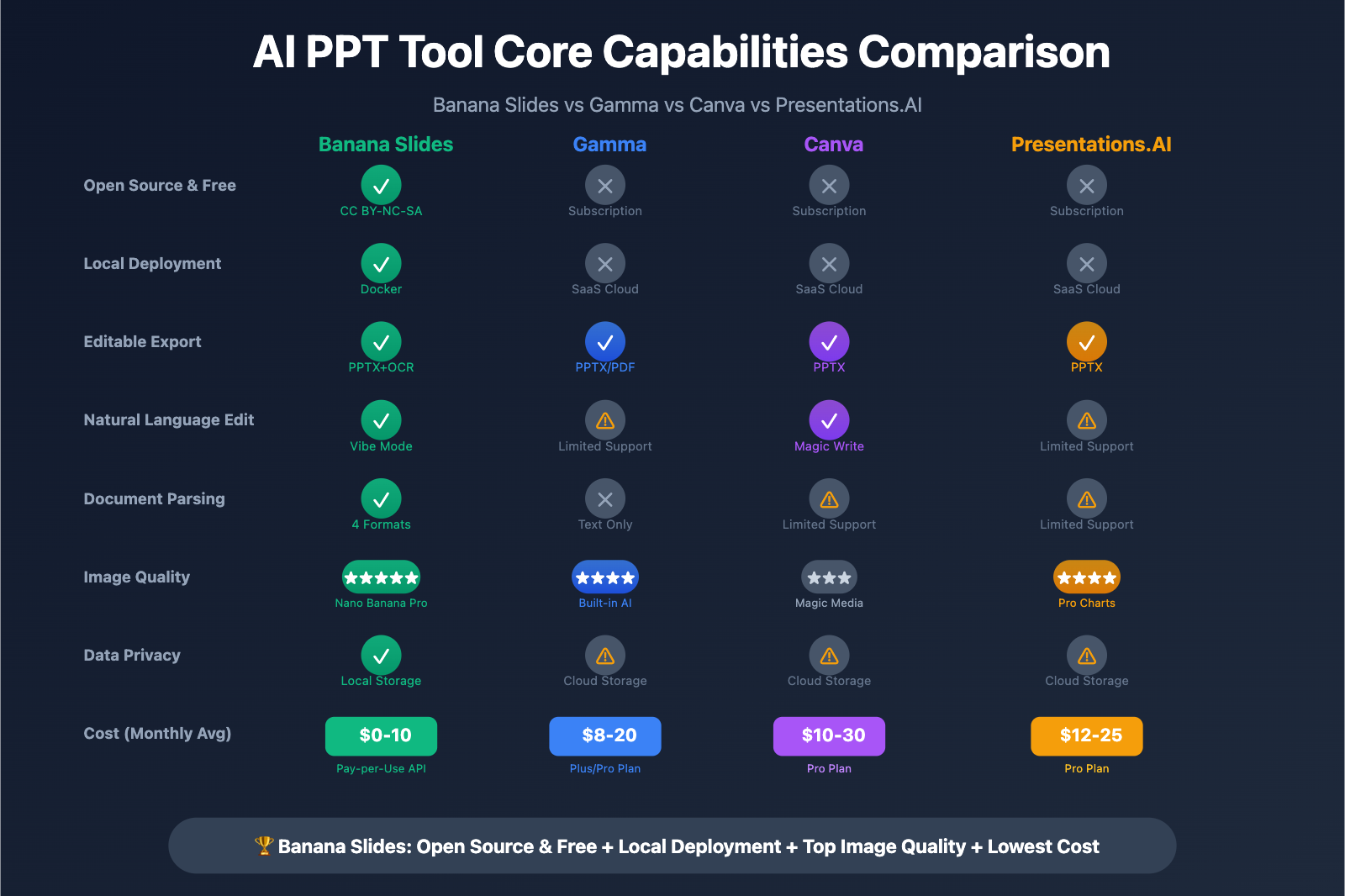
Feature Comparison Table
| Comparison Dimension | Banana Slides | Gamma | Canva Magic Design | Presentations.AI |
|---|---|---|---|---|
| Open Source & Free | ✅ CC BY-NC-SA 4.0 | ❌ Subscription ($8-20/month) | ❌ Subscription | ❌ Subscription |
| Local Deployment | ✅ Docker/Source Code | ❌ SaaS Cloud | ❌ SaaS Cloud | ❌ SaaS Cloud |
| Editable Export | ✅ PPTX + OCR Enhancement | ✅ PPTX/PDF | ✅ PPTX | ✅ PPTX |
| Natural Language Edit | ✅ Vibe Mode | ⚠️ Limited Support | ✅ Magic Write | ⚠️ Limited Support |
| Document Parsing | ✅ PDF/DOCX/MD/TXT | ❌ Text Only | ⚠️ Limited Support | ⚠️ Limited Support |
| Image Quality | ⭐⭐⭐⭐⭐ Nano Banana Pro | ⭐⭐⭐⭐ Built-in AI | ⭐⭐⭐ Magic Media | ⭐⭐⭐⭐ Professional Charts |
| API Cost | $0.04-0.05/slide (API-Yi) | Included in subscription | Included in subscription | Included in subscription |
| Data Privacy | ✅ Local Database | ⚠️ Cloud Storage | ⚠️ Cloud Storage | ⚠️ Cloud Storage |
Use Case Recommendations
Choose Banana Slides if you:
- ✅ Need complete control over data privacy (local deployment)
- ✅ Have limited budget but high volume needs (open source & free)
- ✅ Require deep customization (open source for secondary development)
- ✅ Seek the best image quality (Nano Banana Pro)
Choose Gamma if you:
- Need team collaboration features and cloud synchronization
- Don't mind subscription fees (suitable for enterprise procurement)
- Need brand management features (apply brand guidelines from PDF)
Choose Canva if you:
- Are already a Canva paid user
- Need a broader design asset library
- Prioritize ease of use over technical depth
Choose Presentations.AI if you:
- Need automatic complex chart generation (timelines, Gantt charts)
- Value AI intelligent layout capabilities
- Can accept higher subscription fees
FAQ
Summary
Core Advantages of Banana Slides + Nano Banana Pro:
- Open Source & Free: No subscription fees, pay-as-you-go API calls (as low as $0.04/slide)
- Local Deployment: Full data privacy control, suitable for enterprise internal use
- Ultimate Efficiency: Generate complete PPT in 5-8 minutes, saving 95% time compared to traditional creation
- Professional Quality: Nano Banana Pro's text rendering and infographic generation capabilities are industry-leading
- Fully Editable: Exported PPTX can be further edited in PowerPoint, offering high flexibility
For designers, corporate training departments, educational institutions, and consulting firms, Banana Slides transforms PPT creation from "hours of professional design" to "minutes of AI-assisted generation", improving content production efficiency by 95-98%.
⚠️ Open Source License Reminder: Banana Slides uses the CC BY-NC-SA 4.0 license. Free for personal use, commercial deployment requires contacting the author @Anionex for authorization.
We recommend quickly validating results through APIYi apiyi.com, which provides free test credits, unified OpenAI SDK calling format, and preferential pricing of $0.05/image covering 1K-4K resolutions. Visit imagen.apiyi.com to experience Nano Banana Pro image generation online.
Author: Technical Team
Technical Exchange: Welcome to share your Banana Slides creations in the comments. More AI content generation resources are available at the APIYi apiyi.com technical community
Banana Slides Project: https://github.com/Anionex/banana-slides
References:
- Banana Slides GitHub Repository https://github.com/Anionex/banana-slides
- Nano Banana Pro Official Documentation https://deepmind.google/models/gemini-image/pro/
- Google Workspace Nano Banana Pro in Slides https://workspaceupdates.googleblog.com/2025/11/workspace-nano-banana-pro.html
- Gemini 3 Pro Image Developers Guide https://blog.google/innovation-and-ai/technology/developers-tools/gemini-3-pro-image-developers/
- APIYi Platform Development Documentation https://docs.apiyi.com
Sources:
- Google Workspace Updates: Introducing Nano Banana Pro in Slides, Vids, Gemini app, and NotebookLM
- Gemini 3 Pro Image (Nano Banana Pro) – Google DeepMind
- Developers can build with Nano Banana Pro (Gemini 3 Pro Image)
- Best AI Presentation Makers of 2026 (with example outputs) – Plus
- The 7 best AI presentation makers in 2026 | Zapier