

PyYAML (How It Works For Developers)

PyYAML is a Python library that works as a YAML parser and emitter. YAML (YAML Ain’t Markup Language) is a human-readable data serialization format that integrates well with Python applications, features great error support, capable extension API, and more. YAML is often used for configuration files and data exchange between languages with different data structures, with human readability in mind. Later in this article, we will look into IronPDF, a PDF-generation Python package from Iron Software.
Key Features of PyYAML
- Human-Readable Format: YAML is designed to be easy to read and write, making it ideal for complex configuration files and data serialization.
- Full YAML 1.1 Support: PyYAML supports the complete YAML 1.1 specification, including Unicode support and custom data types.
- Integration with Python: PyYAML provides Python-specific tags that allow for the representation of arbitrary Python objects, making it versatile for various applications.
- Error Handling: PyYAML offers sensible error messages, which can be very helpful during debugging.
Installation
To install the YAML package, you can use pip:
pip install pyyamlpip install pyyamlBasic Usage
Here is a simple example of how to use PyYAML to load and dump a YAML document to and from an arbitrary Python object.
import yaml

# Sample YAML data
yaml_data = """
name: John Doe
age: 30
children:
 - name: Jane Doe
 age: 10
 - name: Jim Doe
 age: 8
"""

# Load YAML data into a Python dictionary
data = yaml.safe_load(yaml_data)
print(data)

# Dump Python data back to formatted YAML
yaml_output = yaml.dump(data, default_flow_style=False)
print(yaml_output)
import yaml
# Sample YAML data
yaml_data = """
name: John Doe
age: 30
children:
- name: Jane Doe
age: 10
- name: Jim Doe
age: 8
"""
# Load YAML data into a Python dictionary
data = yaml.safe_load(yaml_data)
print(data)
# Dump Python data back to formatted YAML
yaml_output = yaml.dump(data, default_flow_style=False)
print(yaml_output)Output

Advanced Features
- Custom Data Types: PyYAML allows you to define custom constructors and representers for handling complex data types for canonical YAML format.
import yaml

# Define a custom Python object
class Person:
 def __init__(self, name, age):
 self.name = name
 self.age = age

# Function to convert a Person object to a YAML representation
def person_representer(dumper, data):
 return dumper.represent_mapping('!Person', {'name': data.name, 'age': data.age})

# Function to create a Person object from YAML representation
def person_constructor(loader, node):
 values = loader.construct_mapping(node)
 return Person(**values)

# Register custom representer and constructor for Person
yaml.add_representer(Person, person_representer)
yaml.add_constructor('!Person', person_constructor)

# Object Serialization
person = Person(name='John Doe', age=30)
yaml_data = yaml.dump(person)
print(yaml_data)

# Deserialize YAML to a Person object
loaded_person = yaml.load(yaml_data, Loader=yaml.FullLoader)
print(loaded_person.name, loaded_person.age)
import yaml
# Define a custom Python object
class Person:
def __init__(self, name, age):
self.name = name
self.age = age
# Function to convert a Person object to a YAML representation
def person_representer(dumper, data):
return dumper.represent_mapping('!Person', {'name': data.name, 'age': data.age})
# Function to create a Person object from YAML representation
def person_constructor(loader, node):
values = loader.construct_mapping(node)
return Person(**values)
# Register custom representer and constructor for Person
yaml.add_representer(Person, person_representer)
yaml.add_constructor('!Person', person_constructor)
# Object Serialization
person = Person(name='John Doe', age=30)
yaml_data = yaml.dump(person)
print(yaml_data)
# Deserialize YAML to a Person object
loaded_person = yaml.load(yaml_data, Loader=yaml.FullLoader)
print(loaded_person.name, loaded_person.age)Output
👁 PyYAML (How It Works For Developers): Figure 2

- Handling Large Files: PyYAML can handle multiple YAML documents or large YAML files efficiently by using stream-based loading and dumping.
import yaml

# Load a large YAML file
with open('large_file.yaml', 'r') as file:
 data = yaml.safe_load(file)

# Dump data to a large YAML file
with open('output_file.yaml', 'w') as file:
 yaml.dump(data, file)
import yaml
# Load a large YAML file
with open('large_file.yaml', 'r') as file:
data = yaml.safe_load(file)
# Dump data to a large YAML file
with open('output_file.yaml', 'w') as file:
yaml.dump(data, file)Output

Introducing IronPDF
👁 PyYAML (How It Works For Developers): Figure 4
IronPDF is a powerful Python library designed to create, edit, and sign PDFs using HTML, CSS, images, and JavaScript. It offers commercial-grade performance with a low memory footprint. Key features include:
HTML to PDF Conversion: Convert HTML files, HTML strings, and URLs to PDFs. For example, render a webpage as a PDF using the Chrome PDF renderer.
Cross-Platform Support: Compatible with various .NET platforms, including .NET Core, .NET Standard, and .NET Framework. It supports Windows, Linux, and macOS.
Editing and Signing: Set properties, add security with passwords and permissions, and apply digital signatures to your PDFs.
Page Templates and Settings: Customize PDFs with headers, footers, page numbers, and adjustable margins. IronPDF supports responsive layouts and custom paper sizes.
- Standards Compliance: IronPDF adheres to PDF standards such as PDF/A and PDF/UA. It supports UTF-8 character encoding and handles assets like images, CSS, and fonts.
Generate PDF Documents using IronPDF and PyYAML
import yaml
import json
from ironpdf import *

# Apply your license key
License.LicenseKey = "your license"

# Sample YAML data
yaml_data = """
name: IronPDF User1
age: 25
children:
 - name: IronPDF User2
 age: 23
 - name: IronPDF User3
 age: 24
"""

# Load YAML data into Python structures
data = yaml.safe_load(yaml_data)
print(data)

# Dump Python data back to YAML
yaml_output = yaml.dump(data, default_flow_style=False)
print(yaml_output)

# Write YAML to File
with open('output_file.yaml', 'w') as file:
 yaml.dump(yaml_output, file)

# Write YAML data as JSON
with open('output_file.json', 'w') as json_file:
 json.dump(data, json_file)

# Read JSON and format with indentation for readability
output = json.dumps(json.load(open('output_file.json')), indent=2)
print(output)

# Create PDF renderer
renderer = ChromePdfRenderer()

# Create a PDF from HTML containing YAML data
content = "<h1>Awesome Iron PDF with PyYAML</h1>"
content += "<p>YAML data: " + yaml_output + "</p>"
pdf = renderer.RenderHtmlAsPdf(content)

# Save the PDF document to a file
pdf.SaveAs("awesome.pdf")
import yaml
import json
from ironpdf import *
# Apply your license key
License.LicenseKey = "your license"
# Sample YAML data
yaml_data = """
name: IronPDF User1
age: 25
children:
- name: IronPDF User2
age: 23
- name: IronPDF User3
age: 24
"""
# Load YAML data into Python structures
data = yaml.safe_load(yaml_data)
print(data)
# Dump Python data back to YAML
yaml_output = yaml.dump(data, default_flow_style=False)
print(yaml_output)
# Write YAML to File
with open('output_file.yaml', 'w') as file:
yaml.dump(yaml_output, file)
# Write YAML data as JSON
with open('output_file.json', 'w') as json_file:
json.dump(data, json_file)
# Read JSON and format with indentation for readability
output = json.dumps(json.load(open('output_file.json')), indent=2)
print(output)
# Create PDF renderer
renderer = ChromePdfRenderer()
# Create a PDF from HTML containing YAML data
content = "<h1>Awesome Iron PDF with PyYAML</h1>"
content += "<p>YAML data: " + yaml_output + "</p>"
pdf = renderer.RenderHtmlAsPdf(content)
# Save the PDF document to a file
pdf.SaveAs("awesome.pdf")Code Explanation
Imports:
- Imports necessary libraries:
yamlfor YAML operations,jsonfor JSON operations, andironpdffor PDF generation.
- Imports necessary libraries:
Setting License Key:
- Sets the IronPDF license key for legal and functional access to the library.
Sample YAML Data:
- Defines sample YAML data to demonstrate YAML operations.
YAML Operations:
- Converts YAML data into Python objects using
yaml.safe_load()for manipulation.
- Converts YAML data into Python objects using
Dumping to YAML:
- Converts Python objects back into YAML format for output using
yaml.dump().
- Converts Python objects back into YAML format for output using
Writing to Files:
- Exports YAML data to a YAML file and JSON data to a JSON file for storage or transmission.
Reading JSON and Formatting:
- Reads JSON data from a file and formats it for readability using
json.dumps().
- Reads JSON data from a file and formats it for readability using
Generating PDF with IronPDF:
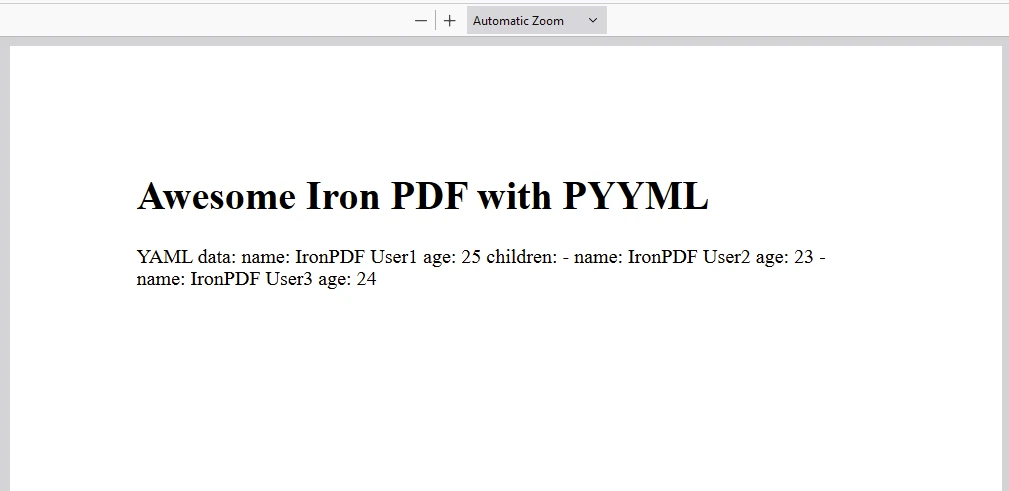
- Uses IronPDF to render an HTML string into a PDF document, including embedded YAML data.
Saving PDF:
- Saves the generated PDF to the filesystem, demonstrating programmatic PDF creation.
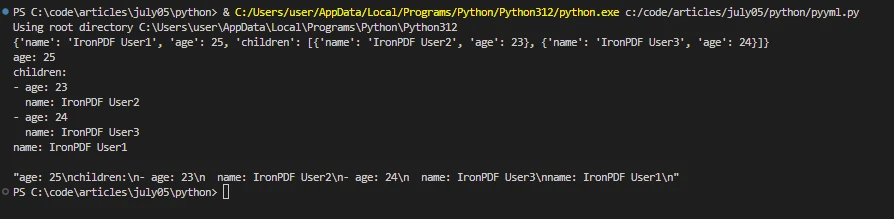
Output
IronPDF License
IronPDF runs on the license key for Python. IronPDF for Python offers a free trial license key to allow users to check out its extensive features before purchase.
Place the License Key at the start of the script before using the IronPDF package:
from ironpdf import *

# Apply your license key
License.LicenseKey = "key"
from ironpdf import *
# Apply your license key
License.LicenseKey = "key"Conclusion
PyYAML is a powerful and flexible library for working with YAML in Python. Its human-readable format, full YAML 1.1 support, and integration with Python make it an excellent choice for configuration files, data serialization, and more. Whether you are dealing with simple configurations or complex data structures, PyYAML provides the tools you need to handle YAML data effectively.
IronPDF is a Python package that facilitates the conversion of HTML content into PDF documents. It offers a straightforward API (ChromePdfRenderer) for developers to generate high-quality PDFs from HTML, including support for modern web standards like CSS and JavaScript. This makes it an effective tool for dynamically creating and saving PDF documents directly from Python applications.

























