|
VOOZH | about |
|
VOOZH | about |
Mako Server is a ready-to-run Lua application server built on the Barracuda App Server engine. One executable gives you Lua Server Pages, REST APIs, WebSockets, SQLite, TLS, IoT messaging, and integrated server APIs without assembling a separate web stack.
You do not need Apache, Nginx, PHP, Node.js, database driver packages, and a separate real-time messaging layer before getting started. The Mako Server bundle contains only two files: unpack it, run one command, and open your application in a browser.
Mako Server is designed for developers who want a small, practical server that can run on anything from an embedded Linux device to a cloud VM. It is especially useful when your application needs a web UI, local control logic, secure communication, and real-time messaging in one package.
Use one executable server with built-in Lua, Lua Server Pages, SQLite, WebSockets, and networking APIs. For many projects, there is no separate web server, application server, database driver package, or runtime stack to assemble first.
Mako is a strong fit for embedded Linux systems, gateways, appliances, and private on-premises servers where footprint, startup time, and long-term maintainability matter. See the Embedded Linux Web Server Tutorial for details.
Use WebSockets and the integrated SMQ protocol for live dashboards, browser-to-browser communication, online games, device control, and IoT messaging.
Mako includes security features such as TLS support, automated certificate management, and TPM-based secret storage. See the Automated Certificate Management Tutorial for details.
Host private IoT and messaging portals without cloud lock-in. See the tutorial How to Set Up an Environmentally Friendly Portal for details.
Includes an optional plugin called LSP-Claw that lets you design professional apps in no time.
If you are new to Lua or new to command-line tools, start small. You can run the server in a few minutes, create your first dynamic page shortly after that, and then add database access, REST endpoints, WebSockets, forms, and IoT messaging as your application grows.
index.lsp file and refresh the browser.New to the command line? Start with Getting Started with the Mako Server. It explains how to open a terminal, start Mako, find the port number, and create your first LSP page.
Build configuration pages, diagnostics dashboards, admin tools, and local control panels for embedded Linux products and industrial gateways.
Host internal tools, small business applications, REST/JSON APIs, database-backed sites, and admin dashboards without a large external framework stack.
Create live dashboards, browser-to-browser messaging, shared UIs, collaborative tools, and online game infrastructure using WebSockets and SMQ.
Use the integrated SMQ broker for device management, telemetry, browser-to-device control, and scalable IoT deployments. See the SMQ IoT page.
See the Blob Arena Multiplayer Game tutorial for details.
Lua Server Pages (LSP) lets you mix HTML with small Lua expressions. The example below generates a different number when the page is refreshed.
mako.zip package. The older tutorial-bundle Xedge.zip method is still available for manual setups.Lua is small, fast, and practical for server-side scripting. Lua Server Pages adds dynamic web page support similar in spirit to PHP, but integrated with the Barracuda App Server APIs.
Mako includes SQLite and high-level APIs for web applications, REST/JSON endpoints, files, sockets, HTTP client/server logic, SMTP, timers, and asynchronous server-side work.
Use WebSockets, SMQ, MQTT, Modbus, and OPC-UA related tooling to connect browsers, services, devices, and industrial systems.
The built-in Lua debugger lets you step through Lua code, set breakpoints, and inspect variables while developing.
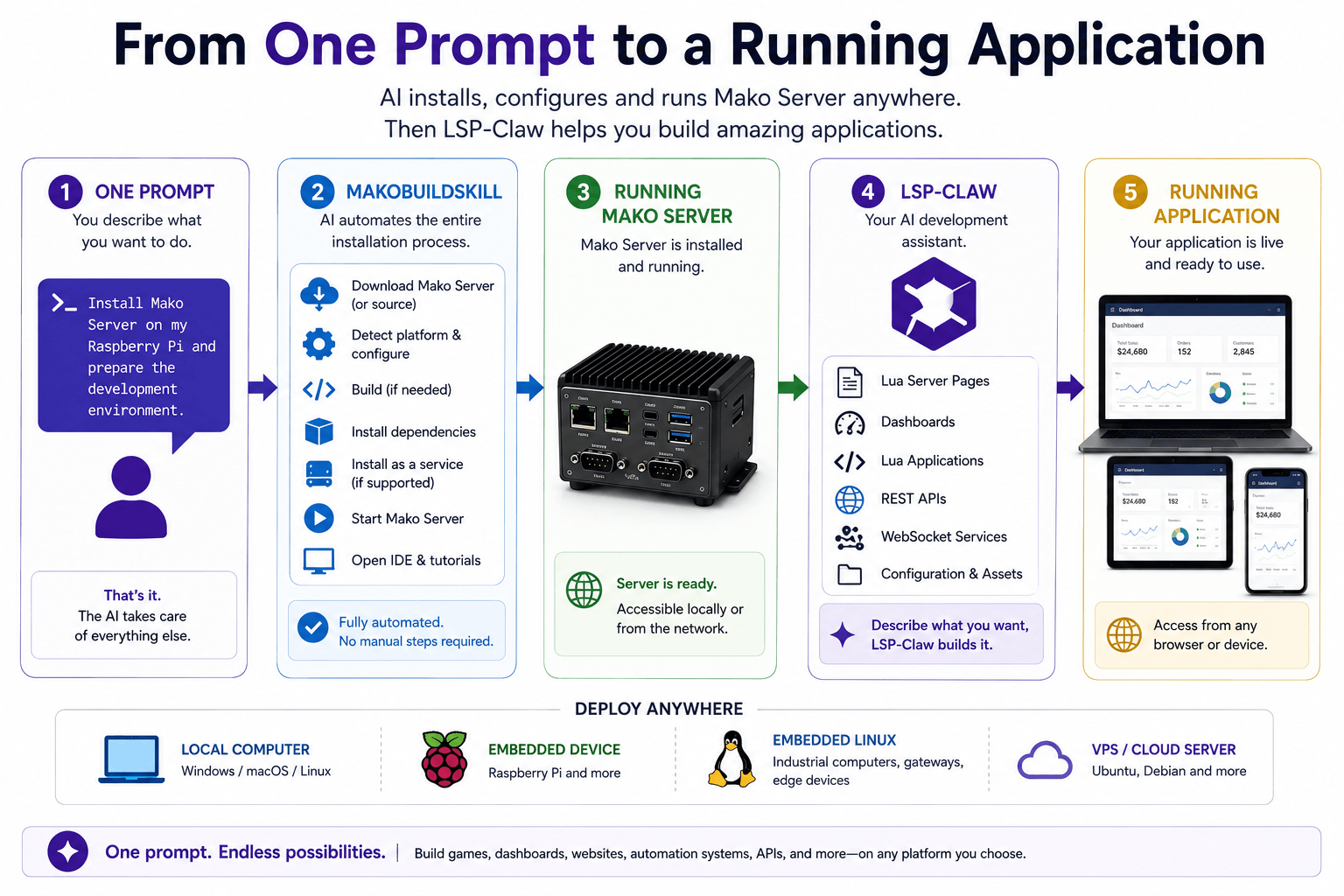
Building a Mako Server application can start with a short description of what you want to create, rather than a long setup checklist. The Mako Server AI Build/Installation Skill helps prepare a working development environment from a single prompt.
👁 Mako Server AI Build and Installation SkillDepending on the target platform, the AI-assisted setup can download a precompiled Mako Server package or build Mako Server from source. It can help with Windows PCs, embedded Linux devices such as Raspberry Pi systems, and cloud VPS deployments. Where appropriate, it can also install Mako Server as a service and prepare the necessary components for development.
The Mako Server download pages include ready-to-use AI prompts, so you can start with the prompt for your platform and adjust it only when your environment needs something specific.
Once Mako Server is running, LSP-Claw can act as an AI development assistant for the application itself. You describe the application you want, review what it creates, test it in the browser, and iterate from there.
Use the AI Build Skill to move through download, build, install, and first-run steps without manually assembling the environment first.
Use LSP-Claw to create and refine Lua Server Pages, REST APIs, dashboards, browser tools, and other Mako Server applications.
Professional developers can use the workflow to speed up setup and prototyping. New developers can use it as a guided path into building real applications.
In one test, a person with no software development experience used the AI-guided installation to install Mako Server on Windows, then asked LSP-Claw to create a browser-based game. They did not manually write the code, but still ended up with a complete running application they could test and refine.
The same workflow can help create personal desktop applications, company websites, home automation dashboards, industrial monitoring systems, REST APIs, web services, and embedded web applications.
The goal is not just faster code generation. It is to reduce the distance between an idea and a working Mako Server application while keeping the result visible, editable, and testable.
Mako Server is not trying to be a large general-purpose web framework. It is a compact application server for projects where the server should be easy to ship, easy to start, and close to the device or service it controls.
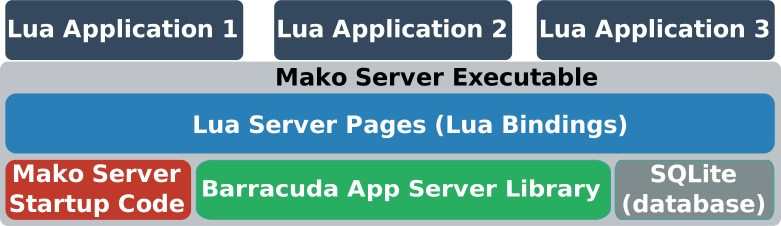
The Mako Server consists of one executable file that includes the Mako startup code, the Barracuda Application Server Library, SQLite, Lua, and Lua Server Pages.
Figure 1: Mako Server running 3 Lua web applications
The Barracuda App Server (BAS) is the C source code library that provides the core server engine. Mako Server packages BAS, Lua, SQLite, LSP, and supporting functionality into a configurable application server for high-level operating systems such as Linux, Windows, and macOS. Industrial companies also use BAS directly to web-enable equipment and connect products to cloud services.
The BAS design scales from microcontrollers to cloud servers. If you are interested in RTOS-powered IoT development, see the Xedge32 ESP32 Lua IDE. If you are using embedded Linux, see Embedded Linux Web Interface Design.
The Mako Server is based on the Barracuda App Server (BAS) source code library. See the BAS GitHub repo for license details.