VOOZH about

URL: https://support.mozilla.org/en-US/questions/1033352

⇱ Inspector goes blank after a couple of requests | Firefox Support Forum | Mozilla Support


Windows 10 reached EOS (end of support) on October 14, 2025. If you are on Windows 10, see this article.

Search Support

Avoid support scams. We will never ask you to call or text a phone number or share personal information. Please report suspicious activity using the “Report Abuse” option.

Learn More
Darrensw

I use Firefox inspector a lot, like all day, and now for some reason it works correctly then it goes blank as shown below.

I then have to close it and reopen it but it goes blank after about 2 minutes so not a good solution.

Is there as fix for this?

I'm currently using 33.1.1 but this has been a problem since at least 32.0

Have seen this: https://support.mozilla.org/en-US/questions/980988 but it doesn't offer a solution that works for me

I use Firefox inspector a lot, like all day, and now for some reason it works correctly then it goes blank as shown below. I then have to close it and reopen it but it goes blank after about 2 minutes so not a good solution. Is there as fix for this? I'm currently using 33.1.1 but this has been a problem since at least 32.0 Have seen this: https://support.mozilla.org/en-US/questions/980988 but it doesn't offer a solution that works for me

All Replies (6)

Thanks for reporting, I just find this on bugzilla:

you can create a bugzilla account and add yourself in cc list to get latest update.

Thanks!

Thanks for reporting, I just find this on bugzilla: * https://bugzilla.mozilla.org/show_bug.cgi?id=983386 you can create a bugzilla account and add yourself in cc list to get latest update. Thanks!

Hi, thanks for the reply.

I don't think this is related to the bug I'm seeing. I never mentioned an error page or stopping the web server in OP.

This happens on any site I extensively test on. Screenshot attached.

Hi, thanks for the reply. I don't think this is related to the bug I'm seeing. I never mentioned an error page or stopping the web server in OP. This happens on any site I extensively test on. Screenshot attached.
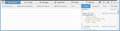
Modified by Darrensw

Try to update to the current Firefox 34.0.5 release.

  • Help > About Firefox

Start Firefox in to check if one of the extensions (Firefox/Tools > Add-ons > Extensions) or if hardware acceleration is causing the problem.

  • Switch to the DEFAULT theme: Firefox/Tools > Add-ons > Appearance
  • Do NOT click the Reset button on the Safe Mode start window
Try to update to the current Firefox 34.0.5 release. *Help > About Firefox *https://support.mozilla.org/kb/update-firefox-latest-version. *https://support.mozilla.org/kb/Updating+Firefox Start Firefox in <u>[[Safe Mode|Safe Mode]]</u> to check if one of the extensions (Firefox/Tools > Add-ons > Extensions) or if hardware acceleration is causing the problem. *Switch to the DEFAULT theme: Firefox/Tools > Add-ons > Appearance *Do NOT click the Reset button on the Safe Mode start window *https://support.mozilla.org/kb/Safe+Mode *https://support.mozilla.org/kb/Troubleshooting+extensions+and+themes

Modified by cor-el

That didn't work.

As mentioned in OP:

"...this has been a problem since at least 32.0"

The problem is I can't "make" it happen, it just does, seemingly at random.

That didn't work. As mentioned in OP: "...this has been a problem since at least 32.0" The problem is I can't "make" it happen, it just does, seemingly at random.

Did you also try a new profile?

Create a new profile as a test to check if your current profile is causing the problem.

See "Creating a profile":

If the new profile works then you can transfer files from a previously used profile to the new profile, but be cautious not to copy corrupted files to avoid carrying over problems.

Did you also try a new profile? Create a new profile as a test to check if your current profile is causing the problem. See "Creating a profile": *https://support.mozilla.org/kb/profile-manager-create-and-remove-firefox-profiles *http://kb.mozillazine.org/Standard_diagnostic_-_Firefox#Profile_issues If the new profile works then you can transfer files from a previously used profile to the new profile, but be cautious not to copy corrupted files to avoid carrying over problems. *http://kb.mozillazine.org/Transferring_data_to_a_new_profile_-_Firefox

Still no joy, I will add though that this happens on any PC I work on too, on any site.

I think it's quite simply a bug.

I know a lot of Devs who've moved to Chrome because of this but I don't want to, I prefer FF

Still no joy, I will add though that this happens on any PC I work on too, on any site. I think it's quite simply a bug. I know a lot of Devs who've moved to Chrome because of this but I don't want to, I prefer FF