Avoid support scams. We will never ask you to call or text a phone number or share personal information. Please report suspicious activity using the “Report Abuse” option.
Learn More
This thread was archived.
Please ask a new question if you need help.
In the far right section of the menu bar, FireFox refresh replaced my 1Password4 icon with a "save to pocket" icon. How do I recreate the password icon? Thanks, lv
In the far right section of the menu bar, FireFox refresh replaced my 1Password4 icon with a "save to pocket" icon. How do I recreate the password icon?
Thanks,
lv
All Replies (1)
Chosen Solution
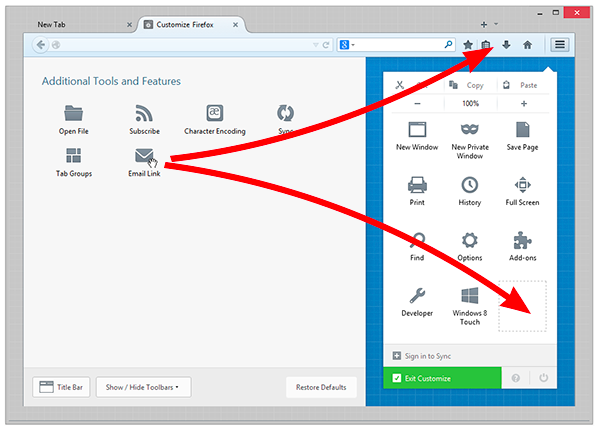
You can change the items that appear in the menu or your toolbar.
- Click the menu button The image "new fx menu" does not exist. and choose Customize.
- A special tab will open which allows you to drag and drop items in or out of the menu and the toolbar. Feel free to experiment with what works best for you. You can always start over by clicking the Restore Defaults button at the bottom of the screen.