
Avoid support scams. We will never ask you to call or text a phone number or share personal information. Please report suspicious activity using the “Report Abuse” option.
Learn MoreMozilla made an update of my Firefox installation on my Win11 laptop. all my password disappeared as well as my history and bookmarks.
I have now a virgin installation and is starting from scratch.
Now I get this error message: "This profile was last used with a newer version of this application. Please create a new profile." I deleted met shortcut and I opened Firefox by using Windows search. Now I see 4 profiles! I think I do not need to create a new profile. Maybe delete 3 of them ? What to do ? And, how?
All Replies (3)
mikael.boldt, I wouldn't delete any profiles as one of them may contain the missing bookmarks and passwords etc.
To try and see if one of them does, follow this guide: https://support.mozilla.org/en-US/kb/recover-user-data-missing-after-firefox-update
If you can't launch Firefox because of the 'used with a newer version' message then you can either create a new profile as suggested, or you can bypass Firefox's downgrade protection and force it to open with a profile from a newer version with the "-allow-downgrade" command line argument.
See here for more information on using Firefox with a command line argument, but note the caution under the "-allow-downgrade" heading: https://wiki.mozilla.org/Firefox/CommandLineOptions
Modified by TechHorse
OK. Now I have collected all my usernames and password. However, I still get this error: "This profile was last used with a newer version of this application. Please create a new profile."
I don't know what you are doing or why you are getting the "Please create a new profile" error but, to force Firefox to start with a profile used in a newer version:
Right-click the Windows Start 👁 Windows11StartButton
button, select Run, enter one of the following commands in the Run dialog and click OK:

- firefox.exe -P -allow-downgrade
.... or, use the full path to firefox.exe enclosed in quotes, for example:
- "C:\Program Files\Mozilla Firefox\firefox.exe" -P -allow-downgrade
The Firefox - Choose User Profile window should open.
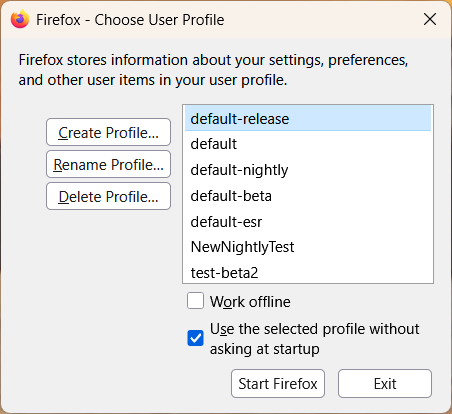
Select the profile you wish to use in the Firefox - Choose User Profile window and click Start Firefox.
Modified by AliceWyman
You must log in to your account to reply to posts. Please start a new question, if you do not have an account yet.