
Avoid support scams. We will never ask you to call or text a phone number or share personal information. Please report suspicious activity using the “Report Abuse” option.
Learn MoreI've been using Firefox since well, lets just say long enough... Version 20 for the Mac seems to not have fixed any bugs or memory leaks.
One of the "fixes" is to restart Firefox, which is the only "fix" that works, but this really isn't a fix, this is a stopgap situation, in where you release the memory by closing it...
Are there other people with this same situation? My Firefox uses with nothing in the main page except google.com, if it's open for over 24 hours over 1GB of ram... 2 GB in 48 hours, etc...
The most Firefox has ever used was 5GB before I shut it down, now I know, restarting Firefox seems to stop this from happening, but as I said, this is a stopgap, there is something inside Firefox that makes this happen.
Is there anything in the future that will fix this issue, or is Firefox going to be forever a Memory Hog worse than Microsoft Office?
Modified by Cyberpawz
All Replies (104)
You can check the memory usage on the about:memory page.
- http://blog.kylehuey.com/post/21892343371/fixing-the-memory-leak about:khuey - Fixing the Memory Leak
Yes, I know about that document, as I stated above the only thing that fixes it is restarting the program, which isn't a true fix, just a stop-gap.
So, minimizing the memory usage by clicking the button on the about:memory page doesn't have effect?
Start Firefox in to check if one of the extensions (Firefox/Tools > Add-ons > Extensions) or if hardware acceleration is causing the problem (switch to the DEFAULT theme: Firefox/Tools > Add-ons > Appearance).
- Do NOT click the Reset button on the Safe Mode start window or otherwise make changes.
- https://support.mozilla.org/kb/Safe+Mode
- https://support.mozilla.org/kb/Troubleshooting+extensions+and+themes
Do a clean reinstall and delete the Firefox program folder before reinstalling a fresh copy of Firefox.
Download a fresh Firefox copy and save the file to the desktop.
- Firefox 20.0.x: http://www.mozilla.org/en-US/firefox/all.html
Uninstall your current Firefox version, if possible, to cleanup the Windows registry and settings in security software.
- Do NOT remove personal data when you uninstall your current Firefox version, because all profile folders will be removed and you will also lose your personal data like bookmarks and passwords from profiles of other Firefox versions.
Remove the Firefox program folder before installing that newly downloaded copy of the Firefox installer.
- It is important to delete the Firefox program folder to remove all the files and make sure that there are no problems with files that were leftover after uninstalling.
- http://kb.mozillazine.org/Uninstalling_Firefox
Your bookmarks and other profile data are stored in the Firefox profile folder and won't be affected by an uninstall and (re)install, but make sure that "remove personal data" is NOT selected when you uninstall Firefox.
If you keep having problems then also create a new profile.
Hello,
The Reset Firefox feature can fix many issues by restoring Firefox to its factory default state while saving your essential information. Note: This will cause you to lose any Extensions, Open websites, and some Preferences.
To Reset Firefox do the following:
- Go to Firefox > Help > Troubleshooting Information.
- Click the "Reset Firefox" button.
- Firefox will close and reset. After Firefox is done, it will show a window with the information that is imported. Click Finish.
- Firefox will open with all factory defaults applied.
Further information can be found in the Refresh Firefox - reset add-ons and settings article.
Did this fix your problems? Please report back to us!
Thank you.
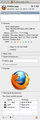
@cor-el the only extension I have running is Ghostery, I have my cache cleaned out every day by a chron job, and through another app I use to keep my computer running smoothly. The Cache is not allowed to 50 MB, I have no Application Cache, and as you will see via the image this version of Firefox was installed a little over a month ago.
When I installed it, it was from a clean install. I used Amnesia to remove everything, including my personal data. I have everything on the cloud that I need so getting my personal info back was no issue.
Also, a heads up, I'm on a Mac. As my More System Information shows on the right of the screen.
User Agent: Mozilla/5.0 (Macintosh; Intel Mac OS X 10_8_3) AppleWebKit/536.28.10 (KHTML, like Gecko) Version/6.0.3 Safari/536.28.10
This should not be happening with less than a month under the life of the App unless there is a memory leak. Restarting the App, Resetting the App, and going through the steps I have should of been more than enough to resolve this issue.
@philipp
As shown above I went beyond that, no go... I did a clean install a month ago, I really don't understand why this is happening. I can wipe out Firefox again, but seriously? Are you telling me once a month I got to blow away Firefox and re-install it to keep it "fresh and functional"...
That's not a fix, as I've said before, that is the ultimate stop-gap, one I will not tolerate. Safari is looking pretty good to me right now.

Modified by Cyberpawz
Also, the last time I posted about this, and it was a real issue was back in version 4, and was beta testing version 5. At that time over 700 people said they had the same issue. Want to wait a week or so and see how many more people have the same issue?
https://support.mozilla.org/en-US/questions/803094?esab=a&as=s&r=1&page=1
I don't see why after 16/15 versions this issue has not been resolved.
the most common cause of memory leaks in firefox are third-party extensions. you didn't provide much information about your configuration though - please go to firefox > help > troubleshooting information & use the button to copy the contents of the page & paste them here into a forum reply...
Here you go, there is nothing in my extensions except Avast! WebRep and Ghostery, that's it. Nothing fancy, and except one, I haven't stated before.
I am not an extension collector, I only use what I require. As you can see there is nothing truly out of place.
Application Basics
 Name
 Firefox
 Version
 20.0
 User Agent
 Mozilla/5.0 (Macintosh; Intel Mac OS X 10.8; rv:20.0) Gecko/20100101 Firefox/20.0
Build Configuration
about:buildconfig
Extensions
Name
Version
Enabled
ID
 Ghostery
 2.9.4
 true
 firefox@ghostery.com
 avast! WebRep
 8.0.4451
 false
 wrc@avast.com
Important Modified Preferences
Name
Value
 accessibility.typeaheadfind.flashBar
 0
 browser.cache.disk.capacity
 51200
 browser.cache.disk.smart_size_cached_value
 358400
 browser.cache.disk.smart_size.enabled
 false
 browser.cache.disk.smart_size.first_run
 false
 browser.cache.disk.smart_size.use_old_max
 false
 browser.places.smartBookmarksVersion
 4
 browser.startup.homepage
 www.google.com
 browser.startup.homepage_override.buildID
 20130326150557
 browser.startup.homepage_override.mstone
 20.0
 browser.tabs.warnOnClose
 false
 dom.mozApps.used
 true
 dom.w3c_touch_events.expose
 false
 extensions.lastAppVersion
 20.0
 font.language.group
 x-western
 font.minimum-size.ar
 12
 font.minimum-size.el
 12
 font.minimum-size.he
 12
 font.minimum-size.ja
 12
 font.minimum-size.ko
 12
 font.minimum-size.th
 12
 font.minimum-size.tr
 12
 font.minimum-size.x-armn
 12
 font.minimum-size.x-baltic
 12
 font.minimum-size.x-beng
 12
 font.minimum-size.x-cans
 12
 font.minimum-size.x-central-euro
 12
 font.minimum-size.x-cyrillic
 12
 font.minimum-size.x-devanagari
 12
 font.minimum-size.x-ethi
 12
 font.minimum-size.x-geor
 12
 font.minimum-size.x-gujr
 12
 font.minimum-size.x-guru
 12
 font.minimum-size.x-khmr
 12
 font.minimum-size.x-knda
 12
 font.minimum-size.x-mlym
 12
 font.minimum-size.x-orya
 12
 font.minimum-size.x-sinh
 12
 font.minimum-size.x-tamil
 12
 font.minimum-size.x-telu
 12
 font.minimum-size.x-tibt
 12
 font.minimum-size.x-unicode
 12
 font.minimum-size.x-user-def
 12
 font.minimum-size.x-western
 12
 font.minimum-size.zh-CN
 12
 font.minimum-size.zh-HK
 12
 font.minimum-size.zh-TW
 12
 gfx.blacklist.direct2d
 3
 gfx.blacklist.layers.direct3d9
 3
 gfx.blacklist.webgl.msaa
 4
 network.cookie.prefsMigrated
 true
 places.database.lastMaintenance
 1367011227
 places.history.expiration.transient_current_max_pages
 104858
 plugin.disable_full_page_plugin_for_types
 application/pdf
 privacy.donottrackheader.enabled
 true
 privacy.sanitize.migrateFx3Prefs
 true
Graphics
 Device ID
 0x6740
 GPU Accelerated Windows
 1/1 OpenGL
 Vendor ID
 0x1002
 WebGL Renderer
 ATI Technologies Inc. -- ATI Radeon HD 6770M OpenGL Engine
 AzureCanvasBackend
 quartz
 AzureContentBackend
 none
 AzureFallbackCanvasBackend
 none
JavaScript
 Incremental GC
 true
Accessibility
 Activated
 false
 Prevent Accessibility
 0
Library Versions
Expected minimum version
Version in use
 NSPR
 4.9.5
 4.9.5
 NSS
 3.14.3.0 Basic ECC
 3.14.3.0 Basic ECC
 NSSSMIME
 3.14.3.0 Basic ECC
 3.14.3.0 Basic ECC
 NSSSSL
 3.14.3.0 Basic ECC
 3.14.3.0 Basic ECC
 NSSUTIL
 3.14.3.0
 3.14.3.0
yes, this all looks fairly normal to me - nothing that should give concerns in relation to RAM leaks. could you test if you can replicate the problem while you're in safemdoe (as explained by cor-el above) nevertehless, since it might provide some other clues... (hardware acceleration, jit-compiling and other things are turned off there)
I'll do that, but it will take a few hours to get back any real information, since a memory leak takes time to build up.
Create a new profile as a test to check if your current profile is causing the problems.
See "Creating a profile":
- https://support.mozilla.org/kb/profile-manager-create-and-remove-firefox-profiles
- http://kb.mozillazine.org/Standard_diagnostic_-_Firefox#Profile_issues
If the new profile works then you can transfer some files from an existing profile to the new profile, but be careful not to copy corrupted files.
Seriously, creating a new profile just to have Firefox to work? Perhaps if Firefox was the one App I couldn't live without (Like Photoshop is) I would attempt something like that.
BTW, all other accounts I have on this computer act the same way. My wife won't use Firefox because it's slow. Which happens when it takes so much memory away from the computer that everything slows down. She was the original reason why I looked into this, because I was tired of her bothering me while I was learning how to program in HTML 5 and JavaScript.
I use to use it all the time to verify my coding works, now only when I need to.
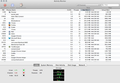
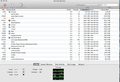
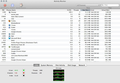
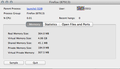
Oh, and BTW, there are three screenshots you may want to look at here. This is with only google up and running. Less than 7 hours, and the memory has increased by 100MB, and the VM has nearly increased by 3 times it's size.
This is a memory bug, plain and simple.
This app is a month old, this should not be happening period. I'm sorry to say, but Firefox is becoming the new Microsoft when it comes to memory usage.
And just a heads up, this was in safe mode.



Modified by Cyberpawz
Well it's been a week, and this is what bothers me, nothing open, and Firefox just sitting in the background, I'd like to know why 4GB of VRAM is being used at all?
First off my desktop has 16GB Ram. Secondly, no web pages have been opened using Firefox for a week. Thirdly, why hasn't Firefox released the VRam?
I can go for a bit more, but seriously, 364 MB of Real memory being held up, and then 4GB of VRam for a program that has nothing being used in it... am I missing something?
Moderators Comments for clarification
Please see link ~J99
There are undoubtedly problems and this thread has been viewed thousands of times.
- Some people find an outdated version of Ghostery was the cause
- A couple of bugs have been filed at least one of those currently appears to manifest reproducibly only on one site.
- I have spun off a new thread specifically for this sort of memory problem.
(thumbnails from original post ~J99)

Modified by John99

Hi,
Same problem here, Firefox goes crazy with RAM usage, building up to at least 1.5Gb but I might try to leave it open for several days just to check if it eventually crashes up the box :-/
Hope some dev or staff member is at least aware of the problem, at best already trying to fix it - and please don't post bot-like answers about resetting profiles and so on, because users concerned about Firefox's memory usage and bothered enough to post on support forums (i've just created the account i'm using right now) have usually already tried the usual workarounds :-).
Cheers
BTW box is a Mac with OSX 10.8 and FF 21.0
In about:config, try these :
New - numeric : Name : browser.cache.memory.capacity Value : 4000 ou 8000
New - boolean : Name : config.trim_on_minimize Value : true
New - boolean : Name : browser.turbo.enabled Value : true
New - numeric : Name : browser.sessionhistory.max_total_viewers Valeur : 0
Change network.http.pipelining to true
Change network.http.pipelining.maxrequests to 9 (if lower, mine was already 32)
Change network.http.proxy.pipelining to true
New - string : Name : nglayout.initialpaint.delay Value : 2000
New - string : Name : content.notify.backoffcount Value : 5
New - string : Name : ui.submenuDelay Value : 0
Change plugin.expose_full_path to true
Currently testing this ...
I've heard of this, but hackery only fixed so much for me. I tried this already, before posting here, because, well I thought I could fix it myself.
It fixed a little, but not the problem itself. The problem is a little more deep than just a simple code parameter re-write.
It is best to leave those prefs at their default setting as they were chosen as such for a reason and changing them can lead to problems if web servers aren't supporting them or you can otherwise get negative performance effects.
You should leave plugin.expose_full_path to false for security reasons because this exposes the path of all plugins to web servers via the navigator.plugins array.
@Cor-El, I agree, but you know what, if Mozilla, or Firefox, or whoever owns the browser now, doesn't recognize there is a problem, it won't fix itself.
Regretfully, that means people take things into their own hands, which right now means we attempt to find fixes for problems that should not exist in the first place.
Most of those prefs don't do anything anymore & some are removed like: browser.turbo.enabled which is ancient and was removed in 2004. I never knew it existed before today in fact! And I was a hardcore about:config guy back in those days!
I agree that your addons don't look like anything special enough to cause memory problems like this. But I still don't trust an AV product inserting a addon into my browser. If you could, I'd test for a while (a week) w/ that disabled. Just to see if there's a difference.
Also you've answered everything except how many tabs you have open in a typical session? It doesn't have to be an exact count but if you have 20+ tabs open (even counting inactive tab groups), that can really send your memory usage thru the roof.
I've also found certain sites cause Firefox to raise its memory and keep it raised as long as it was open. Sites like Tumblr and the like. Or steaming sites like Netflix, Hulu, HBOGo or anything really that has a flash or silverlight plugin running in it.
My theory is that depending on the type of content you have open in your tabs + the number of them, it increases Firefox's memory and doesn't release it like it's supposed to.
Also the only pref I think might make a difference in your case is raising the pref browser.sessionstore.interval to 60000. Which is 60 seconds aka 1 min. By default it is 15000 milliseconds which is 15 seconds. This pref controls how often to save your tabs & windows (and all the data in the tabs, including form history, etc) to the hard drive.
So, in my opinion, saving tabs once every 15 seconds is crazy. And has caused momentary hangs/freezes while watching flash videos for others and makes Firefox react slowly when interacting with it.
Anyway, I'm not claiming this is going to fix all your problems. It's just a hunch of mine. Let me know if you get any relief.
Also I don't work for Mozilla. I'm a volunteer that's been fiddling w/ Firefox since 2004. :)
Extra thought: If you have a large store of anything, I think that can contribute to the memory problem. For example, having 500+ bookmarks saved or 200 downloads saved in the download history or having 800+ cookies saved or having 100+ passwords saved and so on. You get the picture.