
| Original author(s) | MusicMatch, Inc. |
|---|---|
| Developer(s) | Yahoo! Inc. |
| Initial release | 5 January 1998 (1998-01-05); 28 years ago[1] |
| Final release | |
| Operating system | |
| Successor | Yahoo! Music Jukebox |
| Type | Media player |
| License | Freemium |
MusicMatch Jukebox was a desktop media player developed by MusicMatch, Inc. for Windows and classic Mac OS. In September 2004 (2004-09), Yahoo! Inc. announced the acquisition of MusicMatch Inc., rebranding the software to Yahoo! Music MusicMatch Jukebox. It was replaced by Yahoo! Music Jukebox in 2005, with MusicMatch Jukebox's online services discontinued on 31 August 2007 (2007-08-31).
iPod Plugin
| 👁 Image iPod Manager 1.0.30.0 | |
| Developer(s) | Apple Computer, Inc. |
|---|---|
| Initial release | 17 July 2002 (2002-07-17); 23 years ago |
| Final release | ?
/ ? |
| Operating system | |
| Successor | iTunes |
| Type | Device driver |
| License | Freeware |

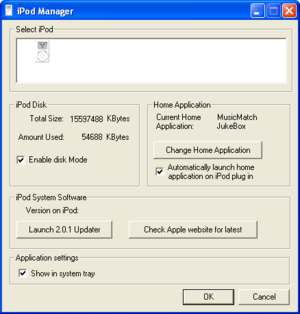
Between 17 July 2002 (2002-07-17) and 16 October 2003 (2003-10-16), Apple distributed an iPod plugin for MusicMatch Jukebox, allowing Windows users to sync an iPod (1st, 2nd, and 3rd generation) over FireWire, and later, USB. It was replaced by iTunes for Windows, which first became available with version 4.1.
The plugin is distributed as an .mmz file, a ZIP-based format that contains installers for:
- iPod Service: The Windows service that handles communication with an attached iPod. iPod Service continues to be included with iTunes.
- iPod Manager: A basic program that displays attached iPods, their storage use, allows enabling Disk Mode, allows setting an application to launch when the iPod is connected, and provides a shortcut to launch iPod Updater. iPod Manager starts with Windows and displays an icon in the notification area.
- iPod Updater: The latest version of iPod Updater is bundled with the plugin, to allow the device to be updated or restored to factory settings.
At least Windows Me or Windows 2000 is required. Windows 98 is not supported, because support for USB/FireWire mass storage devices was introduced with Windows Me and 2000.
System requirements
According to readme.doc, installed with version 1.0:
To use iPod for Windows, you must have a PC with the following:
- A 300MHz Pentium (or better) microprocessor
- Microsoft® Windows ME®, Windows 2000®, or Windows XP®
- Built-in or Windows-certified FireWire card (IEEE 1394)
- At least 96 MB RAM (at least 128 MB for Windows XP)
Versions
| 👁 Image | This list is incomplete; you can help by adding missing items. |

| Version | iPod Service Version | iPod Manager Version | iPod Updater included | Release Date | Download URL | SHA1 Hash | File Size | Release Notes |
|---|---|---|---|---|---|---|---|---|
| 1.0.0.7 | 1.0.0.16 | — | 1.2.1 | 11 September 2002 (2002-09-11) | Included on CD with part number 2Z691-4083-A | — | ||
| 2.0.1.6 | 1.0.0.85 | 1.0.30.0 | 2.0.1 | 1 July 2003 (2003-07-01) | iPodSetup_v2_web_ENU_1s.mmz[note 1] | ebcefaed5dac42bd4628ffb7b2d919ff6524c668
|
10,927,521 | DL1211[permanent dead link]
System requirements: Windows ME, 2000, XP Home and Pro |
- ^ Use right click → Save Link As… to save this file, as it is incorrectly served as a plain text file by Apple's servers.

