|
VOOZH | about |
|
VOOZH | about |
Note: If you are more interested in learning concepts in an Audio-Visual format, We have this entire article explained in the video below. If not, you may continue reading.
Let’s start with a scenario. Suppose, we have stored the marks of a student sam in a list.
Can you tell, after looking at this list how much he has scored in History or Geography? No, you can not until you have the data where you have stored which subject marks are stored at which index.
If we have this data, you can easily answer that. Since History stored at index 1, we can say that Sam scored 36 marks in History.
But there are a few problems with this approach.
All these issues can be solved using a Python data structure called Dictionary. This is how the dictionary is going to solve our problem.
Instead of indices, the marks are stored using names or keys in the dictionaries. Here, the subject names Geography, History, Mathematics are the keys, and the marks 45, 36,54, etc. are the values corresponding to these keys.
A dictionary is an unordered data structure with elements separated by a comma and stored as a key-value pair. It is enclosed within curly brackets. Also, the key-value pair is separated by a : (colon).
Here is one example of. Here, the key is the name of the person and the value is a number.
We can also have any other data structure as a value. Look at the example below, here we have a list of numbers as value for each key.
Now let’s see how we can access elements of a dictionary. Elements are accessed by keys rather than index. If we try to access a dictionary using the index, we get an error. Because this is not elements are stored inside it.
dict2 = {'Ramesh':[150,46],'Suresh':[146,58],'Sudesh':[160,50]}

dict2[1]
Elements are stored using keys. So to access them we need to use the key. Suppose you want to access the details of the key Suresh use dict2[‘Suresh] as shown in the following image.
It will return the values stored using the key Suresh i.e a list of values 146 and 58.
Now let’s move on to see how to add elements to a dictionary. To add a single value to the dictionary we can use the name of the dictionary along with the new key enclosed in a pair of square brackets. See the image below.
When you print the dictionary you can see a new key-value pair added to the dictionary.
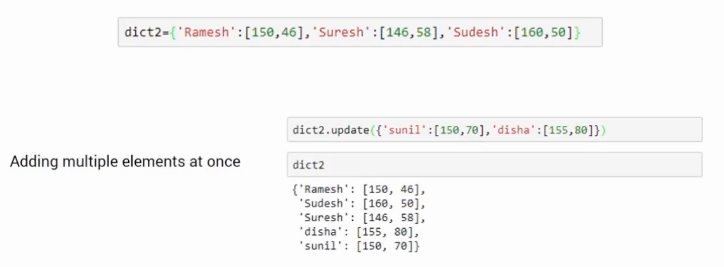
What if we want to add multiple elements to a dictionary. We can do this using the update function. This update function takes it as an input.
In our example, we are adding to key-value pair Sunil and Disha to the existing dictionary using the update function. When we do so the two new elements get added to the dictionary.
This was all about how we can add elements to dictionaries.
What if you want to delete an element? Deleting an element from a dictionary is very much similar to that of a list. The only difference is instead of the index we pass the key within the square bracket that you want to delete from it.
For example, if I want to delete the details of Ramesh. We can do del dict2[‘Ramesh] as shown below.
It will remove the Ramesh key-value pair from the dictionary. After performing the deletion, it will have only two elements.
This was all about dictionaries in this article. We saw how easily we can store and access the data in dictionaries. It uses the key-value pair format to store the values and allow instant access without any overhead. We also saw how to add and remove the elements from an existing dictionary.
Some important points about dictionaries-
If you are looking to kick start your Data Science Journey and want every topic under one roof, your search stops here. Check out Analytics Vidhya’s Certified AI & ML BlackBelt Plus Program
If you have any queries let me know in the comment section!
Shipra is a Data Science enthusiast, Exploring Machine learning and Deep learning algorithms. She is also interested in Big data technologies. She believes learning is a continuous process so keep moving.
GPT-4 vs. Llama 3.1 – Which Model is Better?
Llama-3.1-Storm-8B: The 8B LLM Powerhouse Surpa...
A Comprehensive Guide to Building Agentic RAG S...
Top 10 Machine Learning Algorithms in 2026
45 Questions to Test a Data Scientist on Basics...
90+ Python Interview Questions and Answers (202...
8 Easy Ways to Access ChatGPT for Free
Prompt Engineering: Definition, Examples, Tips ...
What is LangChain?
What is Retrieval-Augmented Generation (RAG)?
Very good explanation for beginner's...Its so simple and crisp.. Thanks for sharing
Sir could you please explain more stuff about dictionary . Cus I want to more about this please update it
Great blog post! I really like the explanation of how dictionaries work in Python, and how they can be used to store and manipulate data. It's helpful to have a clear understanding of what a dictionary is and how it differs from other data structures, like lists. Thanks for sharing!
Edit
Resend OTP
Resend OTP in 45s