|
VOOZH | about |
|
VOOZH | about |
This article was published as a part of the Data Science Blogathon
Anomaly detection is the process of finding abnormalities in data. Abnormal data is defined as the ones that deviate significantly from the general behavior of the data. Some of the applications of anomaly detection include fraud detection, fault detection, and intrusion detection. Anomaly Detection is also referred to as outlier detection.
Some of the anomaly detection algorithms are,
In outlier detection, the training data consists of both anomalies and normal observations whereas in novelty detection the training data consists only of normal observations rather than having both normal and anomalous observations. In this post, we’re gonna see a use case of novelty detection.
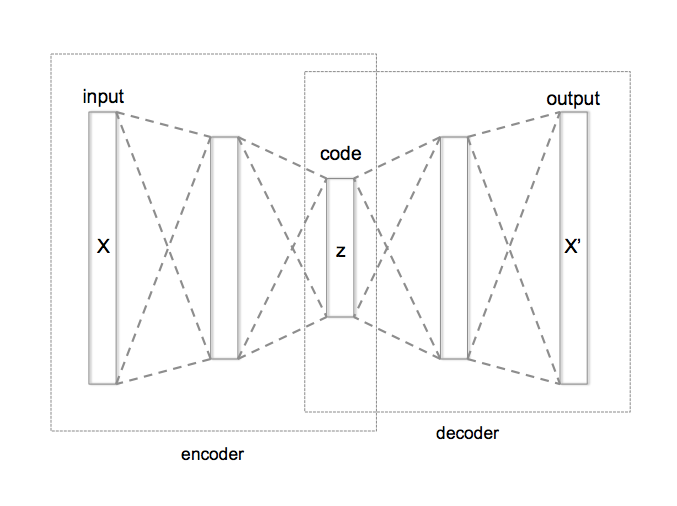
AutoEncoder is an unsupervised Artificial Neural Network that attempts to encode the data by compressing it into the lower dimensions (bottleneck layer or code) and then decoding the data to reconstruct the original input. The bottleneck layer (or code) holds the compressed representation of the input data. The number of hidden units in the code is called code size.
In this post let us dive deep into anomaly detection using autoencoders.
AutoEncoders are widely used in anomaly detection. The reconstruction errors are used as the anomaly scores. Let us look at how we can use AutoEncoder for anomaly detection using TensorFlow.
Import the required libraries and load the data. Here we are using the ECG data which consists of labels 0 and 1. Label 0 denotes the observation as an anomaly and label 1 denotes the observation as normal.
import numpy as np
import pandas as pd
import tensorflow as tf
import matplotlib.pyplot as plt
from sklearn.metrics import accuracy_score
from tensorflow.keras.optimizers import Adam
from sklearn.preprocessing import MinMaxScaler
from tensorflow.keras import Model, Sequential
from tensorflow.keras.layers import Dense, Dropout
from sklearn.model_selection import train_test_split
from tensorflow.keras.losses import MeanSquaredLogarithmicError

# Download the dataset
PATH_TO_DATA = 'http://storage.googleapis.com/download.tensorflow.org/data/ecg.csv'
data = pd.read_csv(PATH_TO_DATA, header=None)
data.head()

# data shape
# (4998, 141)
# last column is the target
# 0 = anomaly, 1 = normal
TARGET = 140

features = data.drop(TARGET, axis=1)
target = data[TARGET]

x_train, x_test, y_train, y_test = train_test_split(
 features, target, test_size=0.2, stratify=target
)

# use case is novelty detection so use only the normal data
# for training
train_index = y_train[y_train == 1].index
train_data = x_train.loc[train_index]

# min max scale the input data
min_max_scaler = MinMaxScaler(feature_range=(0, 1))
x_train_scaled = min_max_scaler.fit_transform(train_data.copy())
x_test_scaled = min_max_scaler.transform(x_test.copy())
The last column in the data is the target ( column name is 140). Split the data for training and testing and scale the data using MinMaxScaler.
# create a model by subclassing Model class in tensorflow
class AutoEncoder(Model):
 """
 Parameters
 ----------
 output_units: int
 Number of output units

 code_size: int
 Number of units in bottle neck
 """

 def __init__(self, output_units, code_size=8):
 super().__init__()
 self.encoder = Sequential([
 Dense(64, activation='relu'),
 Dropout(0.1),
 Dense(32, activation='relu'),
 Dropout(0.1),
 Dense(16, activation='relu'),
 Dropout(0.1),
 Dense(code_size, activation='relu')
 ])
 self.decoder = Sequential([
 Dense(16, activation='relu'),
 Dropout(0.1),
 Dense(32, activation='relu'),
 Dropout(0.1),
 Dense(64, activation='relu'),
 Dropout(0.1),
 Dense(output_units, activation='sigmoid')
 ])

 def call(self, inputs):
 encoded = self.encoder(inputs)
 decoded = self.decoder(encoded)
 return decoded

model = AutoEncoder(output_units=x_train_scaled.shape[1])
# configurations of model
model.compile(loss='msle', metrics=['mse'], optimizer='adam')

history = model.fit(
 x_train_scaled,
 x_train_scaled,
 epochs=20,
 batch_size=512,
 validation_data=(x_test_scaled, x_test_scaled)
)
The encoder of the model consists of four layers that encode the data into lower dimensions. The decoder of the model consists of four layers that reconstruct the input data.
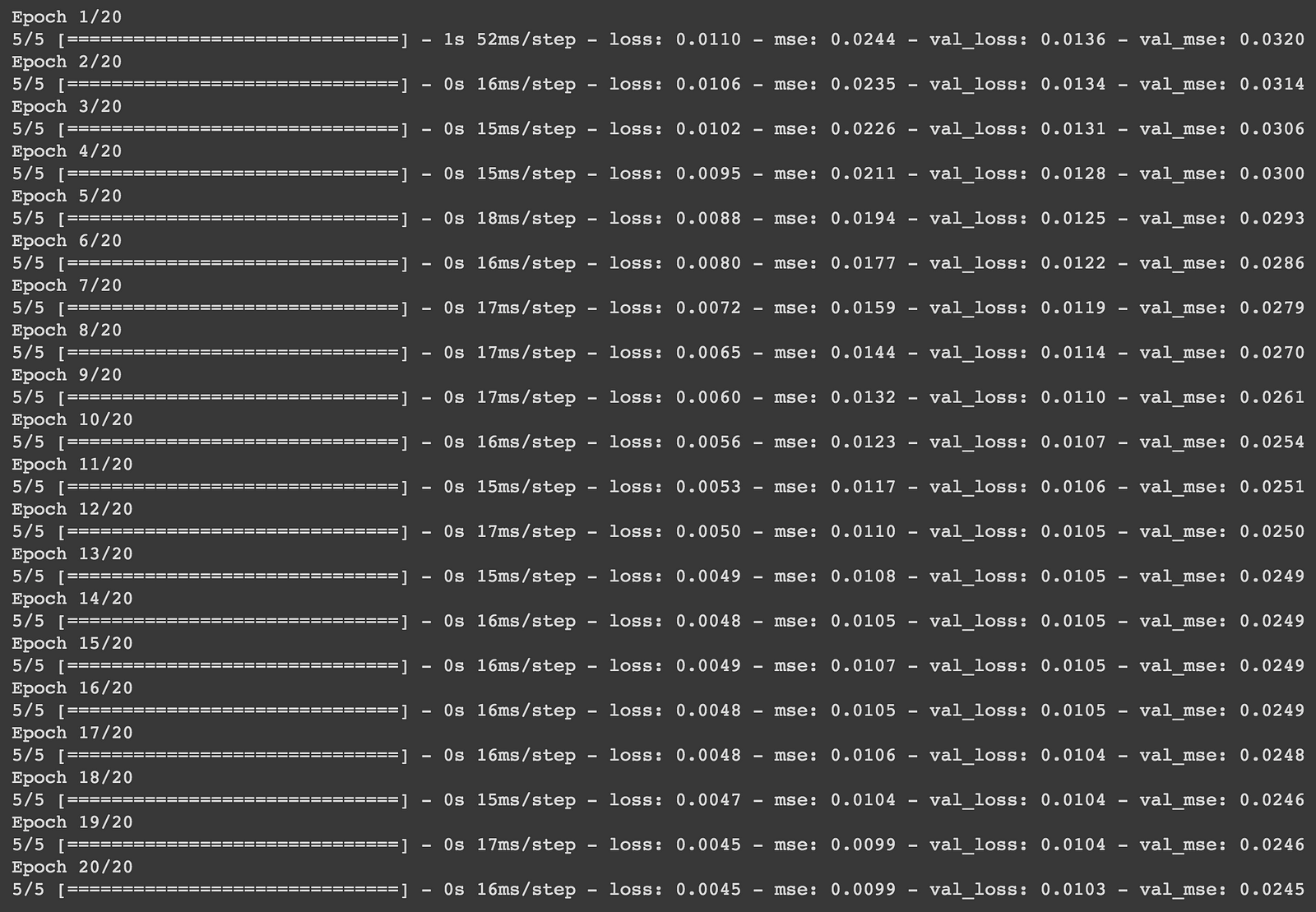
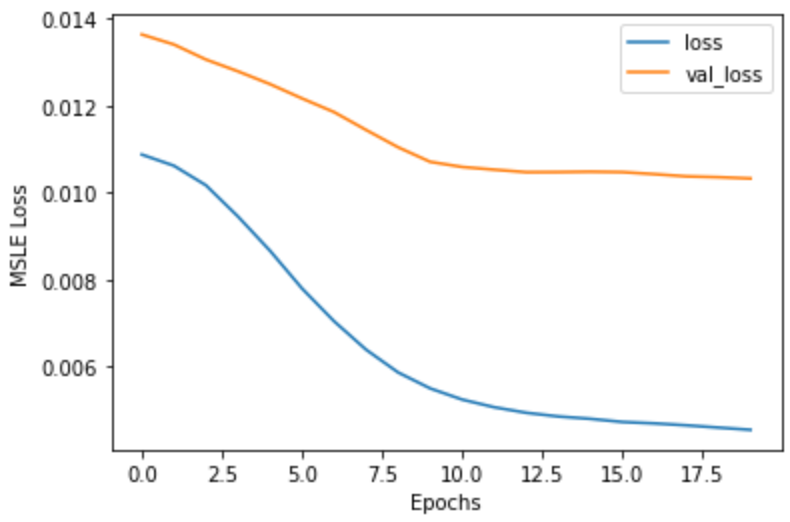
The model is compiled with Mean Squared Logarithmic loss and Adam optimizer. The model is then trained with 20 epochs with a batch size of 512.
plt.plot(history.history['loss'])
plt.plot(history.history['val_loss'])
plt.xlabel('Epochs')
plt.ylabel('MSLE Loss')
plt.legend(['loss', 'val_loss'])
plt.show()
def find_threshold(model, x_train_scaled):
 reconstructions = model.predict(x_train_scaled)
 # provides losses of individual instances
 reconstruction_errors = tf.keras.losses.msle(reconstructions, x_train_scaled)
 # threshold for anomaly scores
 threshold = np.mean(reconstruction_errors.numpy()) \
 + np.std(reconstruction_errors.numpy())
 return threshold

def get_predictions(model, x_test_scaled, threshold):
 predictions = model.predict(x_test_scaled)
 # provides losses of individual instances
 errors = tf.keras.losses.msle(predictions, x_test_scaled)
 # 0 = anomaly, 1 = normal
 anomaly_mask = pd.Series(errors) > threshold
 preds = anomaly_mask.map(lambda x: 0.0 if x == True else 1.0)
 return preds

threshold = find_threshold(model, x_train_scaled)
print(f"Threshold: {threshold}")
# Threshold: 0.01001314025746261
predictions = get_predictions(model, x_test_scaled, threshold)
accuracy_score(predictions, y_test)
# 0.944
The reconstruction errors are considered to be anomaly scores. The threshold is then calculated by summing the mean and standard deviation of the reconstruction errors. The reconstruction errors above this threshold are considered to be anomalies. We can further fine-tune the model by leveraging Keras-tuner.
The autoencoder model does not have to symmetric encoder and decoder but the code size has to be smaller than that of the features in the data.
Find the entire code in my Google Colab Notebook.
Happy Deep Learning!
Thank You!
The media shown in this article are not owned by Analytics Vidhya and is used at the Author’s discretion.
Machine Learning Engineer @ Zoho Corporation
GPT-4 vs. Llama 3.1 – Which Model is Better?
Llama-3.1-Storm-8B: The 8B LLM Powerhouse Surpa...
A Comprehensive Guide to Building Agentic RAG S...
Top 10 Machine Learning Algorithms in 2026
45 Questions to Test a Data Scientist on Basics...
90+ Python Interview Questions and Answers (202...
8 Easy Ways to Access ChatGPT for Free
Prompt Engineering: Definition, Examples, Tips ...
What is LangChain?
What is Retrieval-Augmented Generation (RAG)?
Edit
Resend OTP
Resend OTP in 45s