|
VOOZH | about |
|
VOOZH | about |
This article was published as a part of the Data Science Blogathon
Tensorflow callbacks are functions or blocks of code which are executed during a specific instant while training a Deep Learning Model.
We all are familiar with the Training process of any Deep Learning model. With the models getting more complex and resource-intensive the training times also have significantly increased. So it’s usual for models to take many hours to train. In the usual workflow before training the model, we fix all the options and parameters like learning rate, optimizers, losses. etc and start the model training. Once the training process is started there is no way to pause the training in case we want to change some params. Also, in some cases when the model has been trained for several hours and we want to tweak some parameters at the later stages, it is impossible to do so. This is where TensorFlow callbacks come to the rescue.
1. First define the callbacks
2. Pass the callbacks when calling the model.fit()
# Stop training if NaN is encountered
NanStop = TerminateOnNaN()
# Decrease lr by 10%
LrValAccuracy = ReduceLROnPlateau(monitor='val_accuracy', patience=1, factor= 0.9, mode='max', verbose=0)
model.fit(X_train,y_train,
epochs=10,
validation_data=(X_test,y_test),
callbacks = [NanStop, LrValAccuracy])
Let us have a look at some of the most useful callbacks
When we are training our models, we usually take a look at the metrics in order to monitor how well the model is performing. Usually, if we see extremely high metrics, we can conclude that our model is overfitting and if our metrics are really low then we are underfitting.
In case if the metrics increase above a certain range we can stop the training to prevent overfitting. The EarlyStopping callback allows us to do exactly this.
early_stop_cb = tf.keras.callbacks.EarlyStopping(
 monitor='val_loss', min_delta=0, patience=0, verbose=0,
 mode='auto'
)
tf.keras.callbacks.LambdaCallback(
 on_epoch_begin=None, on_epoch_end=None, on_batch_begin=None, on_batch_end=None,
 on_train_begin=None, on_train_end=None, **kwargs
)
Here we can pass any lambda function we need to execute at the specified time. Let’s see what the arguments mean
print_batch_callback = LambdaCallback(on_batch_begin=lambda bat,log: print(bat), on_batch_begin=lambda bat,log: print(bat))
One of the most common tasks during the training process is to change the learning rates. Usually, as the model approaches the loss-minimization minima (best fit) we gradually start decreasing the learning rate to have better convergence.
Let’s see a simple example where we want to reduce our learning rate by 5% for every 3rd epoch. Here we need to pass in a function to the schedule argument which specifies the logic for change in learning rate.
def schedule(epoch,lr):
 if epoch % 3 == 0:
 lr = lr - (lr*.05)
 return lr
 return lr

# Decrease lr by 5% for every 3rd epoch
LrScheduler = tf.keras.callbacks.LearningRateScheduler(schedule,verbose=1)
We use this callback in order to save our Model at different frequencies. This allows us to save weights at intermediate steps so that if needed we can load weights later.
tf.keras.callbacks.ModelCheckpoint(
 filepath, monitor='val_loss', verbose=0, save_best_only=False,
 save_weights_only=False, mode='auto', save_freq='epoch'
)
file-path: the location where the mode
monitor: metric to be monitored
save_best_only: True: Save only the best model, False: Save all the models when metric improves
mode: min, max, or auto
save_weights_only: False: save only model weights, True: Save both model weights and model architecture
For example, let’s see an example to save the model having the best accuracy
filePath = "models/Model1_weights.{epoch:02d}.hdf5"
model_checkpoint_callback = tf.keras.callbacksModelCheckpoint(
 filepath=filePath,
 save_weights_only=True,
 monitor='val_accuracy',
 mode='max')
Here we specify the file path using some template strings. {epoch:02d} is substituted by the epoch number when saving the model
This callback is used to reduce the training rate when the specific metric has stopped increasing and reached a plateau.
tf.keras.callbacks.ReduceLROnPlateau(
 monitor='val_loss', factor=0.1, patience=10, verbose=0,
 mode='auto', min_delta=0.0001, cooldown=0, min_lr=0, **kwargs
)
factor: the factor by which LR is reduced. New learning rate = old_learning_rate * factor
min_delta: minimum change needed to be considered as an improvement
cooldown: number of epochs to wait until the LR is reduced
min_lr: a minimum value below which the Learning rate cant go
tf.keras.callbacks.TerminateOnNaN()
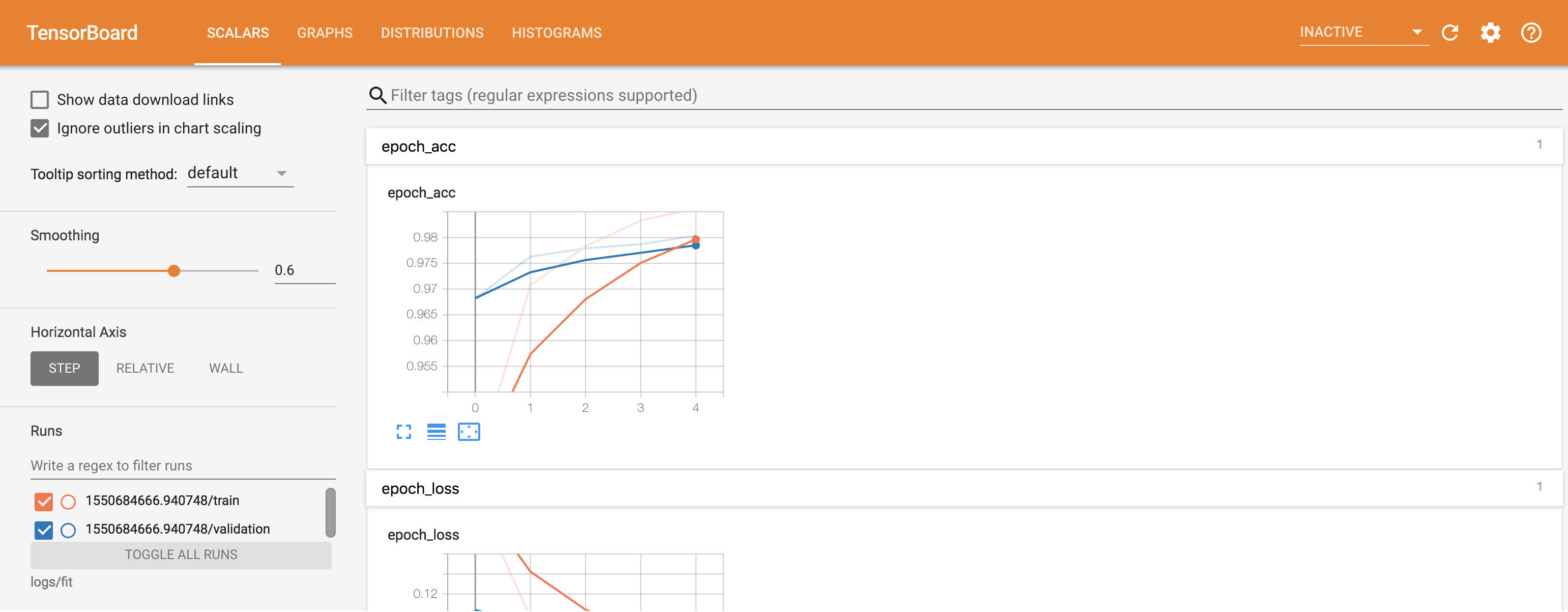
Tensorboard allows us to display information regarding the training process like Metrics, Training graphs, Activation function histograms, and other distribution of gradients. To use tensorboard we first need to set up a log_dir where the tensorboard files get saved to.
log_dir="logs"
tensorboard_callback = tf.keras.callbacks.TensorBoard(log_dir=log_dir, histogram_freq=1, write_graph=True)
Image 1 (link below)
Apart from the inbuilt callbacks, we can define and use our own callbacks for different purposes. For example, let us say we want to define our own metric which gets calculated at the end of each epoch.
# Monitor MicroF1 and AUC Score
class Metrics_Callback(tf.keras.callbacks.Callback):
 def __init__(self,x_val,y_val):
 self.x_val = x_val
 self.y_val = y_val
 def on_train_begin(self, logs={}):
 self.history = {"auc_score":[],"micro_f1":[]}
 def on_epoch_end(self, epoch, logs={}):
 auc_score = roc_auc_score(self.y_val, model.predict_proba(self.x_val))
 y_true = [0 if x[0]==1.0 else 1 for x in self.y_val]
 f1_s = f1_score(y_true,self.model.predict_classes(self.x_val), average='micro')
 self.history["auc_score"].append(auc_score)
 self.history["micro_f1"].append(f1_s)
Metrics = Metrics_Callback(X_test,y_test)
Here we want to calculate the F1 score and AUC score at the end of each epoch. in the __init__ method we read the data needed to calculate the scores. Then at the end of each epoch, we calculate the metrics in the on_epoch_end function. We can use the following methods to execute code at different times-
These were a few commonly used and most popular callbacks. The official TensorFlow documentation: https://www.tensorflow.org/api_docs/python/tf/keras/callbacks/Callback gives us in-detail information about various other callbacks and their related use cases.
A Data Scientist currently exploring the fascinating world of Data Science. Well versed with Machine Learning and Deep Learning with an inclination towards NLP and Computer Vision applications. Apart from data science, my prior experiences includes working as a Python Developer for a brief period.
GPT-4 vs. Llama 3.1 – Which Model is Better?
Llama-3.1-Storm-8B: The 8B LLM Powerhouse Surpa...
A Comprehensive Guide to Building Agentic RAG S...
Top 10 Machine Learning Algorithms in 2026
45 Questions to Test a Data Scientist on Basics...
90+ Python Interview Questions and Answers (202...
8 Easy Ways to Access ChatGPT for Free
Prompt Engineering: Definition, Examples, Tips ...
What is LangChain?
What is Retrieval-Augmented Generation (RAG)?
Wow, this article on Tensorflow Callbacks from Ashish Salaskar, as part of the Data Science Blogathon, was an absolute revelation for me! I was aware of the training process involved with Deep Learning models, but the concept of callbacks really adds another layer of complexity and control that wasn't previously clear to me. The idea that callbacks such as 'NanStop' or 'EarlyStopping' allow us to modify the training process dynamically to avoid overfitting or stop training at a certain metric level is fascinating. It's clear that there is a level of sophistication here that heightens the control and influence we have on the model's learning and development. The use of lambdas within the 'LambdaCallback' was especially intriguing, offering a means to engage with certain functions during specific moments of training. Could you clarify more on how and when you'd use this specific callback? Also, the 'ModelCheckpoint' function appears to be a really useful tool, enabling intermediate weights and model architecture to be stored. I wonder, is there a best practice regarding the frequency of checkpoints? I'm extremely appreciative of the section on how to create custom callbacks, such as expanding into metrics like F1 Scores and AUC scores. It just underlines the flexibility and freedom that tensorflow callbacks afford! So much appreciation for sharing this wonderful article! I'm eager to explore more about each callback and how it can improve and optimize my own Deep Learning models. I would certainly be diving deeper into the TensorFlow documentation. Thank you for inspiring this exciting new learning journey!
Edit
Resend OTP
Resend OTP in 45s