How to scale customer support with AI: A startup guide for 2026

Last edited March 17, 2026
Every startup hits the same wall. At five people, coordination feels natural. Everyone knows the product, customers get personal attention, and responses happen fast. But somewhere between fifteen and twenty employees, the system starts to crack. Leads pile up. Response times stretch from hours to days. The founder becomes a bottleneck, pulled into approvals and escalations they never signed up for. Growth, ironically, starts to feel like a problem.
This is the support scaling challenge. Hiring linearly is expensive and slow. Each new agent needs weeks of training before they are productive. Meanwhile, ticket volume keeps climbing. The solution that has emerged for startups in 2026 is AI, but not the kind that promises to replace your team overnight. The startups getting this right are taking a progressive approach: start with assistance, validate quality, then expand autonomy.
Why most AI support implementations fail
Here is a sobering statistic: nearly 80% of AI projects never move beyond proof of concept. That is not a technology problem. It is an implementation problem.
The most common mistake is trying to automate everything at once. Startups get excited about AI agents handling tickets end-to-end, flip the switch, and watch quality plummet. Customers get frustrated. The team loses confidence. The project gets shelved.
Another failure pattern is layering AI on top of broken processes. If your ticket routing is already a mess, AI will just route tickets to the wrong place faster. If your knowledge base is outdated, an AI trained on it will confidently give customers wrong answers.
Then there is the expectation gap. Some founders expect AI to replace strategic thinking, to handle nuanced customer situations that require judgment and empathy. That is not what AI support does. What it does well is handle the repetitive, pattern-based work that consumes most of a support team's time. The 70/30 rule applies here: AI should handle about 70% of repetitive work, while humans retain the 30% that requires judgment, creativity, and relationship building.
The progressive AI support framework
The startups seeing real results are not going from zero to full automation. They are following a three-stage progression that lets them validate quality at each step.
Stage 1: AI Copilot drafting and assistance
This is where most startups should begin. An AI Copilot drafts replies based on your past tickets, help center articles, and macros. Human agents review, edit, and send. It is training wheels for AI support.
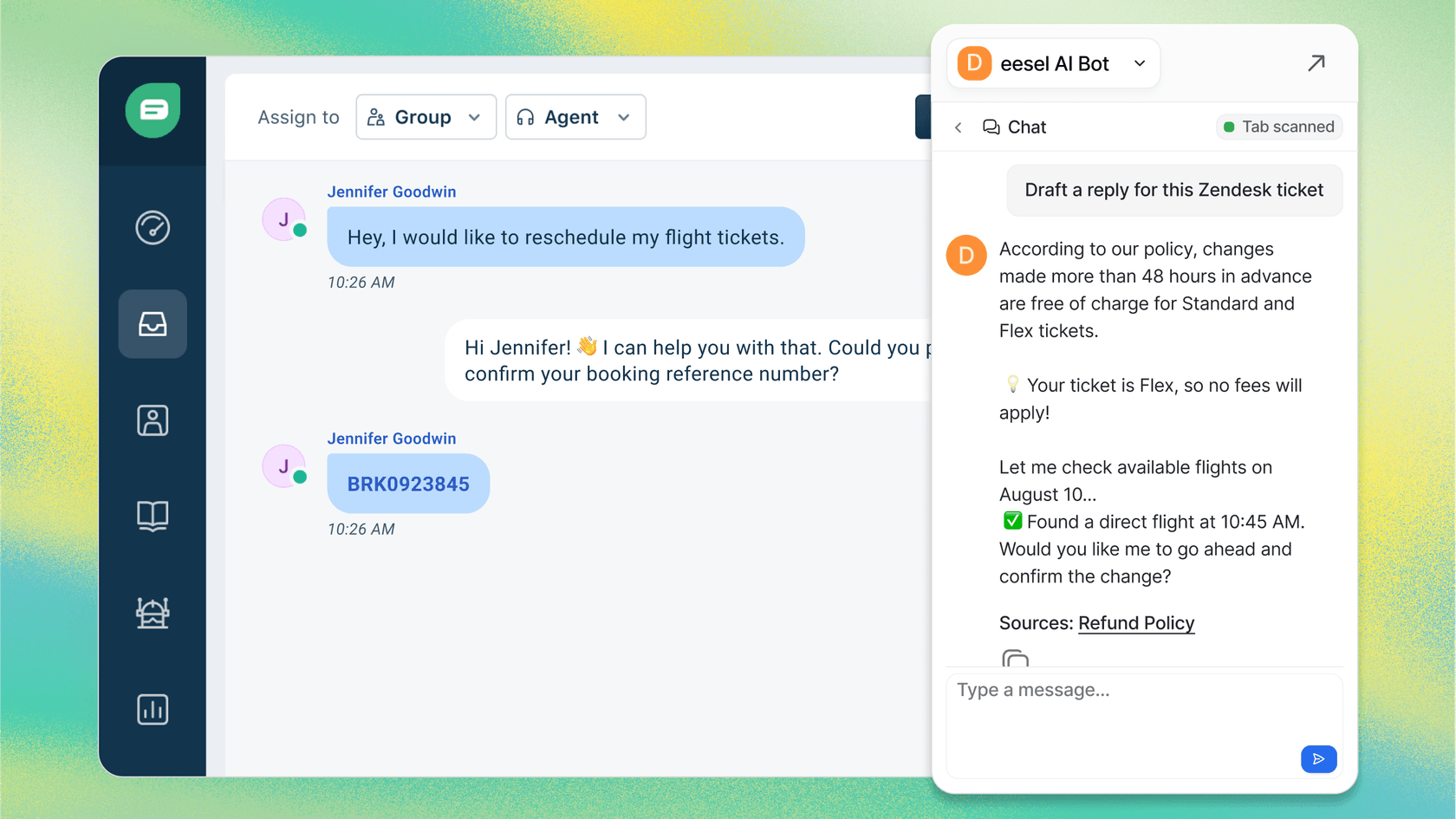
The benefits show up immediately. Response times drop 30-50% because agents are not starting from blank pages. New hires get up to speed faster because they are learning from AI drafts grounded in your best past responses. Quality stays high because nothing goes to customers without human review.
This stage is ideal if you are just starting with AI, if your tickets tend to be complex, or if your team is skeptical about automation. It builds confidence without risking customer relationships.
Stage 2: AI Triage automation and routing
Once you have 500+ tickets per month, queue hygiene becomes a real problem. Tickets sit untagged. Urgent issues get buried. Agents waste time on spam and duplicates.
AI Triage handles the operational work: auto-tagging by topic and sentiment, routing to the right team or agent, closing spam and "thank you" messages, and merging duplicates. It runs continuously in the background.
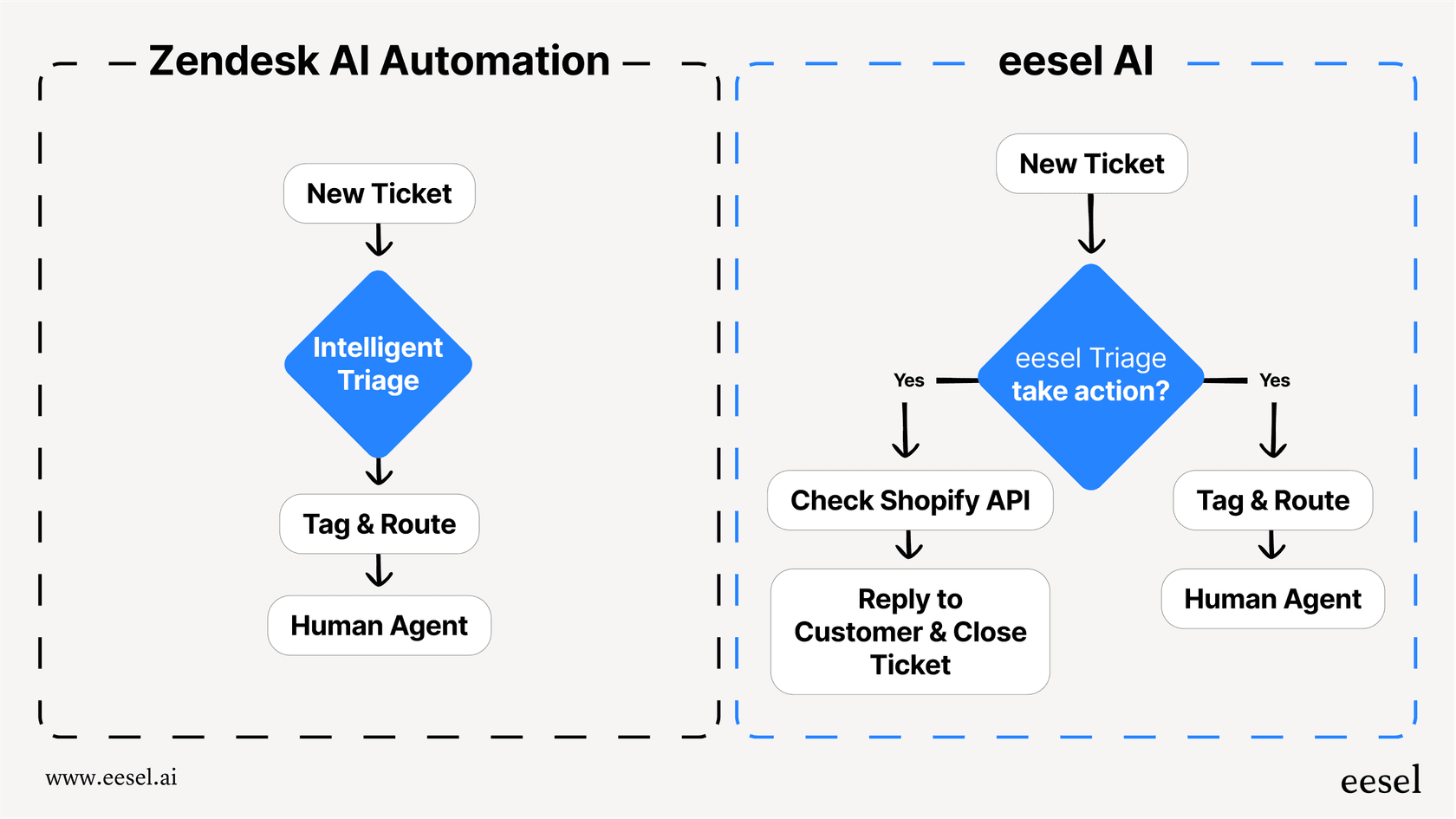
Typical results include 40% reduction in manual ticket handling and faster time-to-resolution because tickets reach the right person immediately. This stage is best for teams drowning in queue management, not response drafting.
Stage 3: AI Agent full autonomous resolution
This is the end state, but it is not where you start. An AI Agent handles tickets end-to-end: reading the ticket, drafting a response grounded in your knowledge, sending it, and taking actions like looking up orders or processing refunds. It escalates only what you define.
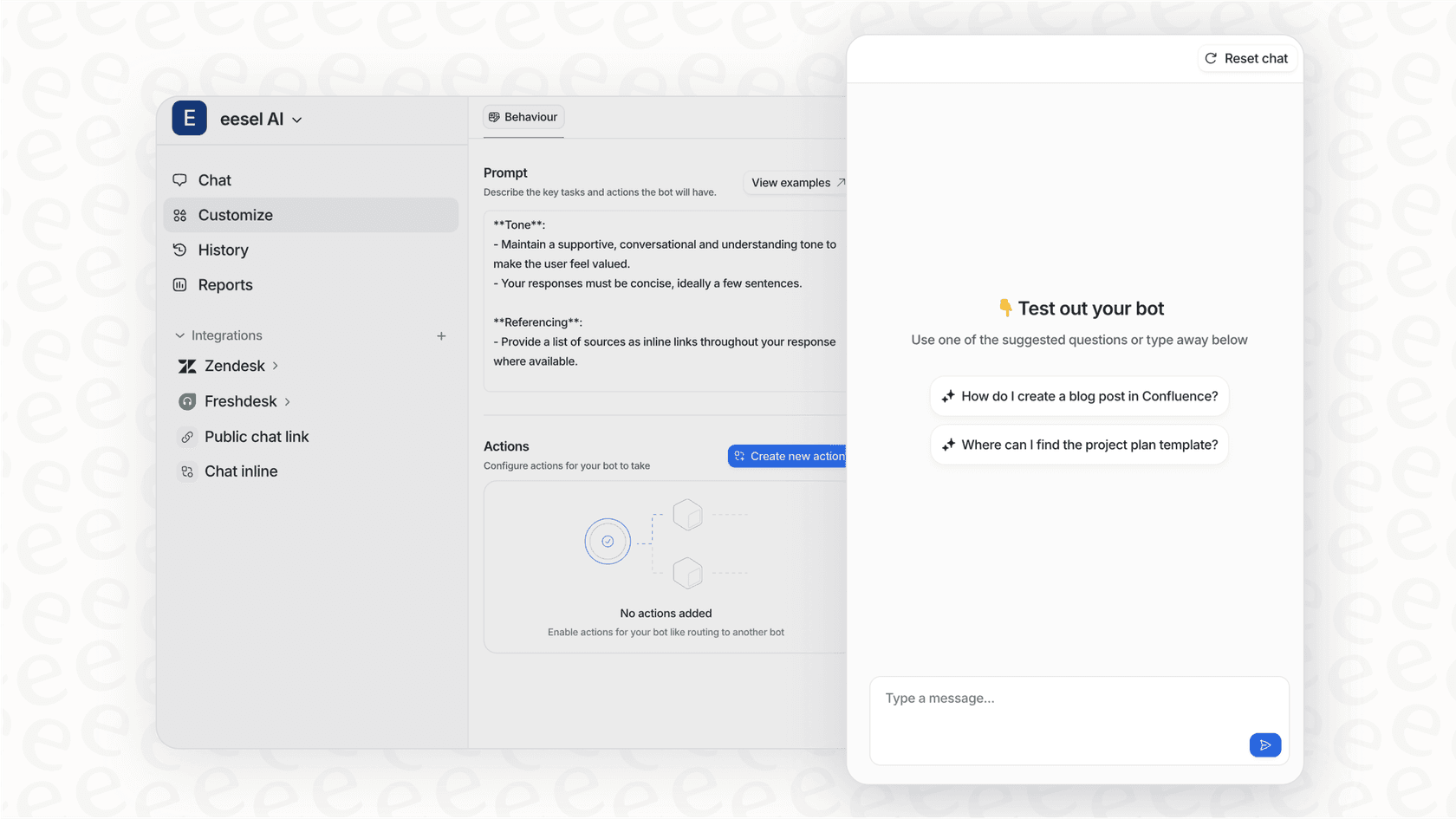
Mature deployments achieve up to 81% autonomous resolution. The key word is mature. These teams have spent months refining their knowledge base, tuning escalation rules, and validating quality through simulation.
You know you are ready for this stage when your Copilot drafts are consistently good enough to send without edits, when you have clear escalation rules in plain English, and when you have run simulations on past tickets to verify performance.
Choosing the right AI support solution
Not all AI support tools are built the same. Here is what to evaluate:
Integration with your existing help desk. Does it plug into Zendesk, Freshdesk, or whatever you already use? Or does it force you to migrate? The best tools work with your stack, not against it.

Setup complexity. Some tools require weeks of configuration, data mapping, and training. Others connect in minutes and learn from your existing data. For resource-constrained startups, ease of setup matters.
Pricing model. Per-seat pricing penalizes growth. Per-interaction pricing scales with usage. For a startup planning to grow, the latter is usually more predictable.
Testing capabilities. Can you run the AI on past tickets before going live? This is non-negotiable. You need to see how it would have performed before customers see it.
Progressive deployment. Can you start with Copilot, add Triage, then graduate to Agent? Or is it all-or-nothing? The staged approach reduces risk significantly.
eesel AI: an AI teammate for growing teams
We built eesel AI around the progressive framework because that is how we would want to deploy AI support ourselves. Here is how it works:
Connect eesel to your help desk in minutes. It immediately learns from your past tickets, help center, macros, and connected docs like Confluence or Google Docs. No manual training. No documentation uploads.
Start with AI Copilot. Your agents see draft replies when they open tickets. They review, edit, and send. As quality proves out, enable AI Triage to handle queue hygiene automatically.
When you are ready, graduate to AI Agent. Define escalation rules in plain English: "If the refund request is over 30 days, politely decline and offer store credit." "Always escalate billing disputes to a human." Run simulations on thousands of past tickets to verify performance before going live.
Pricing starts at $239 per month when billed annually for the Team plan, which includes up to 3 bots and 1,000 interactions. The Business plan at $639 per month adds AI Agent capabilities, unlimited bots, and 3,000 interactions. No per-seat fees. No surprise charges as you add agents.
Implementation roadmap: your first 90 days
Here is a practical rollout plan that minimizes risk while building toward autonomy.
Week 1-2: Foundation
Connect your AI to the help desk. Train it on historical data: past tickets, help center articles, macros, any connected docs. Define your first escalation rules in plain English. Run simulations on a sample of past tickets to see how the AI would have performed.
Week 3-4: Pilot launch
Enable AI Copilot for a specific ticket type or queue. Maybe start with refund requests or password resets, something relatively standardized. Agents review and edit AI drafts. Gather feedback on what is working and what needs tuning.
Month 2: Expand scope
Add AI Triage for queue management. Expand Copilot to more ticket categories. Monitor quality metrics weekly: response times, CSAT, edit rates on AI drafts.
Month 3: Optimize and scale
Evaluate readiness for AI Agent mode. If Copilot drafts are consistently sendable without edits, you might be ready. Adjust escalation rules based on what you have learned. Plan expansion to additional channels like chat or social.
Measuring success: KPIs for AI support
You need baseline metrics before you start and targets to measure against. Here are the numbers that matter:
| Metric | Baseline | Target | Notes |
|---|---|---|---|
| First response time | Measure current | Near-instant for AI-handled | Customers notice this immediately |
| Resolution rate | Measure current | 60-80% autonomous | Varies by ticket complexity |
| CSAT/customer satisfaction | Measure current | Maintain or improve | Quality cannot drop |
| Cost per ticket | Calculate current | 60-70% reduction | Include fully loaded agent costs |
| Agent productivity | Tickets per agent | 30-50% increase | Agents handle more complex work |
| Payback period | N/A | Under 2 months | Typical for mature deployments |
Track these weekly during rollout. If CSAT drops, slow down. If response times improve but quality suffers, tighten escalation rules.
Common pitfalls and how to avoid them
Skipping the simulation phase. Some teams go live without testing on past tickets. This is gambling with customer relationships. Always simulate first.
Setting unclear escalation rules. Vague rules like "escalate complex issues" do not work. Be specific: "Escalate if the ticket mentions legal, billing disputes, or VIP customers."
Expanding too fast. Going from Copilot to full Agent in a week is reckless. Each stage should run for at least a month with stable metrics before advancing.
Ignoring continuous learning. AI is not set-and-forget. When agents edit drafts, the AI should learn from those corrections. When policies change, the AI needs updates. Plan for ongoing tuning.
Choosing the wrong pricing model. Per-seat pricing looks cheap when you are small but gets expensive as you grow. Per-interaction pricing is more predictable for scaling teams.
Start scaling your support with AI today
The progressive approach, Copilot to Triage to Agent, is not just safer. It is faster. Teams that try to go straight to full automation usually fail and end up starting over. Teams that validate at each stage build confidence and momentum.
AI support is accessible to startups now. You do not need an engineering team or a six-figure budget. You need a help desk with historical data, clear escalation rules, and the discipline to validate before expanding.
If you are facing the support scaling challenge, the place to start is a simulation. See how AI would handle your past tickets. Measure the results. Then decide if you are ready for the next stage.
Try eesel AI free for 7 days and run simulations on your own ticket history. Or book a demo to see the progressive framework in action.
Frequently Asked Questions

Share this article

Article by
Stevia Putri
Stevia Putri is a marketing generalist at eesel AI, where she helps turn powerful AI tools into stories that resonate. She’s driven by curiosity, clarity, and the human side of technology.