The 7 best AI tools for startup support in 2026


Last edited June 21, 2026

Table of Contents
- Why I'm not just listing features
- The 7 best AI tools for startup support at a glance
- 1. eesel: best for adding AI to a helpdesk you already run
- 2. Freshdesk: best for the friendliest free on-ramp
- 3. Help Scout: best for the simplest, most human-feeling inbox
- 4. Tidio: best for solo founders and tiny ecommerce stores
- 5. Gorgias: best for Shopify and ecommerce startups
- 6. Chatwoot: best for technical, budget-zero teams
- 7. Zendesk: best for startups that plan to scale into enterprise
- What a startup actually pays: a worked example
- How to actually choose
- Try eesel for your existing helpdesk
Why I'm not just listing features
Here's a moment that stuck with me. A CX lead at a US healthcare platform with a few thousand patients told me on a call that they'd "kicked the tires on Zendesk's native AI and found it largely inadequate and overpriced." That's the startup story in one sentence: the tooling exists, but it's priced and packaged for companies ten times your size, and the AI bolted on top often underwhelms.
So I judged every tool below against four things a founder actually cares about:
- Time to first value. Can a non-technical founder get it answering real questions this week, or does it need a dedicated admin?
- The real monthly cost. Not the "starts at $X" number. The number after the AI add-on, the seats, and the overages.
- Test-before-trust. Can you see how the AI would have handled your last 1,000 tickets before it touches a live customer? This is the single most underrated feature for a small team that can't afford a public mistake.
- Room to grow. Does it punish you for scaling, or grow with you?
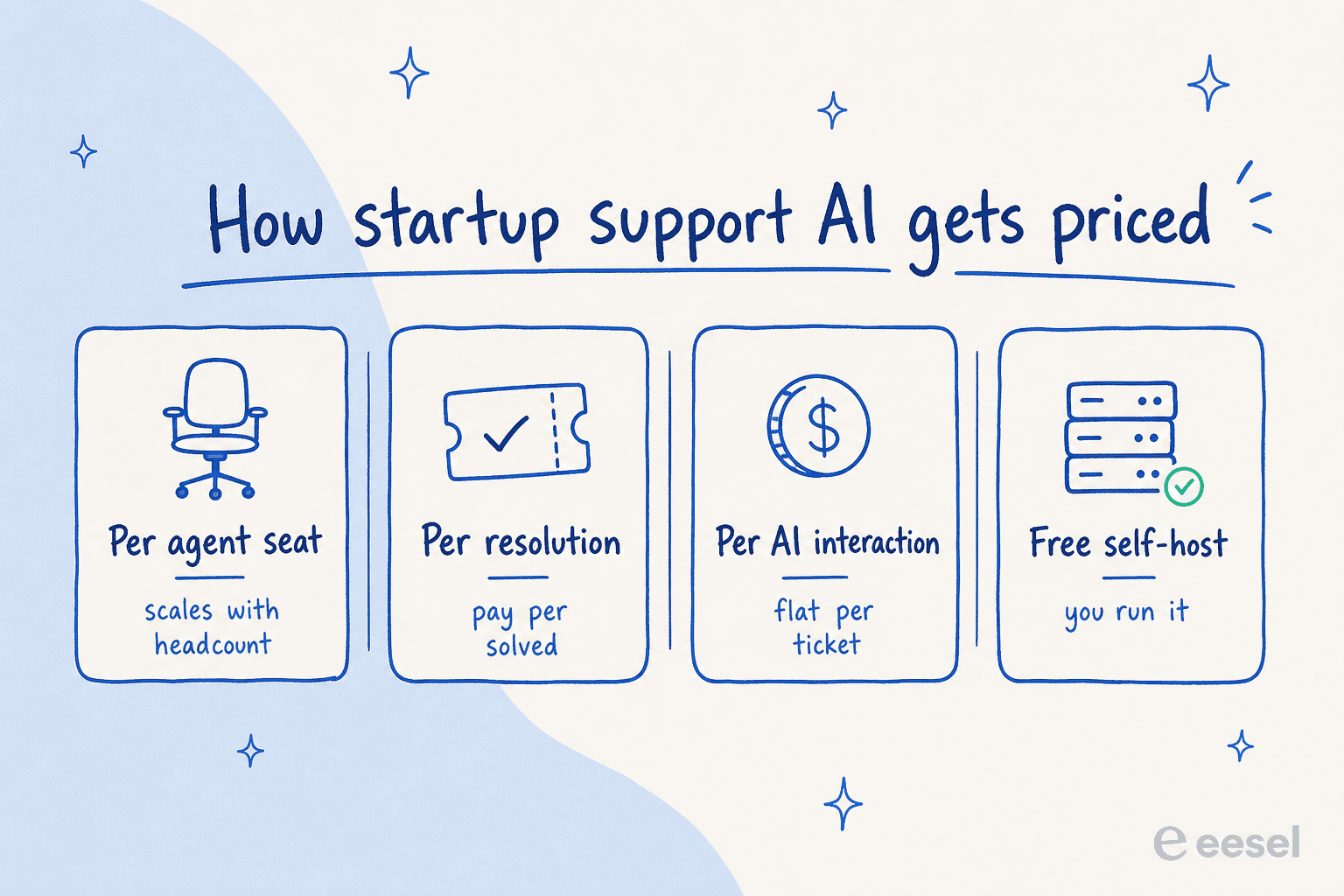
One quick definition, since it trips up every cost comparison: a "resolution" usually means a ticket the AI closed with no human, and it's the unit most AI agents bill on. A "session" or "conversation" is a single back-and-forth thread. They are not the same thing, and the difference is where your money goes.
The 7 best AI tools for startup support at a glance
Here's the whole field in one table. The "real billing unit" column is the one I'd screenshot, because it's what separates a predictable bill from a scary one.
| Tool | Best for | AI billing unit | Paid plans start at | Free tier | Standout for startups |
|---|---|---|---|---|---|
| eesel | Adding AI to a helpdesk you already run | Per AI interaction (~$0.40/ticket), no per-seat fee | Usage-based, no platform fee | $50 free trial credit | Go live in minutes, simulate on past tickets first |
| Freshdesk | The friendliest free on-ramp | Freddy sessions ($49 / 100 after 500 free) | $19/agent/mo | Free, 1-2 agents, 6 months | Genuinely usable free plan |
| Help Scout | The simplest human-feeling inbox | AI Answers add-on, $0.75/resolution | $25/user/mo | Free, 5 users | Learn it in under an hour |
| Tidio | Solo founders and tiny ecommerce | Per Lyro conversation (~$0.50) | $24.17/mo | Free, 50 Lyro chats | Cheapest live chat + AI combo |
| Gorgias | Shopify and ecommerce startups | $0.90/resolved conversation | $10/mo | 7-day trial | Native Shopify order actions |
| Chatwoot | Technical, budget-zero teams | Captain credits ($20 / 1,000) | $0 self-hosted; $19/agent cloud | Free self-host (open source) | Own your data, no lock-in |
| Zendesk | Startups that plan to scale to enterprise | Per automated resolution (~$1.50) | $19/agent/mo (no AI) | Startup program trial | Matures with you into enterprise |
A few honest caveats before we dig in: Zendesk's cheapest $19 tier has no AI at all, and most of these tools price their AI as a separate meter on top of the base plan. Keep reading and I'll show you a worked example of what a real startup actually pays.
Now, the tools.
1. eesel: best for adding AI to a helpdesk you already run

I'll get my own bias out of the way first: I helped build eesel, so take the verdict with that in mind and judge it against the others. The reason it leads this list isn't loyalty, it's the shape of the problem. Most startups don't need a new helpdesk; they need the one they already have to stop drowning them.
What it does. eesel is an AI helpdesk agent that sits inside the tools you already run, Zendesk, Freshdesk, Front, Help Scout, Gorgias, and more, rather than asking you to migrate. It learns from your past tickets, help-center articles, and macros, then drafts and sends on-brand replies, triages, and escalates the hard stuff to a human. You can run it as a fully autonomous AI agent or as a copilot that just suggests drafts your team approves.
Why it fits startups. Two reasons. First, setup is measured in minutes, not weeks: it's no-code, auto-imports your existing knowledge, and one customer (Ecosa) reported full integration in under an hour. Second, the simulation mode runs the agent against thousands of your historical tickets so you see the real resolution rate and the gaps before a single customer is affected. For a small team that can't afford a public faceplant, that test-before-trust step is the whole ballgame.
Pricing. This is where it diverges from the pack. eesel bills per AI interaction, not per seat and not per "resolution," so adding teammates is free and a chatty ticket doesn't cost more than a quick one.
| Plan | Price | Notes |
|---|---|---|
| Free trial | $0 ($50 credit) | All features, no credit card |
| Pay-as-you-go | from ~$0.40 per ticket | No platform fee, no per-seat fee, no minimum |
| Annual commit | 25% off | Commit ≥$300/mo for the year |
| Enterprise | $1,000/mo + usage | SSO, custom data retention, dedicated support |
There's also a built-in spend cap, so the agent auto-pauses before a runaway bill, which matters more for a startup than anyone admits.
Pros
- Fastest path to live AI if you already have a helpdesk
- Usage-based pricing with no per-seat tax as the team grows
- Simulate on real tickets before go-live; Gridwise hit 73% resolution in month one
Cons
- It's a layer, not a standalone helpdesk, so you need a helpdesk (or live chat) underneath it
- Usage-based billing can feel less predictable than a flat cap if your volume is very spiky
- SOC 2 Type II is in progress rather than fully certified, which a regulated-industry startup should weigh
Verdict: If you already run Zendesk, Freshdesk, Front, Help Scout, or Gorgias, eesel is the lowest-effort way to get real AI resolution this week without ripping anything out. If you have no helpdesk at all yet, pick one of the platforms below first, then layer eesel on.
2. Freshdesk: best for the friendliest free on-ramp
Freshdesk is Freshworks' cloud helpdesk, and it's the tool I most often point a brand-new startup toward when they have nothing set up yet, because the on-ramp is the gentlest in the category.
What it does. It's a full ticketing helpdesk with a clean agent workspace, omnichannel support (email, chat, phone, social), and a knowledge base, with Freddy AI layered on top as the AI agent and copilot. Freshworks says Freddy resolves up to 80% of common queries and now ships 50+ prebuilt agent workflows.
Why it fits startups. The free plan is genuinely usable: $0 for one to two agents for six months, with real ticketing, a knowledge base, and reporting, no credit card. The paid entry at $19/agent is the cheapest of the major helpdesks too. One support-ops lead on Reddit summed up the appeal:
"Freshdesk Freddy: for early stage teams that want something simple, it covers the basics, auto assignment, suggested replies, FAQ deflection. It's reliable and affordable, nothing crazy."

Pricing.
| Plan | Price (per agent/mo, annual) | Notes |
|---|---|---|
| Free | $0 | 1-2 agents, 6 months, ticketing + KB |
| Growth | $19 | Core helpdesk |
| Pro | $55 | Advanced routing, 500 free Freddy sessions |
| Enterprise | $89 | Audit logs, skills-based assignment |
The catch is the AI add-on. After the 500 free Freddy sessions, the customer-facing agent runs about $49 per 100 sessions on standalone Freshdesk, and those session packs expire each billing cycle. A "session" is one 24-hour chat window (or 72 hours over email), so high volume adds up fast.
Pros
- The best free tier for a startup that's starting from scratch
- Cheapest paid entry of the big helpdesks, and friendly to learn
- Deep integrations marketplace (Shopify, Stripe, PayPal)
Cons
- The AI is a separate, consumption-priced add-on, not bundled into the cheap plans
- Operators report Freddy handles FAQs well but misclassifies complex tickets
- Session-based pricing is hard to forecast at scale
Verdict: Start here if you have no helpdesk and want to spend nothing while you find your feet. Just model your Freddy session volume before you bank on the AI, and know you can always layer a dedicated agent on later. (We keep a running list of Freshdesk alternatives if you outgrow it.)
3. Help Scout: best for the simplest, most human-feeling inbox
If Zendesk feels like a cockpit, Help Scout feels like an email inbox, and for a lot of early teams that's exactly right. It's the tool I recommend when a founder says "I just want my five-person team to answer customers without learning a system."
What it does. Help Scout bundles a shared inbox, a Docs knowledge base, the embeddable Beacon widget, and live chat, with Help Scout AI on top. The AI splits into AI Answers (a customer-facing agent that resolves from your docs, averaging a 73% resolution rate) and an inbox assistant that drafts and summarizes for your agents.
Why it fits startups. You can learn it in under an hour, there's no admin overhead, and the unlimited AI Drafts on paid plans quietly speed up every reply your team writes. There's a free tier for up to five users, too.
Pricing. Help Scout bills per user/seat per month, with the customer-facing AI Answers as a usage add-on.
| Plan | Price (per user/mo, annual) | Notes |
|---|---|---|
| Free | $0 | 5 users, 1 inbox |
| Standard | $25 | Multiple inboxes, AI inbox assistant |
| Plus | $45 | Unlimited AI Drafts, advanced workflows |
| Pro | $75 | SSO, HIPAA (quote only) |
| AI Answers | +$0.75 per resolution | Add-on, 3-month free trial |
One thing to flag honestly: Help Scout's pricing model has whiplashed over the past year, from per-seat to per-contact and back, and longtime users noticed.
"HelpScout changed back to user-based pricing. Guess too many people cancelled including me… Helpscout lost all trust with this flip-flopping on pricing."
Pros
- The fastest tool here to actually get comfortable with
- A real free tier and a low $25 entry seat
- Strong out-of-the-box AI resolution claims (~73%)
Cons
- Thin on advanced features and reporting depth as you scale
- AI Answers cost compounds: ~$750/mo extra at 1,000 resolutions, on top of seats
- Recent pricing changes have spooked even loyal customers
Verdict: Pick Help Scout if simplicity and a human feel matter more than deep automation, and your volume is modest. As your ticket count climbs, watch that per-resolution AI bill, and compare it against a usage-based layer. (See our Help Scout review and Help Scout alternatives for the deeper dive.)
4. Tidio: best for solo founders and tiny ecommerce stores
Tidio is the cheapest credible way to put a live chat widget and an AI agent on your site, which makes it a favorite of solo founders and small Shopify stores. Its Lyro AI agent is notable for running on Anthropic's Claude rather than a generic model, and Tidio claims a 67% average resolution rate.
What it does. It's a live chat widget, a light ticketing inbox, a no-code automation builder (Flows), and Lyro, all aimed at small businesses rather than enterprise. Lyro trains on your FAQ uploads and website content and stays grounded in your material.
Why it fits startups. You can have a chat widget and a basic AI bot live in about an hour, for free. One small-ecommerce operator put it well:
"Setup was honestly faster than LiveChat. I had the chat widget running and a basic bot handling FAQs within like an hour… The free plan is actually usable too."
Pricing. Tidio meters three separate things, human conversations, Lyro AI conversations, and Flows visitors, which is both its flexibility and its trap.
| Plan | Price (annual) | Notes |
|---|---|---|
| Free | $0 | 50 chats, 50 Lyro conversations (one-time) |
| Starter | $24.17/mo | 100 conversations |
| Growth | from $49.17/mo | Advanced analytics, automation |
| Plus | from $749/mo | Custom seats, OpenAPI |
That three-way metering is the single loudest complaint about Tidio, and it's worth taking seriously:
"their pricing is so off and hidden, 'free tier' is just a trap… once you want to scale… tidio is a NO-GO for me, they need to be more transparent."
Pros
- Cheapest real entry point with a usable free tier
- Sets up in about an hour with no engineering
- Strong Shopify chatbot fit for small stores
Cons
- It's a chat-widget tool first, not a full helpdesk
- Three separate usage meters make cost genuinely hard to predict
- The jump from Growth to Plus is a steep cliff
Verdict: Great for a solo founder or a tiny store that wants chat plus light AI today, cheaply. If your support is mostly email or you expect real volume, the conversation caps will pinch, so plan your exit before you hit them. (We track Tidio alternatives and Lyro pricing separately.)
5. Gorgias: best for Shopify and ecommerce startups
If you're a DTC brand on Shopify, Gorgias is built for you in a way the general-purpose tools aren't. Its whole pitch is that support and sales live in the same conversation, and its AI Agent was trained on a billion ecommerce conversations.
What it does. It's an ecommerce helpdesk that unifies email, chat, SMS, and social, with a native Shopify integration that pulls order data right into the ticket. The AI Agent runs in two modes, a pre-purchase shopping assistant and a post-purchase support agent, and it can actually track, edit, cancel, and refund orders inside the conversation.
Why it fits startups. For an ecommerce startup, a big chunk of tickets are "where's my order" and "I need a refund," and Gorgias automates exactly those with real Shopify actions, not just canned text. As one ten-year ecommerce veteran framed the decision:
"40%+ tickets need Shopify actions → I'd lean Gorgias. Mostly conversational support → Zendesk is fine."
Pricing. Gorgias prices on ticket volume, not seats, plus a per-resolution AI fee.
| Plan | Price (annual/mo) | Tickets/mo | AI resolutions included |
|---|---|---|---|
| Starter | $10 | 50 | 0 |
| Basic | $50 | 300 | 60 |
| Pro | $300 | 2,000 | 600 |
| Advanced | $750 | 5,000 | 2,500 |
The AI Agent costs about $0.90 per resolved conversation on annual billing, and each AI resolution also counts as a billable ticket, so model that double-count against your ticket mix.
Pros
- The cleanest Shopify order-action automation of any tool here
- AI that drives revenue (upsells), not just deflection
- Fast one-click install and a 7-day trial
Cons
- Really only makes sense if you're ecommerce
- Volume-based pricing punishes high-ticket, low-revenue stores; the per-resolution and per-ticket charges stack
- A single-agent store may find the jump hard to justify
Verdict: If you're on Shopify and order actions dominate your queue, Gorgias is the obvious pick. If your tickets are mostly conversational, a cheaper general helpdesk plus an AI layer will do the same job for less. (More in our best Gorgias alternatives guide.)
6. Chatwoot: best for technical, budget-zero teams
Chatwoot is the wildcard, and for the right startup it's unbeatable on price: it's open source, so if you have the engineering chops to run it, the Community Edition is free forever on your own server.
What it does. It's an open-source omnichannel support platform, an inbox for WhatsApp, social, email, and chat, plus a knowledge base, with an AI suite called Captain layered on top (an AI agent, an agent-assist copilot, and knowledge-gap detection). You can run it on Chatwoot Cloud or self-host it and own all your data.
Why it fits startups. No vendor lock-in, full source code, and a zero-dollar path if you self-host. The praise from technical founders is consistent:
"there's an open-source platform called Chatwoot that you can self-host for free on your own vps… you get the full source code so you can build whatever you want on top."
Pricing.
| Plan | Price (per agent/mo, annual) | Notes |
|---|---|---|
| Community (self-hosted) | $0 | Open source, no Captain AI |
| Hacker (cloud) | $0 | 2 agents, 500 conversations |
| Startups | $19 | 300 Captain credits |
| Business | $39 | 500 Captain credits |
Captain AI runs on credits at $20 per 1,000, and they're non-refundable, so usage overages are something to watch.
Pros
- Genuinely free if you self-host; no lock-in
- Open source with a huge community (32k+ GitHub stars)
- One inbox for WhatsApp and social, which small global teams love
Cons
- Self-hosting means you own upgrades, storage, and uptime, a real time cost
- Captain AI is newer and thinner than dedicated AI agents, with no published deflection rate
- It's not on the free tier, and credits can produce surprise overage bills
Verdict: If you have an engineer who'd rather own the stack than pay a SaaS bill, Chatwoot self-hosted is the best free option on this list. If you don't, the cloud plans are still cheap, but weigh Captain's maturity against a more proven AI agent. (See our Chatwoot alternatives and Captain breakdown.)
7. Zendesk: best for startups that plan to scale into enterprise
Zendesk is the incumbent, and that's both the case for it and against it. It's the most mature, battle-tested platform here, with AI agents, a copilot, and a 1,800+ app marketplace, and it genuinely scales into enterprise. The flip side is that it's priced and built for companies bigger than most startups.
What it does. It's a full seat-based helpdesk, ticketing, messaging, voice, and a knowledge base, with Zendesk AI as the intelligence layer and AI agents billed per automated resolution.
Why it can fit startups. If you know you're going to scale fast and don't want to migrate again in two years, starting on Zendesk means you'll never outgrow it. There's also a startup program that gives qualifying early-stage companies a free runway.
Pricing. This is the sticking point.
| Plan | Price (per agent/mo, annual) | Notes |
|---|---|---|
| Support Team | $19 | No AI |
| Suite Team | $55 | AI agents, omnichannel |
| Suite Professional | $115 | Admin copilot, skills routing |
| Suite Enterprise | Talk to sales | Advanced AI, approvals |
The quotable $19 entry has no AI; real AI starts at $55/agent, then Copilot stacks another $50/agent, plus per-resolution usage on top. And the per-resolution model draws steady fire:
"we'll be paying about $1.50 ~ $1.20 per resolution. And what Zendesk counts as a resolution can be… subjective… If you have 500 AR per week, the bill blows out to be $650, where there wasn't a charge before."
Pros
- The most mature, reliable platform here, with the deepest marketplace
- Genuinely scales into enterprise, so you won't migrate again
- A startup program softens the early cost
Cons
- Real AI starts at $55/agent and stacks add-ons plus per-resolution fees
- Setup is heavier; reviewers call admin work a full-time job
- "Resolution" is defined in Zendesk's favor, so the bill can surprise you
Verdict: Choose Zendesk if you're a well-funded startup that's confident you'll be an enterprise soon and want to plant your flag once. If you're cost-sensitive today, the bill scales the wrong way, and you might pair a leaner helpdesk with an AI layer instead. (Our guide to Zendesk AI agents covers setup and real costs.)
What a startup actually pays: a worked example
Sticker prices lie, so let's run a realistic scenario. Say you're a 3-person support team handling ~500 tickets a month, and ~60% of them (300 tickets) are automatable FAQs and status questions. Here's roughly what each model costs once the AI is switched on (using each tool's published per-unit rates):
| Tool | Rough monthly cost | How it's built |
|---|---|---|
| eesel | ~$120 | 300 AI tickets × ~$0.40, no seat fees |
| Chatwoot (self-host) | ~$0 + infra + credits | Free CE + a cheap VPS + Captain credits |
| Gorgias | ~$300 | Pro plan, 300 AI resolutions within the 600 included |
| Help Scout | ~$300 | 3 × $25 seats + 300 resolutions × $0.75 |
| Freshdesk | ~$165 + sessions | 3 × $55 Pro for the 500 free sessions, then packs |
| Zendesk | ~$615+ | 3 × $55 Suite Team + 300 resolutions × ~$1.50 |
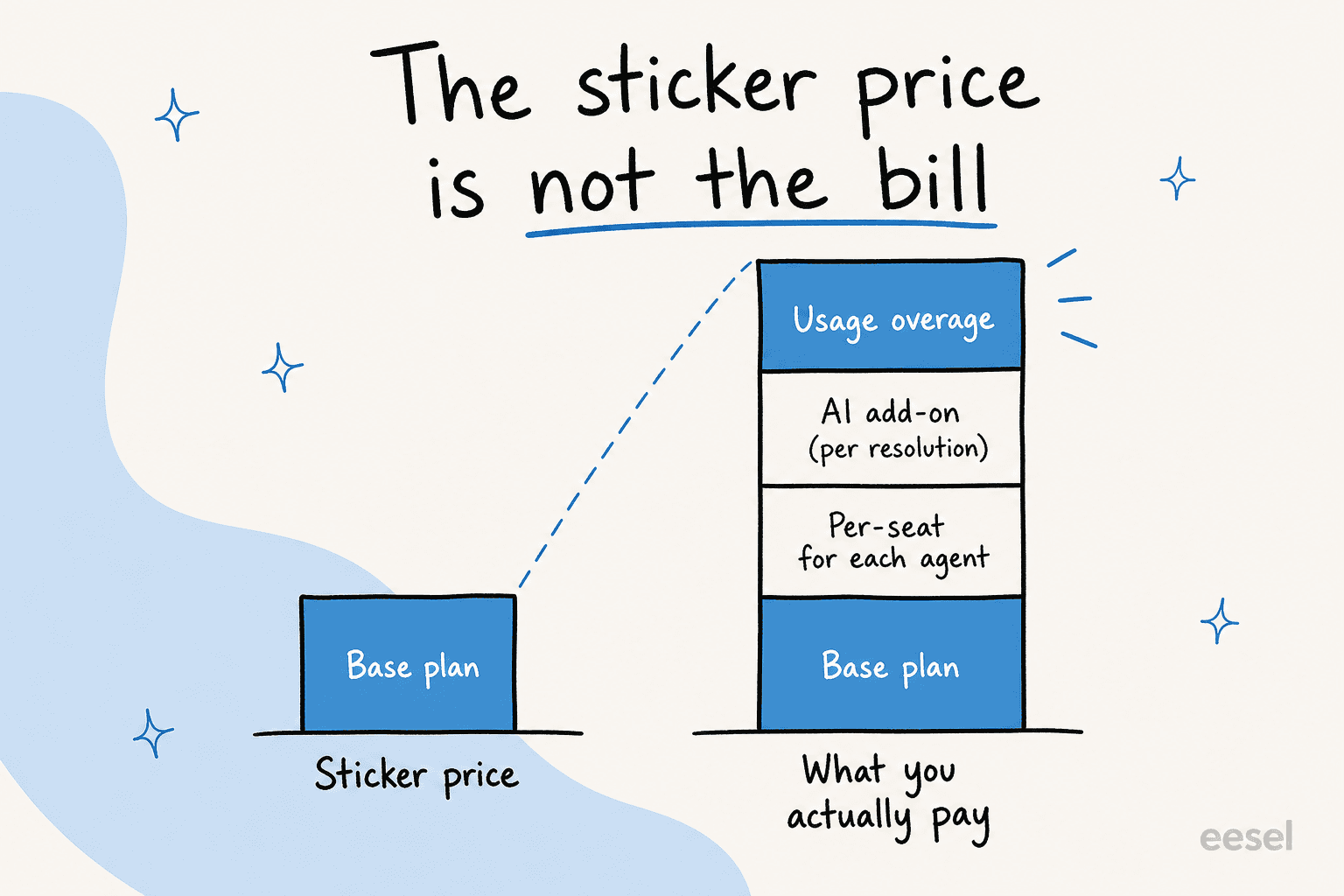
These are estimates, not quotes, and your mix will move them. But the pattern holds: the per-seat-plus-per-resolution stacks (Zendesk, Help Scout) cost the most at startup scale, while usage-only and self-hosted models stay leanest. This is exactly the "the sticker price is not the bill" problem in numbers.
How to actually choose
If you strip away the brand names, the decision comes down to a handful of forks. Here's the flow I'd walk a founder through.
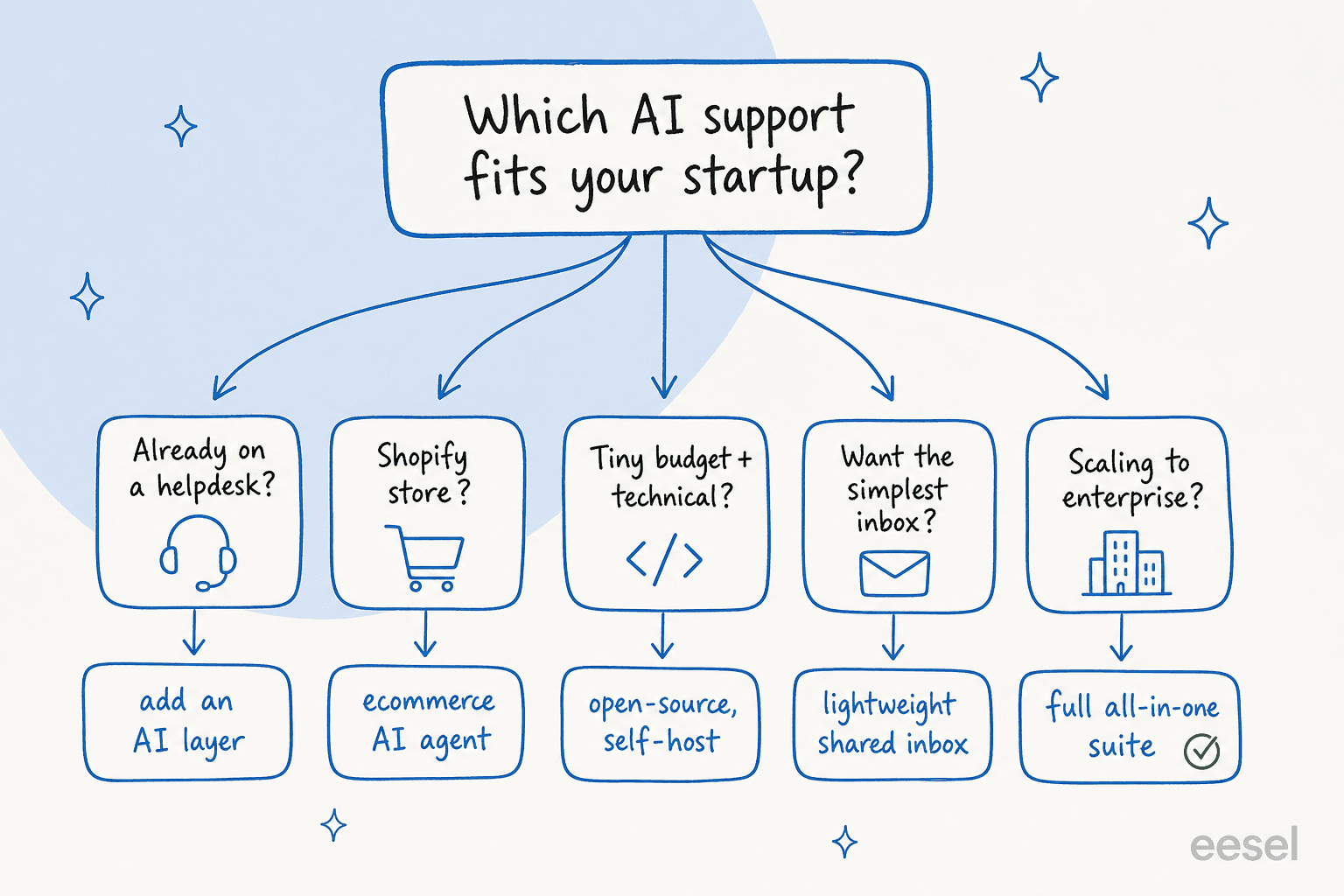
- Already on a helpdesk? Don't migrate. Add an AI layer on top and keep your existing setup.
- Selling on Shopify? Look at Gorgias first for the native order actions.
- Tiny budget and a technical team? Self-host Chatwoot for free.
- Want the simplest possible inbox? Help Scout or Freshdesk's free tier.
- Confident you'll scale to enterprise? Zendesk, eyes open about the bill.
Whatever you pick, insist on two things: test the AI against your real historical tickets before it goes live, and read the billing unit closely so month two doesn't surprise you. Those two habits matter more than any single feature.
Try eesel for your existing helpdesk

If the takeaway from all this is "I already have a helpdesk and just want it to stop drowning my tiny team," that's exactly the problem eesel was built for. It plugs into Zendesk, Freshdesk, Help Scout, Gorgias, and Front in a few minutes, learns from the tickets you've already answered, and can simulate its resolution rate on your real history before it ever replies to a customer. Pricing is per AI interaction with no per-seat fee, so it grows with your team instead of taxing it. It's free to try, no credit card, so you can point it at your last thousand tickets and see for yourself. Try eesel.
Frequently Asked Questions

Share this article

Article by
Alicia Kirana Utomo
Kira is a writer at eesel AI with a Computer Science background and over a year of hands-on experience evaluating AI-powered customer service tools. She focuses on breaking down how helpdesk platforms and AI agents actually work so that support teams can make better buying decisions.