I tested 7 DeepL alternatives to find the best for multilingual support in 2026


Last edited June 23, 2026
Table of Contents
- What are machine translation tools?
- Why look for DeepL alternatives for your business?
- A quick comparison of the top DeepL alternatives
- The 7 best DeepL alternatives for businesses in 2026
- How to choose the right DeepL alternative for you
- Beyond translation: Automating your global support with DeepL alternatives
- Want an AI for multilingual support?
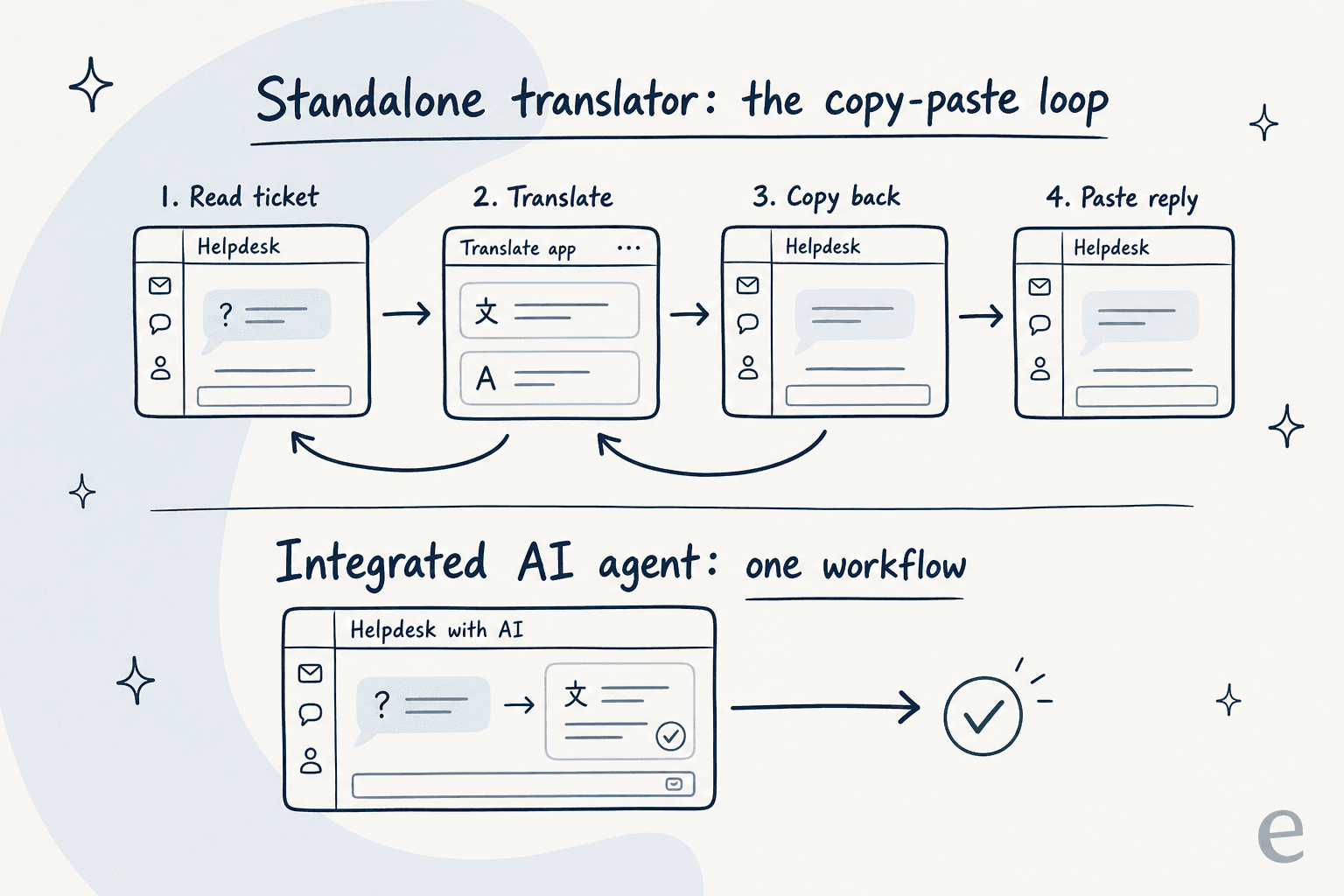
If your business has a global audience, you know the daily routine. A customer question pops up in a language you don't speak. You open a new tab, paste the text into DeepL, figure out what they need, type your reply, translate it back, and copy-paste it into your helpdesk.
I work on eesel's support side, and I've watched this play out across real rollouts. The one that reframed it for me: a German jewelry e-commerce brand running ~1,000 tickets a month on Zendesk and Shopify pointed our AI agent at their help center and tickets, and it started handling German, English, French, Dutch, Spanish, Polish, Croatian and Turkish without anyone configuring a single language. Nobody pasted anything into a translator. That's the gap this guide is about: you're not looking for a better translator, you're looking for a better workflow.
What are machine translation tools?
You've probably heard the term "machine translation." It's basically AI that automatically translates text from one language to another. DeepL is a famous example, known for its nuanced translations, especially with European languages.
These tools are built on neural networks that have analysed huge amounts of text to get a feel for context, grammar, and idioms. The result is often a translation that sounds surprisingly human. For businesses, they offer a way to connect with customers across the globe without having to hire a massive multilingual team.
Why look for DeepL alternatives for your business?
DeepL is a solid tool, no doubt, and our full DeepL pricing breakdown covers what it costs. But when you try to build a customer support system around it, some limitations quickly become obvious. As your team grows, these little friction points turn into real problems. Picking the right alternative means figuring out what your specific pain points are and finding a tool that solves them.
Here's what you should be thinking about:
-
Does it work where you work? The number one headache with standalone tools is the lack of integration. Your agents have to constantly jump out of their helpdesk, paste text into another window, translate, and paste it back. A good alternative should live inside the tools you already use, like Zendesk, Freshdesk, or your own help center.
-
Does it get the context? A generic translator doesn't know the difference between a frustrated customer, a refund request, or a bug report. A better alternative should be smart enough to understand the context of a support ticket.
-
Can it keep up? You can't just copy-paste faster when ticket volumes spike. A real alternative automates the process, letting a single agent handle conversations in multiple languages without breaking a sweat, which is the whole point of ticket automation.
-
Is your data safe? Pasting customer conversations into a random third-party website can be a security nightmare. Any tool you consider should have strong data protection policies and a commitment not to use your data to train their models.
-
Does it sound like you? Your company has a specific brand voice. A generic translator can't capture it. The best tools can learn from your past support tickets to make sure every reply sounds like it came from your team, no matter the language.
A quick comparison of the top DeepL alternatives
Here's a bird's-eye view of the tools I'm about to cover. Some are direct competitors to DeepL, while others offer a completely different way of tackling the multilingual support challenge.
| Tool | Best For | Key Feature | Pricing Model | Multilingual Approach |
|---|---|---|---|---|
| eesel AI | Integrated Customer Support | AI agents inside your helpdesk | Usage-based, from $0.40 | Automated, contextual replies |
| ChatGPT (GPT-5.2) | Flexible Text Generation | Conversational AI | Subscription / API usage | Ad-hoc text translation |
| Google Translate | Quick, Free Translations | 100+ languages supported | Free / API usage | Manual copy-paste |
| Microsoft Translator | Business & Office Integration | Real-time conversation translation | Free / API usage | Manual & integrated options |
| Pairaphrase | Enterprise Document Localization | Secure batch file translation | Custom enterprise plans | Centralized translation platform |
| Supertext | Niche European Languages | Swiss language support | Per-word / custom plans | Translation as a service |
| Redokun | Marketing & Design Documents | Preserves file layout | Project Pass / per user | Document workflow tool |
The 7 best DeepL alternatives for businesses in 2026
Alright, let's get into the details. Here's a breakdown of each tool, what makes it stand out, its pros and cons, and who it's really for.
1. eesel AI
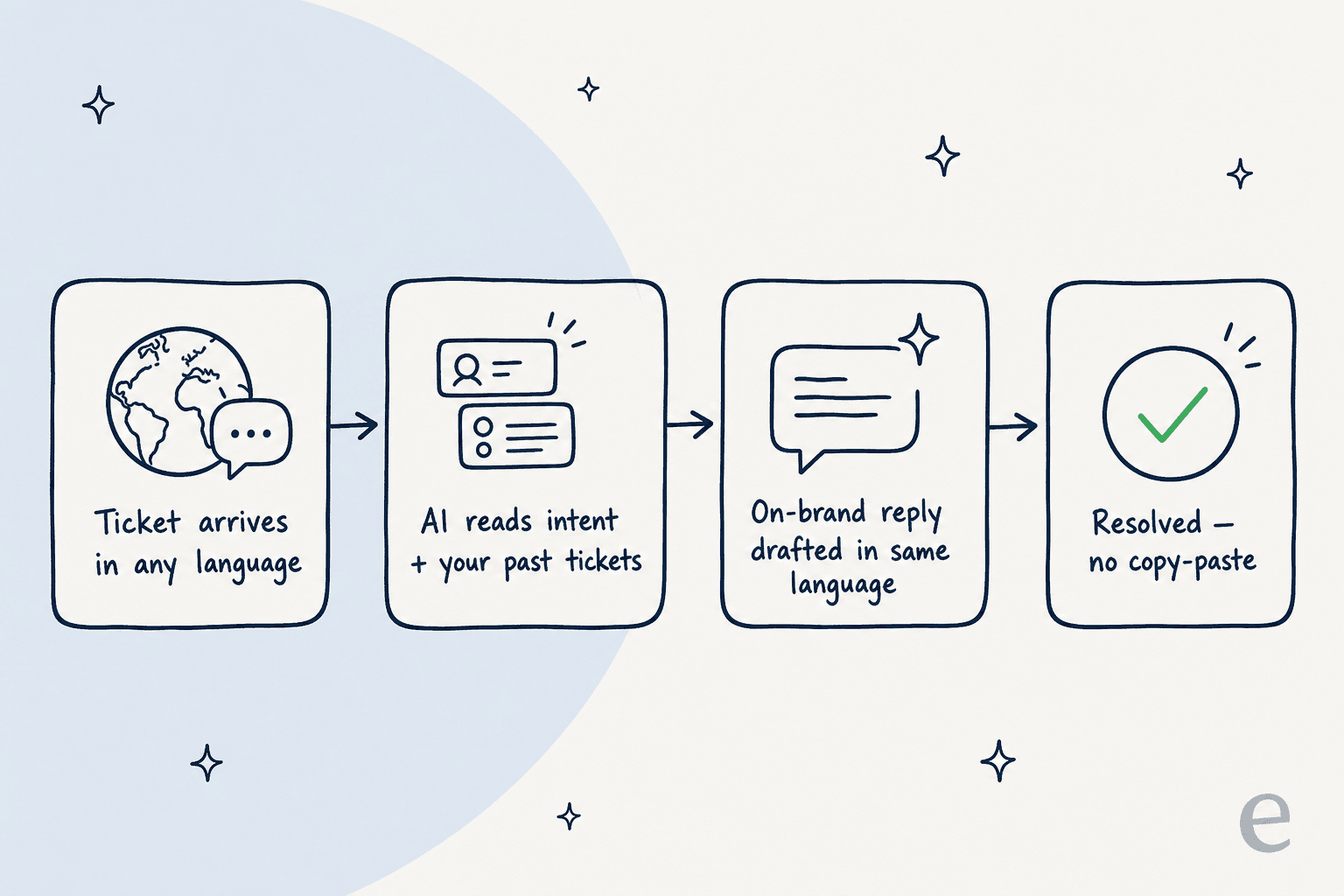
Instead of being just another translation tool, eesel AI is an AI agent that works right inside your helpdesk. It learns from your past multilingual tickets, knowledge base articles, and macros to understand what your customers are asking and how your team normally responds. From there, it can either resolve common questions on its own or draft on-brand replies for your agents in any language, killing the need for copy-pasting entirely.
This changes multilingual support from a manual chore into an automated part of your workflow. Because it's fully integrated, eesel AI can also do things like tag tickets, pull order info from Shopify, or escalate an issue to the right person, all based on the conversation. It's less of a translator and more of a complete multilingual support brain for your team.
-
Pros:
- Up and running in minutes: The setup is genuinely self-serve with one-click integrations for major helpdesks.
- Learns your business: It analyses your past tickets to give answers that are actually helpful and sound like you.
- You're in control: You get to decide which tickets the AI handles and what it's allowed to do, and you can simulate it on past tickets before it goes live.
- Connects your knowledge: It can pull information from Confluence, Google Docs, and other places to give complete answers.
- Pay for what it does: Usage-based pricing with no per-seat fees, so multilingual support doesn't get more expensive just because you add agents.
-
Cons:
- It's built for customer support and internal knowledge, so it's not a general-purpose translator for your personal docs.
- It's more of a platform solution than a simple tool for a single task.
-
Pricing:
- Free to start: $50 of free usage plus a couple of free blog generations, no credit card required.
- Usage-based: After that, pricing starts at $0.40 per ticket or chat handled (not per reply), with no platform fee, no per-seat fees, and no monthly minimum. So 1,000 AI-handled tickets a month works out to about $400. You can commit annually to save 25%.
- Enterprise: $1,000/month flat fee on top of usage, adding a dedicated solutions engineer, SSO, HIPAA, and signed agreements.
2. ChatGPT (GPT-5.2)
Let's be honest, we all use ChatGPT. Its knack for understanding context and generating natural-sounding text makes it a decent DeepL alternative for one-off translations. You can ask it to translate a customer email, rewrite a response to sound more empathetic, or even summarise a long, confusing ticket. Its flexibility is its biggest asset.
The catch? For a structured support workflow, it has the same problems as DeepL. It's a separate tool, which means manual copy-pasting, and you have to be careful about pasting sensitive customer info into it. It's best used as a smart assistant for your agents, not a scalable, automated system. If you do want it closer to your tickets, there are guides on connecting ChatGPT to Zendesk.
-
Pros:
- Really good at understanding nuance and context.
- Can do more than just translate, like summarising and rephrasing text.
- Supports a huge number of languages.
-
Cons:
- Doesn't integrate directly with helpdesks.
- Data privacy can be a big question mark for business use.
- Translation quality can get a bit shaky for less common languages.
-
Pricing:
- Free: Access to GPT-5 with usage limits.
- ChatGPT Plus: $20/month for higher limits on the latest GPT-5.2 models and advanced features.
- ChatGPT Team: $25/user/month (billed annually) for a shared workspace.
- Enterprise: Custom pricing for large companies needing advanced security.
3. Google Translate
Google Translate is the tool everyone knows. It's free, super fast, and supports more than 100 languages. If you just need to know what a single word or phrase means, it's perfect.
For professional customer support, though, its weaknesses show. The translations can miss the subtlety needed for tricky customer conversations. And just like the others, it forces your agents into a clunky workflow. It's a handy tool to have in your back pocket, but you can't build a global support strategy on it.
-
Pros:
- Free and simple to use.
- Supports a massive range of languages.
- Great for quick, on-the-spot translations.
-
Cons:
- Translation quality can be hit-or-miss and often lacks nuance.
- It's not built for business workflows.
- Pasting company data into it is a major privacy concern.
-
Pricing:
- Free: For web, mobile app, and browser extension use.
- Cloud Translation API: You get the first 500,000 characters per month free. After that, it's $20 per million characters.
4. Microsoft Translator
Microsoft Translator is Redmond's answer to Google Translate and DeepL. It offers a similar feature set for translating text, voice, and images. Its main advantage is its tight integration with the Microsoft universe, including Office, Teams, and Bing. If your company already runs on Microsoft, this might feel more natural than other standalone tools.
But even with its business focus, it's still mostly a translation utility. It doesn't solve the core workflow problem for support teams working in platforms like Zendesk unless you're prepared to build a custom integration with their API.
-
Pros:
- Integrates well with other Microsoft products.
- Translation quality is competitive.
- Offers security features geared toward businesses.
-
Cons:
- Needs custom work to integrate deeply with non-Microsoft helpdesks.
- The user interface isn't as clean as DeepL's.
-
Pricing:
- Free Tier (F0): Includes 2 million characters of standard translation per month.
- Pay-as-you-go (S1): Standard text translation costs $10 per million characters.
5. Pairaphrase
Pairaphrase is a translation platform built for big companies where security is everything. It offers features you won't find in consumer-grade tools, like secure batch file translation and support for 24 different file types (including design files).
This is not a tool for casual use. It's a heavy-duty solution for companies that need to translate large volumes of sensitive documents. Think of it as a tool for a corporate localization department, not a nimble customer support team. The complexity and price tag match that enterprise focus.
-
Pros:
- Top-notch security features.
- Supports a wide variety of file formats.
- Designed for team collaboration on big translation projects.
-
Cons:
- It's complex and expensive.
- Total overkill for translating real-time customer support messages.
- Not a self-serve tool; you have to talk to their sales team.
-
Pricing:
- Pairaphrase provides custom enterprise pricing only. You'll need to contact them for a quote, which usually means it's aimed at larger organizations with specific compliance needs.
6. Supertext
Supertext stands out by focusing on quality and specific language niches, particularly Swiss languages like Romansh and Swiss German. It's a mix of AI translation and a network of professional human translators, so it's positioned as a premium service where you absolutely can't afford an error.
Supertext is a great choice if your customers are in these specific regions and you need perfectly localized content. For a global support team juggling dozens of languages in real time, however, it feels more like a traditional translation agency than a modern tech solution.
-
Pros:
- Specializes in Swiss languages and other European niches.
- Strong focus on data protection and local data hosting.
- Gives you the option to have AI translations checked by human experts.
-
Cons:
- Supports fewer languages than the big platforms.
- Not built for real-time, automated support.
- Pricing is based on volume, which could get expensive for a support team.
-
Pricing:
- Free: A basic online translator is available.
- Advanced Subscription: You need to contact them for pricing.
- Professional Services: Priced per word or through custom plans, based on how much human review you need.
7. Redokun
Redokun solves one very specific, very annoying problem: translating documents while keeping the original formatting. If you've ever tried to translate an InDesign brochure or a PowerPoint deck, you know the pain of having to manually fix the layout for every single language. Redokun uses translation engines like DeepL, Google Translate, and OpenAI but wraps the whole process in a workflow that saves your design.
This makes it a fantastic DeepL alternative for marketing and design teams. But for customer support? Not so much. It's built for static documents, not the fast-paced, back-and-forth of a support ticket.
-
Pros:
- Keeps the layout of your design files intact automatically.
- Makes the document translation workflow much smoother.
- Connects with standard machine translation engines and includes AI pre-translation.
-
Cons:
- Not designed for translating real-time support conversations.
- Subscription tiers are priced per seat, which adds up for bigger teams.
-
Pricing:
- Project Pass: A one-time €95 pass gives you 30 days of access for a single project (5 documents, 30,000 words, 2 translator seats).
- Basic & Premium: Ongoing subscriptions for teams with recurring needs (translation memory, AI fine-tuning, more seats). Contact Redokun for current per-plan rates.
- Custom: Larger teams negotiate custom seat and word limits.
How to choose the right DeepL alternative for you
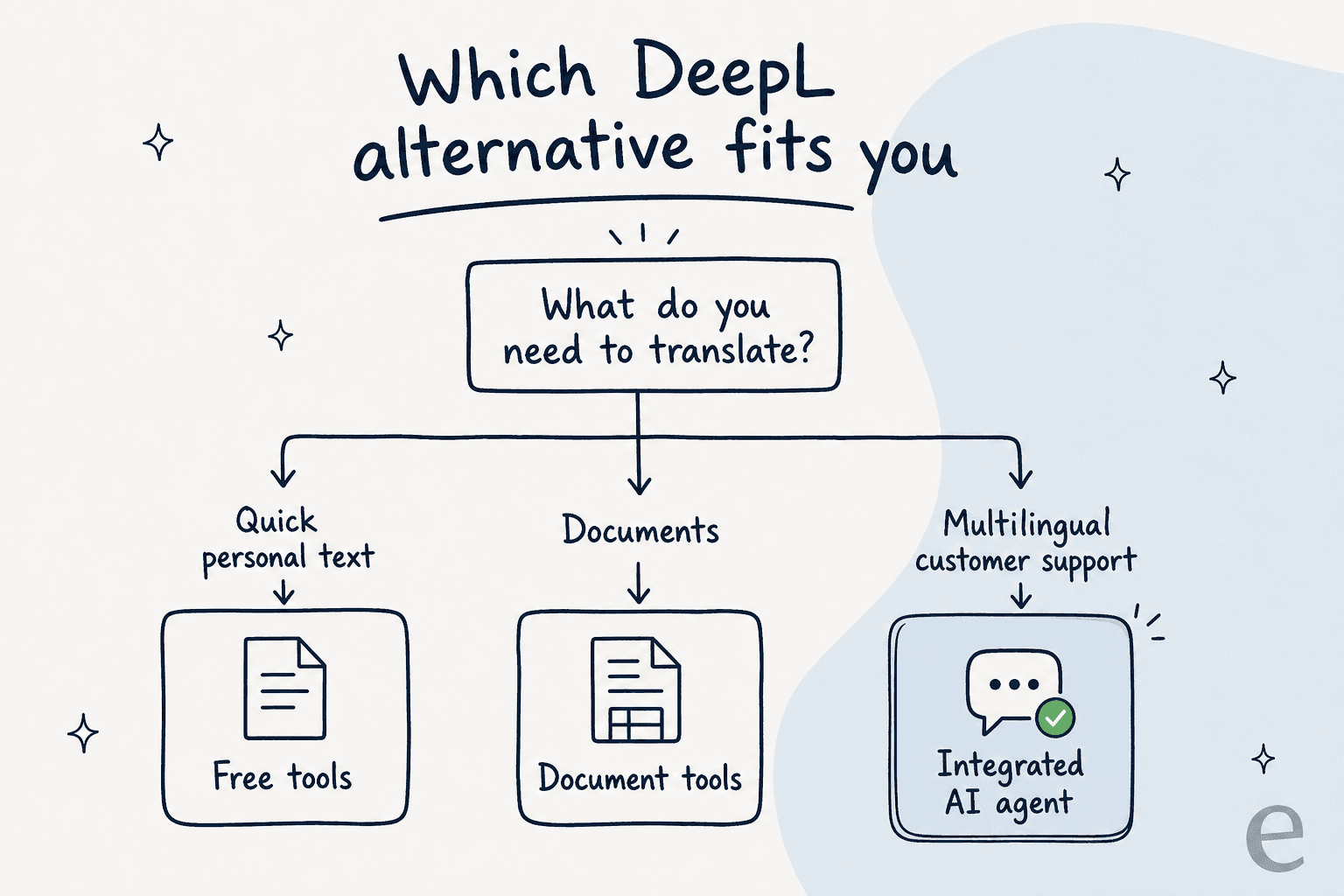
The best tool for you really comes down to what you're trying to do. Don't just look for the most accurate translation; think about the workflow that will save your team the most time and headaches.
-
For quick, personal translations: Stick with the free tools like Google Translate or the free version of DeepL. They're more than enough.
-
For translating marketing or legal documents: Look at specialized tools like Redokun (for design files) or Pairaphrase (for high-security needs).
-
For multilingual customer support: This is where you get the biggest win from automation. A tool that works inside your helpdesk, learns from your data, and automates replies is the only way to scale without hiring an army of agents. This is where an AI agent platform like eesel AI is a much better fit than any standalone translator.
Beyond translation: Automating your global support with DeepL alternatives
The hunt for DeepL alternatives usually starts because you're tired of translating text.

But for a growing business, the real goal is to talk to your customers well, no matter what language they speak. The solution that truly makes an impact isn't a slightly better copy-paste tool; it's a system that removes the manual work completely.
Internally, our team has a running joke that multilingual support is eesel's most under-marketed strength, as one colleague put it, "a lot of people don't realise this works in all kinds of languages." By putting AI right inside your helpdesk, you stop reacting to language barriers and start building a proactive support strategy. eesel AI lets your team handle conversations in any language without ever switching tabs, and because it learns from your past tickets, you can get a reliable multilingual support system running in minutes, not months.
Want an AI for multilingual support?
If your tickets land in five languages and your team speaks two, eesel works like a new hire that plugs into Zendesk, Freshdesk, and your help center in a few minutes, already reads your help center, and answers in whatever language the customer wrote in, no copy-pasting. It's free to try, with no per-seat fees, so you only pay for the tickets it actually handles.

Frequently asked questions

Share this article

Article by
Riellvriany Indriawan
Riell is a designer and writer at eesel AI with about two years of experience researching CX platforms, AI chatbots, and helpdesk software. She combines her design background with a sharp eye for how these tools actually look and feel in practice — making her comparisons unusually visual and user-focused.