A complete guide to Descript pricing in 2025


Last edited November 14, 2025
Let's be honest, picking the right creative tool can feel like a huge commitment. You want something that makes your content look and sound amazing, but you don't want to spend the next six months buried in tutorials just to figure it out. That's why Descript turned so many heads. Its AI-powered, text-based editing was a breath of fresh air for podcasters and video creators. The promise was simple: edit video just by editing text. And for the most part, it nailed it.
But the big question always comes down to money and whether it's actually worth it. Is this the right tool for you? We’re here to give you a straight-up look at the Descript pricing plans, what you really get, and the little catches you should know about. By the end of this, you'll know exactly which plan (if any) makes sense for you.
What is Descript?
So, what exactly is Descript? It’s basically an all-in-one app for recording and editing audio and video. The magic trick is its text-based editing. You just upload a file, and Descript spits out a full transcript. From there, editing your video is as easy as editing a text doc. Delete a word from the transcript, and poof, it’s gone from the audio. It’s a ridiculously simple idea that makes video editing way less intimidating.
It's a dream for podcasters, marketers, and anyone making tutorials or screen recordings. The real power lies in its AI tools that handle the boring stuff for you. Think automatic removal of all your "ums" and "ahs," a voice-cloning feature called Overdub, and a "Studio Sound" button that cleans up background noise. It all adds up to a much faster path from raw recording to finished product.
A detailed look at Descript pricing plans
Descript’s pricing is split into a few tiers, each built for a different kind of user, from someone just messing around to full-on professional teams. The prices here are for annual billing, which saves you a decent chunk of change compared to paying month-to-month. Let’s get into what you get with each one.
Table: Descript pricing plan comparison (2025)
Here’s a side-by-side look at what each plan offers.
| Feature | Free | Hobbyist ($16/mo) | Creator ($24/mo) | Business ($50/mo) |
|---|---|---|---|---|
| Price (Billed Annually) | $0 | $16/user/month | $24/user/month | $50/user/month |
| Media Hours | 1 hour/month | 10 hours/month | 30 hours/month | 40 hours/month |
| Watermark-Free Export | No (watermarked) | Yes | Yes | Yes |
| Max Export Resolution | 720p | 1080p | 4K | 4K |
| Studio Sound | Limited | Yes | Unlimited | Unlimited |
| Filler Word Removal | Limited | Yes | Unlimited | Unlimited |
| AI Speech / Dubbing | Limited Trial | Yes | Yes (more minutes) | Yes (most minutes) |
| AI Eye Contact | Limited | Yes | Unlimited | Unlimited |
| Collaboration Seats | 1 | 1 | Up to 3 | Up to 5 |
| Cloud Storage | 5 GB | 100 GB | 1 TB | 2 TB |
The Free plan
The Free plan is your test drive. It's perfect if you're just curious about text-based editing and want to poke around without pulling out your credit card.
But you'll probably hit its limits fast. You only get one hour of media per month, which you can burn through just by playing with a couple of files. Add in the watermarked videos and barely-there AI features, and it's pretty clear this isn't for anyone creating content regularly.
The Hobbyist plan
For $16 a month, the Hobbyist plan is for creators who are done experimenting and ready to make actual, finished content. The biggest win here is getting rid of the watermark and exporting in 1080p, which is a must if you want to look professional.
You get 10 hours of media a month, which is a lot more breathing room. The AI features are still a bit limited, though. Some users have also mentioned that transcription and exporting can be a little flaky on the lower plans. It's probably not a huge deal for a personal project, but it could definitely be annoying if you're on a tight deadline.
The Creator plan
At $24 a month, the Creator plan is where Descript gets serious. This is for the dedicated creators and small teams pumping out content weekly.
With 30 hours of media, 4K exports, and the ability to go wild with unlimited Studio Sound and Eye Contact, it's a solid setup. But it’s not perfect. You’ll need a solid internet connection, which can be a pain if you're trying to work from a cafe. Also, the transcription can get tripped up by technical terms or thick accents, so you’ll definitely need to budget some time for proofreading.
The Business plan
The Business plan jumps to $50 per user per month and is really for professional teams that need to work together smoothly. It includes everything from the Creator plan, plus team goodies like a shared Brand Studio for templates and priority support. It’s a bigger price tag, for sure, so this one makes the most sense for companies where creating content is a central part of the job.
The Enterprise plan
Then there's the Enterprise plan, which is for the big leagues. The pricing is custom, so you'll have to chat with their sales team. This plan adds heavy-duty security features like SSO, gives you a dedicated person to call for help, and includes custom onboarding. It's built for huge teams with serious security and workflow needs.
Descript pricing: Key features and their limitations
Beyond the pricing table, it helps to understand what Descript’s most talked-about features can do and where they sometimes stumble.
Text-based video and audio editing
This is Descript's main attraction. Being able to chop up a video just by fiddling with a transcript is super intuitive and makes editing feel less like rocket science. You can cut, copy, and paste your recording like you’re just writing an email.
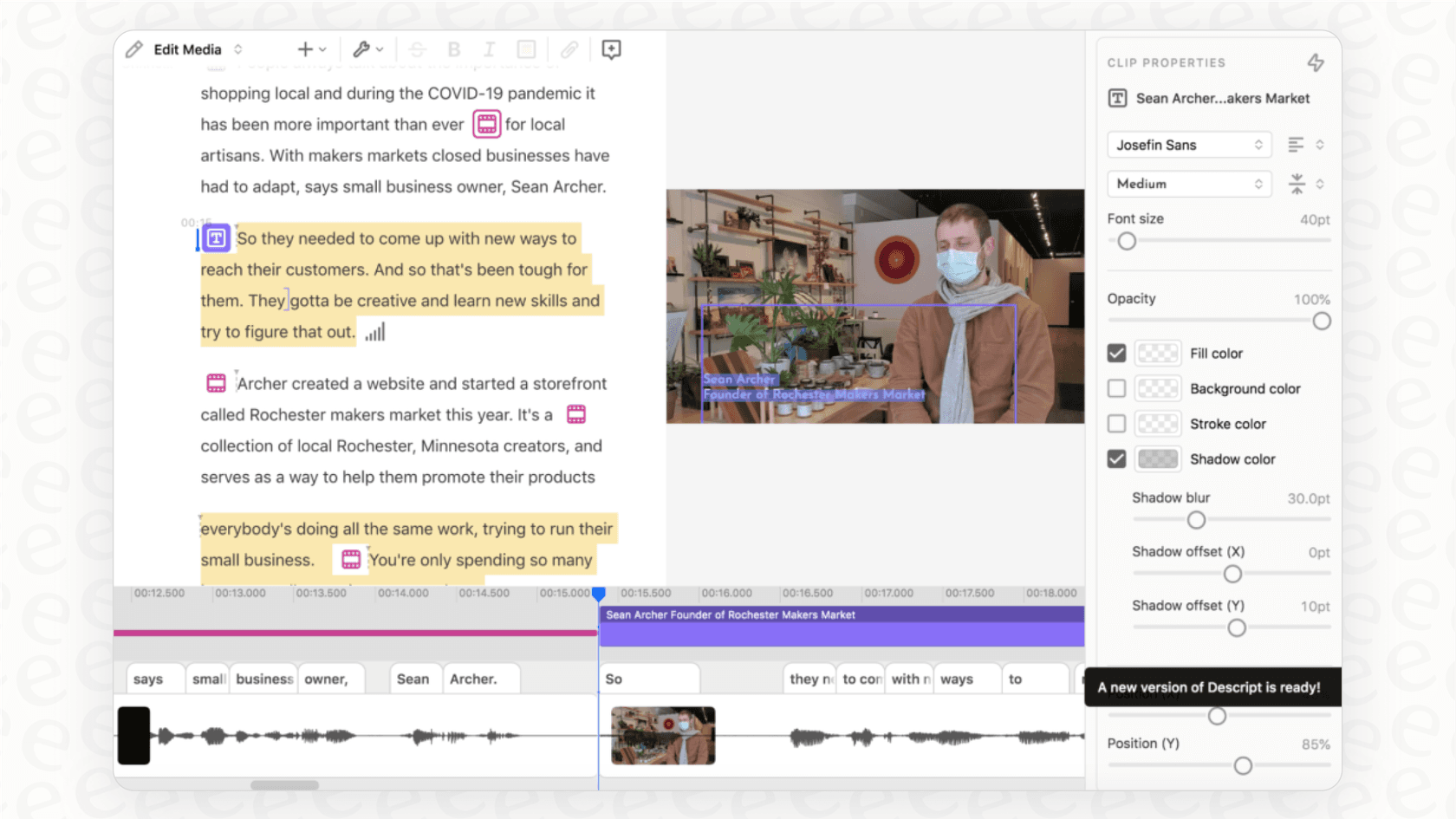
But it's not for every editor out there. If you've spent years mastering traditional timeline editors like Adobe Premiere Pro or Final Cut Pro, this text-first approach might feel a bit limiting. Plus, it can start to chug and lag if you're working on really big or complicated projects, which is always frustrating.
AI-powered audio and video enhancement
The AI tools in Descript can be a huge time-saver. Studio Sound is pretty wild; it can take a recording made in a noisy room and make it sound like you were in a booth. The Filler Word Removal zaps all your "ums" and "ahs* with a single click, and Eye Contact cleverly adjusts your eyes to make it look like you're staring right into the camera.
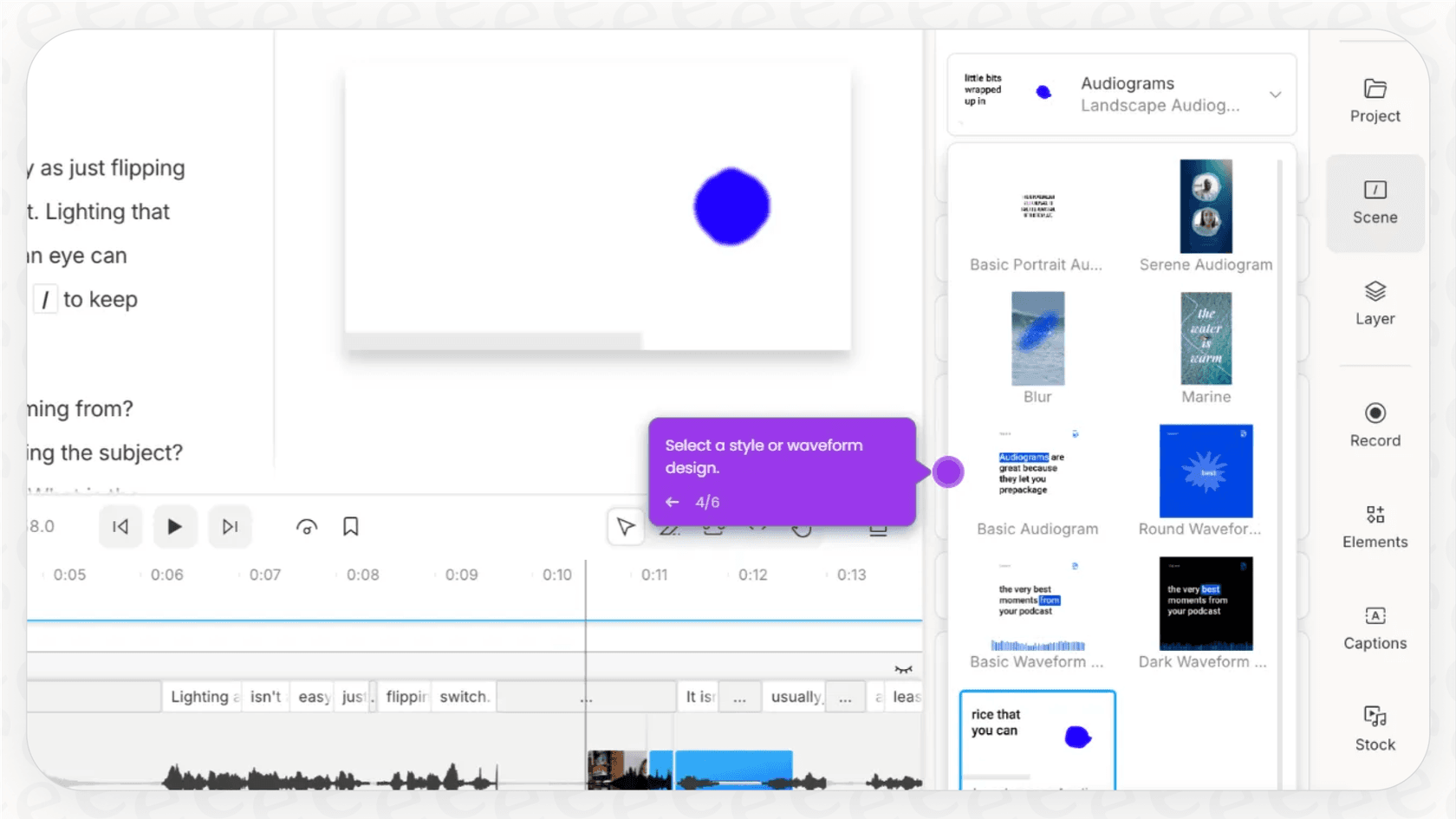
But, the AI isn't a silver bullet. The automatic transcription is good, but not perfect. It often messes up names, technical words, or speech with a strong accent. So, you can't just hit a button and walk away. You’ll still need to put on your proofreader hat and give it a once-over.
Overdub and AI voice generation
Overdub feels like something out of a sci-fi movie. It lets you create an AI clone of your voice so you can fix a word you messed up or add a new sentence just by typing it. If that's too weird, you can use their stock AI voices instead.
It sounds amazing, and it is, but it’s mostly good for small fixes. The quality can be a bit hit-or-miss, and you need a paid plan to really use it. It's great for correcting one little mistake, but it's not quite ready to read out a whole new script for you.
Is Descript pricing worth it for your business?
So, is the Descript pricing worth it? For teams making marketing videos, training materials, or podcasts, absolutely. It helps you get polished content out the door way faster than you could with old-school editing software. It’s an awesome tool for the creation side of things.
But what happens after you’ve created all that great content? How do you make sure your helpful tutorials and guides actually get used by your support team when they need them most? That’s often the missing piece of the puzzle.
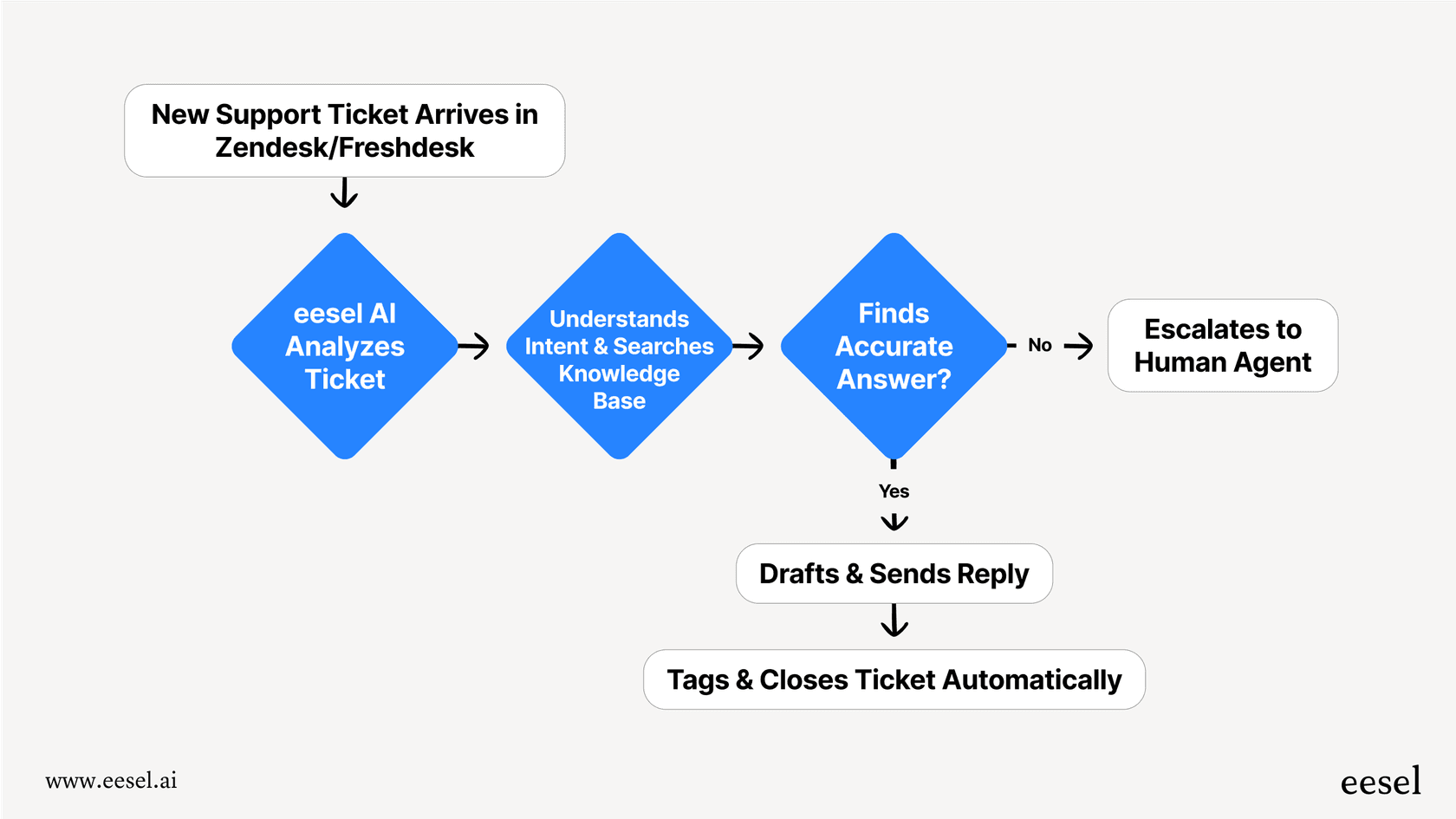
While Descript helps you create the knowledge, a tool like eesel AI helps you put it to work automatically. Think about it: your support team is always writing FAQs, help articles, and internal guides. All that information ends up scattered everywhere, in your help center, old tickets, and internal wikis like Confluence or Google Docs.
What eesel AI does is pull all of that information together, including the video transcripts you made in Descript, to create a smart AI assistant for your team. It connects right into the tools you already use, like Zendesk, Freshdesk, and Slack, and you can get it up and running in minutes. This means all that content you spent time creating can start answering customer questions on its own, drafting replies for your agents, and handling internal questions. It’s all about getting the most out of the work you’ve already done.
Beyond Descript pricing: From content creation to support automation
Descript's pricing is pretty reasonable for any team that wants to speed up their video and audio production. It makes creating content so much easier. But if you really want to get the most bang for your buck, don't stop at creation. The real payoff comes when you put all that great knowledge to work.
If your team is already creating helpful content, the next logical step is to automate with it. Take a look at how eesel AI can bring all your knowledge together and put your support on autopilot.
Frequently asked questions

Share this article

Article by
Stevia Putri
Stevia Putri is a marketing generalist at eesel AI, where she helps turn powerful AI tools into stories that resonate. She’s driven by curiosity, clarity, and the human side of technology.