How to onboard an AI support agent


Last edited June 21, 2026

Table of Contents
- Why most AI support agents flunk onboarding
- What you'll need before you start
- Step 1: Connect your knowledge
- Step 2: Set its behaviour in plain English
- Step 3: Simulate on your past tickets before it touches a customer
- Step 4: Launch supervised, then grant autonomy gradually
- Step 5: Monitor, coach, and expand
- Common mistakes when onboarding an AI support agent
- Try eesel
Why most AI support agents flunk onboarding
I work the support queue, and I've spent the last few years watching teams put AI agents on live tickets, so let me start with the failure I see most.
A support lead signs up, switches the agent on, and asks it a real customer question. It says "sorry, I don't know." They upload a PDF. Still nothing. They start typing corrections by hand, one reply at a time: use this page, not that one; always link the bestselling products; we can't start the return for them, they do it in the portal. I once watched a team on a $299/month plan spend their entire first day doing exactly this, and the quote that stuck with me was simple: a customer paying that much shouldn't have to hand-build the agent's brain themselves.
That's the trap. Onboarding fails when "training" means manually teaching the agent everything from a blank slate. Your team has already answered these questions thousands of times. The job of onboarding isn't to re-teach all of that, it's to point the agent at where the answers already live.
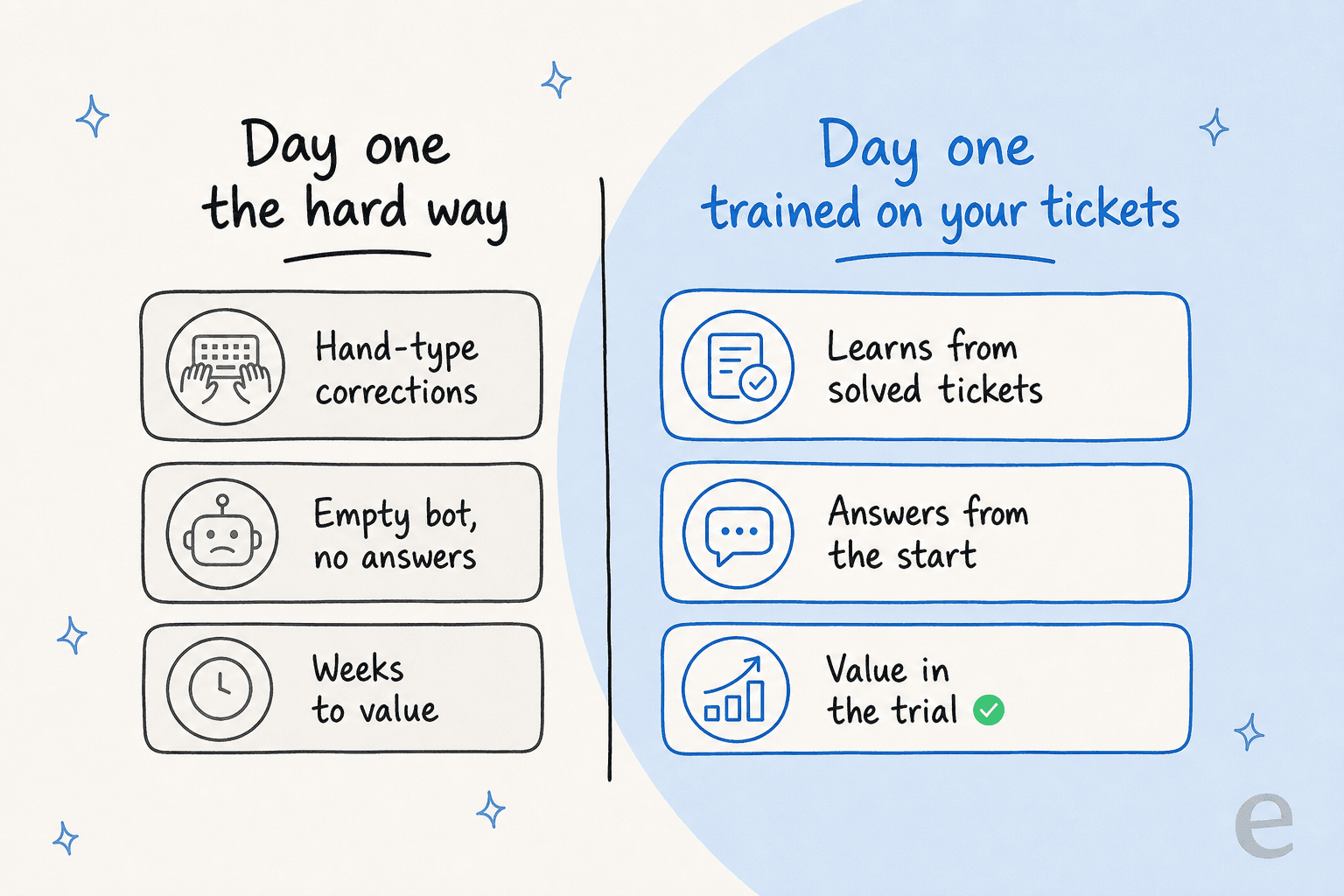
The difference between a painful onboarding and a smooth one comes down to where you start. Start from an empty bot and you're writing a knowledge base by hand. Start from your solved tickets and your help center, and the agent can answer on day one. The rest of this guide is the second path, step by step.
What you'll need before you start
You don't need a data team or a six-week project plan. You need three things ready:
- A helpdesk with history in it. Whether that's Zendesk, Freshdesk, Gorgias, Front or HubSpot, your past tickets are the single most valuable training material you have.
- Your existing knowledge. Help center articles, internal docs in Confluence or Notion, Google Docs, even old macros and saved replies.
- A rough idea of what you want it to do first. Don't try to automate everything. Pick one job, usually the repetitive tier-1 questions, and onboard the agent for that.
That's it. If you've got those, you can onboard a helpdesk AI agent this afternoon.
Step 1: Connect your knowledge
The first step is wiring the agent into the places your answers already live. This is where the "don't train from scratch" idea becomes concrete: instead of typing facts in, you connect sources.
Two kinds of knowledge matter here. The first is your help docs and articles, which give the agent the official, current answer to "how do I reset my password." The second, and the one people underrate, is your past tickets, which teach it how your team actually phrases things, which edge cases come up, and what a good resolution looks like for your product specifically.

Training on historical tickets is, hands down, the most requested capability I see come up. A colleague on our side, Amogh, put it bluntly after a run of customer calls: people really, really want to train on past tickets. It's almost always the first thing a new admin tries to do, sometimes within a day or two of signing up. There's a reason: a knowledge base tells the agent what's true, but solved tickets tell it how you talk.
If you run multiple brands or products, connect each one's history separately. One multi-brand team I know trained a dedicated agent per brand, each learning only from its own tickets, so a question about one product never gets answered with another product's policy. Connecting more sources also tends to make the agent stickier and more accurate, because it has more places to ground an answer.
Step 2: Set its behaviour in plain English
Once the agent knows your stuff, you tell it how to act. This is the part that used to mean a developer and a flowchart, and now mostly means writing instructions the way you'd brief a new teammate.
You're answering questions like: when should it jump in versus stay quiet? What tone matches your brand? Should it draft a reply for a human to send, or send on its own? Which topics should it never touch (billing disputes, anything legal, account deletions)?

The nice thing about onboarding this way is you can do most of it by just chatting to the agent. New admins literally type things like "connect my Zendesk to start handling tickets" and walk through setup conversationally, the same way they'd onboard a person. Writing the behaviour in plain language also means the people who actually know the answers, your support team, can shape the agent without filing a ticket with engineering. If you want a deeper look at the patterns here, our guide to an AI copilot for support walks through the common setups.
A word of advice from the queue: start narrow. It's tempting to write twenty rules on day one. Write three, see how the agent behaves, and add more once you've watched it work. Over-instructing early just makes it harder to tell what's actually driving its replies.
Step 3: Simulate on your past tickets before it touches a customer
This is the step people skip, and it's the one that saves you. Before the agent replies to a single live customer, run it against tickets you've already closed and compare what it would have said to what your team actually said.
A simulation answers the questions that keep support leads up at night: How many tickets can it actually handle? Where does it get things wrong, and how much ticket automation is realistic? Which topics is it confidently good at, and which should stay with humans? You get those answers from your own data, in private, with zero risk to a real customer.
The numbers from a good dry run are genuinely reassuring. In one trial on real helpdesk traffic, the agent hit 93% triage accuracy and caught 100% of spam with no false positives, all measured before it ever went live. That's the entire point of simulating first: you find the gaps, fix them (add a doc, tweak an instruction), and re-run until the coverage looks right. You're not hoping it works, you're checking.
If you're onboarding into Zendesk specifically, our complete guide to Zendesk AI agents covers the setup-and-test loop in more detail. And if ticket triage is the first job you're automating, the same simulate-then-launch pattern applies.
Step 4: Launch supervised, then grant autonomy gradually
Now you go live, but not all the way. The pattern that works almost every time is copilot first, autopilot later.
Start with the agent drafting replies that a human reviews and sends. Your team gets faster, you build confidence in the quality, and nothing reaches a customer without a person seeing it. Once you trust its drafts on a given topic, flip that topic to auto-reply. Repeat. You're handing over autonomy one ticket type at a time, not all at once.
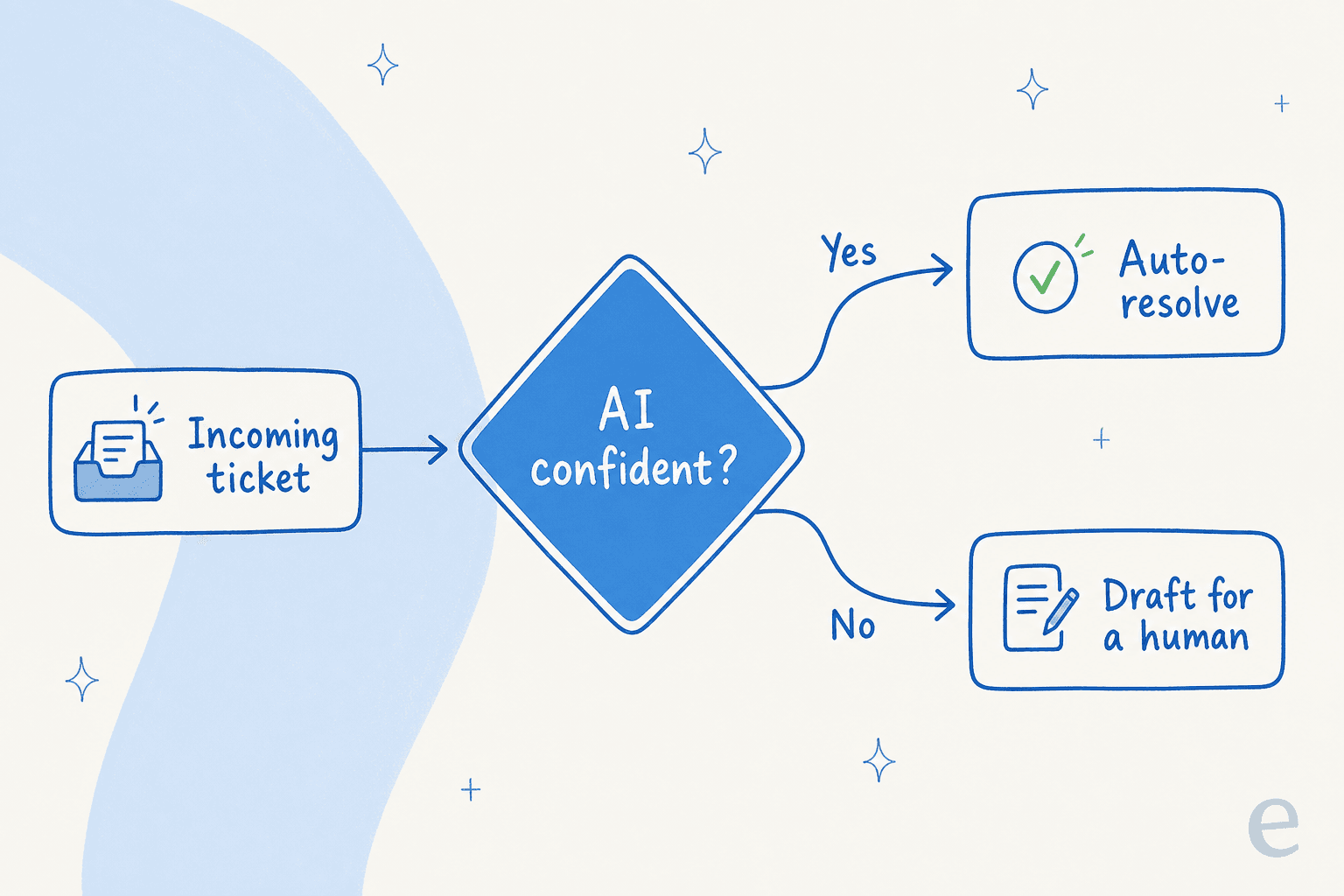
The mechanism that makes this safe is confidence-based routing: the agent only handles tickets it's confident about and leaves the rest alone. This is, by a distance, the thing buyers care about most, and they're right to. A CX lead at a DTC supplements brand put the fear perfectly: the AI will never answer 100% of questions, but if it just guesses and then says "sorry I don't know," nobody can go back and check 7,000 tickets to see if it made things up. As they put it, they needed an AI that only handles the tickets it's confident to handle, and all the others, leave them alone. Onboarding done right bakes that boundary in from the first live ticket.
"In the first month, eesel is resolving 73% of our tier 1 requests. Our team implemented and achieved results quickly during our 7-day trial."
Kim Simpson, Gridwise
That 73% didn't require a heavy build. It came from this exact ramp: connect, simulate, launch supervised, expand. If you want to see what the live agent looks like working a queue, here's eesel AI working inside Zendesk.
Step 5: Monitor, coach, and expand
Onboarding doesn't end at go-live, it ends when the agent is a trusted part of the team. That last stretch is about watching what it does and coaching it, the same way you'd coach a new hire in their first month.
Keep an eye on the basics, the support metrics that matter: what it's resolving, what it's escalating, where customers push back. Every correction you make should feed back in, so the same mistake doesn't happen twice. The agents that get good are the ones whose teams treat early misses as coaching moments, not proof it doesn't work.

Once a topic is solid, expand. Add a new ticket category, a new channel, another language. One team I came across drove 56 resolved tickets from just nine synced macros, and was still using the agent daily more than a month after their trial expired, without ever opening a support request. That's what a finished onboarding looks like: the agent quietly handling more over time, and reporting that proves it's reducing your ticket volume rather than just deflecting blindly.
Common mistakes when onboarding an AI support agent
A few traps I see often enough to call out:
- Hand-training from an empty slate. If you're typing facts in one by one, you've skipped Step 1. Connect your past tickets and docs instead.
- Going straight to full autopilot. Skipping the supervised phase is how you get a confident-sounding wrong answer in front of a customer. Ramp through drafts first.
- Skipping the simulation. Launching without a dry run against your own history is launching blind. It's also the cheapest insurance you'll ever buy.
- Over-instructing on day one. Too many rules early makes the agent's behaviour impossible to debug. Start with a few, watch, then add.
- Treating it as set-and-forget. The agents that plateau are the ones nobody coaches. A little ongoing tuning compounds fast.
Get those right and onboarding stops feeling like a project and starts feeling like a new hire who happens to ramp in days.
Try eesel
If you're onboarding an AI support agent and want the guardrails from this guide built in, that's exactly what eesel is for. It learns from your solved tickets and help docs on day one, lets you simulate against your real ticket history before it ever replies to a customer, and uses confidence-based routing so it only handles what it's sure about. You can set the whole thing up by chatting to it, inside the helpdesk you already run.

It's free to try, with no credit card and no sales call, so you can run the simulation on your own tickets and see your real resolution number before you commit. That's the fastest way I know to find out whether an AI agent will actually work for your queue, instead of guessing.
Frequently Asked Questions

Share this article

Article by
Riellvriany Indriawan
Riell is a designer and writer at eesel AI with about two years of experience researching CX platforms, AI chatbots, and helpdesk software. She combines her design background with a sharp eye for how these tools actually look and feel in practice — making her comparisons unusually visual and user-focused.