Kaiber pricing 2026: Plans, credits, and is it worth it?

Last edited October 1, 2025
AI video tools like Kaiber are popping up everywhere, and it’s easy to see why. They can take a simple idea and spin it into a full-blown animation in minutes. But just as you’re getting excited to try one out, you hit a wall: the pricing page. Suddenly, it’s not just a simple monthly fee. You're looking at a confusing mix of subscription plans, credits, and pay-as-you-go options that can leave you scratching your head.
That’s what this guide is for. We’re going to pull back the curtain on Kaiber pricing to give you a clear, honest, and complete breakdown. We'll look at what it really costs to make a video, what those credits actually get you, and help you figure out which plan, if any, is the right fit for your creative projects.
What is Kaiber AI?
So, what exactly is Kaiber? It's an AI-powered creative platform built to turn your ideas into visual content. Basically, you can feed it a text prompt, an image, or even a song, and it generates an animated video for you. It's built with artists, musicians, and content creators in mind.
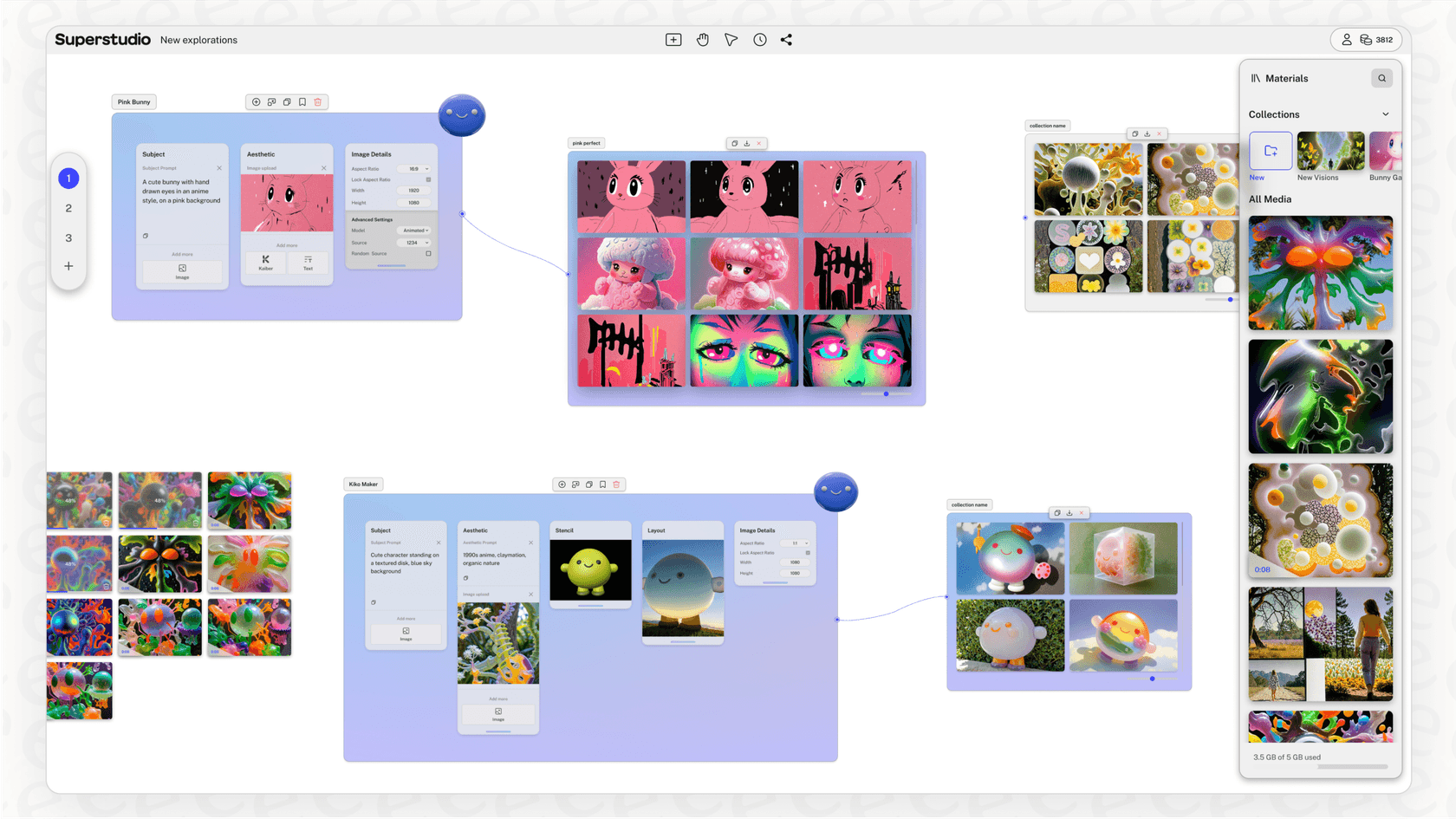
Most of the magic happens in its creative suite, which includes tools for:
-
Audioreactivity: This one is pretty cool. It creates visuals that pulse and move in sync with a song you upload.
-
Animation Styles: You can choose different animation types, like the choppy, frame-by-frame "Flipbook" style or the much smoother "Motion" style.
-
Video Transformation: You can upload a video you already have and let the AI transform it into a completely different artistic style.
It’s a fun sandbox for visual experiments, but the way you pay for it is where things start to get a little tricky.
A deep dive into Kaiber pricing plans
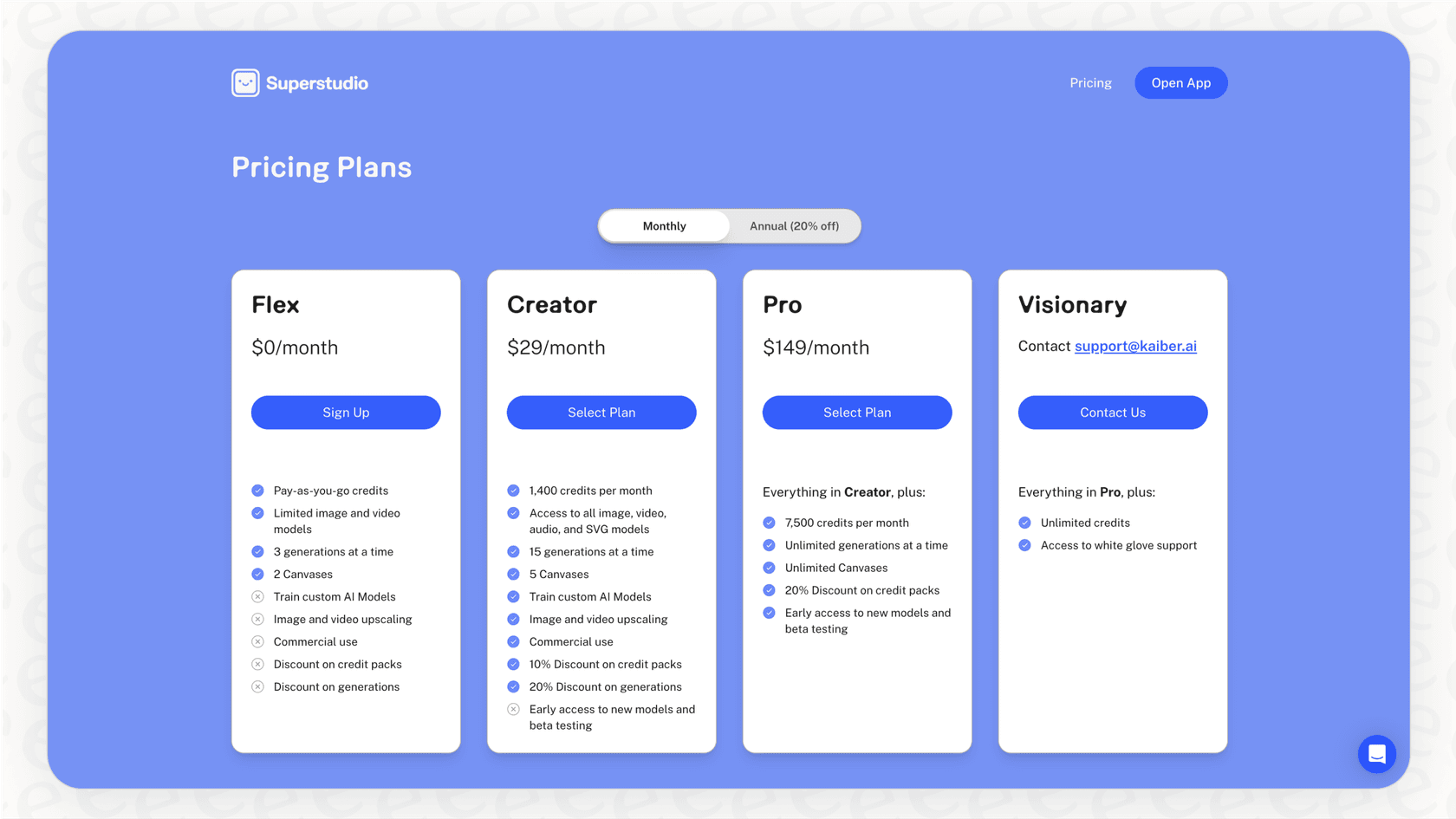
Kaiber’s pricing has gone through a few changes, so if you’re looking at older reviews, the info might be out of date. We’re focusing on the latest plans you’ll find on their website. The whole system is built around three main subscription tiers: Flex, Creator, and Pro, plus a custom plan for big teams.
Let's break them down.
The Flex Plan: Think of this as the "try before you buy" option. It's free to sign up, and you don't have a monthly subscription fee. Instead, you just buy packs of credits as you need them. This is a good starting point if you just want to test the waters with a single project without committing.
The Creator Plan: This is their main offering for most people. It costs $29 a month and gets you a bucket of 1,400 credits. That sounds like a lot, but as we’ll get into in a second, those credits can disappear faster than you’d think. This plan is aimed at active creators and freelancers who have regular projects.
The Pro Plan: At $149 a month, this one is for the power users, agencies, or small studios. You get a much bigger pool of 7,500 credits and a 20% discount on any extra credit packs you need to buy. If you’re generating videos all day, this is probably the tier you'd be looking at.
And for any plan, if you burn through your monthly credits, you can always buy more. The credit packs range from a $5 "Mini Pack" for 300 credits up to a $250 "Super Pack" for a whopping 20,000 credits.
| Plan | Monthly Cost | Included Credits | Best For |
|---|---|---|---|
| Flex | $0 (Pay-as-you-go) | Buy as needed | Single projects or testing |
| Creator | $29/month | 1,400 | Active creators & freelancers |
| Pro | $149/month | 7,500 | Power users & small studios |
Understanding the Kaiber credit system: What's the real cost?
The monthly subscription is just one part of the equation. The real price of using Kaiber comes down to how you spend your credits, and it’s not always clear how many you’re burning through. Different actions, video lengths, and AI models all have different price tags.
This is where a lot of users start to get frustrated. Digging through community discussions and user reviews, a few themes keep coming up:
-
A short video isn't as cheap as you'd think. A simple 4-second animation using the "Motion" feature can easily cost over 30 credits. If you’re on the $29 Creator plan, your 1,400 credits will get you about 40 of these short clips, and that’s assuming you get the perfect result on the very first try.
-
High quality costs extra. The videos you first generate are in a lower resolution. If you want to upscale them to 1080p or 4K to actually use them in a project, you have to spend more credits. This is a big "hidden" cost. That 30-credit video might now cost you 40 or 50 credits in total just to look good.
-
Experimentation is expensive. Let's be real, you rarely get the perfect AI output on the first go. You have to tweak your prompts, play with the settings, and generate a few previews. The catch? Kaiber charges you credits for those previews. Many users say they burn through hundreds of credits just experimenting to land on one final video they’re happy with. One person mentioned it took them about 200 credits on average to get a single result they liked after five or six tests.
When you do the math, those 1,400 credits on the Creator plan might only be enough for a few fully upscaled, high-quality videos, especially after you account for all the trial and error.
The hidden costs and limitations
Before you jump in, it’s worth knowing about a few "gotchas" that can make Kaiber more expensive than it looks on the surface.
1. Upscaling isn't free
This is probably the biggest surprise for new users. Making the video is one cost, but making it look professional is a whole other charge. If you need crisp 1080p or 4K video for your work, you have to budget extra credits for every single video you upscale. This bumps up the true cost per video quite a bit.
2. No risk-free previews
Unlike some creative tools that give you a watermarked, low-res preview for free, Kaiber makes testing an investment. Since every generation, even for a short preview, digs into your credit balance, you’re basically paying to experiment. This can feel a bit punishing when you’re just trying to figure out the right prompt.
3. Inconsistent quality means more spending
AI can be unpredictable. If you have a very specific vision in mind, it can take a lot of attempts to get the AI to cooperate. Each of those failed attempts costs you credits, which can lead to a lot of frustration when you blow through your monthly allowance without getting the animation you were hoping for.
4. The annual commitment risk
Kaiber offers a discount if you pay for a full year upfront, which is always tempting. But the world of generative AI is moving incredibly fast. Locking yourself into a year-long subscription for a tool with a fluctuating cost is a gamble. A monthly plan, while a bit more expensive on paper, gives you the freedom to cancel if a better or cheaper tool comes along in a few months.
Why transparent pricing matters for business AI tools
This complicated, credit-based system might be okay for individual creators with flexible budgets, but it's a real headache for a business. When you need to forecast your expenses and figure out your return on investment, you need predictability. Variable costs and surprise bills just don't fly.
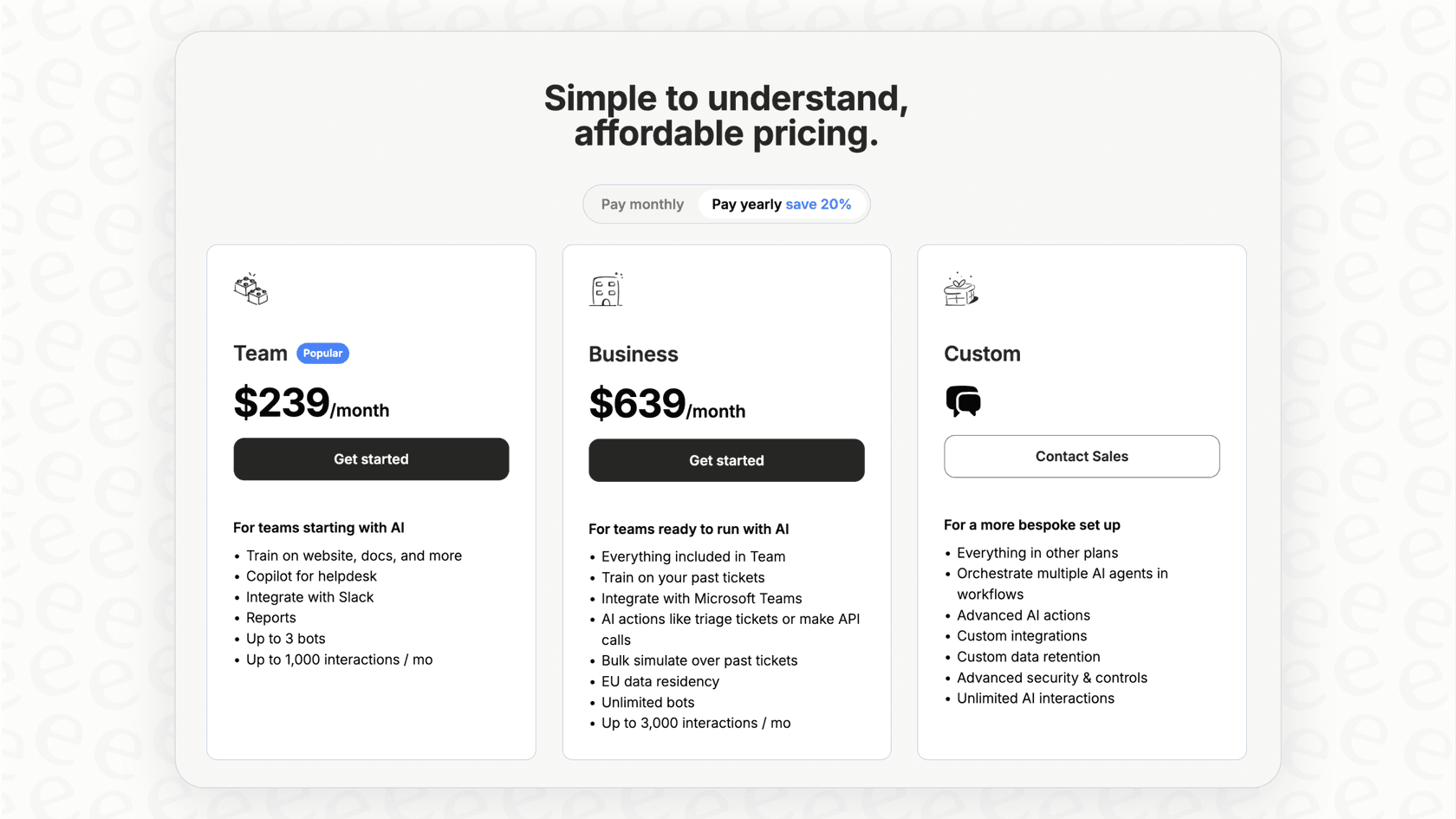
For businesses, this kind of per-action pricing can make budgeting a nightmare. It's why tools built for professional workflows, like eesel AI for customer support, focus on transparent, all-inclusive plans. You get a predictable cost without being nickel-and-dimed for every little action, letting you scale your support automation with confidence. With a tool like eesel AI, the price is the price. You aren't charged more just because you had a busy month, which is exactly the kind of stability you need for core business functions.
Is Kaiber pricing right for you?
So, what’s the final verdict? Kaiber is a powerful and genuinely fun tool for creative exploration. It opens up a world of AI-driven animation that was pure science fiction just a few years ago. But its pricing model is its biggest drawback. The credit system is confusing, and the true cost of creating high-quality videos is often much higher than the monthly subscription fee suggests.
Here’s our take:
-
It's a good fit for: Creators with a flexible budget who are more interested in artistic experimentation than churning out a high volume of HD content. If you’re a musician making one music video or an artist exploring new styles, Kaiber could be a fantastic choice.
-
It might not be a good fit for: Anyone on a tight budget or businesses that need predictable, scalable pricing. If you need to produce consistent content without worrying about your credit balance hitting zero, you’ll likely find the model frustrating and expensive.
Ready to take your AI strategy to the next level?
If you're looking for a powerful AI solution for your business with a pricing model you can actually count on, see how eesel AI automates customer support with simple, predictable plans. You can get it up and running in minutes, not months.
Frequently asked questions

Share this article

Article by
Stevia Putri
Stevia Putri is a marketing generalist at eesel AI, where she helps turn powerful AI tools into stories that resonate. She’s driven by curiosity, clarity, and the human side of technology.