NLU vs NLP: The crucial difference everyone in customer support should know

Last edited September 25, 2025

Table of Contents
- What is natural language processing (NLP)?
- What is natural language understanding (NLU)?
- The core differences: NLU vs NLP in a nutshell
- Why the NLU vs NLP difference is critical for your support team
- Putting NLU vs NLP into practice: From theory to application
- How to choose an AI support tool that masters NLU vs NLP
- Wrapping up the discussion
Ever had a "conversation" with a chatbot that felt more like talking to a brick wall? You ask a simple question, and it gets stuck in a loop, asking you to rephrase or, my personal favorite, sending you links to completely random help articles. We've all been there. But then, you interact with another AI assistant that feels almost magical, it just gets you and solves your problem in seconds.
The gap between that frustrating bot and the helpful assistant isn't just "better AI." It comes down to a fundamental difference: the ability to simply process language versus the power to truly understand it.
This is the world of Natural Language Processing (NLP) and Natural Language Understanding (NLU). They might sound like interchangeable tech jargon, but knowing the difference is key for any support team looking to use AI well. This guide will break down the NLU vs NLP distinction in plain English, show you why it matters for your support team, and explain what to look for when choosing an AI tool that actually gets the job done.
What is natural language processing (NLP)?
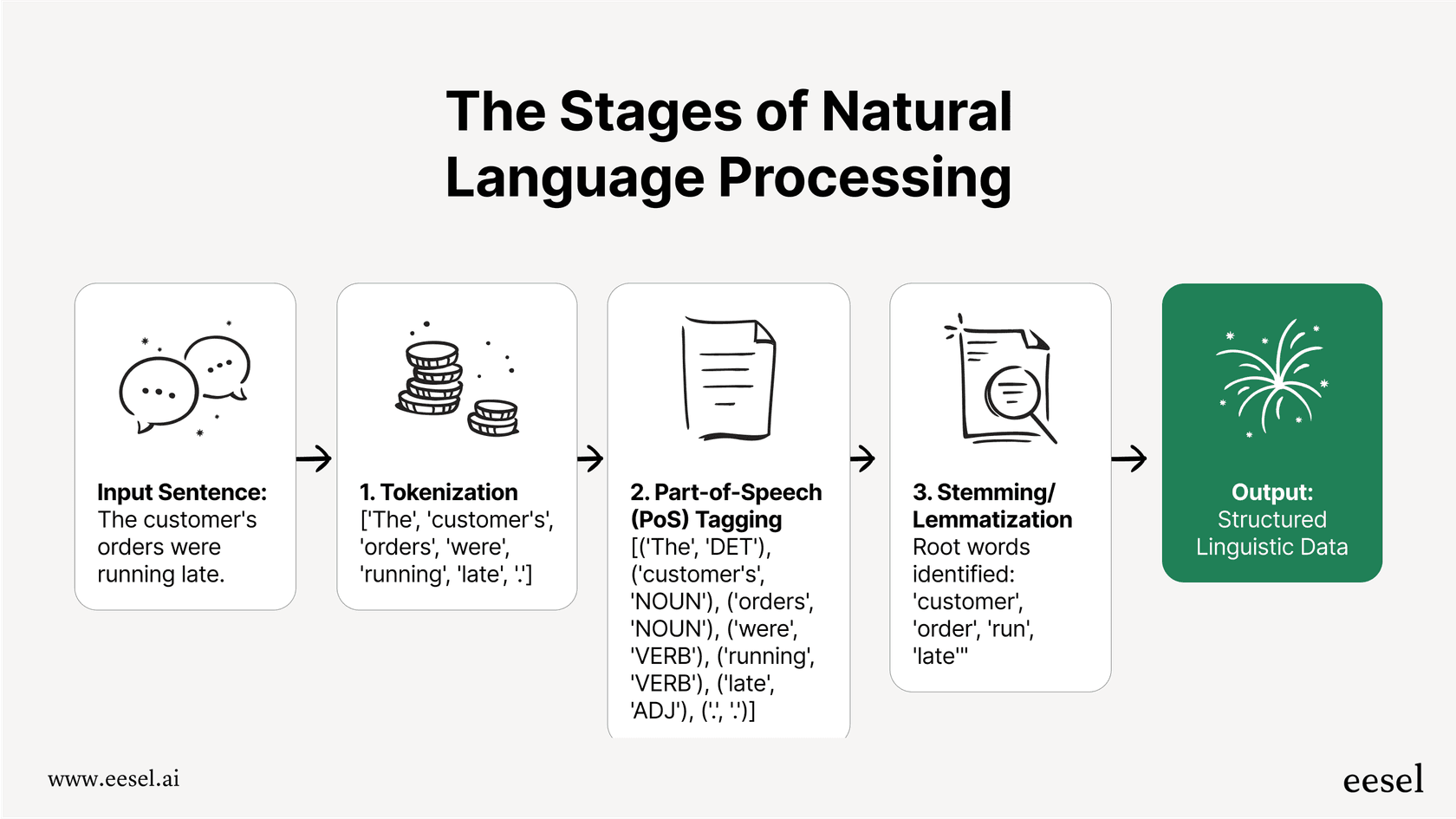
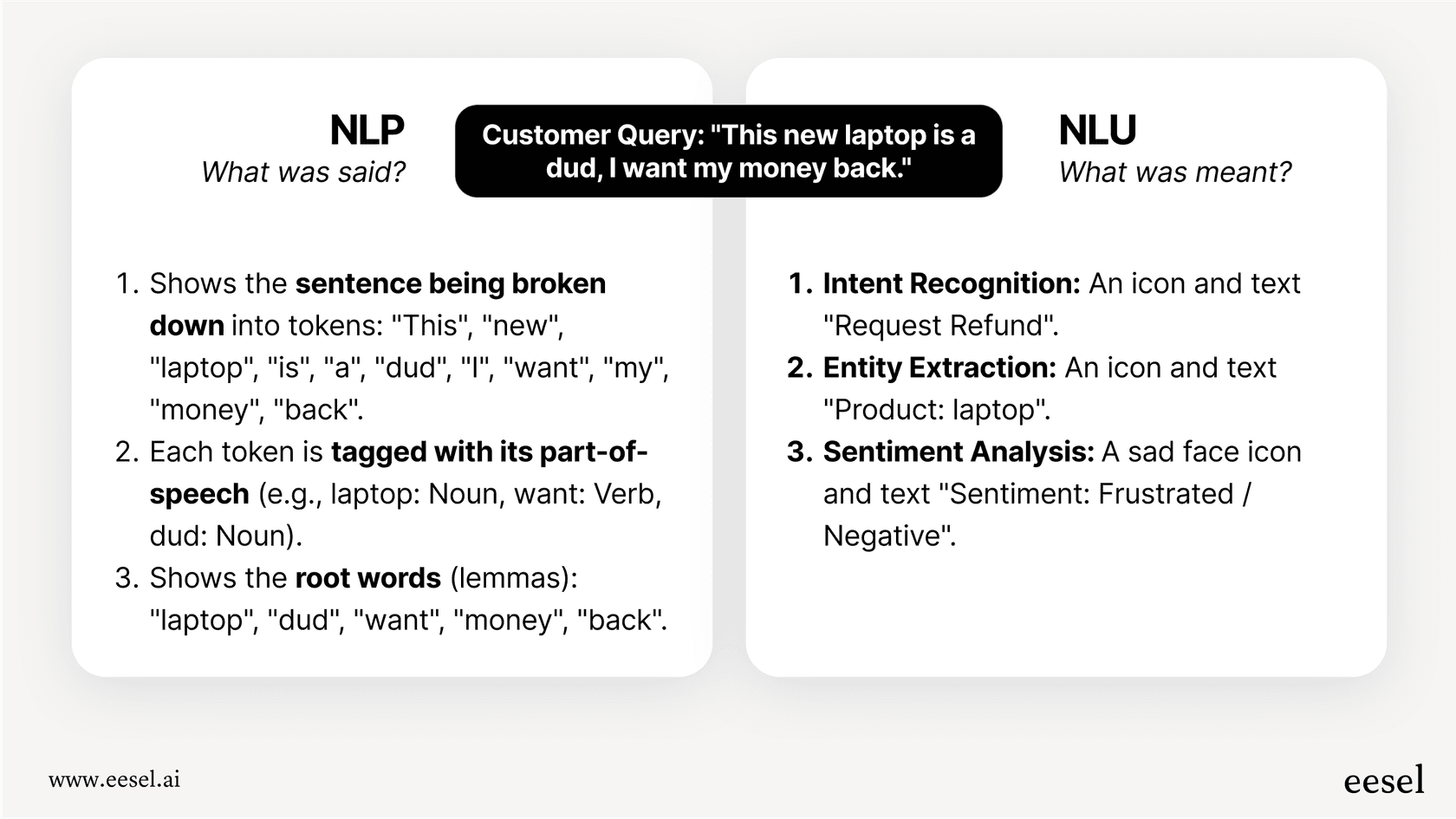
Natural Language Processing (NLP) is the broad field of AI that gives computers the ability to read, process, and make sense of human language. Think of it as the foundational engine that takes the messy, unstructured chaos of our communication, emails, chat logs, support tickets, and organizes it into a format a machine can actually work with.
Let’s try an analogy. Imagine a customer support ticket is a giant, unsorted pile of LEGO bricks. NLP is the process of sorting those bricks by color, shape, and size. It has no idea you're trying to build a spaceship, but it’s creating order out of the chaos.
Under the hood, NLP does a few key things to make this happen:
- Tokenization: This is step one, where sentences are broken down into individual words or "tokens." It’s basically digital dicing and slicing.
- Part-of-Speech (PoS) Tagging: The system then looks at each token and figures out its job in the sentence, tagging it as a noun, verb, adjective, and so on.
- Stemming & Lemmatization: These fancy-sounding terms just mean reducing words to their root form. For example, "running," "runs," and "ran" all get simplified back to the core idea of "run."
NLP is the essential first step for any language-based AI. It turns raw text into structured, machine-readable data. But it has one big limitation: it understands the structure of language, but not the meaning behind it.
What is natural language understanding (NLU)?
If NLP is all about structure, Natural Language Understanding (NLU) is all about meaning. NLU is a specialized part of NLP that focuses on one critical task: figuring out the intent behind the words. It’s the comprehension piece of the puzzle, where the AI goes from just organizing words to grasping what the user actually wants to accomplish.
Back to our LEGOs: if NLP sorted the bricks, NLU is the part that reads the instruction manual and realizes you’re supposed to be building a spaceship. It understands the goal.
To do this, NLU focuses on a completely different set of tasks:
- Intent Recognition: This is the big one. NLU figures out the user's objective. Are they trying to "check order status," "request a refund," or "update billing info"?
- Entity Recognition: It pulls out the key pieces of information, the entities, from the text, like order numbers, product names, dates, or locations.
- Sentiment Analysis: NLU can also get a read on the emotional tone of the message. Is the customer happy, confused, or furious? This context is incredibly important for prioritizing issues and crafting the right response.
NLU is what makes an AI tool feel intelligent and genuinely useful. It’s the reason an AI can understand the critical difference between "My order is late" (a delivery problem) and "I want to change my order" (a modification request), even though both sentences use the word "order."
The core differences: NLU vs NLP in a nutshell
While NLP and NLU are a team, they have very different jobs. Getting a handle on these differences is how you can tell apart AI tools that are just "keyword-aware" from those that are truly "context-aware" and can actually solve customer problems.
Here’s a quick breakdown:
| Feature | Natural Language Processing (NLP) | Natural Language Understanding (NLU) |
|---|---|---|
| Primary Goal | To process and structure language data. | To comprehend the meaning and intent of the language. |
| Answers... | "What was said?" | "What was meant?" |
| Scope | A broad field that includes NLU. | A specialized subfield of NLP. |
| Core Tasks | Tokenization, parsing, stemming. | Intent recognition, entity extraction, sentiment analysis. |
| Output | Structured linguistic data (e.g., tagged words). | Actionable insights (e.g., user intent: 'refund'). |
| Business Analogy | An admin who organizes and files incoming mail. | A manager who reads the mail and decides what to do next. |
Why the NLU vs NLP difference is critical for your support team
Okay, so why does this technical distinction matter so much in the real world of support queues and customer satisfaction scores? Because an AI that only uses basic NLP can often create more problems than it solves.
Many early automation tools, including the built-in AI in some helpdesks, lean heavily on simple keyword matching. This is why they so often miss the mark. They might be programmed to react to the word "cancel," but they can't tell the difference between "How do I cancel my plan?" (a customer looking for instructions) and "I want to cancel right now!" (a customer who needs immediate action). This failure to grasp intent leads to irrelevant answers, frustrated customers, and more work for your human agents who have to jump in and fix things.
An AI powered by strong NLU, on the other hand, is a whole other ball game. It can:
- Understand Nuance: It can pick up on the difference between a simple question, a sarcastic comment, and an urgent complaint that needs to be escalated immediately.
- Determine Intent: It correctly figures out what the customer wants, even if their message is full of typos, slang, or awkward phrasing.
- Handle Ambiguity: It uses context to figure out what words mean in different situations. For example, it knows "booking" is about a reservation for a travel company but an appointment for a salon.
True conversational AI, like what powers eesel AI, goes way beyond basic processing. By training on thousands of your team's past support conversations, our AI develops a deep understanding (that’s NLU at work) of your specific customer issues, your brand's voice, and the solutions that actually fix problems. It doesn't just learn generic language rules; it learns your unique business.
Putting NLU vs NLP into practice: From theory to application
Let's see how NLP and NLU work together in a few common support scenarios. This flowchart shows the journey of a typical customer question, where NLU provides the critical brainpower to get to a resolution.
Here's how this plays out in the real world for support teams.
Automated ticket triage and routing
When a new ticket comes in, an AI system immediately gets to work.
- NLP's Role: The system first breaks down the ticket text and flags keywords like "broken," "shipping," or "payment."
- NLU's Role: This is where the real intelligence kicks in. The AI analyzes the sentiment (frustrated) and intent (complaint about a broken item) to mark the ticket as urgent. It then routes it directly to the hardware support queue instead of the billing department, making sure the right team sees it first. Tools like eesel AI's Triage automate this entire process by understanding context, saving your team from having to manually sort through incoming requests.
Impact on AI-powered agent assistance (Copilot)
For teams that want to give their agents superpowers instead of fully automating, NLU is what makes an assistance tool truly helpful.
- NLP's Role: It structures the customer's question and organizes your knowledge base articles and past conversations.
- NLU's Role: The AI understands the specific question the customer is asking. It then searches your internal knowledge and finds the single best macro or past ticket to draft a precise, on-brand response. It knows which of the ten macros about "returns" is the right one for this specific situation. This is exactly how the eesel AI Copilot helps agents fly through tickets while improving accuracy and consistency.
Fully autonomous AI agents
This is where NLU really gets to shine, allowing an AI to handle issues from start to finish.
- NLP's Role: The AI processes the user's message in a chat or email.
- NLU's Role: It quickly figures out the user wants their order status (the intent) and pulls out the order number (the entity). Because it understands the goal, the AI can then take action, like pinging your Shopify store through an API to get the real-time shipping status and give an immediate, accurate update. This ability to understand and act is what separates a simple FAQ bot from a true AI Agent that can resolve issues on its own.
How to choose an AI support tool that masters NLU vs NLP
When you're looking at AI vendors, it’s easy to get lost in a sea of buzzwords. Don't just ask if they use "AI" or "NLP." You need to dig deeper to find out if their tech has genuine understanding. Here are three critical questions to ask any provider.
1. How does it learn our business?
A common trap with AI tools is that they come with a generic, one-size-fits-all model that doesn’t know anything about your company.
- Bad Answer: "Our model is pre-trained on general internet data." This is a huge red flag. It means the AI will probably give generic, robotic answers that don't match your company's policies, products, or tone.
- Good Answer: "It trains directly on your historical support tickets, help center articles, and internal docs from sources like Confluence." This is the only way for an AI to actually learn the ins and outs of your business.
- Pro Tip: Platforms like eesel AI connect to your Zendesk, Freshdesk, and other knowledge sources in minutes, so it can build a highly contextual understanding from day one.
2. Can we test its understanding before it talks to customers?
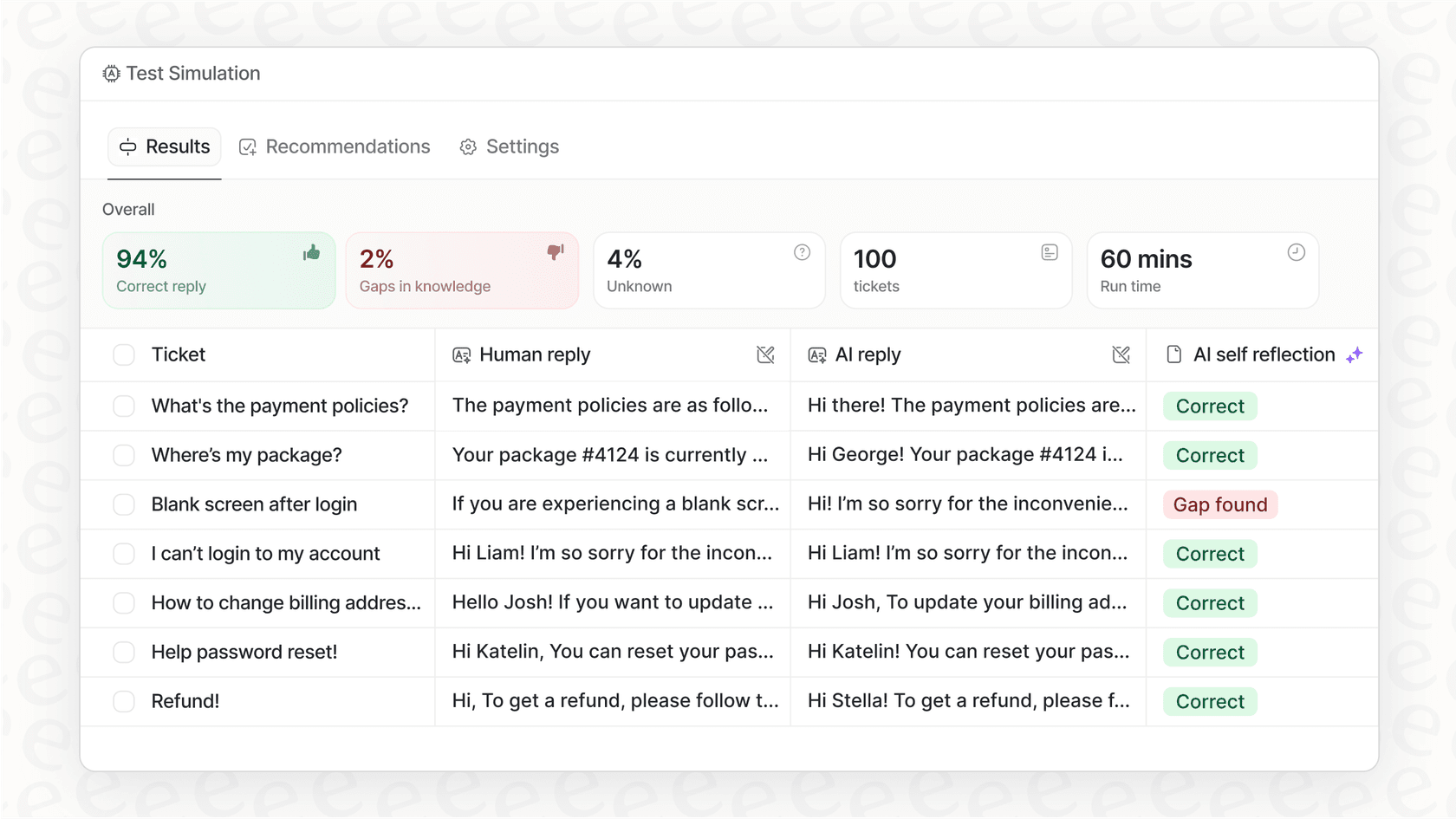
You shouldn't have to just cross your fingers and hope for the best. A vendor who is confident in their tech will let you see exactly how their AI performs with your own data.
- Bad Answer: "We can show you a demo with our sample data." A polished demo doesn't prove anything about how the AI will handle the messy reality of your actual customer conversations.
- Good Answer: "You can run a simulation on thousands of your past tickets to see exactly how it would have responded. You'll get a precise, data-backed measure of its resolution rate." This kind of risk-free test gives you a reliable forecast of its performance and ROI before you ever turn it on for live customers.
3. Considering NLU vs NLP, can it handle multi-step, complex issues?
The difference between a glorified FAQ bot and a real AI agent is its ability to take action.
- Bad Answer: "It's great at answering frequently asked questions." That’s the bare minimum. It might deflect simple questions, but it can't resolve anything that requires actually doing something.
- Good Answer: "It can perform custom actions, like looking up customer data via an API, updating a ticket field, or escalating to a specific team, and then generate a personalized response based on what it did." This shows an NLU engine that can not only understand but also act on that understanding to solve real problems.
Wrapping up the discussion
While people often use the terms interchangeably, the NLU vs NLP difference is pretty simple: NLP structures language, and NLU understands it. For customer support, you absolutely need both, but NLU is the secret ingredient that actually resolves tickets, makes customers happy, and frees up your team to focus on more important work.
Don't settle for an AI that just processes keywords. Your customers are more complex than that, and your support team's time is too valuable to waste cleaning up after a bot that doesn't get it. Demand a platform that truly understands your customers' intent from the very first message.
Ready to see what real NLU looks like in action? Sign up for eesel AI and see how our AI can understand and resolve your real customer tickets in minutes.
Frequently asked questions

Share this article

Article by
Kenneth Pangan
Writer and marketer for over ten years, Kenneth Pangan splits his time between history, politics, and art with plenty of interruptions from his dogs demanding attention.