A practical guide to OpenAI Codex integrations with Unity


Last edited October 30, 2025

The hype around AI in game development is everywhere. Tools like OpenAI Codex promise to automate tedious coding, letting you build and prototype in Unity at lightning speed. It sounds amazing, but getting it to work well involves more than just asking an AI to "write a movement script."
This guide offers a down-to-earth look at OpenAI Codex integrations with Unity. We'll skip the buzzwords and cover how you can connect them, why you'd want to, what the real-world uses are, and, most importantly, the limitations you'll hit. We'll also look at a smarter way to use AI that taps into your entire team's collective brain, not just the codebase.
What is OpenAI Codex?
First off, let's get one thing straight: OpenAI Codex isn't just a text-to-code generator. It's an AI model trained on a mind-boggling amount of code from public sources and plain English. The best way to think of it is less like a vending machine for code snippets and more like a junior developer you can hand off tasks to.
According to OpenAI, its main purpose is to help with actual software engineering tasks. This means writing new features, helping you fix bugs, answering questions about a piece of code, or even weighing in on code reviews.
It’s a tool made for developers to use right inside their workflow, whether that’s in an IDE like VS Code or through a direct API connection. It gets code, but its real strength is understanding what you mean to do with that code.
How do OpenAI Codex integrations with Unity work?
So, how do you get Codex and Unity on speaking terms? There’s no magic "integrate" button. Most devs end up in one of a few common setups, each with its own pros and cons.
The direct API approach
The most hands-on way to integrate Codex is by making API calls directly from your C# scripts in Unity. This usually means using Unity's "UnityWebRequest" class to send a request over to the OpenAI API. You'll have to manage your API key, build the JSON prompt just right, and then figure out how to parse the JSON response you get back.
This gives you total control, but let's be honest, it's a clunky, code-heavy way to do things. You're building a custom integration from scratch and are on the hook for keeping it running. It’s a solid option if you have a very specific need, but it's a long way from a simple plug-and-play solution.
Using IDE extensions and external tools
A much more popular workflow, especially for solo devs or small teams, is to use external tools that already have Codex built-in. This could be an extension in an editor like VS Code or a dedicated AI-first editor.
In this scenario, the process is less about API calls and more about a frustrating copy-paste dance. You generate a script in one window, then have to manually bring it into your Unity project. Some plugins on the Unity Asset Store or GitHub try to smooth this over, but they often have their own quirks. The real problem is that constantly switching between apps completely breaks your concentration and prevents the AI from getting a full picture of your project.
The friction in manual workflows
Both of these methods share the same headaches: they're disconnected, don't understand your project's context, and are surprisingly inefficient. Does this workflow sound familiar?
-
You have an idea while you're in the Unity Editor.
-
You jump over to your IDE or a browser tab with an AI chat.
-
You spend a few minutes writing a detailed prompt, trying to remember every little detail the AI needs to know.
-
You get a code snippet back from Codex.
-
You copy the code.
-
You switch back to Unity and paste it into a C# script.
-
You hit "Play," and it breaks because the AI was missing some key piece of information.
-
You sigh, go back to your AI chat, and start the cycle all over again.
This back-and-forth is exhausting and just slows you down. You spend more time managing the AI than you do actually making your game.
Key use cases and limitations
Despite the workflow pains, there are definitely moments when Codex can be a huge help. It's just a matter of knowing where it shines and where it stumbles.
Common use cases
-
Prototyping Game Mechanics: If you need a quick script for a character controller, a basic inventory system, or a simple enemy AI, Codex is your friend. You can get a working draft in just a few minutes.
-
Boilerplate Code: It's perfect for generating the skeleton of C# classes, interfaces, or setting up standard Unity methods like "Start()" and "Update()". It saves you from typing the same structures again and again.
-
Debugging Help: Pasting a weird error message or a buggy function and asking for a fix can be a lifesaver. It can often spot syntax mistakes or logic errors you might have stared at for an hour and missed.
-
Dynamic Content: Some developers are playing with using API calls at runtime to power things like dynamic NPC dialogue or even procedurally generate simple level layouts from text prompts.
Critical limitations to keep in mind
-
Lack of Project Context: This is the big one. Codex has zero built-in knowledge of your project. It doesn't know about your other scripts, your prefab setup, your custom asset settings, or how you like to name things. You have to feed it all this information in every single prompt, which is slow and easy to mess up.
-
Workflow Disruption: As we just covered, the constant need to switch between the Unity Editor, your IDE, and a separate AI tool is a productivity killer. It yanks you out of your creative flow and turns a simple task into a chore.
-
It's not just about code: Game development is so much more than what's in your C# scripts. Your most important knowledge often lives elsewhere: your Game Design Document in Google Docs, technical diagrams in Confluence, and key team decisions buried in old Slack threads. A pure code generator is completely blind to all of this crucial info.
Unifying knowledge for smarter integrations
The best AI integration doesn't just look at the code; it understands the entire knowledge ecosystem of your game studio. Developers often spend more time looking for information than they do writing code. They're constantly digging through scattered documents to answer questions like, "How do we manage player state between scenes?" or "What are the asset specs for a new character model?"
This is where a tool that brings all that knowledge together really makes a difference. Instead of a simple code generator, teams need an internal AI assistant that understands everything about the project.
This is exactly what platforms like eesel AI are built to do. If you think of a tool like Codex as the "hands" that can write code, eesel AI acts as the "brain" that provides all the necessary context. It connects to all your team's sources, like Confluence, Google Docs, Slack, and Jira, to give your team instant, context-aware answers right where they're already working.
Let's compare the two approaches. With a DIY Codex integration, you're limited to the code you can paste into a prompt, the context is low because you have to provide it every time, and the workflow is fragmented. It takes time to set up and is really only good for generating isolated snippets of code.
| Feature | DIY Codex Integration | Unified Knowledge Platform (e.g., eesel AI) |
|---|---|---|
| Connected To | Code snippets you can paste | Confluence, Google Docs, Slack, Jira, etc. |
| Project Context | Low (must be provided manually each time) | High (learns automatically from all documents) |
| Workflow | Fragmented (switch between apps) | Seamless (ask questions in your existing tools) |
| Setup Time | Time-consuming | Quick to set up |
| Best For | Generating isolated code snippets | Instant answers, onboarding, process recall |
On the other hand, a unified knowledge platform like eesel AI connects to everything, from your Confluence wikis to your Slack conversations. It has high project context because it learns from all your documents automatically. The workflow is seamless, you can just ask questions in Slack or whatever tool you're using. It's quick to set up and built for providing instant answers, helping new hires get up to speed, and recalling important processes.
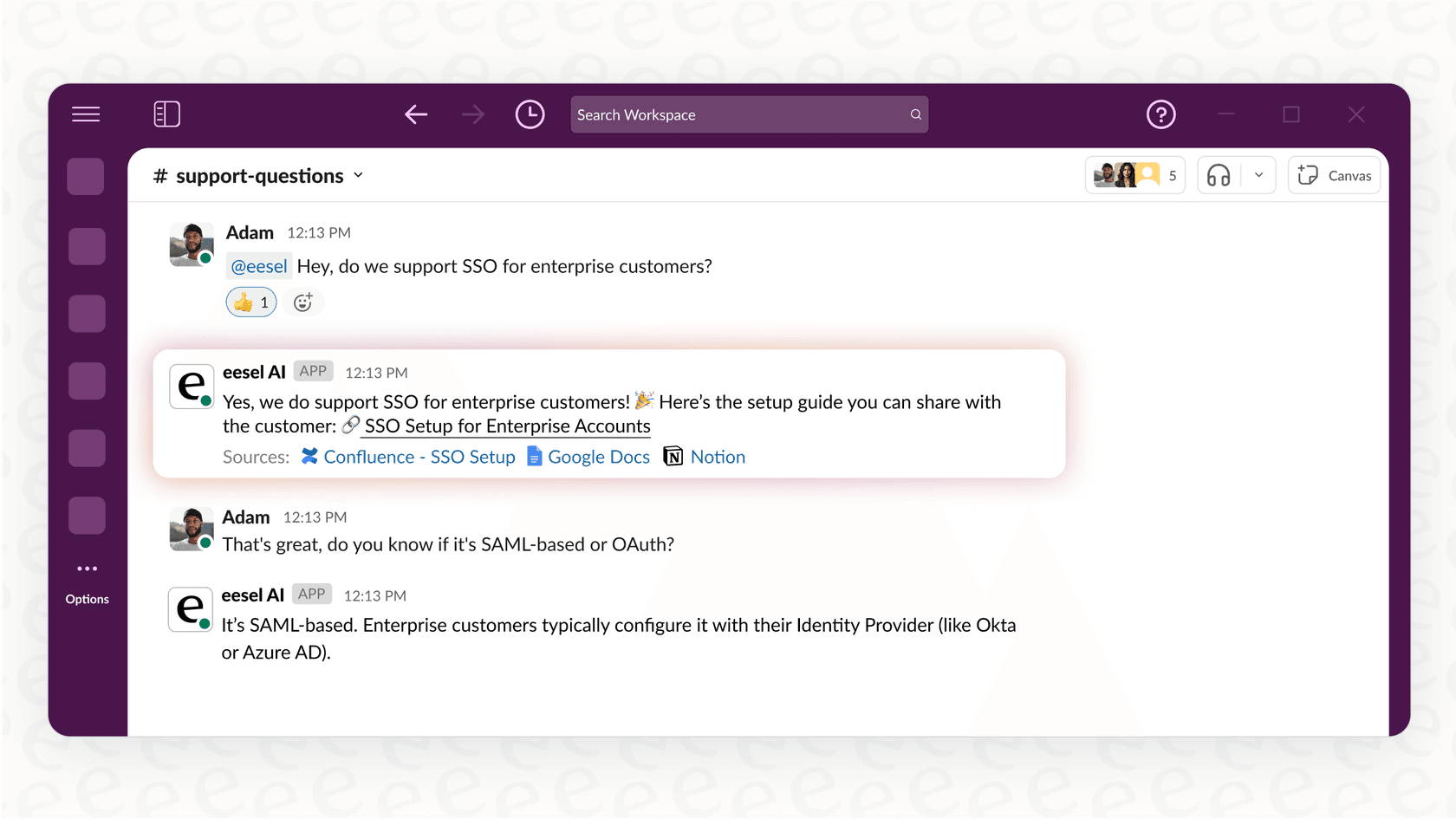
Imagine a developer asking an eesel AI bot in Slack, "What are the parameters for our custom shader for reflective surfaces?" They get a precise answer pulled directly from the team's Confluence wiki, complete with a code snippet. That's a much more efficient and reliable way to work.
Understanding the pricing
The pricing for Codex can be a little confusing. If you're using it through a ChatGPT subscription (like Plus, Pro, or Enterprise), access is generally wrapped into your plan.
However, if you're using the API for a custom integration, you'll be charged based on the model you use and your "token" consumption, which is basically how much text you send and receive. For instance, one of the codex models costs about $1.50 per 1 million tokens for input and $6.00 per 1 million for output.
The tricky part here is that it's tough to predict your costs. Per-token pricing can be hard to forecast and might add up quickly, especially with the kind of complex, back-and-forth conversations that are common when you're developing and debugging a game.
Build smarter, not just faster
OpenAI Codex integrations with Unity can definitely speed up specific coding tasks. There's no question it can help you prototype faster and handle repetitive work. But the real bottleneck in modern game development isn't always how fast you can type code; it's how fast you can find information.
A disconnected, code-only approach quickly runs into walls with project context and workflow. The big wins in productivity come from bringing your team's collective knowledge together and making it instantly available to everyone.
Instead of spending months building a fragile, custom API integration, you could empower your whole team today. A centralized knowledge hub like eesel AI connects all your documents, wikis, and chats. It lets your developers get immediate answers so they can focus on what they do best: building amazing games.
Frequently asked questions

Share this article

Article by
Kenneth Pangan
Writer and marketer for over ten years, Kenneth Pangan splits his time between history, politics, and art with plenty of interruptions from his dogs demanding attention.