OpenAI Prompt Optimizer: Full usage guide for 2026


Last edited November 14, 2025

Table of Contents
- What is the OpenAI Prompt Optimizer?
- How the OpenAI Prompt Optimizer works
- Key OpenAI Prompt Optimizer benefits and common use cases
- The limits of the OpenAI Prompt Optimizer as a standalone tool for business workflows
- Pricing: What does the OpenAI Prompt Optimizer cost?
- A great tool for developers, but businesses need more
Let’s be honest, writing a good AI prompt can feel like a dark art. You spend ages tweaking a word here, rephrasing a sentence there, all in the hopes of getting the perfect output. It’s often a tedious back-and-forth that feels more like a guessing game than a reliable process.
Well, it seems OpenAI felt our pain. They recently released the OpenAI Prompt Optimizer, a tool built to take a lot of that guesswork off our plates. It’s designed to help developers and builders whip their prompts into shape with way less manual effort.
In this guide, we'll walk through what the OpenAI Prompt Optimizer actually is, how to use it, what it's good for (and what it’s not), and how it stacks up against a more complete AI platform built for business teams.
What is the OpenAI Prompt Optimizer?
Think of the OpenAI Prompt Optimizer as a smart editor for your AI instructions. It’s a chat-based tool inside the OpenAI Playground that takes your draft prompt and automatically rewrites it based on proven best practices.
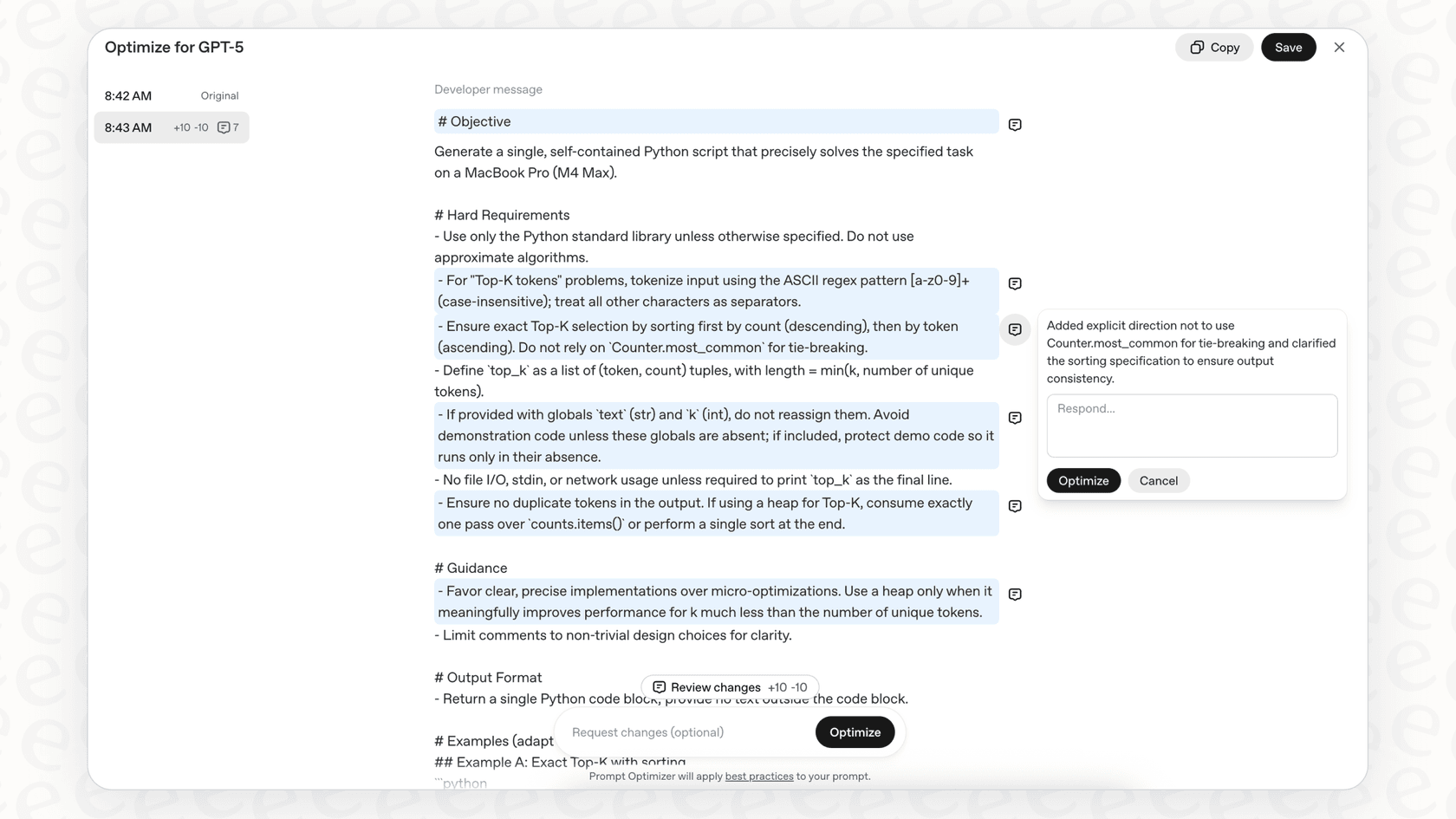
Its main job is to make your instructions for models like GPT-5 clearer, more specific, and better organized. The result? Higher-quality and more consistent answers from the AI. It's mainly aimed at developers, prompt engineers, and anyone building apps with the OpenAI API who needs to get prompts just right for tasks like coding, data analysis, or generating content.
It’s not a magic wand, but it’s a seriously helpful assistant for the technical side of prompt engineering. It helps you avoid common pitfalls like sending mixed signals (e.g., telling the AI to "Always reply in English" and "Never reply in English" in the same prompt) or giving fuzzy formatting rules that can easily confuse an AI.
How the OpenAI Prompt Optimizer works
At its heart, the tool's workflow is pretty simple. You give it a draft prompt, and it hands you back a polished version. What's happening behind the curtain is that OpenAI is using a "meta-prompt", basically, a master prompt that’s an expert at writing other prompts, which is packed with all their internal prompt engineering knowledge.
The whole thing is meant to be a conversation. You can use the optimizer to create a strong starting point and then jump in with your own edits to fine-tune it. It's an interactive process where you and the AI work together to craft the perfect set of instructions.
If you want to get even more specific, you can bring your own data to the party. By giving the optimizer a dataset with examples of inputs, ideal outputs, and maybe even some human-graded results, it can tailor the prompt much more accurately to what you’re trying to do. This sets up a great feedback loop, letting you improve your prompts over time based on how they actually perform.
So, the whole cycle looks something like this: you write a draft, run it through the optimizer, and get a better version. Then you test it out. If it’s not quite there, you can feed it back to the optimizer with a few more instructions or a dataset to dial it in even further. Once you’re happy, you can grab that polished prompt and plug it into your application.

Key OpenAI Prompt Optimizer benefits and common use cases
The biggest win here is the time you save and the quality you get. The optimizer handles the nitty-gritty parts of prompt writing, so you can focus more on the big picture of what you're building. The prompts that come out the other side are usually more durable and less likely to give you weird or badly formatted answers.
It’s also a huge help when you're moving to a newer model. As AI like GPT-5 comes out, the best ways to talk to it can change. The optimizer helps you quickly update your existing prompts so you can get the best performance out of the latest tech without starting from scratch.
Here are a few areas where it’s particularly useful:
-
Coding and analytics: As seen in OpenAI's cookbook, a simple prompt like "write a Python script" can be beefed up into a detailed request with strict requirements, performance goals, and clear formatting for the output. This helps you get code that doesn't just work, but is also clean and efficient.
-
Contextual Q&A: Imagine you're building a tool for answering financial questions. The optimizer can add important rules, like making sure the AI bases its answers only on the documents you provide, knows how to handle messy data (like typos from scanned PDFs), and has a clear policy for saying "I don't know" when the information isn't there. This stops the AI from just making stuff up.
-
Structured data generation: If you need the AI to produce data in a specific format like JSON, the optimizer can add clear instructions for the schema, which fields are required, and what the data types should be. This makes sure the output is always clean and ready for another system to use, which is a must for any automated process.
To give you a clearer picture, here’s a quick comparison for a customer support situation:
| Aspect | A basic prompt | An optimized prompt |
|---|---|---|
| Instruction | "Answer the customer's question about their order." | "You are a customer support agent. Answer the user's question about their order status using ONLY the provided context. If the order ID is not found, state that you cannot find the information and ask for a valid ID." |
| Clarity | A bit vague, so the AI might make things up. | Specific, with clear boundaries and a rule for what to do if it can't find an answer. |
| Format | Not defined. | Leads to a direct, process-driven answer. |
| Consistency | Responses could be all over the place. | You're much more likely to get consistent, safe responses every time. |
The limits of the OpenAI Prompt Optimizer as a standalone tool for business workflows
While the OpenAI Prompt Optimizer is a great tool for a developer working on a specific prompt, it doesn't exist in the real world of business. It’s separate from the dynamic, fast-moving workflows that teams depend on every day.
For starters, it's a completely manual process. You have to copy your prompt, paste it into the Playground, run the optimizer, copy the new prompt, and paste it back into your own application to test it. That little bit of friction makes it tough to use in settings like customer support, where knowledge bases, company policies, and customer problems are always changing.
It also takes a bit of technical know-how to use well. To really make it sing, you need to be comfortable creating datasets, running evaluations, and making sense of the results. That’s usually the job of a developer or AI engineer, not a support manager who just needs a tool that solves their team's problem.
But the biggest thing is that a better prompt is only one piece of the puzzle. Polishing your instructions doesn't magically connect your AI to your knowledge base, let it learn from your past support tickets, or give it the power to do things like tag a ticket, look up an order in Shopify, or hand a tricky conversation over to a human.
An optimized prompt is pretty useless if the AI can't get to the right information or take the right actions.
The OpenAI Prompt Optimizer alternative: An integrated AI workflow engine
This is where a platform like eesel AI comes into the picture. Instead of asking you to become a prompt engineer, eesel AI gives you a complete platform that handles the entire business problem from start to finish.
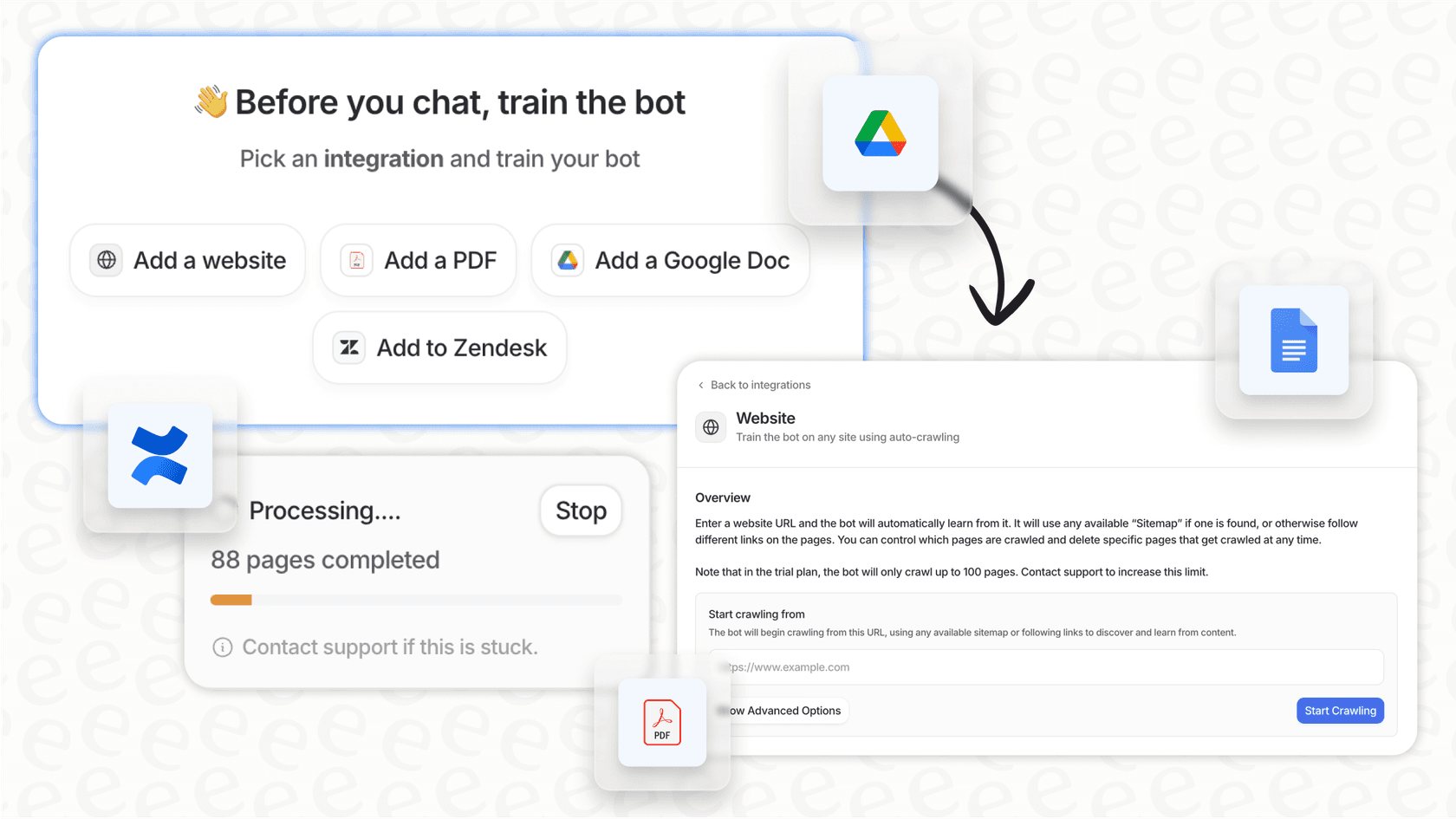
- Get up and running in minutes: With eesel AI, you just connect your helpdesk (like Zendesk or Freshdesk) and knowledge sources with a click. There's no pasting prompts back and forth or wrestling with settings. The system starts learning from your past tickets and help articles right away to get a feel for your business.
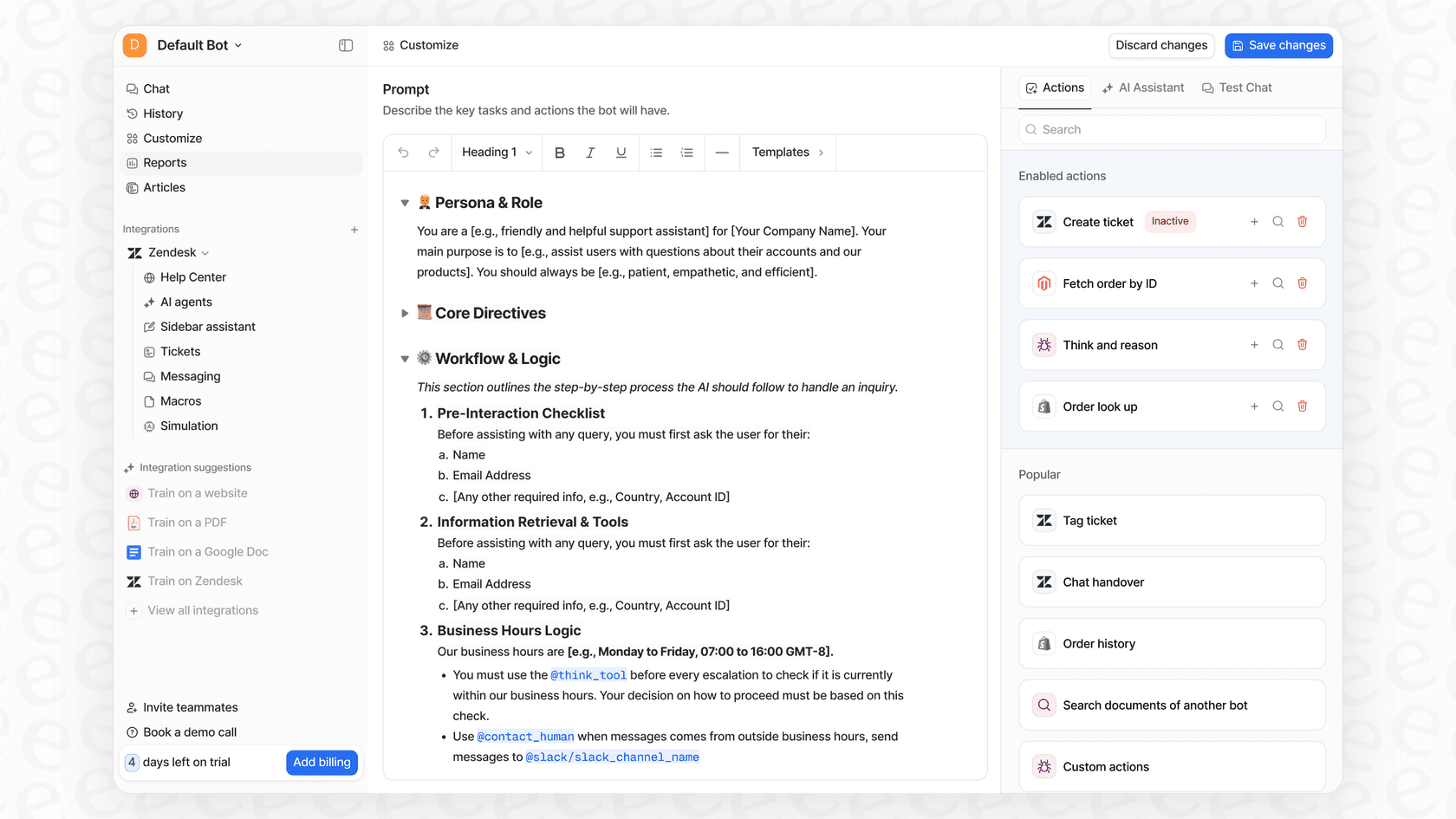
- Stay in control without the technical headaches: You can use a simple editor to give your AI a personality and set its rules, but all the heavy lifting is done for you. You can easily set up custom actions, like having the AI check an order status or automatically tag and route tickets, all from a dashboard that anyone can use. No code needed.
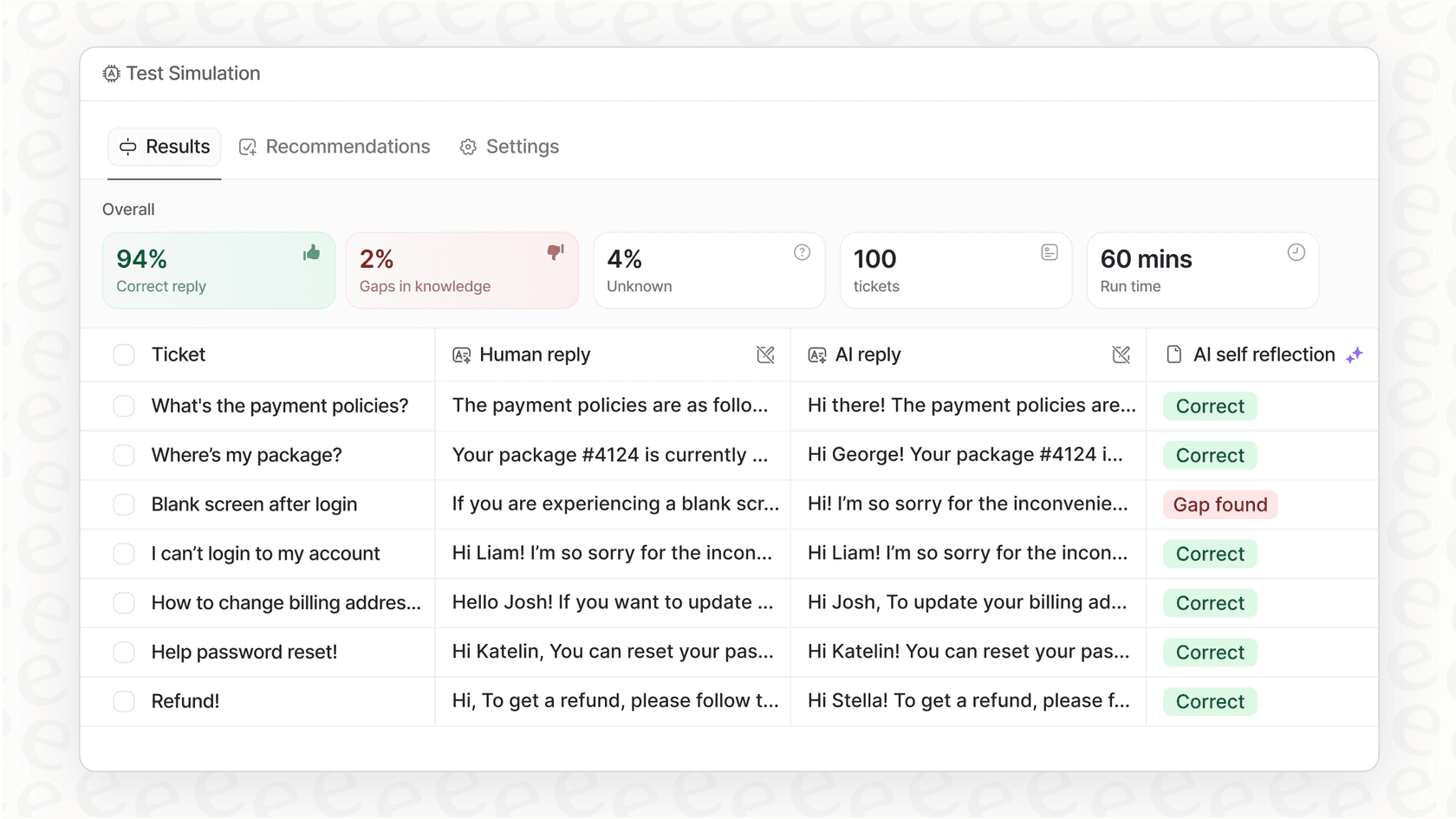
- Test with real-world confidence: Forget about complicated, code-based tests. eesel AI has a simulation mode where you can test your AI on thousands of your actual past tickets. This lets you see exactly how it will behave and even get an estimate of your ROI before it ever talks to a real customer. It's a much more practical way to "optimize" your AI for a business setting.
Pricing: What does the OpenAI Prompt Optimizer cost?
The good news is that the OpenAI Prompt Optimizer tool itself is free to use in the Playground.
However, using those prompts with the API is another story. You'll be charged based on OpenAI's standard token pricing. Since an optimized prompt is usually longer and more detailed, you might see a slight increase in the input token costs for each API call.
The trade-off is that you get better, more dependable outputs, which could mean fewer retries or less need for a human to step in, potentially saving you money and time in the end. For the latest details, you can always check the official OpenAI pricing page.
A great tool for developers, but businesses need more
The OpenAI Prompt Optimizer is a genuinely useful addition to any developer's toolkit. It takes a lot of the pain out of prompt engineering and helps you get better AI results for specific, well-defined tasks.
But for non-technical teams trying to solve complex problems in areas like customer support or IT service management, a standalone optimizer just isn't the whole solution. The process is still manual, technical, and disconnected from the tools where your team actually works. To really get the most out of AI, businesses need a connected platform that handles the entire workflow, from understanding your knowledge and taking action to testing and reporting.
Ready to move beyond manual prompt tuning?
If you're looking to build a smart AI support agent that learns from your data, connects with your tools, and can be safely tested and deployed in minutes, you should give eesel AI a look. It’s the fastest way to go from an idea to a fully functioning AI agent without needing a team of engineers to get there.
Frequently asked questions

Share this article

Article by
Stevia Putri
Stevia Putri is a marketing generalist at eesel AI, where she helps turn powerful AI tools into stories that resonate. She’s driven by curiosity, clarity, and the human side of technology.