The 8 best AI tools for Salesforce in 2026


Last edited June 15, 2026

Table of Contents
- What counts as an "AI tool for Salesforce"?
- How we picked
- The 8 best AI tools for Salesforce at a glance
- 1. Salesforce Agentforce
- 2. eesel AI
- 3. Aisera
- 4. Forethought
- 5. Kore.ai
- 6. Zapier
- 7. Glean
- 8. Writer
- What these AI tools for Salesforce actually cost
- How to choose the right AI tool for your Salesforce setup
- Try eesel AI on your Salesforce stack
What counts as an "AI tool for Salesforce"?
Salesforce calls itself the #1 AI CRM, and its platform brand is now Agentforce 360, a stack with the Salesforce platform at the base, Data 360 as the data foundation, the clouds in the middle, and Agentforce sitting across all of it. That's the native story. But "AI for Salesforce" is bigger than what Salesforce ships, because most of the interesting AI tools you can add either deploy alongside Service Cloud or connect into it through the AppExchange and APIs.
So when we say "AI tool for Salesforce," we mean one of three things:
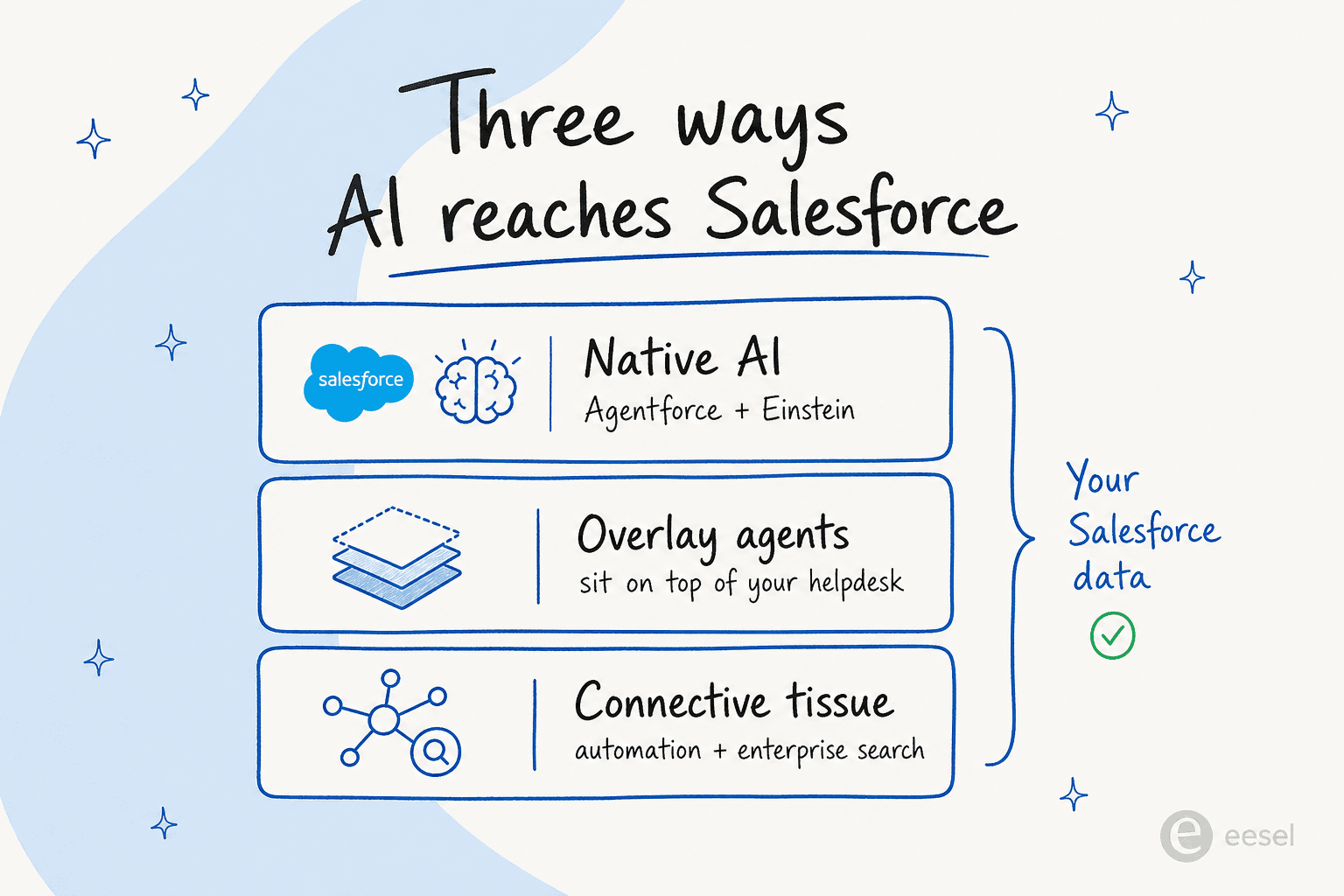
- Native AI built into Salesforce: Agentforce (autonomous agents) and Einstein (predictive and generative AI), governed by the Trust Layer.
- Overlay agents that sit on top of your helpdesk and take over tier-1 work: eesel AI, Aisera, Forethought, Kore.ai.
- Connective tissue that brings AI to your Salesforce data without being a support agent: Zapier (automation), Glean (enterprise search), Writer (enterprise content).
Which group is right depends entirely on what you're trying to do, so the list below is organised by what each tool is actually best at.
How we picked
We've spent real time inside these products: building agents, reading the docs, pulling the pricing pages apart, and gathering what users say on G2, Reddit, and LinkedIn. For each tool we weighed five things:
- Salesforce fit - does it actually connect to or extend Salesforce, and how natively?
- What it's for - support automation, internal search, content, or general workflow.
- Honest pricing - the real billable unit, not the "starts at" sticker.
- Control and trust - can you stop it answering when it shouldn't? This is the biggest objection we hear from buyers.
- Time to value - days, or a quarter-long implementation project?
A quick note on scope: this list leans toward customer service and support, because that's where most Salesforce AI spend goes and where we have the most hands-on experience. Let's get into it.
The 8 best AI tools for Salesforce at a glance
| # | Tool | Best for | Salesforce fit | Starting price | Pricing model | Free option | Security | Standout proof |
|---|---|---|---|---|---|---|---|---|
| 1 | Salesforce Agentforce | Teams all-in on Service Cloud | Native | $2 / conversation | Consumption + per-user | Foundations ($0) | Einstein Trust Layer | 1M+ support requests handled |
| 2 | eesel AI | Support automation, fast | Overlay (integration) | $0.40 / ticket | Usage-based, no seats | $50 trial credit | EU residency, BAA (Enterprise) | 73% tier-1 resolved in month one |
| 3 | Aisera | Cross-functional IT + CX | Overlay (alongside) | Custom | Annual contract | None | SOC 2, ISO 27001, HIPAA | LifeScan auto-resolves 65% |
| 4 | Forethought | Keeping your current helpdesk | Overlay (integration) | Custom (~$30K+/yr) | Platform fee + outcome | POV, no free tier | SOC 2 | YAZIO deflects 80% |
| 5 | Kore.ai | Regulated, voice-heavy enterprises | Overlay (connectors) | ~$50/mo (3rd-party) | 15-min session / seat | $500 starting credit | Enterprise-grade | 450M interactions/day |
| 6 | Zapier | Wiring Salesforce to everything | Connective (Premium app) | $19.99/mo | Per-task | Free (100 tasks) | SOC 2 Type II, 99.9% SLA | 9,000+ app integrations |
| 7 | Glean | Enterprise search over Salesforce | Connective (connector) | Custom (~$40-50/user, unconfirmed) | Per-seat enterprise | Demo only | SOC 2, ISO 42001, HIPAA | Zillow saves 1.5 hrs/user/week |
| 8 | Writer | Governed enterprise content | Connective (data) | Custom (5-6 fig ACV) | Per-seat enterprise | 14-day trial | SOC 2 Type II, HIPAA, PCI | Powers Vanguard, Qualcomm |
1. Salesforce Agentforce
Best for: teams already committed to Service Cloud who want AI agents living inside Salesforce, with the admin capacity to build them.
Agentforce is Salesforce's autonomous agent layer, the headline of its whole AI story. Instead of a chatbot reading from a script, you build agents with topics (jobs the agent can do), instructions, and actions (the work it can take in Salesforce), all running on the Atlas Reasoning Engine that decides what to do next. It's grounded in your CRM and Data 360 data, and you build it low-code in Agent Builder. There are out-of-the-box agents for service, sales coaching, SDR work, and more, plus Agentforce Voice. Our plain-English guide to Agentforce agents walks through the build model in detail.
The proof points are real: Salesforce's own deployment handled over 1 million support requests with Agentforce, and a Valoir report it cites claims 16x faster agent delivery versus building your own. Everything runs through the Einstein Trust Layer, with sensitive-data masking and a zero-retention policy, which matters for regulated buyers.
Pros
- Lives natively inside Salesforce; no separate system of record.
- Genuinely capable reasoning and action-taking across CRM data.
- Strong governance through the Trust Layer.
Cons
- Consumption pricing gets expensive fast at $2 per conversation.
- Real build and admin effort; this is a project, not a switch you flip.
- Best value is locked to higher Service Cloud editions.
Pricing: there's a free Foundations tier, then two consumption models: Flex Credits at $500 per 100k credits (pay-per-action) or Conversations at $2 each. The Agentforce add-on for existing editions is $125 per user per month ($150 for Industries), and AI is only included from the Service Cloud Enterprise edition ($175/user/month) up. We mapped the whole thing in our Agentforce setup cost breakdown.
Our take: if you're a large org deep in Service Cloud with admin resources, Agentforce is the natural choice and a strong one. But for most teams the question isn't "is it good" (it is), it's "is it worth the cost" and the setup time. If you want resolutions next week rather than next quarter, keep reading.
2. eesel AI
Best for: support teams that want to automate tier-1 tickets on Salesforce (or any helpdesk) without a big implementation or per-seat contract.
This is our own tool, so take the framing as you like, but the design choices are the whole pitch. eesel AI is an overlay agent: it connects to Salesforce, your other 100+ integrations, and your knowledge (past tickets, help docs, Confluence, Google Docs), then drafts replies, triages, and resolves tickets. It learns from your solved tickets, not just help-center articles, so it sounds like your team from day one. CartonCloud, for example, runs eesel over a Salesforce + Slack setup with 717 knowledge items powering AI-assisted support, per eesel's customer data.
Two things make it a good Salesforce companion specifically. First, control: low-confidence replies stay as drafts instead of going out live, which is the single most common thing buyers ask us for. Second, time to value: you can run a simulation mode against past tickets to see exactly what it would have answered, find gaps, and fix them before going live.

The "buy vs build on Salesforce" tension is real, and it's why teams pick a managed overlay:
"We could try to write our own LLM application but we didn't want to invest our time into that. We wanted something that we would not have to maintain."
Karel, GENERAL BYTES (eesel case study)
Pros
- Connects to Salesforce and your knowledge in minutes, not a quarter.
- Usage-based pricing with no per-seat fees and no minimums.
- Confidence-based control and a simulation mode before you go live.
Cons
- It's a support and helpdesk agent, not a full CRM or sales-AI suite.
- SOC 2 is in progress rather than certified (EU residency and BAAs are available on Enterprise).
Pricing: usage-based from $0.40 per ticket with a $50 free trial credit, no platform fee on standard plans, and a 25% discount for annual commitments above $300/month. Enterprise adds a $1,000/month platform fee with SSO, HIPAA, and a BAA. Full details on the pricing page.
Our take: if your goal is deflecting and drafting support tickets on Salesforce, this is the fastest, lowest-risk way to do it, and you only pay for what it handles. Gridwise saw 73% of tier-1 requests resolved in the first month. If you need a company-wide sales-and-marketing AI, look at Agentforce or Writer instead.
3. Aisera
Best for: large enterprises consolidating IT, HR, and customer service onto one agent platform that deploys alongside Salesforce.
Aisera is an AI Agent Platform built to be cross-functional from day one. Its Universal Agent orchestrates Domain Agents (IT, HR, Finance, Customer Service) and Task Agents across the business, and Aisera Unify uses open standards (A2A, MCP, AGNTCY) to coordinate third-party agents and systems. Crucially for this list, Aisera typically deploys alongside your system of record (Salesforce, ServiceNow, Genesys) rather than inside it, so it can sit over a Salesforce Service Cloud setup without replacing it. It was acquired by Automation Anywhere in November 2025, folding it deeper into agentic automation.
The customer outcomes are enterprise-grade: LifeScan auto-resolves 65% of incoming support requests, and OmniTRAX auto-resolved 70% of tickets.
Pros
- One platform across IT, HR, finance, and CX, not just support.
- Flexible LLM gateway (AiseraLLM, OpenAI, Claude, or bring your own).
- Heavy compliance posture: SOC 2, GDPR, ISO 27001, CSA STAR, HIPAA.
Cons
- No public pricing and no free tier; this is a contact-sales, annual-contract buy.
- Too heavy for a CX-only team of 50-500 seats.
Pricing: unpublished. Both /pricing and /demo route to sales, scoped per use case and volume. There's no trial. Expect a Fortune-500-style annual contract.
Our take: Aisera earns its place if you're a 5,000-employee enterprise unifying internal and external support around one agent layer. If you only need customer-service AI on Salesforce, it's more platform than you'll use, and a focused customer service AI tool will be cheaper and faster.
4. Forethought
Best for: mature support orgs on Salesforce Service Cloud that want agentic AI without switching helpdesks.
Forethought is a standalone AI platform for support, and its strongest pitch is exactly the Salesforce angle: it sits on top of your existing helpdesk rather than replacing it. The product is a multi-agent system - Solve (the omnichannel customer-facing agent), Triage (classification and routing), Assist (an agent copilot), Discover (insights and gap-finding), and Agent QA. Solve uses Autoflows and Custom Actions to call helpdesk and third-party APIs, plus a Browser Agent for legacy systems without APIs.
From its 2025 CX benchmark, Forethought cites up to 98% resolution and a 55% average cut in first response time, and YAZIO deflects 80% of tickets while absorbing 40% ticket growth without new hires.
Pros
- Helpdesk-agnostic: keep Salesforce Service Cloud, add AI on top.
- Clear multi-agent structure across deflection, triage, copilot, and QA.
- Strong action-taking, including legacy tools via the Browser Agent.
Cons
- Quote-only pricing with a platform fee plus outcome-based charges.
- No free trial; you run a Proof of Value instead.
Pricing: no public numbers. Three tiers (Team, Professional, Enterprise) are all "Get a Quote," blending platform access with outcome-based cost. Third-party trackers put it in the ~$30K-$150K+/year ACV range, which Forethought doesn't confirm.
Our take: Forethought is a fair pick for enterprise teams locked into Salesforce Service Cloud who want a polished, action-capable agent and can run a procurement cycle. If you're smaller or want transparent, usage-based pricing, an overlay like eesel will get you live faster and cheaper.
5. Kore.ai
Best for: regulated, voice-heavy enterprises (banking, healthcare) that need a build-your-own conversational AI platform with deep governance.
Kore.ai sells the Agent Platform (codename Artemis), an AI-programmable platform for building agents for both customer and employee experiences. It leans hard into regulated verticals - its customer wall includes Morgan Stanley, MetLife, Deutsche Bank, Johnson & Johnson, and Pfizer - and it's a Gartner Magic Quadrant Leader for Conversational AI. It integrates with Salesforce through connectors and partners closely with Microsoft (Azure AI Foundry, Teams) and AWS (Bedrock, Amazon Connect). The platform reportedly automates 450 million interactions a day.
Pros
- Deep, programmable platform with strong voice and contact-center support.
- Heavy analyst recognition and a regulated-industry track record.
- Pre-built vertical apps for banking, healthcare, and retail.
Cons
- Unusual billing: Automation AI is charged per 15-minute session, so a 31-minute chat counts as three sessions.
- No public pricing page (it 404s); enterprise deals are commonly cited near $300K/year.
- Building and governing it is a real engineering effort.
Pricing: no public page. In-product docs list Essential, Advanced, and Enterprise tiers; third-party trackers cite roughly $50/month (Essential) and $150/month (Advanced), with enterprise deals around $300K/year. A $500 starting credit is referenced for trials.
Our take: Kore.ai is built for big, regulated, voice-first operations that want to engineer their own agents. For a typical Salesforce support team that wants ticket resolution rather than a platform to build on, it's overkill, and the session-based billing is hard to predict.
6. Zapier
Best for: wiring Salesforce into the other 9,000 apps in your stack and adding lightweight AI steps to workflows.
Zapier isn't a support agent; it's the connective tissue. With 9,000+ app integrations (Salesforce among them, as a Premium app) and 66,000+ triggers and actions, it's how you get Salesforce talking to everything else. Its AI layer adds Copilot (build Zaps in plain English), Zapier Agents, Chatbots, and AI Actions across 477 AI apps, and its MCP support connects AI clients like Claude to all those apps. It's serious infrastructure: SOC 2 Type II, a 99.9% uptime SLA, and customers like Nvidia and Airbnb.
The catch is the billing model. Every action step counts as a task, so multi-step workflows multiply fast, and the community is vocal about it:
"I just got a $847 invoice for 15,000 tasks this month... a 5-step Zap running 150x a day is 22,500 tasks."
r/aiagents thread on Zapier's task-based pricing (Reddit)

Pros
- The largest integration library anywhere; Salesforce connects easily.
- Genuinely useful AI building blocks (Copilot, Agents, MCP).
- A real free tier to start, plus a 99.9% uptime SLA.
Cons
- Task-based pricing punishes multi-step automations; bills can surprise you.
- It automates around Salesforce; it won't resolve a support ticket end-to-end.
Pricing: Free (100 tasks/month), Professional from $19.99/month, Team from $69/month (25 users), and custom Enterprise. Annual billing saves 33%. Zapier Agents and Chatbots are billed separately.
Our take: every Salesforce team should probably have Zapier for glue work, but treat it as plumbing, not a support agent. Pair it with a dedicated AI helpdesk tool for actual ticket resolution.
7. Glean
Best for: enterprises that want permission-aware search and assistants across Salesforce and every other system employees use.
Glean is "Work AI that understands your company" - a horizontal platform that unifies enterprise search, an AI assistant, and agents on top of all your tools, with permissions and governance built in. Salesforce is one of its headline connectors, sitting alongside Slack, Confluence, SharePoint, and GitHub, so an employee can ask one question and get an answer drawn from Salesforce records plus everything else, while only seeing what they're allowed to. Its pitch is increasingly about cost: pre-connected context means fewer tokens and lower model spend.
The outcomes skew to productivity: Zillow reports 1.5+ hours saved per user weekly at 80% adoption, and a skeptic was won over:
"In my previous roles, I looked at and tried out tools that said they could handle enterprise search... but nothing worked. So, I was skeptical at first. However, Glean quickly proved that my skepticism was invalid."
Casey Carlton, Director of IT & Business Tech, Webflow (Glean customer story)
Pros
- Permission-aware search and answers across Salesforce and all your apps.
- Strong governance: SOC 2 Type II, ISO 27001, ISO 42001, HIPAA, TX-RAMP.
- Model-flexible and focused on reducing token spend.
Cons
- It's for internal knowledge, not customer-facing ticket resolution.
- No public pricing; enterprise-only, deployed in your own cloud.
Pricing: no published figures - every path is "Get a Demo." Secondary sources have cited roughly $40-$50 per user/month, but that's unconfirmed by Glean and should be treated as a rough signal, not a quote.
Our take: if your problem is "our people can't find what they need across Salesforce and ten other systems," Glean is excellent. If your problem is "our support queue is full of repetitive tickets," it's the wrong category - that's an AI helpdesk agent job.
8. Writer
Best for: enterprise marketing, sales, and ops teams that want governed AI agents and on-brand content connected to enterprise data (Salesforce is a marquee customer).
Writer is a full-stack enterprise generative AI platform - not a consumer writing assistant. It sells WRITER Agent ("an agent you delegate to"), AI Studio for building and governing agents, and its own Palmyra models purpose-built for regulated enterprises. It connects to enterprise systems and data, and notably, Salesforce itself is a named Writer customer alongside Vanguard, KPMG, and Qualcomm. Its wedge is brand-voice enforcement, which reviewers consistently rate as its strongest feature.
Pros
- Enterprise-grade governance: audit logs, RBAC, SSO, SOC 2 Type II, HIPAA, PCI.
- Best-in-class brand-voice control for content at scale.
- Its own model family, with model flexibility on Enterprise.
Cons
- No customer-support angle; it's built for marketing, sales, and ops.
- "Contact sales" pricing, and reviewers flag slow performance on large documents.
Pricing: two tiers with no public dollar amounts. Starter is a self-serve 14-day trial then a per-seat plan with credit limits; Enterprise is contact-sales with unlimited users and the full governance stack. Expect five- to six-figure ACV.
Our take: Writer is a strong pick if you want governed, on-brand content and agents across a big Salesforce-using org. It's not a support tool, so for ticket deflection you'll still want one of the overlay agents above.
What these AI tools for Salesforce actually cost
Pricing is where the "native vs overlay" decision usually gets made, because the billable units aren't comparable. Agentforce charges per conversation ($2) or per action (Flex Credits), eesel charges per ticket ($0.40), Kore.ai charges per 15-minute session, and Zapier charges per task. That's four different meters, and the gap on a like-for-like conversation is large.
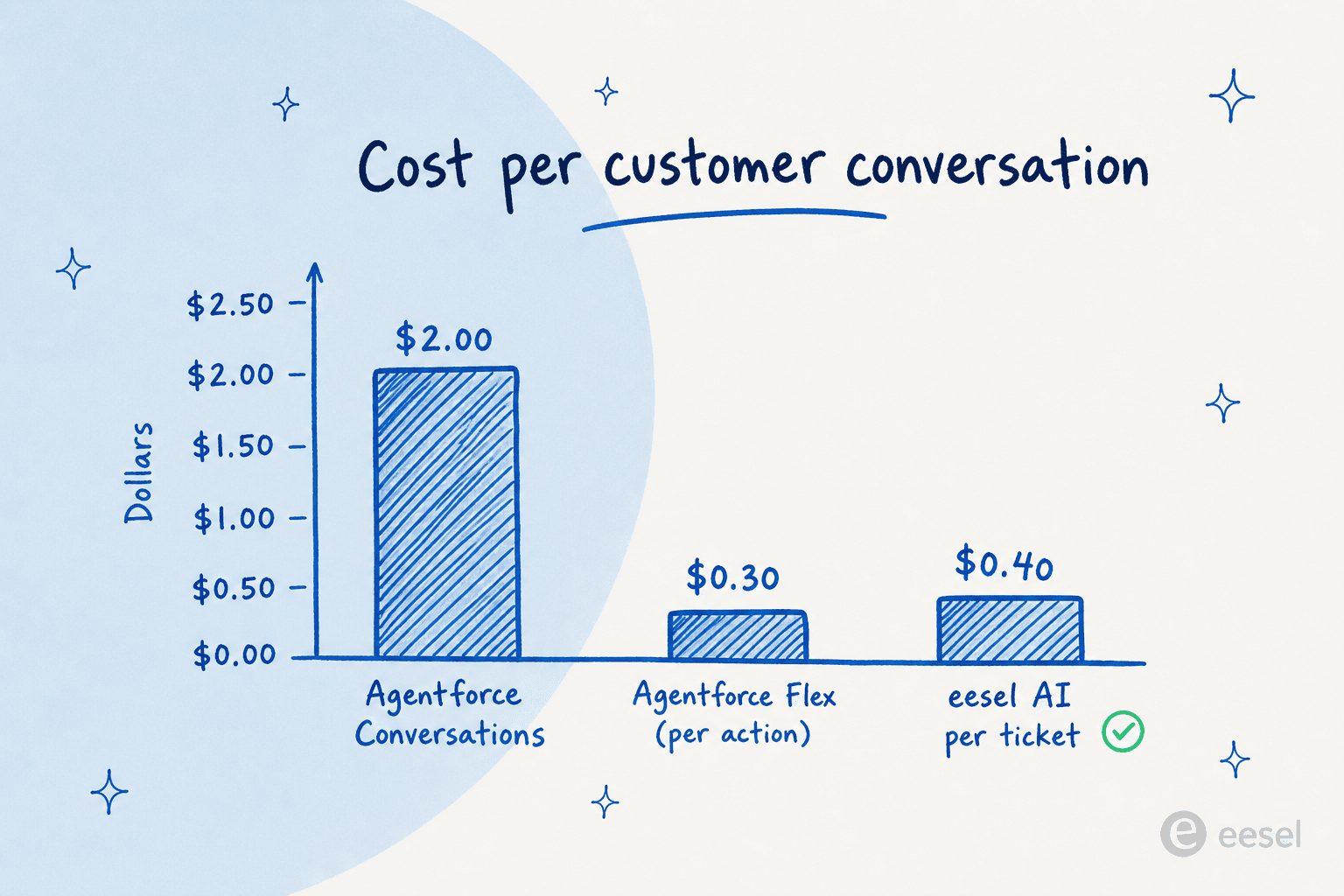
Here's a worked example. Say you handle 5,000 support conversations a month:
- Agentforce Conversations at $2 each = $10,000/month, before the Service Cloud seats your agents already need.
- Agentforce Flex Credits: a multi-action case can run ~60 credits, so heavier automations climb quickly; Salesforce's own example of 3 actions/case across 100 users lands at $1,800/month.
- eesel AI at $0.40/ticket = $2,000/month, with no per-seat fee on top.
Numbers move with your actual usage, and Agentforce's deep CRM actions can justify the premium for some teams. But the headline holds: for straight ticket resolution, an overlay agent is usually several times cheaper per conversation than Salesforce's native conversation pricing. If cost predictability matters, usage-based-per-ticket is the easiest model to forecast. Our Agentforce ROI calculator helps you run your own numbers.
How to choose the right AI tool for your Salesforce setup
The decision comes down to two questions: how native to Salesforce do you need to be, and is your problem support/CX or whole-company? That maps the eight tools cleanly.
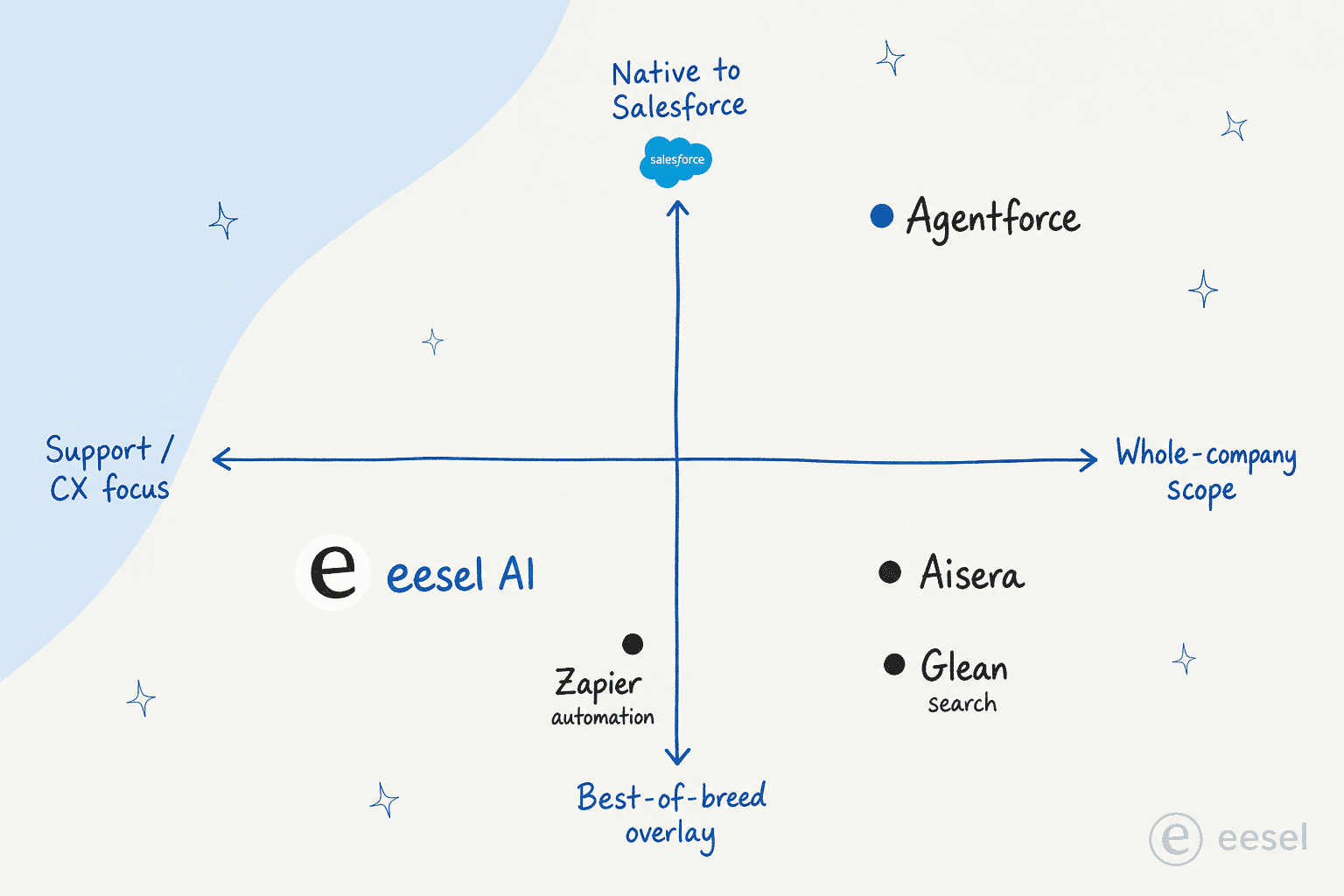
- Native + whole-company: Agentforce and Einstein. The right call when you're deep in Salesforce, have admin capacity, and want AI inside the platform.
- Overlay + support focus: eesel AI and Forethought. The fastest path to resolving tickets on Salesforce without a migration.
- Overlay + whole-company: Aisera and Kore.ai. For large enterprises unifying IT, HR, and CX across systems.
- Connective: Zapier (automation), Glean (search), and Writer (content). Add these around whichever agent you pick.
For the very common case - "we're on Salesforce and our support team is drowning in repetitive tickets" - we'd start with an overlay agent, run it in simulation against past tickets, and only reach for native Agentforce if you need agents taking deep, custom actions across CRM objects. Watch out for the trap of buying the biggest platform first; the best customer service AI for you is the one your team can actually get live and trust.
Try eesel AI on your Salesforce stack
If you're on Salesforce and the real goal is fewer tickets in the queue, eesel AI is built for exactly that. It connects to Salesforce and your other tools, learns from your past tickets and docs, and starts drafting and resolving tier-1 support, with confidence-based control so it only answers when it should. Because it's usage-based from $0.40 per ticket with no per-seat fees, you can prove it out before you commit a budget.

The differentiator is the simulation mode: run the agent over your historical Salesforce tickets to see precisely what it would have resolved, by theme, before a single customer sees it. You can start a trial with $50 of free usage, no credit card. Try eesel and see what it clears in your first week.
Frequently Asked Questions

Share this article

Article by
Riellvriany Indriawan
Riell is a designer and writer at eesel AI with about two years of experience researching CX platforms, AI chatbots, and helpdesk software. She combines her design background with a sharp eye for how these tools actually look and feel in practice — making her comparisons unusually visual and user-focused.