|
VOOZH | about |
|
VOOZH | about |
File handling in C is the process in which we create, open, read, write, and close operations on a file. C language provides different functions such as fopen(), fwrite(), fread(), fseek(), fprintf(), etc. to perform input, output, and many different C file operations in our program.
For opening a file in C, the fopen() function is used with the filename or file path along with the required access modes.
The file is not opened.
The file is not opened because it does not exist in the source directory. But the fopen() function is also capable of creating a file if it does not exist.
Note: It is essential to check for NULL values that might be returned by the fopen() function to avoid any errors.
Syntax of fopen()
Parameters
Return Value
File opening modes or access modes specify the allowed operations on the file to be opened. They are passed as an argument to the fopen() function. Some of the commonly used file access modes are listed below:
| Opening Modes | Description |
|---|---|
| r | Searches file. If the file is opened successfully fopen( ) loads it into memory and sets up a pointer that points to the first character in it. If the file cannot be opened fopen( ) returns NULL. |
| rb | Open for reading in binary mode. If the file does not exist, fopen( ) returns NULL. |
| w | Open for writing in text mode. If the file exists, its contents are overwritten. If the file doesn’t exist, a new file is created. Returns NULL, if unable to open the file. |
| wb | Open for writing in binary mode. If the file exists, its contents are overwritten. If the file does not exist, it will be created. |
| a | Searches file. If the file is opened successfully fopen( ) loads it into memory and sets up a pointer that points to the last character in it. It opens only in the append mode. If the file doesn’t exist, a new file is created. Returns NULL, if unable to open the file. |
| ab | Open for append in binary mode. Data is added to the end of the file. If the file does not exist, it will be created. |
| r+ | Searches file. It is opened successfully fopen( ) loads it into memory and sets up a pointer that points to the first character in it. Returns NULL, if unable to open the file. |
| rb+ | Open for both reading and writing in binary mode. If the file does not exist, fopen( ) returns NULL. |
| w+ | Searches file. If the file exists, its contents are overwritten. If the file doesn’t exist a new file is created. Returns NULL, if unable to open the file. |
| wb+ | Open for both reading and writing in binary mode. If the file exists, its contents are overwritten. If the file does not exist, it will be created. |
| a+ | Searches file. If the file is opened successfully fopen( ) loads it into memory and sets up a pointer that points to the last character in it. It opens the file in both reading and append mode. If the file doesn’t exist, a new file is created. Returns NULL, if unable to open the file. |
| ab+ | Open for both reading and appending in binary mode. If the file does not exist, it will be created. |
As given above, if you want to perform operations on a binary file, then you have to append 'b' at the last. For example, instead of “w”, you have to use “wb”, instead of “a+” you have to use “a+b”.
The fopen() function can not only open a file but also can create a file if it does not exist already. For that, we have to use the modes that allow the creation of a file if not found such as w, w+, wb, wb+, a, a+, ab, and ab+.
The file is created Successfully.
The file write operations can be performed by the functions fprintf() and fputs(). C programming also provides some other functions that can be used to write data to a file such as:
| Function | Description |
|---|---|
| fprintf() | Similar to printf(), this function uses formatted string and variable arguments list to print output to the file. |
| fputs() | Prints the whole line in the file and a newline at the end. |
| fputc() | Prints a single character into the file. |
| fputw() | Prints a number to the file. |
| fwrite() | This function writes the specified number of bytes to the binary file. |
The file is now opened.
Data successfully written in file file.txt
The file is now closed.
The file read operation in C can be performed using functions fscanf() or fgets(). Both the functions performed the same operations as that of scanf() and gets but with an additional parameter, the file pointer. There are also other functions we can use to read from a file. Such functions are listed below:
| Function | Description |
|---|---|
| fscanf() | Use formatted string and variable arguments list to take input from a file. |
| fgets() | Input the whole line from the file. |
| fgetc() | Reads a single character from the file. |
| fgetw() | Reads a number from a file. |
| fread() | Reads the specified bytes of data from a binary file. |
Output
The file is now opened.
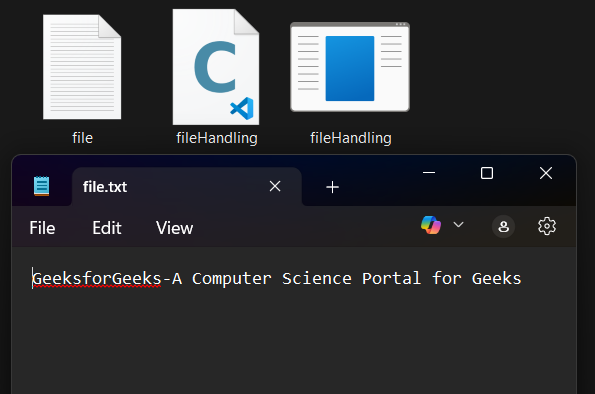
GeeksforGeeks-A Computer Science Portal for Geeks
The getc() and some other file reading functions return EOF (End Of File) when they reach the end of the file while reading. EOF indicates the end of the file, and its value is implementation-defined. Reading more after EOF results in undefined error so, it is always recommended to check for EOF while reading a file.
Note: One thing to note here is that after reading a particular part of the file, the file pointer will be automatically moved to the end of the last read character.
The fclose() function is used to close the file. After successful file operations, you must always close a file to remove it from the memory.
Syntax:
File pointer generally points to the position according to the mode or last read/write operation. We can manually move this pointer to any position in the file using fseek() function.
Syntax:
where, pos is the position from where offset is counted and offset is the number of positions to shift from pos (it can be negative or positive).
Example:
While writing to a file opened in rw+ mode, the file pointer moves to the end of the file. In case where we want to replace a word, then first we have to move the file pointer to the position where that word starts.
The file is now opened.
Data successfully written in file file.txt
The file is now closed.
Now, imagine you want to read this file after writing. We can use fseek() here too, but there is one more function specifically for this purpose which is rewind().
Till now, we have only discussed text file operations. The operations on a binary file are similar to text file operations with little difference.
To open a file in binary mode, we use the rb, rb+, ab, ab+, wb, and wb+ access mode in the fopen() function. We also use the .bin file extension in the binary filename.
Example:
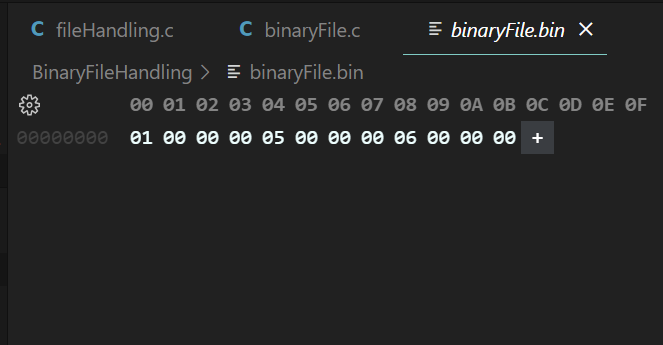
We use fwrite() function to write data to a binary file. The data is written to the binary file in the form of bits (0's and 1's).
Syntax of fwrite()
Parameters:
Return Value:
Write Operation Successful
The fread() function can be used to read data from a binary file in C. The data is read from the file in the same form as it is stored i.e. binary form.
Syntax:
Parameters:
Return Value:
Output
n1: 1 n2: 5 n3: 6The following table lists some more functions that can be used to perform file operations or assist in performing them.
| Functions | Description |
|---|---|
| fopen() | It is used to create a file or to open a file. |
| fclose() | It is used to close a file. |
| fgets() | It is used to read a file. |
| fprintf() | It is used to write blocks of data into a file. |
| fscanf() | It is used to read blocks of data from a file. |
| getc() | It is used to read a single character from a file. |
| putc() | It is used to write a single character to a file. |
| fseek() | It is used to set the position of a file pointer to a mentioned location. |
| ftell() | It is used to return the current position of a file pointer. |
| rewind() | It is used to set the file pointer to the beginning of a file. |
| putw() | It is used to write an integer to a file. |
| getw() | It is used to read an integer from a file. |