|
VOOZH | about |
|
VOOZH | about |
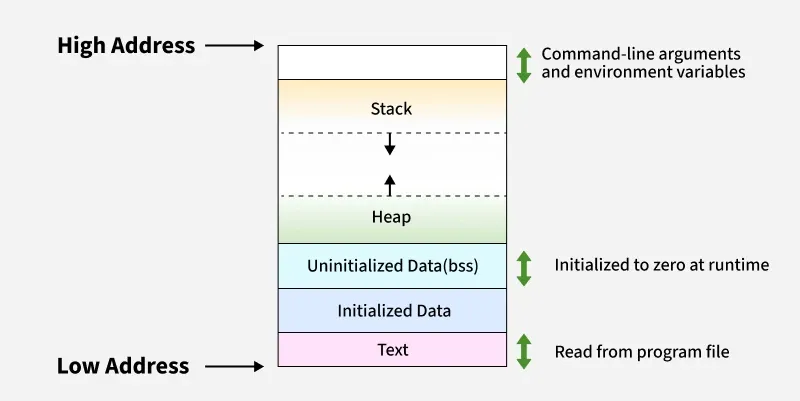
The memory layout of a program shows how its data is stored in memory during execution. It helps developers understand and manage memory efficiently.
As the name suggests, it is the part of the data segment that contains global and static variables that have been initialized by the programmer.
Global variable: 10
Static variable: 20
Message: Hello
The above variables a and b will be stored in the Initialized Data Segment.
Global variable: 10
Static variable: 20
Message: Hello BSS
The size(1) command in MinGW reports the sizes (in bytes) of the text, data, and bss segments of a binary file.
1. Check the following simple C program
Memory Layout
gcc memory-layout.c -o memory-layout
size memory-layout
text data bss dec hex filename
960 248 8 1216 4c0 memory-layout
2. Let us add one global variable in the program, now check the size of bss
Memory Layout
gcc memory-layout.c -o memory-layout
size memory-layout
text data bss dec hex filename
960 248 12 1220 4c4 memory-layout
3. Let us add one static variable which is also stored in bss.
Memory Layout
gcc memory-layout.c -o memory-layout
size memory-layout
text data bss dec hex filename
960 248 16 1224 4c8 memory-layout
4. Let us initialize the static variable which will then be stored in the Data Segment (DS)
Memory Layout
gcc memory-layout.c -o memory-layout
size memory-layout
text data bss dec hex filename
960 252 12 1224 4c8 memory-layout
5. Let us initialize the global variable which will then be stored in the Data Segment (DS)
Memory Layout
gcc memory-layout.c -o memory-layout
size memory-layout
text data bss dec hex filename
960 256 8 1224 4c8 memory-layout
Address of foo:		0x4011d0
Address of cgvar:	0x402084
Address of gvar:	0x404020
Address of ugvar:	0x404028
Address of hvar:	0x119592a0
Address of lvar:	0x7ffe8289c66c
Comparing above addresses, we can see than it roughly matches the memory layout discussed above.