|
VOOZH | about |
|
VOOZH | about |
C switch statement is a conditional statement that allows you to execute different code blocks based on the value of a variable or an expression. It is often used in place of if-else ladder when there are multiple conditions.
Case 1 is Matched.
Explanation: In this program, the switch statement evaluates the variable var. Since var is 1, the code in case with value 1 executes, printing "Case 1 is Matched." and then exiting the switch block due to the break statement. Other cases and the default case are skipped.
Here,
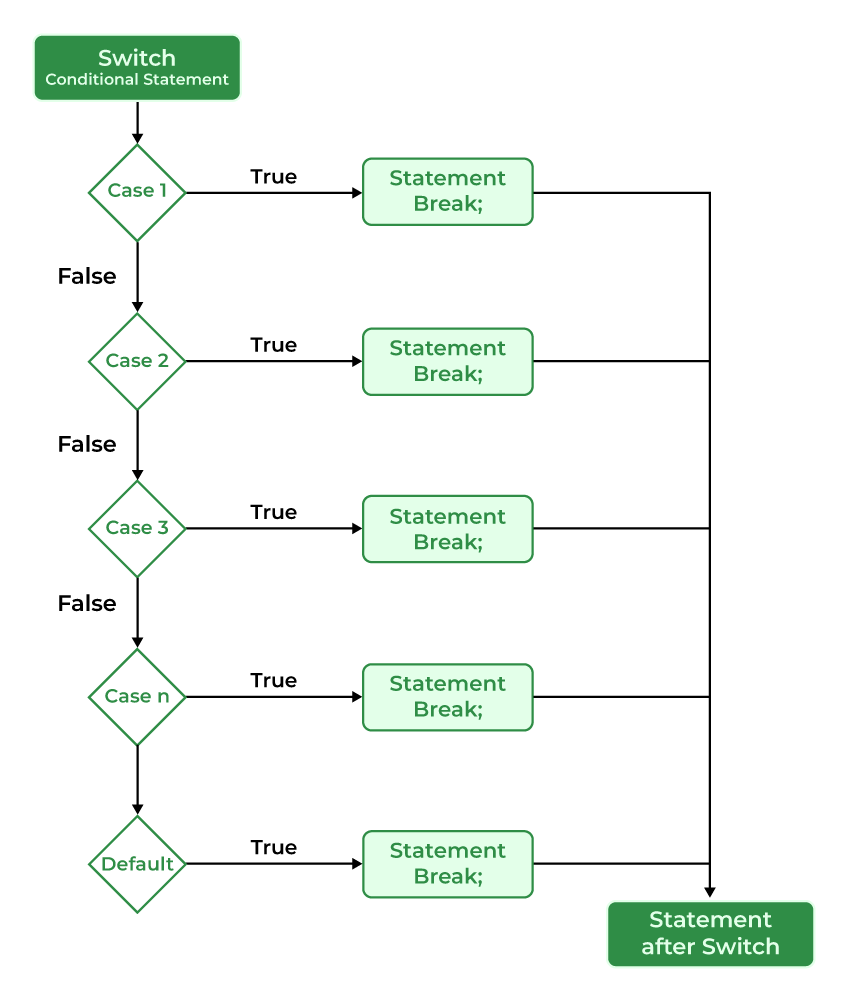
The working of the switch statement in C is as follows:
- Step 1: The switch variable is evaluated
- Step 2: The evaluated value is matched against all the present cases.
- Step 3A: If the matching case value is found, the associated code is executed.
- Step 3B: If the matching code is not found, then the default case is executed if present.
- Step 4A: If the break keyword is present in the executed case, then program control breaks out of the switch statement after executing the code block associated with the first matching condition.
- Step 4B: If the break keyword is not present, then all the cases after the matching case are executed
- Step 5: Statements after the switch statement are executed.
The below programs show some use cases of switch statement in practical scenario:
Tuesday
Output
Enter the Operator (+,-,*,/)
+
Enter the two numbers: 10 20
10 + 20 = 30
The breakkeyword is used to stop the execution inside a switch block. It helps to terminate the switch block and break out of it. If omitted, execution will continue on into the next case.
Case 2 is executed.
Case 3 is executed.
Case 4 is executed.
Nesting of switch statements is allowed, which means you can have switch statements inside another switch. However nested switch statements should be avoided as it makes the program more complex and less readable.
Category 1 selected
Option 2 selected under Category 1