|
VOOZH | about |
|
VOOZH | about |
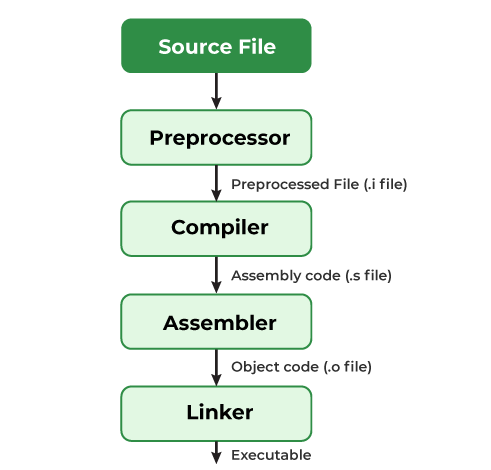
Preprocessors are programs that process the source code before the actual compilation begins. They are not part of the compilation process but operate separately, allowing programmers to modify the code before compilation.
All the above preprocessors can be classified into 4 types:
Macros are used to define constants or create functions that are substituted by the preprocessor before the code is compiled. The two preprocessors #define and #undef are used to create and remove macros in C.
#define token value
#undef token
where after preprocessing, the token will be expanded to its value in the program. Example:
0
1
2
3
4
In the above program, before the compilation begins, the word LIMIT is replaced with 5. The word 'LIMIT' in the macro definition is called a macro template and '5' is macro expansion.
Note There is no semi-colon (;) at the end of the macro definition. Macro definitions do not need a semi-colon to end.
There are also some Predefined Macros in C which are useful in providing various functionalities to our program.
A macro defined previously can be undefined using #undef preprocessor. For example, in the above code,
Output:
./Solution.c: In function 'main':
./Solution.c:10:25: error: 'LIMIT' undeclared (first use in this function)
10 | for (int i = 0; i < LIMIT; i++) {
| ^~~~~
./Solution.c:10:25: note: each undeclared identifier is reported only once for each function it appears in
We can also pass arguments to macros. These macros work similarly to functions. For example,
#define foo(a, b) a + b
#define func(r) r * r
Let us understand this with a program:
Area of rectangle is: 50
Explanation: In the above program, the macro AREA(l, b) is defined to calculate the area of a rectangle by multiplying its length (l) and breadth (b). When AREA(a, b) is called, it expands to (a * b), and the result is computed and printed.
Please refer Types of Macros in C for more examples and types.
File inclusion allows you to include external files (header files, libraries, etc.) into the current program. This is typically done using the #include directive, which can include both system and user-defined files.
Syntax
There are two ways to include header files.
#include <file_name>
#include "filename"
The '<' and '>' brackets tell the compiler to look for the file in the standard directory while double quotes ( " " ) tell the compiler to search for the header file in the source file's directory.
Example:
Hello World
Conditional compilation allows you to include or exclude parts of the code depending on certain conditions. This is useful for creating platform-specific code or for debugging. There are the following conditional preprocessor directives: #if, #ifdef, #ifndef, else, #elif and #endif
Syntax:
#if
// some code
#elif
// some more code
#else
// Some more code
#endif
#endif directive is used to close off the #if, #ifdef, and #ifndef opening directives. Example
PI is defined
Square is not defined
Explanation: This code uses conditional preprocessor directives (#ifdef, #elif, and #ifndef) to check whether certain macros (PI and SQUARE) are defined. Since PI is defined, the program prints "PI is defined", then checks if SQUARE is not defined and prints "Square is not defined".
Apart from the primary preprocessor directives, C also provides other directives to manage compiler behaviour and debugging.
Provides specific instructions to the compiler to control its behaviour. It is used to disable warnings, set alignment, etc.
Syntax
#pragma directive
Some of the #pragma directives are discussed below:
Example
Inside main()
The above code will produce the output as given above when run on GCC compilers while the expected output was:
Expected Output
Inside func1()
Inside main()
Inside func2()
This happens because GCC does not support #pragma startup or exit. However, you can use the below code for the expected output on GCC compilers.
Inside func1() Inside main() Inside func2()
In the above program, we have used some specific syntaxes so that one of the functions executes before the main function and the other executes after the main function.