The itoa function converts an integer into a null-terminated string. It can convert negative numbers too. It is a standard library function that is defined inside stdlib.h header file.
Syntax of itoa in C
char* itoa(int num, char* buffer, int base);
In this article, we create a C Program to implement a custom function that will be able to convert the given integer to a null-terminated string similar to itoa() function in C.
Basic Principle
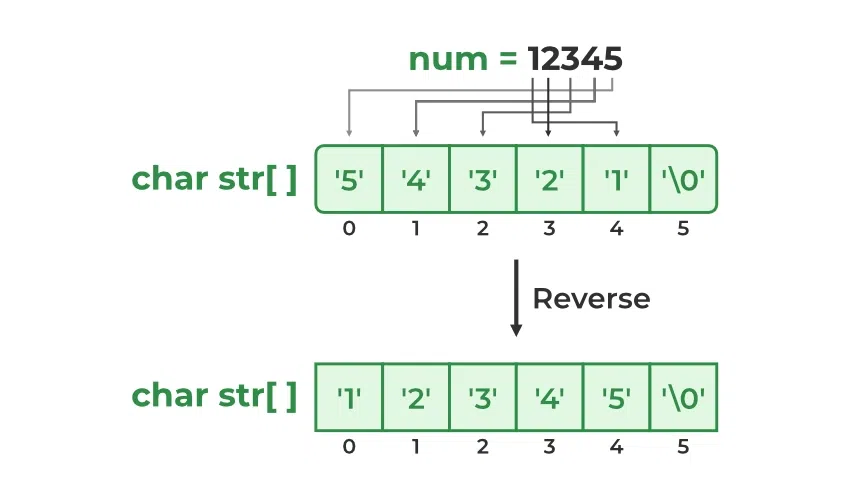
Individual digits of the given number must be processed and their corresponding characters must be put in the given string. Using repeated division by the given base, we get individual digits from the least significant to the most significant digit. But in the output, these digits are needed in reverse order. Therefore, we reverse the string obtained after repeated division and return it.
Algorithm
The working algorithm for the given approach is as follows:
STEP 1: The number is passed to the function along with its base and destination string pointer as the arguments.
STEP 2A: If the number is zero, then return the string: "0\0".
STEP 2B: If the number is not zero, then
STEP 3: Set the isNegative flag to true if the number is negative.
STEP 4: We get the least significant digit by evaluating the remainder of the number divided by the base.
STEP 5A: If the remainder is greater than 9 (i.e. base is higher than 10), then put the corresponding alphabetical character in the string.
STEP 5B: If the reminder is less than or equal to 9, put the corresponding numeric character in the string.
STEP 6: Decrease the number of digits by one by dividing the number by the base.
STEP 7: Repeat the steps from 4 to 6 till the number is less than or equal to zero.
STEP 8: Now, if the isNegative flag is true, then put a ( - ) negative sign at the end.
STEP 9: Put '\0' at the end of the string.
STEP 10: After that, reverse the string as the numbers in the string will be in reverse as compared to the actual integer.