|
VOOZH | about |
|
VOOZH | about |
System calls are the interface through which a program requests services from the operating system kernel, especially for operations that require privileged access. In C, many input and output operations ultimately rely on system calls, where the program interacts with the kernel to access devices such as the keyboard, monitor and other I/O resources.
Before we move on to the I/O System Calls, we need to know about the file descriptor.
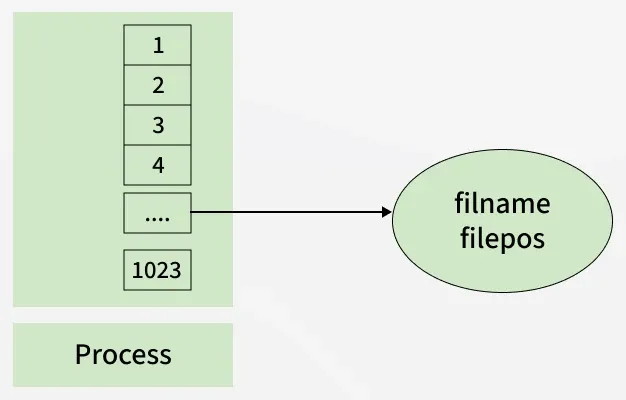
A file descriptor is an integer that uniquely identifies an opened file of the process. It is stored in the file descriptor table in which elements are pointers to file table entries. One unique file descriptor table is provided in the operating system for each process.
File table entries are a structure in-memory surrogate for an open file, which is created when processing a request to open the file and these entries maintain file position.
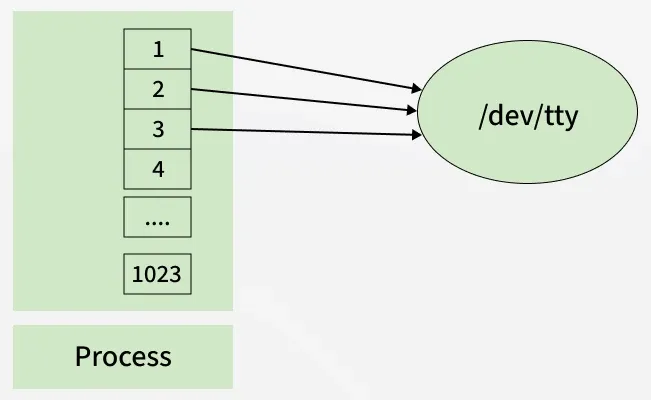
When any process starts, then that process file descriptors table’s fd(file descriptor) 0, 1, 2 open automatically, (By default) each of these 3 fd references file table entry for a file named /dev/tty
The I/O system calls offer direct access to the operating systems' input and output functionalities and provide complete control over file operations, memory management and device communications. There are 5 input and output system calls in C:
The creat system call is used to create a new empty file in C and is provided as the creat() function. It allows specifying the file name and permissions of the file. It is declared in the <fcntl.h> header file.
creat(filename, mode);
Parameters
Return Value
File 'newfile.txt' created successfully
File descriptor: 3
The create() system call works as follows:
The open() function provides the open system call in C. It is used to open the file for reading, writing, or both. It is also capable of creating the file if it does not exist. It is defined inside <unistd.h> header file and the flags that are passed as arguments are defined inside <fcntl.h> header file.
open (path, flags);
Parameters:
Path: Path to the file which we want to open.
flags: It is used to specify how you want to open the file. We can use the following flags:
Flags | Description |
|---|---|
| O_RDONLY | Opens the file in read-only mode. |
| O_WRONLY | Opens the file in write-only mode. |
| O_RDWR | Opens the file in read and write mode. |
| O_CREAT | Create a file if it doesn’t exist. |
| O_EXCL | Prevent creation if it already exists. |
| O_APPEND | Opens the file and places the cursor at the end of the contents. |
| O_ASYNC | Enable input and output control by signal. |
| O_CLOEXEC | Enable close-on-exec mode on the open file. |
| O_NONBLOCK | Disables blocking of the file opened. |
| O_TMPFILE | Create an unnamed temporary file at the specified path. |
Example: Below example demonstrates how to use the open() system call to open an existing file or create it if it does not exist.
Output
fd = 3
The open() system call works as follows:
The close system call is provided as close() function in C that tells the operating system that you are done with a file descriptor and closes the file pointed by the file descriptor. It is defined inside <unistd.h> header file.
close(fd);
Parameter: fd: File descriptor of the file that you want to close.
Return Value
Output
opened the fd = 3
closed the fd.
Output
fd2 = 3
Here, In this code first open() returns 3 because when the main process is created, then fd 0, 1, 2 are already taken by stdin, stdout, and stderr. So the first unused file descriptor is 3 in the file descriptor table. After that in close() system call is free it these 3 file descriptors and then set 3 file descriptors as null. So when we called the second open(), then the first unused fd is also 3. So, the output of this program is 3.
The close() system call works as follows:
The read system call, implemented as the read() function reads the specified amount of bytes cnt of input into the memory area indicated by buf from the file indicated by the file descriptor fd. A successful read() updates the access time for the file. The read() function is also defined inside the <unistd.h> header file.
read (fd, buf, cnt);
Parameters
Return Value
buf needs to point to a valid memory location with a length not smaller than the specified size because of overflow. fd should be a valid file descriptor returned from open() to perform the read operation because if fd is NULL then the read should generate an error. cnt is the requested number of bytes read, while the return value is the actual number of bytes read. Also, sometimes read system call should read fewer bytes than cnt.
Output
called read(3, c, 10). returned that 10 bytes were read.
Those bytes are as follows: 0 0 0 foo.
Suppose that sample.txt consists of the 6 ASCII characters “foobar”. Then what is the output of the following program?
Output
c = f
The descriptors fd1 and fd2 each have their own open file table entry, so each descriptor has its own file position for foobar.txt. Thus, the read from fd2 reads the first byte of foobar.txt, and the output is c = f, not c = o.
The write system call is provided as write() function. It writes cnt bytes from buf to the file or socket associated with fd. cnt should not be greater than INT_MAX (defined in the limits.h header file). If cnt is zero, write() simply returns 0 without attempting any other action.
The write() is also defined inside <unistd.h> header file.
write (fd, buf, cnt);
Parameters
Return Value
The file needs to be opened for write operations. buf needs to be at least as long as specified by cnt because if buf size is less than the cnt then buf will lead to the overflow condition. cnt is the requested number of bytes to write, while the return value is the actual number of bytes written. This happens when fd has a less number of bytes to write than cnt.
If write() is interrupted by a signal, the effect is one of the following:
Output
called write(3, "hello geeks\n", 12). it returned 11
Here, when you see in the file foo.txt after running the code, you get a “hello geeks“. If foo.txt file already has some content in it then the write a system calls overwrite the content and all previous content is deleted and only “hello geeks” content will have in the file.
Output
hello world
In this code, buf1 array's string "hello world" is first written into stdin fd[0] then after that this string write into stdin to buf2 array. After that write into buf2 array to the stdout and print output "hello world".