|
VOOZH | about |
|
VOOZH | about |
Figures on a computer screen can be drawn using polygons. To fill those figures with color, we need to develop some algorithm.There are two famous algorithms for this purpose: Boundary fill and Scanline fill algorithms.
Boundary filling requires a lot of processing and thus encounters few problems in real time. Thus the viable alternative is scanline filling as it is very robust in nature. This article discusses how to use Scanline filling algorithm to fill colors in an image.
Scanline Polygon filling Algorithm
Scanline filling is basically filling up of polygons using horizontal lines or scanlines. The purpose of the SLPF algorithm is to fill (color) the interior pixels of a polygon given only the vertices of the figure. To understand Scanline, think of the image being drawn by a single pen starting from bottom left, continuing to the right, plotting only points where there is a point present in the image, and when the line is complete, start from the next line and continue.
This algorithm works by intersecting scanline with polygon edges and fills the polygon between pairs of intersections.
Special cases of polygon vertices:
Components of Polygon fill:
Data Structure:
Algorithm:

1. We will process the polygon edge after edge, and store in the edge Table.
2. Storing is done by storing the edge in the same scanline edge tuple as
 the lowermost point's y-coordinate value of the edge.
3. After addition of any edge in an edge tuple, the tuple is
 sorted using insertion sort, according to its xofymin value.
4. After the whole polygon is added to the edge table,
 the figure is now filled.
5. Filling is started from the first scanline at the bottom,
 and continued till the top.
6. Now the active edge table is taken and the following things
 are repeated for each scanline:
 i. Copy all edge buckets of the designated scanline
 to the active edge tuple
 ii. Perform an insertion sort according
 to the xofymin values
 iii. Remove all edge buckets whose ymax is equal
 or greater than the scanline
 iv. Fillup pairs of edges in active tuple, if any vertex is got,
 follow these instructions:
 o If both lines intersecting at the vertex are on
 the same side of the scanline, consider it as two points.
 o If lines intersecting at the vertex are at
 opposite sides of the scanline, consider it as only one point.
 v. Update the xofymin by adding slopeinverse for each bucket.
Sample Image
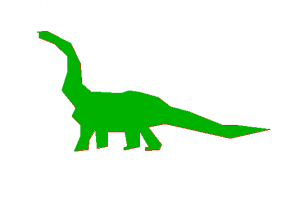
We are using an example of a polygon dinosaur. Paste the following in a textfile in the same folder as the executable and rename it as PolyDino.txt .
Link: PolyDino.txt
Output:
Filled up dinosaur:
Note: See your output on an opengl window. Mind that you have to have glut installed. You may see this video for watching the output.