|
VOOZH | about |
|
VOOZH | about |
Flex (Fast Lexical Analyzer Generator), or simply Flex, is a tool for generating lexical analyzers scanners or lexers. Written by Vern Paxson in C, circa 1987,
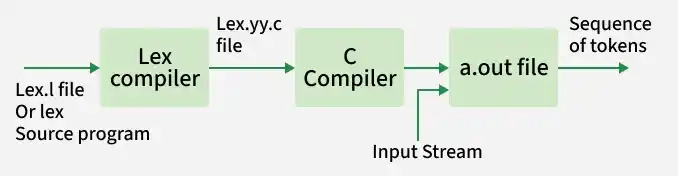
Flex takes a specification file (with extension .l) containing regular expressions and actions, and automatically generates a C program that performs lexical analysis.
yylex()yylex() reads the input stream character by characterInstalling Flex on Ubuntu:
sudo apt-get update
sudo apt-get install flex
Note: If the update command has not been executed on the system for a long time, it is recommended to run it first. This ensures that the latest package versions are installed, since older versions may be incompatible with newly installed packages or may no longer be available in the repository.
lex.l is written using Flex syntax.lex.l into a C file named lex.yy.c.lex.yy.c into an executable (usually a.out).1. Definition Section: This section contains:
Anything written inside %{ %} is copied directly into lex.yy.c.
Syntax:
%{
 // Definitions
%}
2. Rules Section: This section defines patterns and actions.
pattern { action }%%Syntax:
%%
pattern action
%%
Examples: Table below shows some of the pattern matches.
| Pattern | It can match with |
|---|---|
| [0-9] | all the digits between 0 and 9 |
| [0+9] | either 0, + or 9 |
| [0, 9] | either 0, ', ' or 9 |
| [0 9] | either 0, ' ' or 9 |
| [-09] | either -, 0 or 9 |
| [-0-9] | either - or all digit between 0 and 9 |
| [0-9]+ | one or more digit between 0 and 9 |
| [^a] | all the other characters except a |
| [^A-Z] | all the other characters except the upper case letters |
| a{2, 4} | either aa, aaa or aaaa |
| a{2, } | two or more occurrences of a |
| a{4} | exactly 4 a's i.e, aaaa |
| . | any character except newline |
| a* | 0 or more occurrences of a |
| a+ | 1 or more occurrences of a |
| [a-z] | all lower case letters |
| [a-zA-Z] | any alphabetic letter |
| w(x | y)z | wxz or wyz |
3. User Code Section: This section contains:
main() functionyywrap() definitionLinked with the generated lexical analyzer.
Basic Program Structure:
%{
// Definitions
%}

%%
Rules
%%

User code section
First save the file with the extension .l or .lex. After saving the file, execute the following commands in the terminal to compile and run the program.
Step 1: flex filename.l or flex filename.lex depending on the extension file is saved with
Step 2: gcc lex.yy.c
Step 3: ./a.out
Step 4: Provide input to program if it is required
Note: To stop the input, press Ctrl + D (EOF) in the terminal, or define a rule in the program to terminate input. You can refer to the output examples of the programs below if you face difficulty while running them.
Example 1: Count the number of characters in a string
If the user enters:
GFG123gfgOutput:
G capital letter
F capital letter
G capital letter
1 not capital letter
2 not capital letter
3 not capital letter
g not capital letter
f not capital letter
g not capital letter

Number of capital letters in the given input - 3
Example 2: Count the number of characters and number of lines in the input
Input Given:
Geeks
for
Geeks
end
Output:
number of lines = 3, number of chars = 13