Dynamic Domain Name System (DDNS) in Application Layer
Last Updated : 15 Jul, 2025
When DNS (Domain Name System) was designed, nobody expected that there would be so many address changes such as adding a new host, removing a host or changing an IP address. When there is a change, the change must be made to the DNS master file which needs a lot of manual updating and it must be updated dynamically.
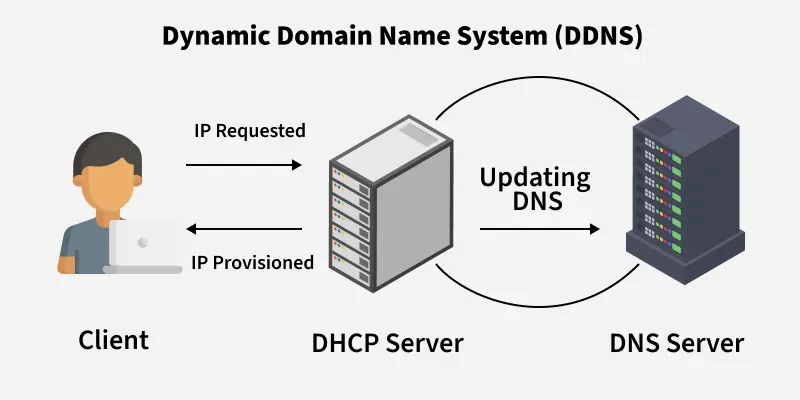
Dynamic Domain Name System (DDNS) is a method of automatically updating a name server in the Domain Name Server (DNS) often in real-time, with the active DDNS configuration of its configured hostnames, addresses or other information.
👁 DDNS Dynamic Domain Name System (DDNS) in Application Layer
How Does DDNS Work
1. Assigning an IP Address:
When a device connects to a network, the Dynamic Host Configuration Protocol (DHCP) assigns it an IP address. This happens dynamically, meaning the IP address can change over time, especially in home networks where ISPs use dynamic IP allocation.
2. Updating the Primary DNS Server:
Once a device’s IP address is assigned, the DDNS client (often built into a router or installed as software) detects the new IP address and sends an update request to the Primary DNS Server.
The request contains the hostname (e.g., myhome.dyndns.org) and the updated IP address.
3. Zone Updates and Notification:
The Primary DNS Server updates its records (DNS zone file) with the new IP address.
To ensure consistency, Secondary DNS Servers (backup DNS servers) also need to be updated. This happens in one of two ways:
Active Notification: The primary DNS server actively sends an update message to secondary servers.
Passive Notification: Secondary DNS servers periodically check the primary server for any changes and update their records accordingly.
4. Zone Transfer:
After receiving the update notification, secondary DNS servers request the updated zone data from the primary server through a zone transfer. This ensures that DNS records across different servers remain synchronized.
5. Maintaining Security with Authentication:
Since DDNS allows automatic updates, security measures must be in place to prevent unauthorized changes. DDNS can use authentication methods such as:
TSIG (Transaction Signature): A cryptographic key that ensures updates are legitimate.
Secure DDNS (DNSSEC): Adds an extra layer of verification to DNS updates.
6. User Access Through a Hostname:
Once the IP update is completed, users can access their devices remotely using a consistent hostname (e.g., myhome.dyndns.org).
Even if the IP address changes again, the DDNS system updates it automatically, ensuring uninterrupted access to network resources like security cameras, home servers and remote desktop connections.
Example :
Imagine a user setting up remote access to their home security camera system.
The router assigns a dynamic IP address (123.45.67.89).
The DDNS client updates the DNS record so that myhome.dyndns.org points to 123.45.67.89.
If the ISP later changes the IP to 98.76.54.32, the DDNS client detects the change and updates the DNS records accordingly.
Now, when the user accesses myhome.dyndns.org, it always resolves to the current IP address, allowing seamless remote access.
Advantages of Using DDNS
Accessibility: DDNS allows users to connect to devices on their home network from anywhere in the world, using a hostname instead of a constantly changing IP address. This makes it easy to remotely access files, control IoT devices and perform other tasks.
Convenience: DDNS eliminates the need to manually update IP addresses, which can be a tedious and time-consuming task.
Compatibility: DDNS is compatible with a wide range of devices and services, including Remote Desktops, FTP and VPN, making it easy to connect to a variety of devices on a home network.
Ease of use: DDNS services are often easy to set up and use, with user-friendly interfaces and clear instructions.
Dynamic IP support: DDNS allows devices on a network to have dynamic IP addresses, which are assigned by the router and can change over time. This allows users to use a hostname to connect to the device even if the IP address changes.
Cost-effective: Many DDNS providers offer free service and it is a cost-effective solution for enabling remote access to devices on a home network.
Backup: DDNS service can be used as a backup solution for the static IP address, in case the static IP address is lost.
Disadvantages of Using DDNS
Reliability: DDNS services rely on the availability of the DDNS provider's servers. If the provider's servers are down, the hostname will not resolve to the correct IP address, making it impossible to connect to devices on the home network.
Security: Because DDNS services link a hostname to a dynamic IP address, it can potentially make it easier for hackers to find and target specific devices on a home network.
Cost: Some DDNS providers charge a fee for their services and the cost can add up over time.
Latency: Some DDNS providers may experience latency issues when trying to update the IP address associated with a hostname, which can cause delays in connecting to devices on the home network.
Limited Control: DDNS services are often operated by third-party companies, which means that users have limited control over the settings and configuration of the service.
Common Use Cases of DDNS
It is used for Internet access devices such as routers.
It is used by security appliance manufacturers and is even required for IP-based security appliances like DVRs.
Remote access to home network resources such as computers, cameras and file servers
Running a personal website or web server from a home internet connection
Setting up a VPN or secure proxy connection to a home network
Enabling access to home automation systems and Internet of Things (IoT) devices
Facilitating gaming and application hosting from a home network.