|
VOOZH | about |
|
VOOZH | about |
NumPy is a fundamental package for scientific computing in Python, providing support for arrays, mathematical functions, and more. One of its powerful features is the ability to perform polynomial fitting using the polyfit function. This article delves into the technical aspects of numpy.polyfit, explaining its usage, parameters, and practical applications.
Table of Content
Polynomial fitting is a form of regression analysis where the relationship between the independent variable xand the dependent variable y is modeled as an n-degree polynomial. The goal is to find the polynomial coefficients that minimize the difference between the observed data points and the values predicted by the polynomial.
Syntax and Parameters:
The numpy.polyfit function fits a polynomial of a specified degree to a set of data using the least squares method. The basic syntax is:
numpy.polyfit(x, y, deg, rcond=None, full=False, w=None, cov=False)Let's explore how to use numpy.polyfit with a practical example.
A linear fit is a first-degree polynomial fit. Consider the following data points:
Output:
Linear Fit Coefficients: [-0.30285714 0.75714286]For higher-degree polynomials, the process is similar. Here is an example with a cubic polynomial:
Output:
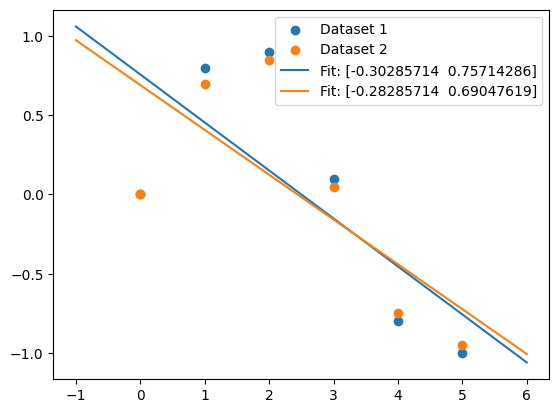
Cubic Fit Coefficients: [ 0.08703704 -0.81349206 1.69312169 -0.03968254]numpy.polyfit can handle multiple datasets with the same x-coordinates by passing a 2D array for y. This is useful for fitting multiple curves simultaneously.
Output:
Linear Fit Coefficients for Multiple Datasets: [array([-0.30285714, 0.75714286]), array([-0.28285714, 0.69047619])]Weights can be applied to the y-coordinates to give different importance to different data points.
Output:
Weighted Fit Coefficients: [-0.36783784 0.84378378]The covariance matrix of the polynomial coefficient estimates can be returned by setting cov=True.
Output:
Fit Coefficients: [-0.30285714 0.75714286]
Covariance Matrix: [[ 0.0213551 -0.05338776]
 [-0.05338776 0.1957551 ]]
NumPy's polyfit function is a versatile tool for polynomial fitting, offering various options to customize the fitting process. Whether you are performing a simple linear fit or a complex multi-dataset fit, numpy.polyfit provides the functionality needed to accurately model your data. With the introduction of the new polynomial API, working with polynomials in NumPy has become even more efficient and user-friendly.