|
VOOZH | about |
|
VOOZH | about |
Pandas dataframe.replace() function is used to replace a string, regex, list, dictionary, series, number, etc. from a Pandas Dataframe in Python. Every instance of the provided value is replaced after a thorough search of the full DataFrame.
Syntax: DataFrame.replace(to_replace=None, value=None, inplace=False, limit=None, regex=False, method='pad', axis=None)
Parameters:
- to_replace : [str, regex, list, dict, Series, numeric, or None] pattern that we are trying to replace in dataframe.
- value : Value to use to fill holes (e.g. 0), alternately a dict of values specifying which value to use for each column (columns not in the dict will not be filled). Regular expressions, strings and lists or dicts of such objects are also allowed.
- inplace : If True, in place. Note: this will modify any other views on this object (e.g. a column from a DataFrame). Returns the caller if this is True.
- limit : Maximum size gap to forward or backward fill
- regex : Whether to interpret to_replace and/or value as regular expressions. If this is True then to_replace must be a string. Otherwise, to_replace must be None because this parameter will be interpreted as a regular expression or a list, dict, or array of regular expressions.
- method : Method to use when for replacement, when to_replace is a list.
Returns: filled : NDFrame
Simple Example of Pandas dataframe.replace()
Here, we are replacing 49.50 with 60.
Output:
 Array_1 Array_2
0 60.0 65.1
1 70.0 60.0
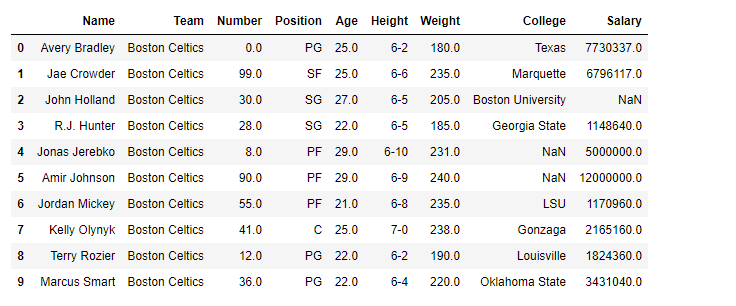
Here, we are going to see the implementation of dataframe.replace() methods with the help of some examples. For a link to the CSV file Used in Code, click here
Output:
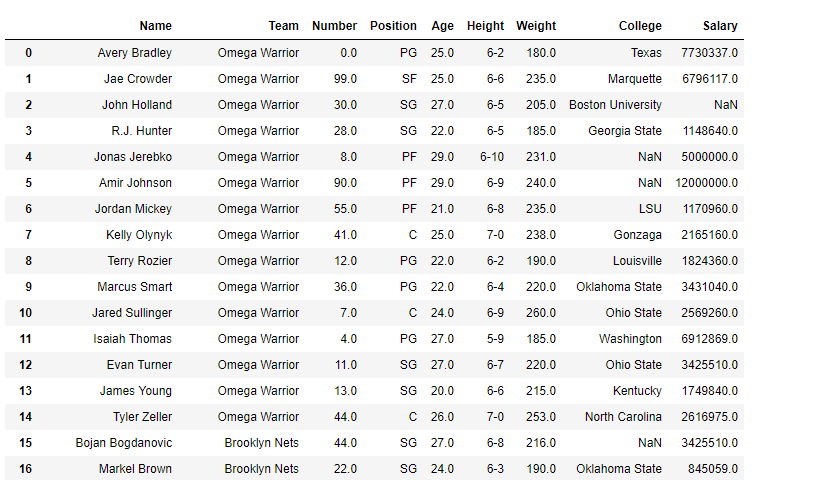
👁 ImageWe are going to replace team "Boston Celtics" with "Omega Warrior" in the 'df' Dataframe.
Output:
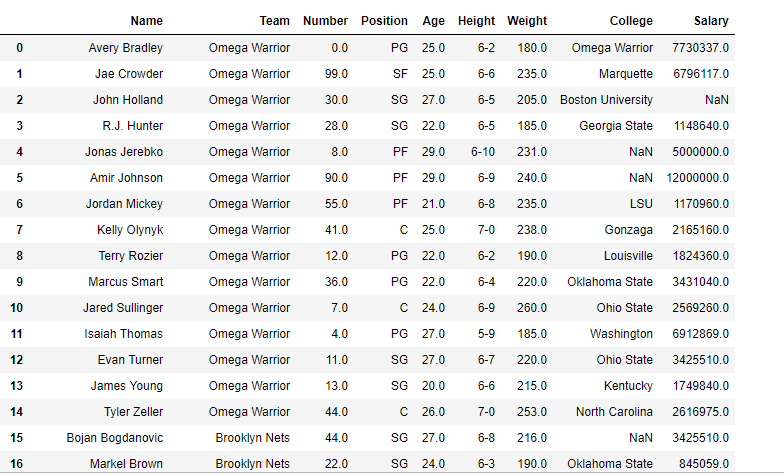
👁 ImageReplacing more than one value at a time. Using python list as an argument We are going to replace team "Boston Celtics" and "Texas" with "Omega Warrior" in the 'df' Dataframe.
Output:
Notice the College column in the first row, "Texas" has been replaced with "Omega Warriors"
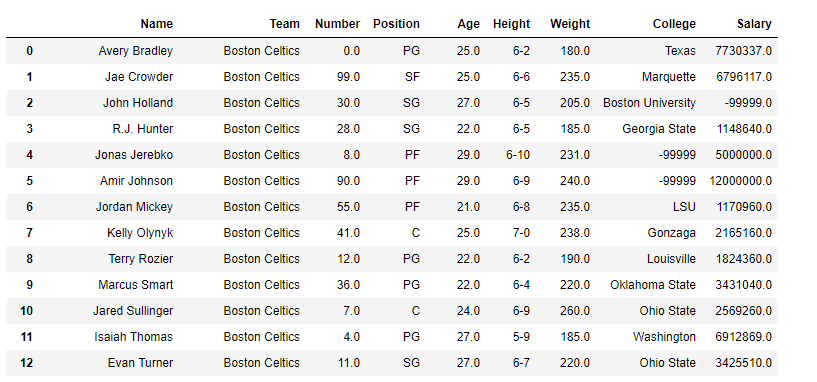
👁 ImageReplace the Nan value in the data frame with the -99999 value.
Output
👁 ImageNotice all the Nan value in the data frame has been replaced by -99999. Though for practical purposes we should be careful with what value we are replacing nan value.
In this example, we are replacing multiple values in a Pandas Dataframe by using dataframe.replace() function.
Output
👁 Screenshot-2023-11-20-113533
You can replace specific values in a DataFrame using the
replace()method. Here's a basic example:import pandas as pd
df = pd.DataFrame({
'A': [1, 2, 3],
'B': [4, 5, 6]
})
# Replace all occurrences of 1 with 100
df.replace(1, 100, inplace=True)
print(df)
The
replace()method in pandas is used to replace a value with another value. It can handle single values, lists, or dictionaries, making it very flexible for various use cases:# Replace multiple values at once
df.replace({2: 200, 3: 300}, inplace=True)
print(df)
To replace string values, you use the same
replace()method. This method is useful for modifying specific string entries across the DataFrame:df = pd.DataFrame({
'A': ['foo', 'bar', 'baz'],
'B': ['foobar', 'barfoo', 'foobarbaz']
})
# Replace 'foo' with 'new' in column A
df['A'] = df['A'].replace('foo', 'new')
print(df)
If you want to replace parts of strings within a DataFrame, you might use the
str.replace()method, which is part of the string methods for pandas Series:# Replace substrings within the DataFrame
df['B'] = df['B'].str.replace('foo', 'new')
print(df)
To replace missing values (NaNs) in a DataFrame, you can use the
fillna()method, which is highly effective for handling missing data:df = pd.DataFrame({
'A': [1, 2, None],
'B': [None, 5, 6]
})
# Replace all NaNs with a specific value
df.fillna(0, inplace=True)
print(df)
# Or replace NaNs with the mean of the column
df['A'].fillna(df['A'].mean(), inplace=True)