Ruby is a dynamic, reflective, object-oriented, general-purpose programming language. Hello World the program is the most basic and first program when we start a new programming language. This simply prints Hello World on the screen. Below is the program to write hello world".
How to run a Ruby Program on different platform?
With Online IDE :
We can use various online IDE. which can be used to run Ruby programs without installing.
Output :
Hello World
Above code will run on online IDE. Here,
puts keyword is used to print any thing on the screen.
With Linux :
Using Command-Line Firstly, open a text editor Notepad or Notepad++. write the code in the text editor and save the file with (.rb) extension. open the command prompt follow step by step process on our system.
👁 Image
To run the
hello.rb Ruby script, run the command ruby
hello.rb it will print the output.
👁 Image
With Window :
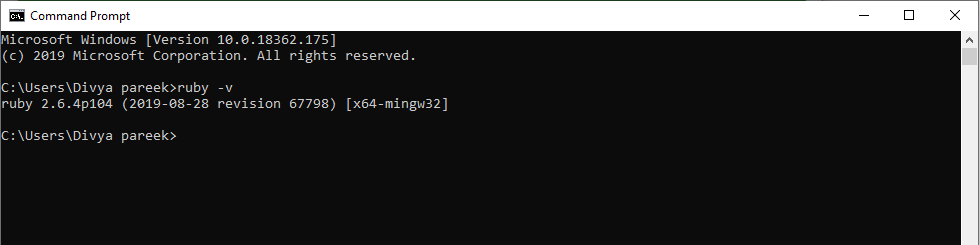
Using Command-Line write ruby -v on command line window to show ruby version. Below is the image to better understand.
👁 Image
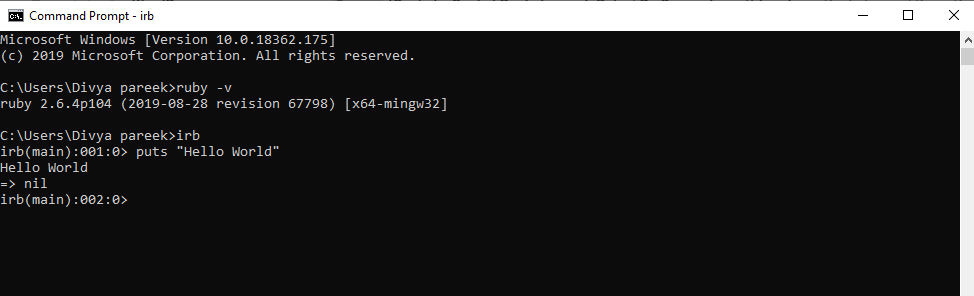
To start the IRB prompt, open your command-line and run the irb command. after this we can write the ruby code and it will run on command line.
👁 Image
In above image we use puts keyword to print the output and it returned nil.