|
VOOZH | about |
|
VOOZH | about |
An array is a collection of different or similar items, stored at contiguous memory locations. The idea is to store multiple items of the same type together which can be referred to by a common name.
In Ruby, numbers, strings, etc all are primitive types but arrays are of objects type i.e arrays are the collection of ordered, integer-indexed objects which can be store number, integer, string, hash, symbol, objects or even any other array. In general, an array is created by listing the elements which will be separated by commas and enclosed between the square brackets[].
Example:
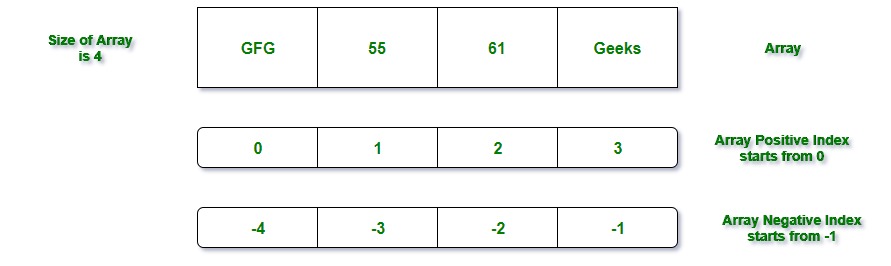
["Geeks", 55, 61, "GFG"]
Here array contains the 4 elements of different type i.e Geeks(a string), 55(number), 61(number), and GFG(string). Array positive index starts from 0. The negative index always starts with -1 which represents the elements from the end of the array. There can be 2-Dimensional array i.e array will store another array. It is also termed as the nested arrays. Here we will only discuss about 1-Dimensional arrays.
Creation of 1-D array in Ruby
There are several ways to create an array. But there are two ways which mostly used are as follows:
1. Using the new class method: new is a method which can be used to create the arrays with the help of dot operator. Here ::new method with zero, one or more than one arguments is called internally. Passing arguments to method means to provide the size to array and elements to array.
Syntax:
name_of_array= Array.new
Example:
arr = Array.new
Here arr is the name of the array. Here Array is the class name which is predefined in the Ruby library and new is the predefined method.
Note: To find the size or length of an array just use either size method or length method . Both methods will return same value for a particular array.
arr = Array.new(40)
arr.size
arr.length
Now array can hold 40 elements. Here 40 is the size & the length of the array.
Program:
Output:
0
7
4
["GFG", "GFG", "GFG", "GFG"]
2. Using literal constructor[] In Ruby, [] is known as the literal constructor which can be used to create the arrays. Between [], different or similar type values can be assigned to an array
Example:
Output:
["a", "b", "c", "d", "e", "f"]
Size of arr is: 6
Length of arr is: 6
Retrieving Or Accessing Elements from Array
In Ruby, there are several ways to retrieve the elements from the array. Ruby arrays provide a lot of different methods to access the array element. But the most used way is to use the index of an array.
Example:
Output:
G4G
Geeks
Retrieving Multiple Elements from Array: There can be many situations where the user need to access the multiple elements from the array. So to access the multiple elements, pass the two specified array index into the [].
Example:
Output:
Sudo
Geeks
Note: If the user will try to access the element that doesn't exist in the array then nil will return.
Example:
There will be nothing in the output.