|
VOOZH | about |
|
VOOZH | about |
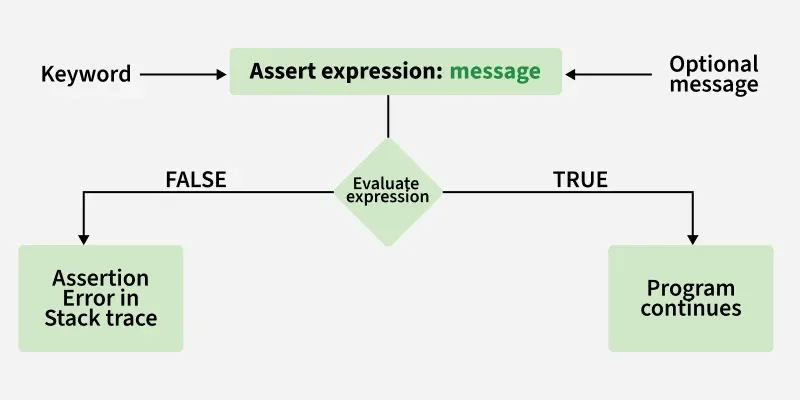
In Java, assertions are used to test the correctness of assumptions made in a program. Assertions help detect logical errors during development by allowing developers to verify conditions that should always be true. If an assertion fails, the Java Virtual Machine (JVM) throws an AssertionError. Assertions are mainly used for testing purposes and debugging during development.
Assertions are written using the assert keyword and can be used in two ways:
1. Simple Assertion
assert expression;
2. Assertion with a Detail Message
assert expression1 : expression2;
Example: Java program to demonstrate the syntax of assertion
value is 15
Output:
Exception in thread "main" java.lang.AssertionError: Underweight
By default, assertions are disabled. We need to run the code as given. The syntax for enabling assertion statement in Java source code is:
Enable Assertions:
java -ea Test
Or
java –enableassertions Test
Here, Test is the file name.
Disabling Assertions:
The syntax for disabling assertions in java is:
java –da Test
Or
java –disableassertions Test
Here, Test is the file name.
Wherever a programmer wants to see if his/her assumptions are wrong or not.
if ((x & 1) == 1) {
// odd
} else {
assert (x % 2 == 0); // x must be even
}
Example: Java program to demonstrate assertion in Java
The voter's age is 14
| Aspect | Assertion | Exception Handling |
|---|---|---|
| Purpose | Check logically impossible states | Handle runtime errors |
| Runtime Behavior | Can be disabled | Always executed |
| Typical Use | Development/testing | Production |
| Example | Precondition/Postcondition checks | User input validation, IO errors |